
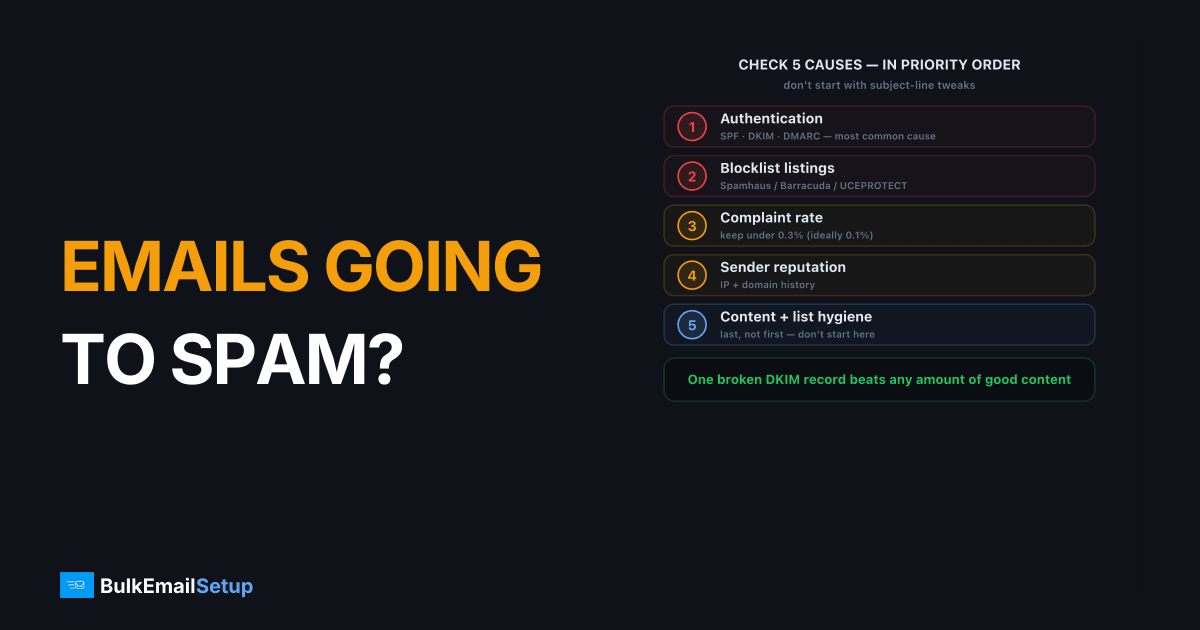
When your emails go to spam, the cause is almost always one of six things, and you find it fastest by checking them in priority order: authentication (SPF, DKIM, DMARC), blocklist listings, complaint rate, reputation and content, list hygiene, then your sending pattern. Don't start with subject-line tweaks. Start with the high-impact infrastructure causes, because a single broken DKIM record or a Spamhaus listing sends everything to spam regardless of how good your content is. This checklist walks the six checks in the order that actually finds the problem.
Step 1: Check authentication first (SPF, DKIM, DMARC)
Broken authentication is the most common cause of sudden spam placement, and it's the first thing to verify. If SPF, DKIM, or DMARC fails, Gmail and Yahoo treat your mail as suspicious or reject it outright with 550 5.7.26 (unauthenticated) or 550 5.7.23 (SPF fail). Aligned authentication is mandatory under the 2024+ bulk sender rules.
Verify each record:
- SPF. Confirm the sending IP is authorized and you're under the 10-DNS-lookup limit. Over it returns
PermError. See SPF PermError fix. - DKIM. Check the signature verifies and the key is at least 1024-bit (2048 recommended). A body change after signing breaks it. See DKIM explained.
- DMARC. Confirm a published policy and that SPF or DKIM aligns to your From domain. Details in DMARC alignment.
Send a test to a Gmail account, open "Show original," and confirm SPF, DKIM, and DMARC all read PASS. If any fail, stop here and fix it.
The single most common "sudden spam" cause we diagnose is a DKIM record that quietly broke, usually because someone rotated a key or edited a DNS record and dropped the TXT value. The mail had passed for months, then one DNS change flipped dkim=pass to dkim=fail, DMARC fell with it, and Gmail started spam-foldering the next morning. Nobody touched the content. One header check on a bounced or spam-foldered message shows it in seconds.
Step 2: Are you on a blocklist?
A blocklist listing causes immediate spam placement or hard rejections, so check it right after authentication. Look up your sending IP and domain at Spamhaus, Barracuda, and UCEPROTECT. A Spamhaus SBL or CSS listing, or a domain blocklist hit, will route your mail to spam at most providers until you delist.
| Blocklist | What it flags |
|---|---|
| Spamhaus SBL | Known spam source IP |
| Spamhaus CSS | Snowshoe / low-reputation sending |
| Spamhaus PBL | IP in a "shouldn't send directly" range |
| Barracuda | Reputation-based, complaint-driven |
| UCEPROTECT | Listed by network range |
If you're listed, fix the root cause first (a compromised account, a dirty list, a missing PTR), then request delisting. Our blocklist delisting guide and Spamhaus delisting guide cover the process per list.
Step 3: Check your complaint and bounce rates
A complaint rate over 0.3 percent pushes your mail to spam across Gmail and Yahoo, so this is the next thing to measure. Open Google Postmaster Tools and read your spam complaint rate and domain reputation directly. Google's sender guidelines want you below 0.1% and never at 0.3% or higher, and the stricter bulk-sender rules start once you send more than 5,000 messages a day to Gmail accounts.
High complaints and high bounces both signal a list problem:
- Complaints over 0.3 percent. You're mailing people who don't want it. Suppress dormant subscribers and tighten opt-in.
- High hard bounces. You're mailing dead addresses, which also hits spam traps. Clean the list. See email list cleaning.
- No one-click unsubscribe. Add RFC 8058
List-Unsubscribeheaders so unhappy recipients opt out instead of complaining.
If complaints are high, fixing the list matters more than anything else on this page.
Step 4: Reputation, content, and infrastructure
Once authentication, blocklists, and complaints are clean, look at reputation and content. A new or cold IP gets throttled and spam-filtered until it's warmed, and weak infrastructure (no PTR record, no TLS, a shared IP poisoned by other senders) drags placement down regardless of content.
Work through these:
- PTR / rDNS. Your sending IP needs a valid reverse DNS record matching your hostname. Missing PTR is an instant trust hit. See PTR record setup.
- IP warm-up. A fresh dedicated IP needs a 4-6 week ramp. Sending full volume on day one gets you throttled and spam-filtered.
- Shared-pool contamination. On a cheap shared IP you inherit other senders' reputation. A dedicated IP removes that variable.
- Content. Only after the above: avoid image-only emails, link shorteners, and broken HTML. See how spam filters score your email.
Step 5: Clean the list and drop the unengaged
Authentication can be perfect and mail still lands in spam if a large slice of the list never opens it. Mailbox providers read silence as a sign the mail isn't wanted. Remove hard bounces for good, then cut or re-permission anyone with no open or click in the last 6 to 12 months. A sunset policy makes this automatic instead of a panic clean-up after a bad week.
Step 6: Fix the sending pattern
The last check is how you send, not what. Google's guidelines are direct about it: send at a consistent rate, avoid bursts, and start low with engaged users before increasing volume slowly. Google gives the example that suddenly doubling your previous volume can cause rate limiting or reputation drops. It also notes you can ramp faster when you send daily rather than weekly.
So if you mail 10,000 people once a month and then send 40,000 in a day for a launch, expect spam placement even with everything else right. Spread big sends across several days and keep a steady weekly rhythm.
How to test that the fix worked
Don't wait for customers to tell you. After each fix:
- Send to a Gmail and an Outlook address you control, open the message, and check the headers show SPF, DKIM, and DMARC as pass.
- Watch the spam rate in Postmaster Tools for the next few sends. Google recommends monitoring it as you increase volume.
- Run a seed test across providers for a wider view; see inbox placement testing.
- Increase volume only after two or three clean sends in a row.
How BulkEmailSetup helps
Most spam-placement problems trace to infrastructure: broken authentication, a blocklisted or unwarmed IP, or a shared pool you don't control. BulkEmailSetup sets up dedicated SMTP servers with IPs only you send from, SPF, DKIM, DMARC, and PTR configured correctly, and a warm-up plan (automatic on the Advance plan), so the high-impact causes are handled and you can focus on list quality. Plans are on our pricing page.
Frequently asked questions
Why are my emails suddenly going to spam?
A sudden shift usually means one specific event: a broken DKIM or SPF record, a blocklist listing, a complaint spike, or sending to a stale list. Check authentication and blocklists first, then your complaint rate in Google Postmaster Tools. Sudden problems have sudden causes, find the event.
How do I check if my domain is on a blocklist?
Look up your sending IP and domain at Spamhaus, Barracuda, and a multi-blocklist checker. A Spamhaus SBL or CSS listing, or a domain blocklist hit, directly causes spam placement or 550 rejections. Each list has its own delisting process once you fix the cause.
Does email content cause spam placement?
It can, but authentication and reputation matter far more. Spammy phrasing, image-only emails, broken HTML, and link shorteners add risk, but a well-authenticated sender with a clean complaint rate rarely lands in spam on content alone. Fix the infrastructure first, then tune content.
How long does it take to recover from spam placement?
If you fix the cause (authentication, blocklist, complaints) recovery takes days to a few weeks as mailbox providers re-learn your sending. Reputation damage from a major complaint spike or blocklist hit recovers slowly, so consistent clean sending after the fix is what rebuilds trust.


