
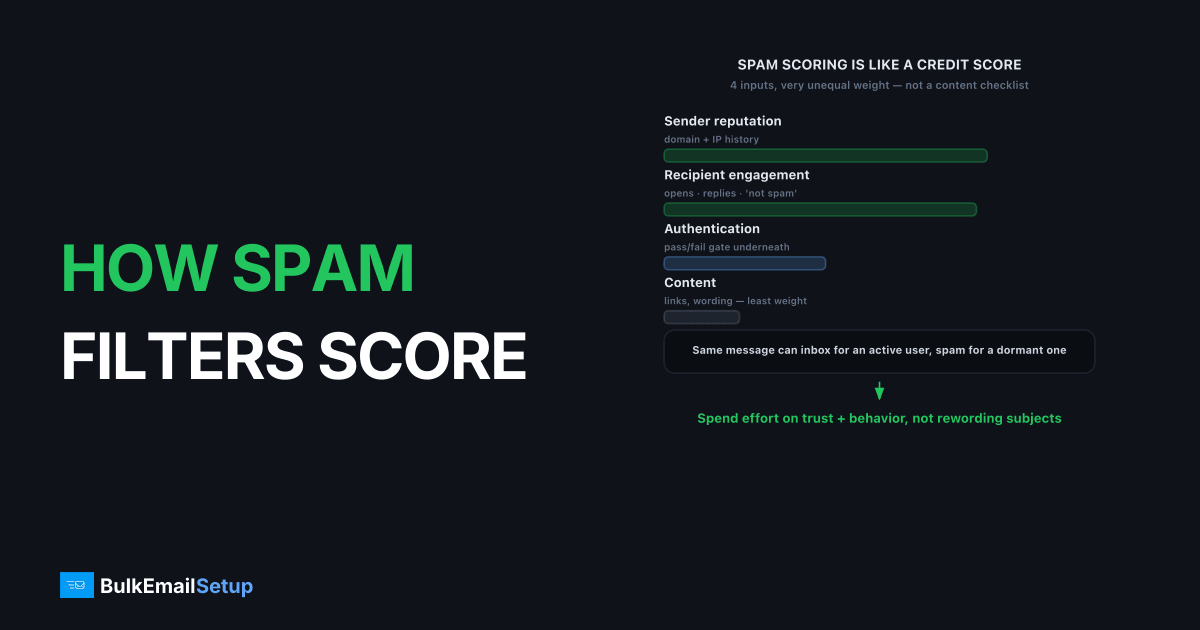
Spam filters score your email by combining four inputs into a delivery decision: authentication (does the mail prove it is really from you), sender reputation (how your domain and IP have behaved), recipient engagement (do people open, reply, and not complain), and content (links, formatting, and wording). At major providers like Gmail and Yahoo, reputation and engagement dominate the score, while content keywords carry far less weight than senders expect. Understanding the weighting tells you where to spend effort: on trust and behavior, not on rewording subject lines.
What signals do spam filters weigh most?
Spam filters weigh sender reputation and recipient engagement most heavily, with authentication as the gatekeeper underneath. Gmail's bulk sender guidelines tie inbox placement to consistent volume, low complaint rates, and authenticated mail, requiring SPF, DKIM, and DMARC for senders above 5,000/day. Fail authentication and the rest barely matters.
The mental model that trips people up is treating spam scoring like a content checklist. It is closer to a credit score. Each send adds or subtracts trust based on how recipients react, and your history is the dominant variable. A brand-new sender and an established one can send the identical message and land in different folders.
How much does engagement really matter?
Engagement matters enormously, and it is the factor most senders underestimate. Opens, replies, and "not spam" actions push you toward the inbox; deletions without reading, no engagement, and "report spam" push you toward the spam folder. Gmail watches per-recipient engagement, so the same message can inbox for an active subscriber and spam-folder for a dormant one.
We have watched a sender with clean authentication and decent content slide into spam purely because half the list had not opened anything in a year. Pruning the dead segment, covered in list hygiene, recovered placement within two weeks. Nothing about the content changed. The audience changed. The pattern repeats: in cases like that, cutting the list to the segment that opened in the last 90 days typically shrinks the send by a third or more, but the Postmaster domain reputation moves from "Medium" back toward "High" inside one to two weeks, because every remaining recipient is one the filter sees positive engagement from.
This is also why complaint rate is so punishing. Gmail's threshold is 0.3%, with under 0.1% healthy. Each "report spam" is a direct negative engagement signal.
How does authentication affect the score?
Authentication acts as a pass/fail gate that earlier scoring layers depend on. SPF, DKIM, and DMARC tell the receiver the mail genuinely comes from your domain. Without alignment, your domain reputation cannot accrue, and DMARC failures can push mail straight to spam or rejection with errors like 550 5.7.26 (unauthenticated) or 550 5.7.23 (SPF fail).
| Check | What it proves | If it fails |
|---|---|---|
| SPF | IP is authorized to send | Reputation can't build, possible reject |
| DKIM | Message not altered, signed by domain | Domain reputation can't accrue |
| DMARC | SPF/DKIM align with From domain | Spam folder or rejection at enforcement |
| PTR / rDNS | IP maps to a real hostname | Many receivers reject outright |
The combined picture is in SPF vs DKIM vs DMARC. Get these wrong and no amount of reputation work helps, because the mail never gets credited to you.
Does email content still matter?
Email content still matters, but at the margins, not as the main driver. Broken HTML, link shorteners pointing to bad domains, image-only messages, and a single misleading subject line can each shave points. A clean, well-formed message with honest subject lines avoids those penalties.
What does not work is keyword paranoia. Avoiding words like "free" will not rescue mail from a poor-reputation sender, and using them will not sink a trusted one. The high-leverage content rules are simple: real text alongside images, working unsubscribe (one-click per RFC 8058 for bulk senders), and links to domains with good reputation. For the broader playbook on staying out of spam, see emails going to spam fix.
How do you actually improve your spam score?
Improve your spam score by spending effort in the order the filters weight: authentication first, reputation and engagement next, content last. This is the opposite of how most senders triage, which is why so much time gets wasted rewording subject lines.
| Priority | Action | Why it moves the score |
|---|---|---|
| 1 | Pass SPF, DKIM, DMARC aligned | Gate everything else depends on |
| 2 | Set valid PTR / rDNS | Many receivers reject without it |
| 3 | Prune inactive recipients | Engagement is a top signal |
| 4 | Keep complaints under 0.1% | Each complaint is direct negative weight |
| 5 | Send consistent volume | Spikes look like compromise |
| 6 | Clean, text-plus-image content | Avoids marginal penalties |
Notice that five of the six highest-leverage moves have nothing to do with the words in your email. The single biggest lever, pruning dead recipients, is invisible in any content scanner. If you only do one thing, segment out the people who have not opened in a year and send to the rest.
What are the common spam-scoring mistakes?
The most common mistake is treating spam filtering as a content problem and running messages through "spam-word checkers" while ignoring reputation. That tool is checking the least important input. Meanwhile a poor-reputation sender with a perfect content score still lands in spam.
The recurring errors we see:
- Keyword paranoia. Rewording subject lines while the dead segment keeps tanking engagement.
- Mailing the whole list every time. Including never-openers drags placement for everyone.
- Skipping authentication. No DMARC alignment means good content never gets credited to your domain.
- Ignoring per-recipient placement. The same message inboxes for actives and spam-folders for dormants; the fix is segmentation, not content.
- Image-only emails. No real text plus a link to a low-reputation domain is a genuine content penalty, and an avoidable one.
The throughline: behavior and trust beat wording. Fix list hygiene and authentication before touching the copy.
How BulkEmailSetup helps
The two biggest scoring factors, reputation and authentication, are exactly what infrastructure controls. Our dedicated SMTP servers configure SPF, DKIM, DMARC, and PTR correctly and give you a dedicated IP whose reputation you build cleanly through proper warm-up. Engagement is your job; the trust foundation is ours. See plans on our pricing page.
Frequently asked questions
How do spam filters decide where my email goes?
Spam filters combine authentication results, sender reputation, recipient engagement, and content signals into a score. Reputation and engagement carry the most weight at major providers like Gmail. Content keywords matter far less than most senders assume.
What is the biggest factor in spam filtering?
Recipient engagement and sender reputation are the biggest factors at Gmail and Yahoo. If recipients open, reply, and rarely complain, you reach the inbox. If they ignore or report you, even clean content lands in spam.
Do spam-trigger words still matter?
Words like free and act now have minor influence today. Modern filters rely on reputation, authentication, and engagement, not keyword lists. Bad content can hurt at the margin, but no word list will save mail from a poor-reputation sender.
How do I improve my spam score?
Authenticate with SPF, DKIM, and DMARC, send consistently to engaged recipients, keep complaint rates under 0.3%, and maintain list hygiene. Reputation and engagement improvements move the score far more than rewording subject lines.


