
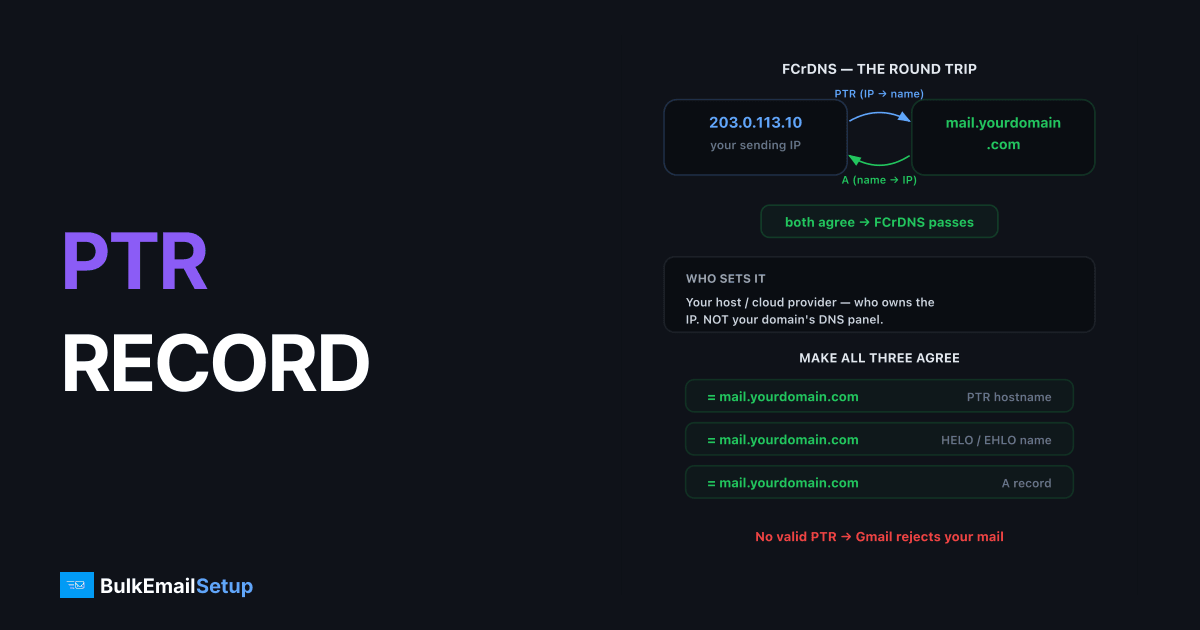
A PTR record (reverse DNS) maps your mail server's IP address back to a hostname, and it's set by whoever controls the IP, your hosting or cloud provider, not in your domain's DNS panel. Gmail, Yahoo, and Microsoft all check it: Gmail's sender guidelines flatly require a PTR whose hostname resolves back to the same IP (forward-confirmed reverse DNS), and mail from IPs without one gets rejected or junked. Setting it takes five minutes in most provider panels; the standard choice is mail.yourdomain.com.
What a PTR record is
Forward DNS maps name → IP. Reverse DNS maps IP → name, using a special zone built from the IP's octets reversed under in-addr.arpa:
; Forward (your DNS zone)
mail.yourdomain.com.        A    203.0.113.10

; Reverse (provider's zone)
10.113.0.203.in-addr.arpa.  PTR  mail.yourdomain.com.
For IPv6, the same idea applies under ip6.arpa, with each hex nibble reversed.
When a receiving server accepts your connection, it looks up the PTR for your IP before it reads a single byte of your message. No PTR, or a generic one like static-203-0-113-10.provider.net, and you start the conversation already penalized.
Forward-confirmed reverse DNS (FCrDNS)
Receivers don't just check that a PTR exists, they confirm the round trip:
- PTR lookup:
203.0.113.10→mail.yourdomain.com - A lookup:
mail.yourdomain.com→ must include203.0.113.10
If step 2 doesn't return the original IP, FCrDNS fails. This is the check Gmail's guidelines mean by "valid reverse DNS." Anyone can point a PTR at gmail.com; only the forward confirmation proves you control both sides.
Step 1, Pick the hostname
Use a real hostname under your sending domain:
| Choice | Verdict |
|---|---|
mail.yourdomain.com | Standard, recommended |
smtp1.yourdomain.com | Fine, useful with multiple IPs (smtp1, smtp2, …) |
yourdomain.com (apex) | Works but inflexible |
Provider default (vps-1234.host.net) | Bad, generic rDNS is a common filtering trigger |
| Hostname of a different domain | Bad, looks like a compromised box |
One IP gets one PTR. Multiple PTRs for the same IP confuse verifiers, pick a single canonical name even if the server sends for several domains.
Step 2, Create the forward A record first
In your domain's DNS (Cloudflare, Route 53, wherever):
mail.yourdomain.com. 300 IN A 203.0.113.10
If you use Cloudflare, set this record to DNS only (grey cloud), proxying it would make the A record resolve to Cloudflare's IPs and break FCrDNS.
Step 3, Set the PTR at the IP's owner
This is the part people get wrong: the PTR lives in the reverse zone delegated to whoever owns the IP block.
| Provider | Where |
|---|---|
| Hetzner | Console → Server → Networking → edit reverse DNS per IP |
| DigitalOcean | PTR auto-set from the droplet's name, rename the droplet to mail.yourdomain.com |
| AWS EC2 | EC2 console → Elastic IP → update reverse DNS (or the rDNS request form) |
| OVH | Control panel → IP → edit reverse |
| Vultr / Linode | Server → IPv4 → set rDNS |
| Colocation / own block | Your upstream delegates the in-addr.arpa zone to you, or sets records on request |
Residential and many small-business ISP connections won't let you set a PTR at all, one of several reasons you can't run a credible mail server from a home connection, where port 25 is usually blocked too.
Step 4, Align the HELO hostname
Your mail transfer agent / MTA announces itself with a HELO/EHLO hostname at connection time. Make it match the PTR. In Postfix:
# /etc/postfix/main.cf
myhostname = mail.yourdomain.com
Filters score the triple-match: HELO name = PTR name, and both resolve to the sending IP. SpamAssassin and rspamd add points for each mismatch.
Step 5, Verify
# PTR lookup
dig +short -x 203.0.113.10
# → mail.yourdomain.com.

# Forward confirmation
dig +short A mail.yourdomain.com
# → 203.0.113.10
Both directions must agree. Then send a test to Gmail and check Show original, no rDNS complaints should appear in the headers. PTR changes can take a few hours to propagate; providers' reverse zones often have longer TTLs than your forward zone.
Where PTR fits in the bigger picture
PTR is identity for the IP; SPF, DKIM, and DMARC authenticate the domain. You need both layers, a perfect PTR with no SPF/DKIM/DMARC still filters poorly, and vice versa. And a fresh IP with flawless DNS still needs gradual volume ramping, see the IP warm-up schedule before you send at scale.
How BulkEmailSetup helps
Every dedicated SMTP server we deliver has its PTR, FCrDNS, and HELO hostname aligned and verified, along with SPF, DKIM, DMARC, and MTA-STS, before you send a single message. Check pricing for fully managed server options.
Frequently asked questions
What is a PTR record?
A PTR record is the reverse of an A record: it maps an IP address back to a hostname. Mail receivers look it up to verify the sending server's identity, and many reject mail from IPs without one.
Who can set a PTR record for my server?
Whoever controls the IP address, your hosting provider, cloud provider, or ISP, not your domain's DNS host. Most providers expose it in their control panel or set it on request.
What is forward-confirmed reverse DNS (FCrDNS)?
FCrDNS means the PTR record for your IP resolves to a hostname, and that hostname's A record resolves back to the same IP. Receivers like Gmail require this round-trip to match.
Does Gmail reject mail without a PTR record?
Yes. Google's sender guidelines require the sending IP to have a PTR record whose hostname resolves back to the same IP. Mail from IPs without valid reverse DNS is rejected or heavily filtered.
Should my PTR record match my HELO hostname?
Yes. Best practice is for the PTR hostname, the SMTP HELO/EHLO hostname, and the A record to all agree, e.g. mail.yourdomain.com. Mismatches raise spam scores in filters like SpamAssassin and rspamd.


