
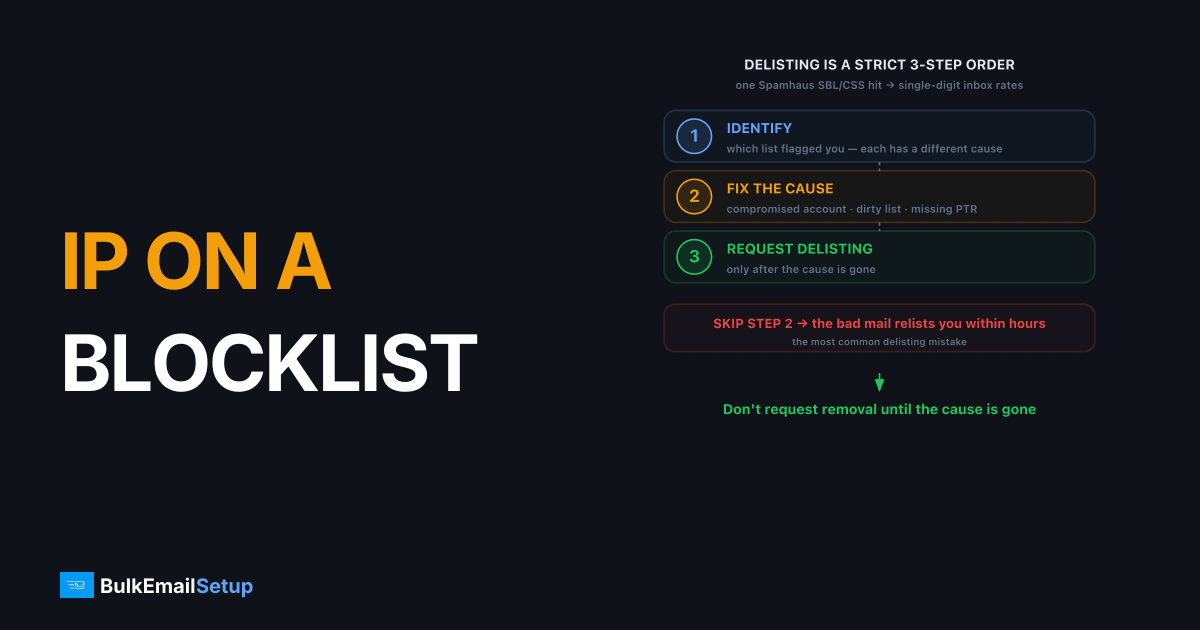
If your sending IP is on a blocklist, the fix is a three-step sequence in strict order: identify which list flagged you, fix the root cause that triggered it, then request delisting. Skipping straight to delisting is the most common mistake, because if the underlying problem (a compromised account, a dirty list, a missing PTR record) is still sending bad mail, the blocklist relists you within hours. A single Spamhaus SBL or CSS listing can drop a 50,000 per day send to single-digit inbox rates, so work the steps in order and don't request removal until the cause is gone.
Step 1: Find out which blocklist you're on
Identify the exact blocklist before doing anything else, because each list has a different cause and a different removal process. Run your sending IP through a multi-blocklist checker, then confirm directly at the source: Spamhaus, Barracuda, and UCEPROTECT each have public lookup pages. Check your sending domain as well as the IP, because Spamhaus also lists domains, and a domain listing follows you to any new IP.
The major lists and what they mean:
| Blocklist | What it flags | Typical cause |
|---|---|---|
| Spamhaus SBL | Known spam source | Sent spam, compromised host |
| Spamhaus CSS | Snowshoe / low reputation | Spread sending across many IPs, low rep |
| Spamhaus PBL | "Shouldn't send directly" range | IP not meant for direct MTA sending |
| Spamhaus XBL | Infected / exploited host | Malware, open relay, compromise |
| Barracuda | Reputation / complaint-driven | High complaints, spam traps |
| UCEPROTECT | Listed by network range | Often a noisy neighbor on shared range |
The specific list is your diagnosis. A PBL listing means the IP isn't authorized for direct sending. A CSS listing points to snowshoe patterns or thin reputation. Our Spamhaus delisting guide breaks down each list.
Step 2: Fix the root cause before requesting removal
Fix what triggered the listing before you delist, or you'll be relisted within hours. Blocklists list IPs because of behavior, and removing the listing without removing the behavior is pointless.
Match the cause to the fix:
- Compromised account or open relay. Find the breach, kill the account, close the relay. An open relay is a common XBL trigger.
- Dirty list / spam traps. You hit spam traps by mailing purchased or stale lists. Clean the list and suppress dormant addresses. See email list cleaning.
- Complaint spike. Complaints over 0.3% triggered a reputation listing. Tighten opt-in, add one-click unsubscribe, suppress unhappy recipients.
- Missing PTR / misconfiguration. A missing reverse DNS record or a PBL-range IP needs proper setup. See PTR record setup.
Stop the bad traffic entirely. The listing won't clear cleanly while the source is still active.
Step 3: How to request delisting correctly
Once the cause is fixed and bad sending has stopped, request removal through each list's official process. Never use third-party "delisting services," go straight to the blocklist operator. The big lists charge nothing to request removal:
| Blocklist | Cost to request removal | What to expect |
|---|---|---|
| Spamhaus CSS | $0 | Listings expire 3 days after the last detection; self-removals are limited (Spamhaus FAQ) |
| Barracuda | $0 | Requests are typically processed within 12 hours; send one request only, repeats are ignored |
| UCEPROTECT | Free to wait, paid express option | Many listings drop off within days once the spam stops |
Barracuda ignores repeat requests and Spamhaus limits self-removals, so one accurate request beats several quick ones.
The process per list:
- Spamhaus. Use the Spamhaus Blocklist Removal Center, enter your IP, and follow the prompts. SBL and CSS removals require the cause to be resolved; PBL listings can be self-removed if the IP is legitimately yours to send from. See Spamhaus CSS and PBL guides.
- Barracuda. Submit the Barracuda removal request form with your IP. See Barracuda removal.
- UCEPROTECT. Many UCEPROTECT listings auto-expire within days once sending stops. Paid expedited removal exists but is rarely worth it. See UCEPROTECT removal.
After delisting, resume sending gradually, not at full volume. A recently delisted IP has damaged reputation and needs careful ramping, much like a warm-up.
In the delistings we have seen, Spamhaus SBL and CSS removals usually clear within a few hours once the form is submitted and the cause is genuinely fixed. The painful cases are the ones where the customer delisted in a panic before stopping the bad send: we have watched a CSS listing return on the same IP twice in one day because a cron job was still firing at a purchased list. Kill the source first, confirm the queue is drained, then submit. One clean request beats three rushed ones.
How to avoid getting blocklisted again
The durable fix is a clean dedicated IP you control, correct authentication, and disciplined list hygiene. Most repeat listings come from shared IPs poisoned by other senders, or from sending practices that keep hitting traps.
Prevention checklist:
- Use a dedicated IP so you're never listed for a stranger's behavior. See dedicated vs shared IP.
- Set SPF, DKIM, DMARC, and PTR correctly so providers trust the source.
- Keep complaint rate under 0.1% and bounce rate low. Google's sender guidelines set 0.1% as the target and 0.3% as a rate never to reach, and anyone sending 5,000 or more messages a day to Gmail must also meet the full bulk-sender rules.
- Suppress dormant recipients to avoid spam traps. See email sunset policy.
- Monitor reputation so you catch a listing in hours, not after delivery collapses. See how to monitor deliverability.
How BulkEmailSetup helps
A blocklist hit on a shared IP often isn't even your fault, you inherited a poolmate's reputation. We provision clean dedicated IPs you control, with SPF, DKIM, DMARC, and PTR set up correctly, and a warm-up plan, so a listing can only come from your own sending and the steps above stay short. Basic is $549 one-time plus about $11 a month hosting. Plans are on our pricing page.
Frequently asked questions
How do I find out which blocklist my IP is on?
Run your sending IP through a multi-blocklist checker, then verify directly at Spamhaus, Barracuda, and UCEPROTECT lookup pages. Each shows whether you're listed and often why. Spamhaus separates its lists (SBL, CSS, PBL, XBL), and the specific list tells you the cause and the right delisting path.
How long does blocklist delisting take?
It varies by list. Some, like UCEPROTECT, auto-expire in days if sending stops. Spamhaus SBL and CSS removals process within hours to a day or two after you fix the cause and request removal. The key is fixing the root problem first, requesting delisting before that just gets you relisted.
Why does my IP keep getting relisted after delisting?
Because you delisted without fixing the cause. If a compromised account, a dirty list, or a missing PTR record is still sending bad mail, the blocklist relists you immediately. Find and fix the root problem, stop the bad traffic, then delist. Delisting is the last step, not the first.
Can I send email while my IP is blocklisted?
You can try, but a Spamhaus SBL or CSS listing causes 550 rejections or spam placement at most major providers, so delivery collapses. A single blocklist hit can drop a 50,000 per day send to single-digit inbox rates. Stop sending, fix the cause, delist, then resume gradually.


