
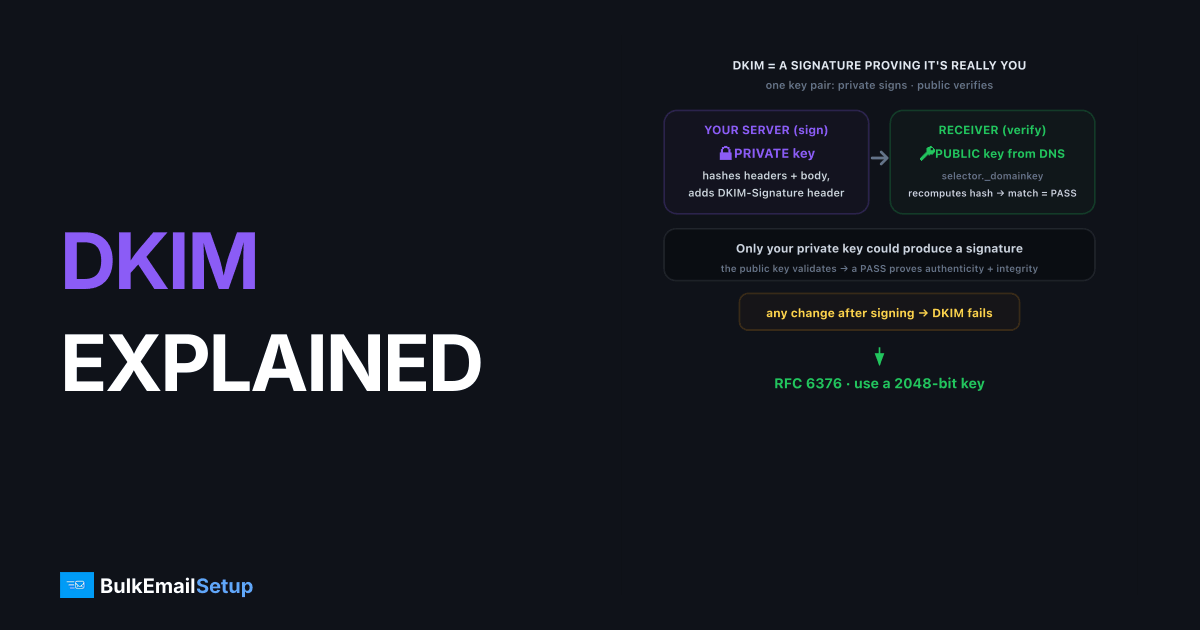
DKIM is an email authentication method that attaches a cryptographic signature to every message you send, letting receiving servers prove the message genuinely came from your domain and wasn't altered on the way. DKIM stands for DomainKeys Identified Mail and is defined in RFC 6376. Your server signs each message with a private key; the matching public key is published in DNS. If the signature verifies, DKIM passes. If anything in the signed content changed, it fails.
How DKIM signing works step by step
DKIM relies on a public/private key pair. The private key stays secret on your sending server; the public key is published openly in DNS for anyone to read. Signing and verifying are two halves of the same cryptographic handshake.
Here's the full flow:
- You generate a key pair. A private key (kept on the sender) and a public key (published in DNS).
- Your server signs each outgoing message. It hashes selected headers and the body, then encrypts that hash with the private key. The result goes into a
DKIM-Signatureheader. - The receiver reads the signature. It sees the signing domain (
d=) and selector (s=) in the header. - The receiver fetches your public key from
selector._domainkey.yourdomain.com. - It verifies the signature. It recomputes the hash and checks it against the decrypted signature. Match means DKIM passes.
Because only your private key could have produced a signature your public key validates, a pass proves authenticity.
What's inside the DKIM-Signature header?
The DKIM-Signature header carries every parameter a receiver needs to verify the message. It travels with the email itself, so receivers don't have to guess which key or which headers were signed. Reading it once makes DKIM far less mysterious.
| Tag | Meaning |
|---|---|
v= | DKIM version (always 1) |
d= | Signing domain (this is what aligns with your From) |
s= | Selector, points to the DNS key record |
h= | List of headers that were signed |
bh= | Hash of the message body |
b= | The actual cryptographic signature |
a= | Algorithm, typically rsa-sha256 |
The d= tag matters most for deliverability: it must match your visible From domain for DMARC alignment to pass.
What the DNS record contains
Your DKIM public key lives in a TXT record at selector._domainkey.yourdomain.com. This record is what receivers query to verify signatures, and it's the only DKIM piece that's public. A typical record looks like this:
selector1._domainkey.yourbrand.com TXT "v=DKIM1; k=rsa; p=MIIBIjANBgkqhkiG9w0BAQEFAAOCAQ8AMIIBCgKCAQEA..."
v=DKIM1declares the version.k=rsais the key type.p=is the public key itself (a long base64 string).
The selector (here selector1) is chosen by your sending platform. The DKIM selector explained post covers how selectors enable safe key rotation.
Why key length and the body hash matter
DKIM security rests on two things receivers check: a strong key and an unbroken body hash. A 2048-bit RSA key is the current standard because shorter keys are easier to brute-force, and the body hash (bh=) is what catches tampering in transit.
On key length:
- 1024-bit is the RFC 6376 minimum, now considered weak.
- 2048-bit is the recommended default and what you should generate.
On the body hash: DKIM hashes the message body and stores it in bh=. If a mail server along the path modifies the body (a forwarding footer, a content rewrite), the recomputed hash won't match and DKIM fails. That's why a "DKIM body hash did not verify" error usually points to content modification, covered in the DKIM body hash did not verify fix.
Common DKIM errors and how to read them
When DKIM fails, the Authentication-Results header in the received message names the reason. Open Show original in Gmail and read the dkim= line. These are the failures you'll actually see.
| Result | What it means | Likely cause |
|---|---|---|
dkim=none | No signature was present | Signing not enabled, or stripped |
dkim=fail (body hash did not verify) | Body changed after signing | Forwarder footer, content rewrite |
dkim=fail (signature did not verify) | Header tampering or wrong key | Mismatched or rotated-out key |
dkim=temperror | DNS lookup for the key failed | Propagation or DNS outage |
dkim=permerror | Malformed key or signature | Bad p= value, truncated record |
The most common real-world failure is body hash did not verify. It almost always means a server on the path altered the message body after your server signed it, a mailing-list footer being the classic culprit. The walkthrough is in the DKIM body hash did not verify fix. A permerror usually means the published p= key was split or truncated when you pasted it into DNS, so re-copy it as one unbroken string. In practice the single most common new-setup ticket we see is exactly this: a 2048-bit p= value is too long for one 255-character DNS string, the control panel splits it across multiple quoted strings, and one of the chunks gets a stray space or a missing quote. DKIM returns permerror, the key looks "published" in the panel, and the fix is to re-paste it so the provider concatenates the quoted chunks cleanly with no spaces between them.
A quick DKIM setup checklist
Run this list when you enable DKIM or move to a new platform. Order matters: publish DNS before you switch on signing.
- Generate 2048-bit keys. Not 1024. RFC 6376 allows 1024 as a floor, but 2048 is the modern default.
- Publish the public key at
selector._domainkey.yourdomain.comas one unbroken TXT string. - Wait for propagation before flipping signing on, a few minutes to a few hours.
- Sign with
d=yourdomain.com, not the provider's domain, so DKIM aligns for DMARC. - Send a test to Gmail and confirm
dkim=passunderShow original. - Plan rotation. Use a fresh selector every 6 to 12 months. See DKIM selector explained.
If you send from a shared ESP pool, your DKIM key is often the provider's, which can break alignment. A dedicated setup signs with your own domain by default. The trade-off is covered in dedicated IP vs shared IP email.
DKIM is not enough on its own
DKIM proves a message wasn't altered and came from a domain, but on its own it doesn't tell receivers what to do when verification fails, and it doesn't force the signing domain to match your visible From. That's the job of DMARC, which ties SPF and DKIM together under a policy. To see how all three interact, read SPF vs DKIM vs DMARC. For the broader stack, the SPF record explained guide pairs naturally with this one.
How BulkEmailSetup helps
BulkEmailSetup provisions your dedicated SMTP server with 2048-bit DKIM keys signed against your own domain, so your d= aligns with your From address and your mail verifies cleanly at Gmail, Yahoo, and Outlook. We also handle selector setup and rotation. Plans are on the pricing page.
Frequently asked questions
What is DKIM?
DKIM (DomainKeys Identified Mail) is an email authentication method that adds a cryptographic signature to each message. Receivers use a public key in your DNS to verify the signature, proving the message came from your domain and wasn't altered in transit.
What is a DKIM selector?
A DKIM selector is a label that tells receivers which public key to fetch from DNS. It forms the record name selector._domainkey.yourdomain.com. Using selectors lets a domain run multiple keys at once and rotate them safely.
Should DKIM keys be 1024-bit or 2048-bit?
Use 2048-bit. RFC 6376 sets 1024-bit as the minimum, but 2048-bit is the modern recommendation because it resists brute-force attacks. Most providers now generate 2048-bit keys by default.
Does DKIM stop email forwarding from breaking?
Partly. DKIM survives forwarding as long as the signed headers and body aren't modified. If a forwarder rewrites the subject or appends a footer, the body hash won't verify and DKIM fails for that hop.


