
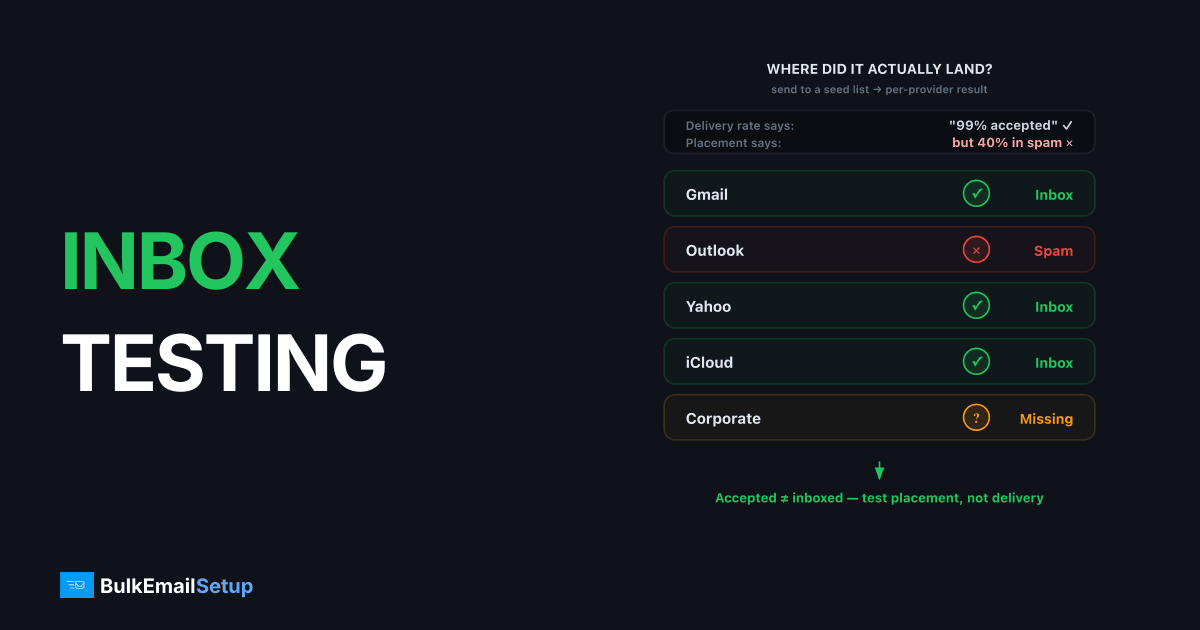
Inbox placement testing sends your real campaign to a seed list, test mailboxes across Gmail, Outlook, Yahoo, iCloud, and other providers, and reports whether it landed in the inbox, the spam folder, or nowhere, per provider, within minutes. It answers the question delivery rates can't: not "was the mail accepted," but "where did it actually land."
Delivery rate lies by omission
Your SMTP logs and ESP dashboard report delivered = accepted by the receiving server. A message filed straight to spam counts as delivered.
| Metric | What it measures | Blind spot |
|---|---|---|
| Delivery rate | Server accepted the message | Says nothing about folder |
| Open rate | Recipients who rendered tracking pixel | Lags, inflated by Apple MPP, confounded by content |
| Inbox placement rate | Share of seeds landing in inbox | Seeds lack real engagement history |
A sender at 99% delivered and 8% opens almost always has a placement problem, and seed testing finds it in one send.
How a seed test works
- Assemble seeds, 15-40 mailboxes weighted to match your list's provider mix (typically Gmail-heavy, then Microsoft, Yahoo, iCloud).
- Include them in a real send, same content, same IP, same time as the live campaign. Testing a different message tests nothing.
- Read results per provider, inbox / spam / missing, usually within 10-30 minutes.
- Log the run, placement trends over weeks matter more than any single test.
Commercial seed services automate steps 1 and 3 and add Gmail-tab detection (Primary vs Promotions).
Reading the results
| Pattern | Likely cause | First move |
|---|---|---|
| Spam at all providers | Authentication or content problem | Verify SPF/DKIM/DMARC passes, re-test with stripped-down content |
| Spam at Gmail only | Gmail domain reputation / engagement | Check Postmaster Tools reputation panels |
| Spam at Microsoft only | IP reputation (Microsoft weights IPs heavily) | Check SNDS; slow the ramp if mid-warm-up |
| Missing entirely at one provider | Silent rejection or block | Check SMTP logs for that provider's responses; possible blacklist |
| Promotions tab, not spam | Normal classification for marketing mail | Not a deliverability failure; optimize only if it matters commercially |
Promotions-tab placement deserves the explicit call-out: it is the inbox. Burning engineering time "escaping Promotions" usually costs more than it returns.
The seed-list caveat
Seed mailboxes are strangers to you, no opens, no replies, no contact-list presence. Gmail's per-user personalization means your engaged subscribers often inbox mail that seeds see in spam.
So read seeds as a floor and a differential: if placement was 95% last week and 60% today on identical seeds, something real changed even if the absolute number is pessimistic. For the recipient-side truth, cross-check open rates by provider domain in your own send data.
When to test
| Trigger | Cadence |
|---|---|
| Steady-state baseline | Weekly |
| During IP warm-up | Daily or every send |
| Infrastructure change (IP, ESP, DNS, new template system) | Before and after |
| Open-rate drop > 20% campaign-over-campaign | Immediately |
| New campaign type (first cold-ish segment, re-engagement series) | Per send |
Pair seeds with Google Postmaster Tools: seeds give same-day, multi-provider placement; Postmaster gives Gmail's own reputation scoring with a 1-3 day lag. Each covers the other's blind spot.
Fixing what the test finds
Placement failures trace to a short list of causes, authentication, reputation, list quality, or content, roughly in that order of likelihood. The full diagnostic sequence is in how to keep emails out of the spam folder; the standing preventive measures are in email deliverability best practices.
One discipline matters most: change one variable per re-test. Fixing DKIM, swapping the template, and trimming the list simultaneously tells you nothing about which one worked.
How BulkEmailSetup helps
Managed deliverability on our dedicated SMTP servers includes routine inbox placement checks, we seed-test your sends across major providers, watch the trend, and intervene when placement slips instead of waiting for your open rates to tell you. See pricing.
Frequently asked questions
What is a seed list in email testing?
A seed list is a set of test mailboxes you control or rent across providers. Gmail, Outlook, Yahoo, iCloud, and others. You include them in a send, then check each mailbox to see whether the message landed in the inbox, spam folder, or didn't arrive.
How accurate is seed list testing?
Directionally accurate, not perfect. Seed mailboxes have no personal engagement history, and Gmail personalizes filtering per user, so seeds can under-report inbox placement for your engaged subscribers. Treat seed results as a floor and a trend line.
What's the difference between delivery rate and inbox placement rate?
Delivery rate counts messages accepted by the receiving server, including those filed to spam. Inbox placement rate counts only messages that reached the inbox. A 99% delivery rate can coexist with 60% inbox placement.
How often should I run inbox placement tests?
Weekly as a baseline for active senders, before and after any infrastructure change (new IP, new ESP, DNS edits), daily during IP warm-up, and immediately whenever open rates drop more than 20% campaign-over-campaign.
Can I build my own seed list for free?
Yes, create 10-20 mailboxes across Gmail, Outlook, Yahoo, and iCloud and check them manually. It's labor-intensive and the accounts need occasional activity to stay realistic, but it covers the major providers at zero cost.


