
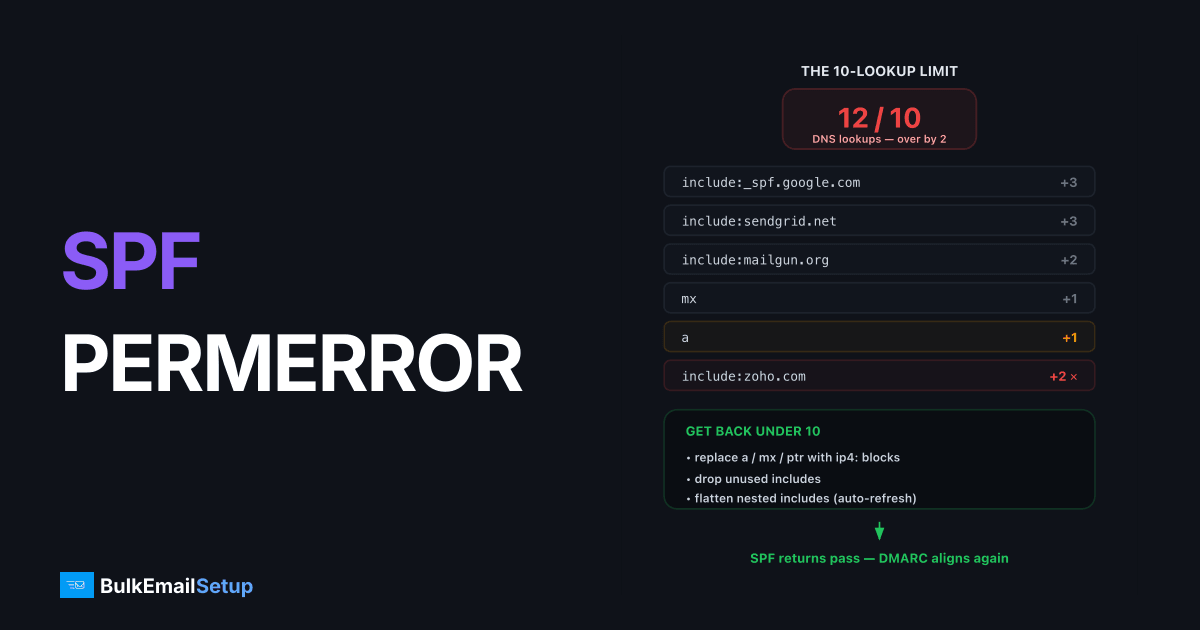
SPF PermError "too many DNS lookups" means your SPF record exceeds the hard limit of 10 DNS-querying mechanisms set by RFC 7208, so receiving servers abandon evaluation and treat SPF as permanently failed. The fix is to remove unused includes, replace a/mx/ptr mechanisms with literal ip4:/ip6: blocks, and flatten or split nested includes until the total recursive count is 10 or fewer. Once you're under the limit, SPF returns pass again and your DMARC alignment recovers.
Why the 10-lookup limit exists
SPF evaluation happens on the receiver's mail server in real time, before the message is accepted. Without a cap, a malicious record with deeply nested includes could force a receiver into dozens of DNS queries per message, a denial-of-service vector.
RFC 7208 section 4.6.4 caps the total at 10 lookups per check. It's not a warning threshold; lookup number 11 ends evaluation immediately with PermError.
What counts as a lookup
| Mechanism / modifier | Lookups | Notes |
|---|---|---|
include: | 1 + everything inside it | Counts recursively |
a | 1 | Even with no argument |
mx | 1 | Plus the A lookups for MX hosts count toward a separate 10-limit for void answers |
ptr | 1 | Deprecated, remove it on sight |
exists: | 1 | Rare outside advanced setups |
redirect= | 1 + target's contents | Counts like an include |
ip4: / ip6: | 0 | Free, use these wherever possible |
all | 0 | Free |
The count is recursive. include:spf.protection.outlook.com looks like one lookup, but if Microsoft's record contained includes of its own, those would add to your total too.
Count your current lookups
Start by pulling the record:
dig +short TXT yourdomain.com | grep spf1
Then follow each include:
dig +short TXT spf.protection.outlook.com
dig +short TXT _spf.google.com
A typical over-limit record looks like this:
v=spf1 include:_spf.google.com include:spf.protection.outlook.com
       include:servers.mcsv.net include:_spf.salesforce.com
       include:helpdesk-vendor.com a mx ptr ~all
Google's include alone resolves to three nested includes (4 lookups total). Add Outlook (1), Mailchimp (1), Salesforce (often 2+), the helpdesk vendor (1+), plus a, mx, and ptr (3), you're at 12 or more before the receiver finishes reading.
Five fixes, in order of preference
1. Delete what you don't use
Most over-limit records are graveyards of abandoned vendors. Audit each include against tools you actually send from today. A trial of Salesforce from 2023 doesn't need to cost you a lookup in 2026.
2. Replace a, mx, and ptr with IP literals
If your web server or MX hosts also send mail, list their addresses directly:
v=spf1 ip4:203.0.113.10 ip4:203.0.113.11 include:_spf.google.com ~all
ptr should always be removed, it's deprecated in RFC 7208 and some receivers ignore it entirely. Reverse DNS still matters for your sending IP, but it belongs in a PTR record, not in SPF.
3. Move marketing mail to a subdomain
Your apex domain's SPF only needs to cover what sends as @yourdomain.com. Move bulk and marketing traffic to mail.yourdomain.com or news.yourdomain.com with its own SPF record and its own lookup budget:
news.yourdomain.com. TXT "v=spf1 include:servers.mcsv.net ~all"
This also isolates marketing reputation from transactional mail, a win on its own.
4. Flatten includes into IP blocks, carefully
Flattening replaces an include with the IP ranges it currently resolves to:
v=spf1 ip4:198.51.100.0/24 ip4:203.0.113.0/25 ~all
Zero lookups, but the ranges go stale the moment the provider shifts infrastructure. Microsoft and Google change ranges regularly. If you flatten, schedule automated re-resolution (daily is reasonable) or use a managed flattening service. Never flatten by hand and walk away.
5. Use one dedicated sending source
The structural fix: consolidate sending onto infrastructure with a small, stable IP footprint. A dedicated SMTP server needs exactly one mechanism:
v=spf1 ip4:203.0.113.10 -all
One lookup-free mechanism, no third-party includes drifting underneath you.
Verify the fix
After updating DNS, confirm the new record propagated:
dig +short TXT yourdomain.com @1.1.1.1
Then send a test message to a Gmail address and open Show original. You want:
spf=pass (google.com: domain of [email protected] designates 203.0.113.10 as permitted sender)
Also check your next DMARC aggregate report. PermErrors show up there as SPF result permerror, and they should disappear within 24-48 hours of the fix.
Common mistakes that reintroduce the problem
- Adding vendors without recounting. Every new SaaS tool that "just needs one include" eats your budget. Recount after every change.
- Keeping
mxout of habit. If your MX provider (e.g., Google Workspace) is already covered by its include, themxmechanism is a wasted lookup. - Two SPF records. Publishing a second
v=spf1TXT record is a separate PermError, see multiple SPF records and how to merge them. - Confusing
~allwith the lookup problem. The qualifier onalldoesn't affect the count; see SoftFail vs HardFail for which to use.
SPF is one leg of the authentication stack, if you're setting up from scratch, work through SPF, DKIM, and DMARC together so alignment works end to end.
How BulkEmailSetup helps
Every dedicated SMTP server we provision ships with a clean single-mechanism SPF record, plus DKIM, DMARC, and PTR configured and verified before you send your first campaign. No include sprawl, no PermErrors, no lookup math. See pricing for plans with full deliverability management included.
Frequently asked questions
What does SPF PermError: too many DNS lookups mean?
Your SPF record requires more than 10 DNS lookups to evaluate, which RFC 7208 forbids. Receivers treat the record as permanently broken, so SPF returns PermError instead of pass or fail.
Which SPF mechanisms count toward the 10-lookup limit?
include, a, mx, ptr, exists, and the redirect modifier each cost one lookup, plus every lookup triggered inside nested includes. ip4, ip6, and all cost nothing.
Does SPF PermError hurt deliverability?
Yes. A PermError means SPF cannot pass, so DMARC loses SPF alignment for that message. If DKIM also fails or is unaligned, the message fails DMARC and can be quarantined or rejected.
Is SPF flattening safe?
Manual flattening is risky because providers like Microsoft 365 and SendGrid change their IP ranges without notice. If you flatten, automate re-resolution of the underlying includes or use a managed flattening service.
How do I check how many lookups my SPF record uses?
Paste your domain into an SPF checker that counts lookups recursively, or run dig TXT on your domain and manually follow every include. Anything above 10 returns PermError.


