
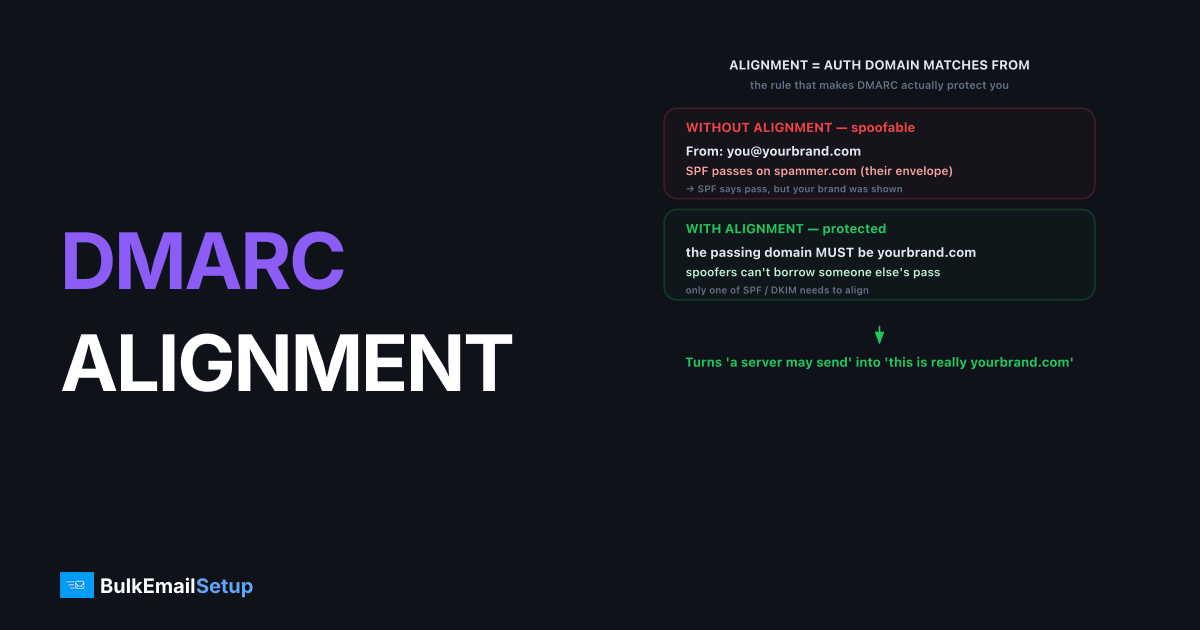
DMARC alignment is the requirement that the domain authenticated by SPF or DKIM matches the domain in your visible From header. It's the rule that makes DMARC actually protect your From address: a message can pass SPF or DKIM and still fail DMARC if the authenticated domain isn't the one a recipient sees. DMARC passes when either SPF or DKIM both passes and aligns. Alignment is why some perfectly authenticated mail still fails DMARC.
Why alignment exists
Alignment exists because SPF and DKIM, on their own, can pass on a domain that has nothing to do with your From address, which leaves the door open to spoofing. A spammer can send From: [email protected] while passing SPF on spammer.com (their own envelope domain). SPF says pass, but the recipient was still shown your brand.
DMARC closes that gap by demanding the authenticated domain match the visible From:
- Without alignment: SPF or DKIM can pass on any domain. The From address is unprotected.
- With alignment: the passing domain must be yours. Spoofers can't borrow someone else's pass.
This is the single mechanism that turns SPF and DKIM from "is this server allowed to send something" into "is this really from yourbrand.com." The alignment rules are specified in RFC 7489, and the policy layer that acts on it is covered in DMARC explained.
SPF alignment vs DKIM alignment
DMARC checks alignment separately for SPF and DKIM, and only one needs to align for the message to pass. They look at different domains, which is why one often aligns when the other doesn't.
| Check | SPF alignment | DKIM alignment |
|---|---|---|
| Domain checked | The envelope sender (MAIL FROM / return-path) | The DKIM signature's d= domain |
| Aligns when | Return-path domain matches From domain | d= domain matches From domain |
| Common failure | Return-path is the ESP's bounce domain | d= is the ESP's domain, not yours |
| Fix | Custom return-path on your domain | Sign with your own domain |
Because DKIM alignment survives forwarding better than SPF, many senders rely on DKIM as their primary aligned method and treat SPF alignment as a bonus.
Relaxed vs strict alignment
DMARC offers two alignment modes, relaxed and strict, set by the aspf and adkim tags in your DMARC record. The difference is whether subdomains are allowed to align with your organizational domain. Relaxed is the default and the right choice for almost everyone.
v=DMARC1; p=reject; aspf=r; adkim=r
- Relaxed (
r): a subdomain aligns with the organizational domain.mail.yourbrand.comaligns withyourbrand.com. This is the default. - Strict (
s): the domains must match exactly.mail.yourbrand.comdoes not align withyourbrand.com.
Use relaxed unless you have a specific reason to require exact matches. Strict alignment breaks legitimate subdomain sending and rarely adds meaningful security for typical senders.
Why does mail pass SPF but fail DMARC?
The most common alignment surprise is a message that passes SPF yet fails DMARC, and the cause is almost always the return-path. SPF authenticates the envelope sender (MAIL FROM), which many ESPs set to their own bounce domain, not yours. SPF passes on the ESP's domain, but that domain doesn't align with your From, so DMARC counts SPF as failed.
The fix is one of two things:
- Align SPF: configure a custom return-path (bounce subdomain) on your own domain, usually by adding a CNAME the ESP provides. Now
MAIL FROMmatches your From domain. - Align DKIM instead: if DKIM signs with
d=yourbrand.com, DKIM alignment passes and DMARC passes regardless of SPF. This is often the easier path.
Either one is sufficient. You don't need both aligned, just one. The signing side is in DKIM explained, and the envelope side in SPF record explained.
A worked example: reading alignment in the headers
Open Show original on a received message and the Authentication-Results header spells out alignment. Here's a message that passes SPF but fails DMARC, the classic trap:
spf=pass (sender IP is 198.51.100.5) smtp.mailfrom=bounces.esp.com
dkim=pass header.d=esp.com
dmarc=fail (p=reject) header.from=yourbrand.com
Read it top to bottom: SPF passed, but on bounces.esp.com, not your domain. DKIM passed, but header.d=esp.com, again not yours. The header.from is yourbrand.com. Neither passing domain matches the From, so dmarc=fail. Both auth checks succeeded and DMARC still failed, purely on alignment.
Now the same message after fixing DKIM to sign with your domain:
dkim=pass header.d=yourbrand.com
dmarc=pass (p=reject) header.from=yourbrand.com
One change, header.d now reads yourbrand.com, and DMARC passes. You didn't touch SPF at all. That's the point: aligning either method is enough.
This exact trap is the most frequent "but my SPF passes, why is DMARC failing?" ticket we field. The sender has a green SPF check in every test tool and assumes they are covered, but their aggregate reports show a wall of dmarc=fail because every receiver is reading smtp.mailfrom=bounces.theiresp.com against header.from=theirbrand.com. Once they move DMARC enforcement to p=reject on the strength of that misleading SPF pass, their own legitimate mail starts bouncing. Aligning DKIM to their own d= domain, the one-line fix above, is what we reach for first because it survives forwarding too.
Common alignment mistakes
These are the errors that produce a passing SPF or DKIM with a failing DMARC. Each maps to a specific fix.
| Mistake | Result | Fix |
|---|---|---|
| ESP bounce domain as return-path | SPF passes, doesn't align | Set custom return-path on your domain |
DKIM signs with d=esp.com | DKIM passes, doesn't align | Sign with d=yourbrand.com |
| Strict mode on subdomain mail | Subdomain fails alignment | Use aspf=r; adkim=r |
| No DKIM at all, forwarded mail | SPF breaks on forward, nothing aligns | Add aligned DKIM as the durable method |
The recurring fix is to get DKIM signing on your own domain, since DKIM alignment survives forwarding where SPF does not. If your provider won't sign with your domain on a shared pool, that's a structural limit. Dedicated IP vs shared IP email covers why a dedicated setup signs with your domain by default.
How to confirm alignment
To verify alignment, send a test message to Gmail, open Show original, and check that the domain shown for the passing method matches your From domain. You want to see dmarc=pass with the SPF or DKIM domain reading yourbrand.com, not your provider's domain. Your DMARC aggregate reports show the same alignment results across every receiver, which is the authoritative source once mail is flowing at volume.
How BulkEmailSetup helps
BulkEmailSetup configures both your return-path and your DKIM signing to your own domain on your dedicated SMTP server, so SPF and DKIM align with your From address and DMARC passes cleanly. That removes the "passes SPF but fails DMARC" trap before it ever costs you inbox placement. See pricing.
Frequently asked questions
What is DMARC alignment?
DMARC alignment is the requirement that the domain authenticated by SPF or DKIM matches the domain in your visible From header. Without alignment, a message can pass SPF or DKIM yet still fail DMARC, because the authenticated domain isn't yours.
What's the difference between relaxed and strict alignment?
Relaxed alignment (the default) allows subdomains to match the organizational domain, so mail.yourbrand.com aligns with yourbrand.com. Strict alignment requires an exact match. Most senders use relaxed because it's more forgiving and still secure.
Why does my mail pass SPF but fail DMARC?
Because SPF passed on a different domain than your From address. SPF checks the envelope sender (return-path), which is often your ESP's domain. If that doesn't align with your From domain, DMARC counts SPF as failed.
How do I fix DMARC alignment?
For SPF, set a custom return-path on your sending domain. For DKIM, configure signing so the d= domain matches your From domain. Getting either one aligned is enough for DMARC to pass.


