
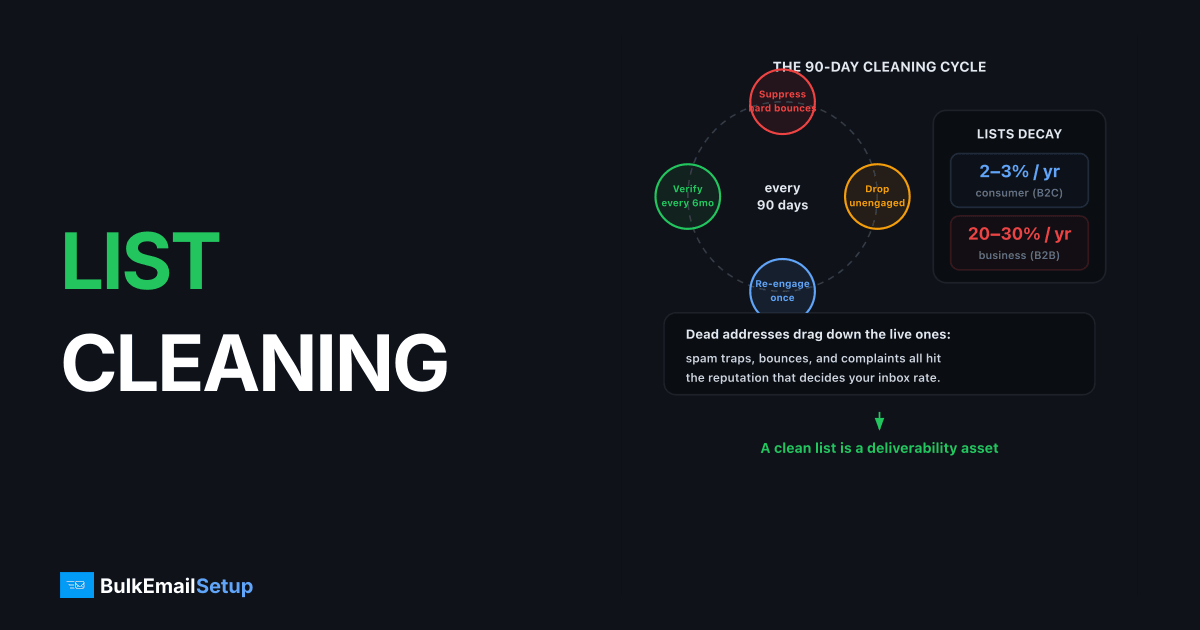
Clean your email list every 90 days: suppress hard bounces the day they occur, remove addresses with no opens or clicks in 6-12 months (after one re-engagement attempt), and run a full verification pass every 6 months. Lists decay at 2-3% per year for consumer addresses and 20-30% for B2B, so a list that was clean last year is carrying dead weight today.
Why dead addresses hurt live ones
Mailbox providers score you on rates, not totals. Every dead or indifferent address in a send lowers the open rate, raises the bounce rate, and dilutes the positive signals from real readers.
Gmail in particular weights engagement heavily: a list where 40% of addresses never open trains Gmail to bulk-folder you for the 60% who would.
Which addresses to remove
| Address type | How to identify | Action | Urgency |
|---|---|---|---|
| Hard bounces | 5xx SMTP response | Suppress permanently, same day | Immediate |
| Chronic soft bounces | 4xx on 3-5 consecutive campaigns | Suppress | Within the cycle |
| Zero-engagement 12 mo+ | No opens/clicks in any of last 12 months | Re-engage once, then suppress | Quarterly clean |
| Disposable domains | mailinator.com, guerrillamail, etc. | Remove on import | Immediate |
| Obvious fakes | [email protected], [email protected] | Remove on import | Immediate |
| Role accounts | info@, admin@, sales@, support@ | Remove from marketing lists | Quarterly clean |
| Spam trap risks | Old, never-engaged, or resurrected addresses | Remove | Quarterly clean |
| Unsubscribes/complaints | FBL + unsubscribe processing | Suppress permanently | Immediate, ≤48h (required) |
The 48-hour unsubscribe processing window isn't a suggestion. Gmail and Yahoo's bulk sender requirements mandate honoring one-click unsubscribe within two days.
The two kinds of spam traps
Pristine traps never belonged to a human. They reach lists only through purchasing, scraping, or co-registration, which is why no cleaning regimen makes a bought list safe. One pristine trap hit can land you on Spamhaus.
Recycled traps are the sneaky ones: real subscribers' abandoned mailboxes, hard-bounced for 6-12 months, then reactivated as traps. The only defense is the one good senders already run, suppress hard bounces forever, and stop mailing long-term non-engagers before their mailboxes get recycled. If you're already trap-burned, start with how to send without getting blacklisted.
The 90-day cleaning cycle
- Export engagement data, last open, last click, last purchase per address, looking back 12 months.
- Segment by recency: active (0-90 days), cooling (91-180), inactive (181-365), dead (365+).
- Run the inactive segment through a re-engagement campaign, one short series, not six months of pleading.
- Suppress the dead segment and re-engagement non-responders. Suppress means stop mailing; you can keep the records for ads matching.
- Verify the cooling segment with a verification API if it predates your current verification setup.
- Log the numbers, list size, removal count, and next-campaign open rate, so you can show the clean worked.
A formal version of steps 3-4, with thresholds by sending frequency, is a sunset policy.
Full verification: every 6 months
Engagement cleaning catches the disengaged; verification catches the technically dead. A bulk verification service checks each address for:
- Syntax and domain validity (MX records exist)
- Mailbox existence (SMTP-level check)
- Catch-all domains, accept everything, verdict unknown
- Disposable and role-account flags
| Verification verdict | Action |
|---|---|
| Valid | Keep |
| Invalid | Remove |
| Catch-all / unknown | Keep if engaged; remove if also inactive |
| Risky (role, disposable) | Remove from marketing streams |
Expect a 6-month-old unverified list to come back 2-8% invalid even with good capture practices.
What not to do
- Don't "clean" by deleting unsubscribes and complaints from your suppression list. Suppression lists are permanent; deleting them re-mails people who said no.
- Don't blast the dead segment "one last time" at full volume. That's the highest-bounce, highest-complaint send possible. Trickle re-engagement at low volume instead.
- Don't rely on opens alone post-Apple Mail Privacy Protection. MPP inflates opens for Apple Mail users (~40-50% of consumer lists); weight clicks and site visits alongside opens when defining "inactive."
- Don't skip the clean before a warm-up. Warming a new IP with a dirty list bakes bad metrics into a fresh reputation, clean first, then follow the warm-up schedule.
What good looks like after cleaning
| Metric | Before typical clean | After |
|---|---|---|
| Bounce rate | 2-5% | < 1% |
| Open rate | 12-18% | 20-30% |
| Spam complaint rate | 0.1-0.3% | < 0.05% |
| List size | 100% | 60-85% |
The list shrinks; everything that matters improves. Bounce mechanics in detail: how to reduce bounce rate below 2%.
How BulkEmailSetup helps
Our dedicated SMTP servers suppress hard bounces and unsubscribes automatically, and our deliverability monitoring flags list-decay symptoms, creeping bounces, sagging engagement, before they cost you inbox placement. See pricing.
Frequently asked questions
How often should I clean my email list?
Run an engagement-based clean every 90 days and a full verification pass every 6 months. Always verify any segment that hasn't been mailed in 90+ days before sending to it.
Which email addresses should I remove from my list?
Remove hard bounces immediately, addresses that soft-bounce 3-5 campaigns in a row, anyone with zero opens or clicks in 6-12 months after a re-engagement attempt, and obvious junk like disposable domains.
What is a spam trap and how does it get on my list?
A spam trap is an address operated by a blocklist or mailbox provider to catch bad senders. Pristine traps arrive via purchased or scraped lists; recycled traps are abandoned mailboxes that once belonged to real subscribers you kept mailing.
Does cleaning my list reduce revenue?
Rarely. Subscribers with 12 months of zero engagement convert at close to zero, while their dead weight suppresses inbox placement for the subscribers who do buy. Most senders see open rates rise 20-40% after a proper clean.
Should I remove role accounts like info@ and sales@?
From marketing lists, usually yes, they're shared mailboxes nobody opted in personally, they complain more, and some verification tools flag them as risky. Keep them only for transactional or operational mail.


