
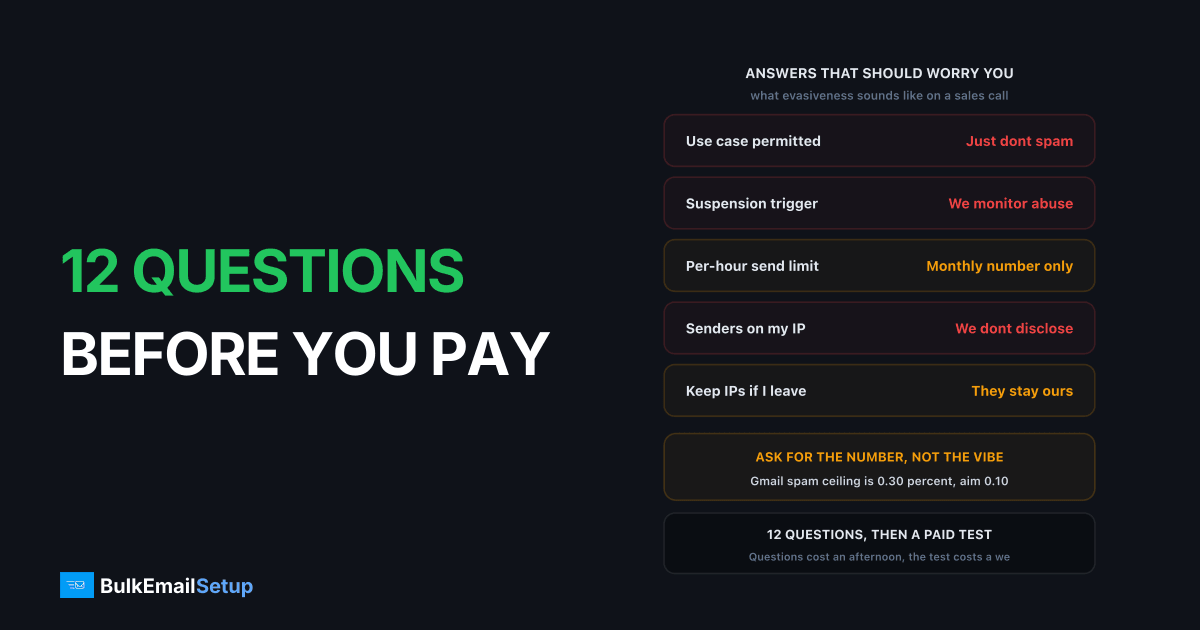
Most SMTP comparisons rank providers by price per thousand emails, which is the last thing that should decide it. These twelve questions surface the problems that actually cost money, and the first four disqualify more providers than price ever does.
Ask them before you pay, and get the answers in writing. An email from a sales rep counts. A verbal "yes, that's fine" on a call does not, and I have watched that distinction cost a client six weeks of sending.
The twelve at a glance
Read this table first, then the detail below. The right-hand column is the part most buyers never think to listen for.
| Question | Why it matters | Answer that should worry you |
|---|---|---|
| 1. Is my use case permitted, in writing? | Enforcement happens after migration | "Should be fine, just don't spam" |
| 2. What triggers a review or suspension? | You need the actual thresholds | "We monitor for abuse" |
| 3. Do you review new accounts on first send? | Large first send looks like a bought list | "No idea, that's the trust team" |
| 4. What is the per-hour send limit? | Decides if a campaign takes 1 hour or 3 days | Only quotes the monthly number |
| 5. Shared or dedicated, how many senders? | Your delivery depends on neighbours | "We don't disclose pool size" |
| 6. What happens on overage? | Suspension mid-campaign is expensive | "It depends on the situation" |
| 7. Can I control SPF, DKIM and DMARC? | Caps how good deliverability can get | "We handle authentication for you" |
| 8. Will PTR match my HELO hostname? | Gmail and Microsoft reject on mismatch | "What's a PTR record?" |
| 9. Do I get per-campaign complaint data? | Without it, the first symptom is suspension | "You can see delivered percentage" |
| 10. Support response time on my plan? | A blocked campaign waits on a ticket | Quotes the enterprise SLA, not yours |
| 11. If I leave, do I keep the IPs? | Warm-up is 4 to 8 weeks of real work | "The IPs remain our property" |
| 12. Can I export suppression lists? | Legal duty to honour prior opt-outs | "Export isn't currently supported" |
Policy and permission
1. Is my specific use case permitted, in writing? Cold outreach, affiliate offers, crypto, gambling, CBD, debt and adult content are banned or restricted on most shared pools. Enforcement happens after you migrate, not before, because nobody reads your business model at signup. This single question prevents more failed migrations than every technical factor combined.
Ask it with your actual detail in it. Not "do you allow marketing email" but "we send 180,000 opt-in emails a month promoting third-party affiliate offers in the personal finance category, is that permitted under your AUP?" A rep who answers that specific question in writing has read the policy. One who answers "sure, marketing is fine" has not.
2. What triggers a review or suspension? Ask for the actual thresholds. A provider that says "we monitor for abuse" without numbers is reserving the right to define it later.
The numbers to push for, and the ranges that are normal in the market:
| Threshold | Typical ESP limit | Google's published line |
|---|---|---|
| Spam complaint rate | 0.08% to 0.30% before review | Below 0.30%, aim under 0.10% |
| Hard bounce rate | 3% to 5% | No published figure |
| Unknown-user bounces on a first send | Often 2% triggers manual review | No published figure |
| Spam trap hits | 1 to 5 hits can pause an account | No published figure |
| Unsubscribe processing | 2 business days is common | One-click unsubscribe, honoured within 2 days |
Google's bulk sender requirements are the useful reference point here, because they apply to anyone sending over 5,000 messages a day to Gmail regardless of which provider you use. If your ESP's internal threshold is looser than 0.30%, that only means they will suspend you after Gmail has already started filtering you. The stricter number wins in practice.
3. Do you review new accounts on first send? Many do, because a large import followed by an immediate send is the signature of a purchased list. If you are migrating a legitimate large list, tell them upfront rather than triggering the alarm. Ask how long a review takes, and get a number: 24 hours and 5 business days are both answers I have been given, and one of those ruins a launch.
Capacity and limits
4. What is the per-hour send limit? Not the monthly allowance, the hourly one. This is the number that decides whether your campaign goes out in an hour or over three days, and it is almost never published.
The arithmetic is worth doing before the call. A 400,000-address campaign at these hourly rates:
| Hourly limit | Time to clear 400,000 | Practical effect |
|---|---|---|
| 5,000/hr | 80 hours | Campaign spans 4 days |
| 20,000/hr | 20 hours | Overnight, arrives at random times |
| 50,000/hr | 8 hours | One working day |
| 150,000/hr | 2 hr 40 min | A normal morning send |
Ask a second question behind it: is the limit per account, per IP, or per sending domain? On a 3-IP setup a "50,000 per hour" limit can mean 50,000 total or 150,000 total, and nobody volunteers which. Also ask whether the cap is enforced by queueing or by rejecting, because a rejected message needs your application to retry it.
5. Are IPs shared or dedicated, and how many senders share mine? On a shared pool your delivery depends on strangers. A provider that cannot answer the second half is telling you something.
If the answer is dedicated, the follow-ups are: what does the IP cost, is warm-up managed or mine to run, and what is the IP's history? Dedicated IP add-ons run roughly $30 to $80 per IP per month at the mainstream ESPs, with Amazon SES around $24.95 per IP per month. At three IPs that is $900 to $2,880 a year on top of your volume plan, which changes the buy calculation entirely. Is a dedicated IP worth it covers the volume threshold where it starts to pay.
6. What happens on overage?
| Outcome | How bad | What to ask next |
|---|---|---|
| Billed at a higher rate | Annoying, survivable | What is the per-email overage rate? |
| Throttled | Campaign stalls mid-send | Throttled to what, and for how long? |
| Suspended | Campaign dies, account at risk | Who reinstates it, and how fast? |
All three exist in the market. Ask which applies. Overage rates are frequently 2 to 5 times the in-plan rate, so a plan that looks cheap at $0.40 per 1,000 can bill $1.50 per 1,000 on the excess. Hidden costs of ESP overage fees has the worked examples.
Control and authentication
7. Can I set my own SPF, DKIM and DMARC on my sending domain? You should be able to. A provider that will not let you control authentication on your own domain limits how far your deliverability can improve, and makes DMARC alignment somebody else's decision. See SPF vs DKIM vs DMARC.
Two specifics worth asking about. First, DKIM key length: 2048-bit is the current expectation, and some older platforms still issue 1024-bit. Second, whether the DKIM d= domain aligns with your From domain, because a provider signing with their own domain gives you DKIM that passes but does not align, and DMARC then depends entirely on SPF.
8. Will the PTR record match my HELO hostname? Missing or mismatched PTR gets you rejected at Gmail and Microsoft regardless of everything else you do right. Google's sender rules list valid forward and reverse DNS as a requirement for every sender, not only bulk ones. On shared pools the PTR belongs to the provider and will not carry your brand, which is fine, but it must resolve and match. How to set up a PTR record covers what correct looks like.
9. Do I get per-campaign complaint and bounce data? You need hard versus soft bounce separation and complaint rates you can see. Without them the first sign of a problem is a suspension.
Ask for the specific list: is there a feedback loop connected at Microsoft and Yahoo, are complaint events exposed by webhook or only in a dashboard, how far back does the retention go, and can you export raw event data? Thirty days of retention is common and is not enough to investigate a slow reputation decline.
Support and exit
10. What is the support response time, and is it a paid tier? Ask whether the number they quote applies to the plan you are buying. Most published response times belong to the enterprise tier. At volume, a blocked campaign waiting three days on a ticket is expensive.
| Support question | Good answer | Weak answer |
|---|---|---|
| First response target on my plan | P1 within 1 hour, 24/7 | "Usually same day" |
| Escalation to a deliverability engineer | Named path, not a queue | Tier one only |
| Blocklist help | They file and chase delistings with you | "That's on the sender" |
| Notice before my IPs change | 30 days minimum, in writing | No stated notice |
| Channel | Phone or chat on my plan | Email tickets only |
The IP change notice is the underrated one. Providers reshuffle pools during infrastructure work, and an unannounced swap resets your warm-up with no warning. Thirty days lets you warm the new addresses in parallel. SMTP provider support response times breaks down what the tiers actually deliver.
11. If I leave, do I keep the IPs and their reputation? Four to eight weeks of warm-up is a real asset. On most shared and many dedicated-IP arrangements, it stays with the provider, because the IP is leased from their allocation and never was yours.
Ask three things: does the IP transfer, can you bring your own addresses in the first place, and what notice period applies to cancellation. Monthly rolling is common at the low end; annual contracts with a 30 to 90 day notice window are common above about $2,000 a month. Who owns the IP reputation you build explains why the answer is almost always "not you".
12. Can I export suppression and bounce lists? This is a compliance question, not a convenience one. You are legally required to honour prior opt-outs wherever you go next, and losing that list means you cannot. Ask for the format, whether it includes the suppression reason and timestamp, and whether it is self-service or a support request. Self-service CSV is the answer you want. "Contact support and we'll see" means you will be chasing it during the two weeks you least want to.
How to read the answers
| Answer you get | What it tells you |
|---|---|
| Vague on policy | Walk away, this is where migrations die |
| No per-hour figure | They have not thought about your volume |
| Cannot say IP count | Crowded pool, or no segmentation |
| Suspends on overage | Fine at low volume, dangerous at high |
| IPs stay with them | Factor the re-warm into any future move |
| Complaint threshold looser than 0.30% | They will act after Gmail already has |
| No export of suppression lists | A compliance problem at your next provider |
A provider answering all twelve clearly is worth paying more for than one that is cheaper and evasive on four of them. Evasiveness is not shyness, it is usually the honest answer being unattractive.
Turn the answers into a test
Answers are claims. The next step is a paid trial that checks the claims that matter, before you migrate the whole programme. Three of the twelve are directly testable inside a week:
- The hourly limit. Queue 20,000 messages and time how long the platform takes to clear them. Compare against what you were told.
- The IP. Look up the assigned address against Spamhaus, Barracuda and SORBS on day one. Spamhaus lists IPs for spam sources and snowshoe ranges, and the zone refreshes every five minutes, so a clean check is meaningful. Delisting is always free, so any provider quoting a fee to clear a listing is a problem in itself.
- Support. File a real P2 ticket at 6pm on a Friday and see when the reply lands.
The full method, including how to measure inbox placement rather than the delivered percentage, is in how to test an SMTP provider before committing. Do the questions first, then the test. The questions cost an afternoon and remove most candidates; the test costs a week and confirms the survivor.
Where dedicated changes the answers
Several of these questions exist only because of shared infrastructure. On dedicated IPs there is no pool to police, so the policy question stops being about whether your use case threatens other customers, the per-hour throttle is set by your warm-up rather than by a provider protecting strangers, and the IP reputation is yours to keep.
| Question | Shared pool answer | Your own server answer |
|---|---|---|
| Use case permitted | Depends on their AUP | Depends on the law and receiver rules |
| Per-hour limit | Provider sets it | Your MTA and warm-up stage set it |
| Who shares my IP | Unknown number of strangers | Nobody |
| Overage behaviour | Bill, throttle or suspend | No plan to exceed |
| Authentication control | Partial, often their d= domain | Full SPF, DKIM, DMARC and PTR |
| Keep IPs on exit | Usually not | Yes |
| Suppression export | Depends on the platform | Your database |
The trade is that warm-up, monitoring and list hygiene become your responsibility. See when do you need a dedicated SMTP server for whether you are at that point, and red flags in cheap SMTP providers for the signals that a low price is hiding a bad pool rather than good economics.
How BulkEmailSetup helps
We answer all twelve up front, because most of them stop being risks when the infrastructure is yours: your own server, your own IPs that stay yours, full SPF/DKIM/DMARC/PTR configuration, MTA tuning, bounce handling and a warm-up plan. No pool policy to fall foul of, no undisclosed hourly cap, no IPs that revert to somebody else when you leave.
Basic starts at $549 one-time, covering 1 SMTP server, 3 dedicated IPs, 25,000 emails/day and unlimited contacts. Higher tiers scale to 15 IPs and 200,000 emails/day. See pricing, or how to choose a bulk email provider for the wider buyer's checklist.
Frequently asked questions
What should you ask an SMTP provider before signing up?
Start with policy fit in writing, because a use case that is banned after you migrate costs more than any price difference. Then ask for the per-hour send limit, not just the monthly allowance, whether IPs are shared or dedicated and how many senders share yours, what happens on overage, and whether you keep your IPs and suppression lists if you leave.
Why does the per-hour sending limit matter more than the monthly one?
Because campaigns are spiky. A plan allowing 2 million a month but throttling at 5,000 an hour cannot send a 400,000-address campaign in a morning, it will meter it over three days. Providers advertise the monthly figure and rarely publish the hourly one, so you have to ask.
Should I ask how many senders share my IP?
Yes, and the answer tells you a lot. On shared pools your delivery depends on strangers' complaint rates. A provider that will not or cannot tell you the number is either not segmenting pools carefully or does not want you to know how crowded they are.
What happens if I exceed my SMTP plan limit?
It varies and all three outcomes exist in the market: some providers throttle you, some bill overage at a higher per-email rate, and some suspend sending outright. Being throttled or suspended mid-campaign is far worse than being billed, so ask which one applies before you sign.
What complaint rate will get me suspended?
Ask for the provider's own number, then compare it to Google's. Google's bulk sender rules require spam rates in Postmaster Tools below 0.30% and recommend under 0.10%. Most ESPs enforce somewhere between 0.08% and 0.30% before a review, and hard bounce ceilings usually sit between 3% and 5%.
How much does a dedicated IP cost as an add-on?
Typically $30 to $80 per IP per month at the mainstream ESPs, on top of the volume plan. Amazon SES is the outlier at about $24.95 per dedicated IP per month. Ask whether the price includes warm-up management, because managed warm-up is often a separate charge or simply not offered.
What should I ask about leaving a provider?
Whether you keep the dedicated IPs and their warmed reputation, whether you can export suppression and bounce lists, and whether there is a contract minimum. Reputation you spent eight weeks building should not evaporate because you changed vendor, and losing suppression lists creates a compliance problem at your next provider.


