
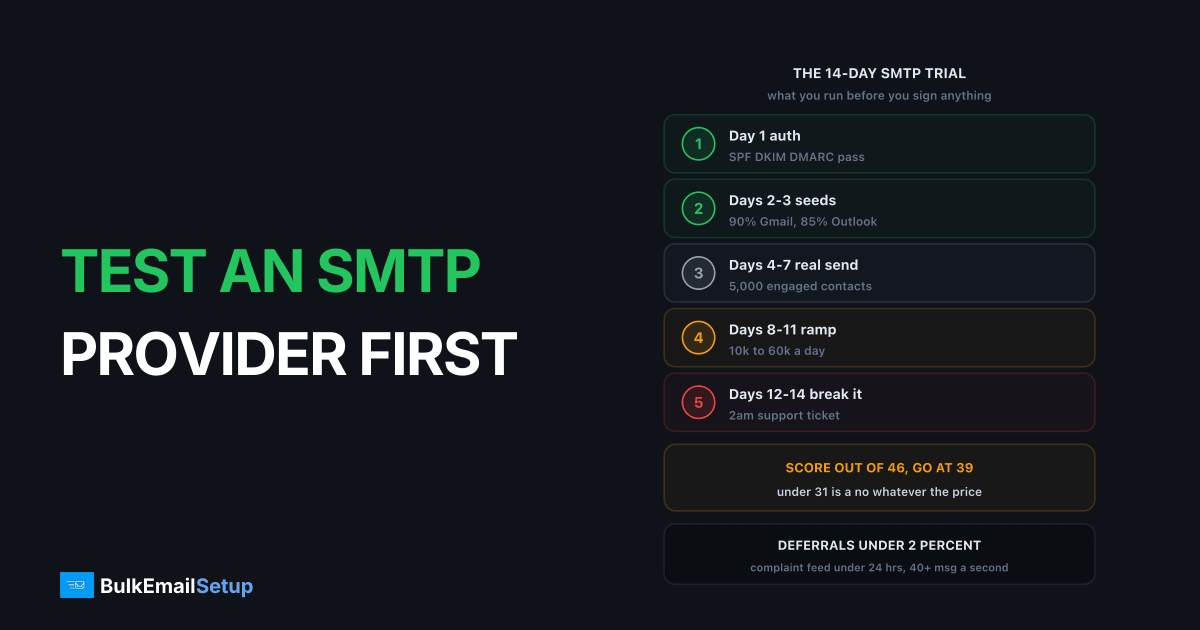
A 14-day structured trial tells you more about an SMTP provider than any sales call, and it costs you one campaign's worth of effort. Run authentication on day 1, seed placement on days 2 to 3, a real send to your most engaged 5,000 on days 4 to 7, a volume ramp on days 8 to 11, and failure plus support testing on days 12 to 14. Seven numbers come out the other end, and they decide it.
I have run this on SendGrid, Mailgun, Amazon SES and self-hosted Postfix. Every time, at least one provider failed on something the pricing page never mentioned.
Why a trial beats a sales call
The sales page gives you a monthly allowance, a per-email price and an uptime number. None of those are what breaks in production.
| What the sales page says | What the trial finds out |
|---|---|
| 99.9% uptime | Deferral rate at Gmail on your assigned IP |
| 2 million emails/month | Actual sustained messages per second |
| "Industry-leading deliverability" | Inbox vs spam split per receiving network |
| 24/7 support | Whether a 2am ticket gets a technical answer |
| "Dedicated IP available" | Whether that IP is on Spamhaus already |
| Real-time analytics | Hours of delay on the complaint feed |
Questions to ask an SMTP provider before you buy covers what you get them to say. This article covers what you make them prove.
The 14-day test plan
Run it in this order. Each phase depends on the one before it, so do not skip ahead.
| Days | Phase | What you do | Pass condition |
|---|---|---|---|
| 1 | Auth and first message | Publish SPF, DKIM, DMARC, send one test message | All three pass, PTR matches HELO |
| 2-3 | Seed placement | Same content to 25-40 seeds, Gmail/Outlook/Yahoo | 90% inbox Gmail, 85% Outlook |
| 4-7 | Real engaged send | 5,000 most engaged contacts, one send a day | Bounce under 2%, complaints under 0.1% |
| 8-11 | Volume ramp | 10k, 20k, 40k, 60k on consecutive days | Deferral rate stays under 2% |
| 12-14 | Failure and support | Bad addresses, bad API calls, a 2am ticket | Right bounce codes, reply under 4 hrs |
Fourteen days is the floor. Under a week you only test the happy path, and that is not where providers fail.
Day 1: authentication and one message
Do not send anything else until this passes. Publish SPF, DKIM and DMARC on a sending subdomain, never the root domain, then send exactly one message to a Gmail address you control and read the raw headers.
Check the PTR first. A dedicated IP whose reverse DNS does not resolve back to your HELO hostname gets rejected at Gmail and Microsoft no matter what else you do right.
dig -x 203.0.113.45 +short
dig TXT selector1._domainkey.mail.example.com +short
dig TXT _dmarc.example.com +short
Then send one message with swaks, which shows you the full SMTP conversation.
swaks --to [email protected] \
      --from [email protected] \
      --server smtp.provider.example \
      --port 587 --auth LOGIN \
      --auth-user "$SMTP_USER" --auth-password "$SMTP_PASS" \
      --h-Subject "day 1 auth test" \
      --tls
Open the original in Gmail and look for spf=pass, dkim=pass and dmarc=pass. Anything less than all three on day 1 is a config problem, and a provider whose docs cannot get you there in an hour has told you something about days 2 to 14.
Days 2 to 3: seed placement per receiver
Send the same content to 25 to 40 seed mailboxes spread across Gmail, Outlook and Yahoo, weighted roughly to match your real list's provider mix. Log inbox, spam or missing per provider.
| Receiver | Target inbox rate | Investigate below |
|---|---|---|
| Gmail | 90% | 80% |
| Outlook and Hotmail | 85% | 70% |
| Yahoo and AOL | 90% | 80% |
Microsoft is what separates providers. Outlook weighs IP reputation far more heavily than Gmail, so a pool with noisy neighbours shows up as Outlook-only spam while Gmail looks fine. That split tells you more about the pool than anything the provider will say.
Seeds have no engagement history, so treat the number as a floor rather than the truth. The full method is in inbox placement testing with seed lists, and the gap between seed numbers and what your real subscribers see is covered in seed list vs real inbox placement.
Days 4 to 7: a real send to 5,000 engaged contacts
Seeds test the plumbing. Real recipients test the reputation. Take your 5,000 most engaged contacts, anyone who opened or clicked in the last 90 days, and send one campaign a day for four days.
Engaged contacts are the right pick because they are the least likely to complain. A complaint rate above 0.1% on this segment is a provider signal, not a list signal.
Record per send:
| Metric | Target | What a miss means |
|---|---|---|
| Hard bounce rate | under 2% | list problem, or the provider is misclassifying |
| Complaint rate | under 0.10% | on engaged contacts, look at the provider |
| Deferral rate (4xx) | under 2% | IP reputation or ramp speed |
| Open rate vs your baseline | within 15% | placement slipped somewhere |
Google's own sender guidelines put the hard complaint limit at 0.30% and the target at 0.10%. On your most engaged segment you should be nowhere near either. If you are, the mail is landing badly enough that people are hitting report spam instead of ignoring it.
Days 8 to 11: ramp and measure throughput
Push volume up on consecutive days and watch the 4xx rate rather than the delivered count. Delivered is a lagging number. Deferrals move first.
| Day | Volume | Watch |
|---|---|---|
| 8 | 10,000 | messages per second sustained |
| 9 | 20,000 | 4xx rate at Gmail specifically |
| 10 | 40,000 | queue drain time end to end |
| 11 | 60,000 | whether the provider throttles you |
Time the whole send, not the API calls. A provider that accepts 60,000 messages in four minutes then takes nine hours to deliver them has just moved the queue to their side, which is fine until you need a campaign out before lunch.
Two numbers to be strict about. Sustained throughput of 40 to 100 messages per second is normal on decent dedicated infrastructure, and API time to first byte should sit under 400ms. Monthly allowances are marketing; the hourly throttle decides whether a 400,000-address campaign goes out in a morning or over three days.
Days 12 to 14: break it on purpose
Working systems all look the same. The differences show up in failure.
Bounce classification. Send to a mix of deliberately bad addresses: a nonexistent mailbox on a domain that exists, a nonexistent domain, and a full mailbox if you can arrange one. A provider that reports a 550 user unknown as a soft bounce will keep retrying dead addresses and quietly poison your reputation. Check the codes it hands back, not the labels in the dashboard.
Complaint reporting delay. Mark one of your own seed messages as spam at Gmail and time how long it takes to appear in the provider's feed. Under 24 hours is fine. Over 72 hours means you learn about a spike three days late.
API failure behaviour. Send a malformed payload, an oversized message and a burst past your rate limit. You want a clear 4xx with a machine-readable reason, not a 500 or a silent accept.
Suppression handling. Unsubscribe one address, then send to it again. It should be blocked at the provider. If it goes out, the suppression list is decorative.
How to test support properly
Most people test support with a billing question during office hours, the one question every provider answers fast. That tells you nothing.
Open a real deliverability ticket at 2am on a Saturday. Ask something technical, such as why you are seeing 421 4.7.0 Try again later from Gmail on the IP they assigned you, with the timestamp and the IP included.
| What to time | Good | Acceptable | Bad |
|---|---|---|---|
| First human response | under 1 hr | under 4 hrs | over 12 hrs |
| First reply is technical | reads your logs | asks a real question | links an article |
| Escalation to deliverability | same day | 24 hrs | no such team |
The tell is whether the first reply engages with your IP and timestamp or points you at a generic warm-up article. A provider whose weekend tier can only forward tickets will be doing exactly that on the morning your campaign stalls. What actually matters in an SMTP provider SLA covers what the contract does and does not promise.
Check the IP and the pool before you commit
Do this on day 1, before your first real send, and again on day 14. Five minutes.
- Look the assigned IP up on the Spamhaus reputation checker and on Barracuda's lookup. A listed IP handed to you on day 1 is grounds to ask for a different one.
- Confirm the PTR resolves to a hostname you control or that at least matches the sending domain. Generic reverse DNS like
45.113.0.203.provider-pool.netis a shared-pool signal. - Check the neighbours. Run reverse lookups across the surrounding /24 and see who else is there. A /24 full of unrelated hostnames on cheap PTRs is a crowded pool.
for i in $(seq 40 50); do
  echo -n "203.0.113.$i "
  dig -x 203.0.113.$i +short
done
On a genuinely dedicated IP the neighbours are quiet, the PTR is yours, and nothing in the range is listed. On a shared pool sold as "dedicated-ish", you find out here.
Score two providers side by side
Run the same 14 days on two providers with the same list split 50/50. Score each line 0, 1 or 2, where 2 is a clear pass.
| Test | Weight | Provider A | Provider B |
|---|---|---|---|
| SPF, DKIM, DMARC all pass day 1 | 3x | 0-2 | 0-2 |
| Gmail seed inbox 90%+ | 3x | 0-2 | 0-2 |
| Outlook seed inbox 85%+ | 3x | 0-2 | 0-2 |
| Deferral rate under 2% at 60k/day | 3x | 0-2 | 0-2 |
| Bounce codes classified correctly | 2x | 0-2 | 0-2 |
| Complaint feed under 24 hrs | 2x | 0-2 | 0-2 |
| Sustained 40+ msg/sec, TTFB under 400ms | 2x | 0-2 | 0-2 |
| Weekend reply under 4 hrs, technical | 2x | 0-2 | 0-2 |
| Assigned IP clean, PTR correct | 3x | 0-2 | 0-2 |
Maximum is 46. My rule: 39 or above is a go, 31 to 38 is a go only if the misses are fixable from your side, and under 31 is a no regardless of price. A zero on any 3x line is an automatic no on its own, because those five are the things you cannot work around.
Price is deliberately absent. A provider that is 30% cheaper and scores 12 points lower is more expensive within a quarter, once you count the campaigns that land in spam.
What the trial answers that the sales page never does
| Question | Where the answer comes from |
|---|---|
| Is the "dedicated" IP really dedicated? | day 1 PTR and /24 check |
| How crowded is the shared pool? | Outlook-only spam, days 2-3 |
| Can I send 400k in a morning? | days 8-11 queue drain time |
| Will I hear about a complaint spike in time? | feed delay, days 12-14 |
| Is anyone technical there on a weekend? | the 2am Saturday ticket |
| Does the suppression list work? | send-to-unsubscribed, day 13 |
None of these have an answer on a pricing page, and all six have cost someone a quarter of email revenue.
One discipline holds it together: change one variable at a time. Swap the template, trim the list and switch IPs between two sends, and the numbers mean nothing.
How BulkEmailSetup helps
We build the infrastructure you would be testing for: your own server, your own IPs that stay yours, SPF, DKIM, DMARC and PTR verified before the first send, MTA tuning, bounce classification that gets the codes right, and a warm-up plan sized to your list. Day 1 of the plan above is our handover checklist, not something you chase support about.
Basic is $549 one-time, covering 1 SMTP server, 3 dedicated IPs, 25,000 emails/day and unlimited contacts. Higher tiers scale to 15 IPs and 200,000 emails/day. See pricing, or 12 questions to ask an SMTP provider before you pay for what to get in writing before the trial starts.
Frequently asked questions
How long should you test an SMTP provider before committing?
Fourteen days is the shortest window that covers everything that matters. You need day 1 for authentication, days 2 to 3 for seed placement, days 4 to 7 for a real send to engaged contacts, days 8 to 11 for a volume ramp, and days 12 to 14 for failure and support testing. Anything under a week only tests the happy path.
What should you measure during an SMTP provider trial?
Seven numbers: SPF, DKIM and DMARC pass rate (target 100%), inbox placement per receiver (target 90% or better at Gmail), deferral rate (target under 2%), API time to first byte (target under 400ms), bounce classification accuracy, complaint reporting delay (target under 24 hours), and sustained throughput in messages per second.
How do you test SMTP provider support properly?
Open a real deliverability ticket at an awkward hour, such as 2am on a Saturday, and ask something technical like why a specific Gmail 421 deferral is happening on your assigned IP. Billing tickets always get answered fast. Time the first response, and judge whether the reply is technical or a copy-paste link to a help article.
How do you check the IP an SMTP provider assigns you?
Look it up on the Spamhaus reputation checker and Barracuda's lookup before you send anything, confirm the PTR record resolves back to the HELO hostname with a dig lookup, and check the neighbouring addresses in the same /24. A listed IP or a mismatched PTR on day 1 is a reason to ask for a different address.
What deferral rate is acceptable during an SMTP trial?
Under 2% at steady volume on warmed IPs. Between 2% and 5% means you are pushing too fast or the IP reputation is weak. Above 5% means the receiving networks are actively slowing you down, and if it stays there while you hold volume flat, the problem is the infrastructure, not your ramp.
Should you run two SMTP providers in parallel during a trial?
Yes, if you can afford two trial accounts. Split the same segment 50/50 on the same day with identical content, and the differences you see are the providers, not your list or your subject line. A single-provider trial gives you numbers with nothing to compare them against.


