
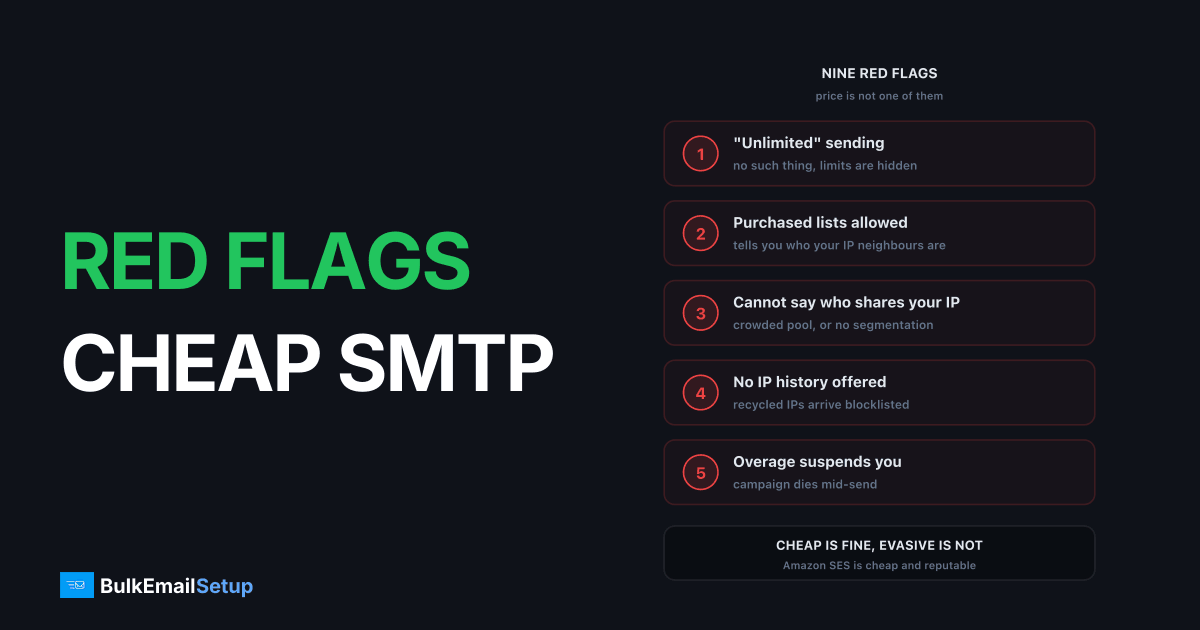
Cheap is not the red flag. Amazon SES is one of the cheapest options available at $0.10 per 1,000 emails and is entirely reputable. The warning signs are behavioural, and they all point at the same underlying question: who else is sending from your IP, and what are they sending?
Get that straight before reading the list, because the useful skill here is separating a merely low price from a suspiciously low one. Those are different things and they fail in different ways.
What a low price actually looks like
Here is the honest range at 500,000 emails a month, so you have a reference for what "cheap" means before deciding whether a quote is too cheap.
| Provider | Cost per 1,000 at 500k/mo | What that price buys |
|---|---|---|
| Amazon SES | About $0.10 | Raw API, no UI, you build the rest |
| Your own server | About $0.10 to $0.16 all-in | Your IPs, your operational time |
| Elastic Email | Roughly $0.30 to $0.50 | Shared pool, basic platform |
| Mailgun | Roughly $0.55 to $0.90 | Full platform, logs, validation |
| SendGrid | Roughly $0.60 to $1.20 | Full platform, dedicated IP extra |
| Klaviyo or Mailchimp | $3 to $12 equivalent | Priced per contact, not per email |
| "Unlimited SMTP, $15/mo" | Under $0.02 | An IP range nobody else wants |
The gap between $0.10 and $0.02 is not efficiency. Amazon SES is already at AWS scale with AWS margins, so nobody undercuts it by five times through better engineering. They undercut it by not paying for clean IP space, not paying for an abuse desk, and not caring who signs up. That is the entire business model behind most unlimited plans. Cost per 1,000 emails at every provider has the full pricing table if you want to place a quote precisely.
The nine signals
1. "Unlimited" sending. No provider can deliver unlimited email, because receiving networks throttle per IP regardless of what was sold. Gmail, Microsoft and Yahoo all rate-limit by sending IP and reputation, so the ceiling was never the vendor's to sell.
What it costs you: unlimited plans always carry undisclosed rate limits, and you discover them mid-campaign. I have seen a "$29 unlimited" account silently capped at 3,000 an hour, which turns a 250,000-address Tuesday send into a four-day drip that lands at 3am for most of the list. Is unlimited SMTP real takes the claim apart in detail.
2. Purchased lists are permitted. The clearest signal of all. Bought lists produce 15% to 40% hard bounce rates and hit spam traps, well past the 3% to 5% bounce ceiling most reputable providers enforce.
What it costs you: a provider tolerating that is either not monitoring their pools or knowingly running dirty ranges, and your mail leaves from the same IPs. Concretely, a neighbour hitting a Spamhaus spam trap gets the whole /24 listed, and your perfectly clean opt-in newsletter starts bouncing at every receiver using the SBL, which is most of them. You did nothing wrong and you have no way to fix it. See what is actually allowed with purchased lists.
3. They cannot say how many senders share your IP. On a shared pool your delivery depends on strangers. A provider who will not answer either has not segmented pools or does not want you to know how crowded they are.
What it costs you: the difference between a pool of 10 vetted senders and a pool of 400 unvetted ones is the difference between predictable inbox placement and a reputation that swings weekly for reasons you cannot see. Ask for the number and for how pools are segmented by sender reputation. "We rotate customers across the pool for balance" means no segmentation.
4. No IP history before assignment. Recycled IPs arrive pre-blocklisted more often than anyone admits. A provider should be able to tell you an IP is clean, and you should verify it yourself.
What it costs you: starting a warm-up on an already-listed address wastes four to eight weeks and produces data you cannot interpret, because you cannot tell a warm-up deferral from a blocklist rejection without checking. Look the address up against Spamhaus, Barracuda and SORBS before your first send. Spamhaus lists IPs for spam sources, bulletproof hosting and snowshoe ranges with frequently changing identification, and the zone refreshes every five minutes. Delisting is always free, so a provider quoting you a fee to clear a listing is running a scam or falling for one.
5. No published acceptable use policy. If the rules are not written down, they can be applied however and whenever. That cuts both ways: you cannot rely on them to police your neighbours, and you cannot rely on them not to suspend you.
What it costs you: no written policy means no appeal. When your account is paused, there is no clause to point at and no threshold you can show you stayed under.
6. No per-campaign bounce and complaint data. Without visibility, the first sign of trouble is a suspension. You need hard versus soft bounce separation and complaint rates you can see per campaign, not a monthly average.
What it costs you: Google's bulk sender requirements put the spam complaint ceiling at 0.30%, with 0.10% as the target, for anyone sending over 5,000 messages a day to Gmail. If your provider only shows you a delivered percentage, you cannot tell whether you are at 0.05% or 0.4% until Gmail starts filtering you. See bounce management and complaint rate vs bounce rate.
7. No authentication control on your own domain. You should be able to set SPF, DKIM and DMARC on your sending domain, and have PTR match your HELO hostname. Google requires valid forward and reverse DNS from every sender, and both SPF and DKIM plus DMARC from bulk ones.
What it costs you: a provider signing DKIM with their own d= domain gives you a pass that does not align, so your DMARC result rides entirely on SPF. One SPF change on their side and your mail starts failing DMARC at Gmail with nothing visibly wrong on your end.
8. Overage suspends rather than bills. All three behaviours exist: billed, throttled, suspended. Being suspended mid-campaign is far worse than being billed for the excess.
What it costs you: overage rates typically run 2 to 5 times the in-plan rate, which is survivable. A suspension at 60% through a 300,000-address send is not, because the half that went out already sets the expectation for a reply you now cannot support. Ask which applies, in writing. Hidden costs of ESP overage fees covers the arithmetic.
9. Support has no stated response time. At volume, a blocked campaign waiting three days on a ticket costs more than the plan saved.
What it costs you: on a $19 a month plan, a three-day support gap during a blocklisting wipes out roughly two years of the savings versus a $60 a month provider with same-day support. The cheap plan is only cheap while nothing breaks.
The red flag table
Nine signals, what each one actually tells you, and how to check it before you hand over a card.
| Red flag | What it signals | How to check it before buying |
|---|---|---|
| "Unlimited" sending | Undisclosed rate limits, or a dirty IP range | Ask for the per-hour cap in writing |
| Purchased lists permitted | No pool policing, bad neighbours | Read the AUP list-quality clause |
| Won't say pool size | No segmentation, or a crowded pool | Ask twice, in email, before paying |
| No IP history | Recycled, possibly pre-listed addresses | Look the IP up on Spamhaus and Barracuda |
| No published AUP | Rules invented at suspension time | Find the URL. No URL, no deal |
| Delivered % only | You cannot see 0.3% coming | Ask for a screenshot of the reporting |
| They own your DKIM | DMARC depends on their SPF | Ask which d= domain signs your mail |
| Overage suspends | Campaign dies mid-send | Ask which of bill, throttle or suspend |
| No support SLA | Days offline during an incident | File a pre-sales ticket, time the reply |
Every one of these checks is free and takes minutes. The pre-sales ticket is the most informative: send a real technical question at 6pm on a Friday and see when the answer arrives.
What good cheap looks like
| Signal | Good cheap | Bad cheap |
|---|---|---|
| Volume claims | Stated limits, per hour and per month | "Unlimited" |
| List policy | Opt-in required, written down | Anything goes |
| IP transparency | Tells you the pool size | Cannot say |
| AUP | Published at a URL | Vague or missing |
| Bounce data | Per campaign, hard vs soft split | Delivered % only |
| Overage | Billed at a stated rate | Suspended |
| Authentication | Your DKIM key, your domain | Their d= domain |
| Price per 1,000 | $0.10 to $0.60 | Under $0.02, or "unlimited" |
Amazon SES sits firmly in the left column and costs about $0.10 per 1,000 emails. Low price and good practice are not in tension. What is in tension is a low price and an unanswered question, because the honest cheap providers can answer every column above in a single email.
How to test before committing
- Check the assigned IP against Spamhaus, Barracuda and SORBS on day one, before your first real send. Two minutes.
- Send a real segment, 1,000 to 5,000 addresses from your actual list, not a test list. Test lists tell you nothing about complaint rates.
- Measure inbox placement with a seed list. Delivered only means the receiving server accepted the message, not that it reached an inbox. See seed list vs real inbox placement.
- Read the AUP for the list-quality clause specifically, then for the suspension clause.
- Ask the overage question in writing, and the per-hour limit with it.
- Time a support ticket outside business hours before you pay.
Six steps, an afternoon, and it catches almost everything. The full method, including what numbers to record so the comparison is honest, is in how to test an SMTP provider before committing, and the pre-sales version is 12 questions to ask an SMTP provider.
The underlying trade
Cheap shared infrastructure is cheap because the cost of policing it is spread thin. That works when the provider polices well and fails when they do not, and you cannot tell which from the pricing page. Amazon SES is cheap because AWS has scale and an aggressive abuse desk. A $15 unlimited plan is cheap because it has neither.
Dedicated IPs change the question rather than answering it. There is no pool to share, so the neighbours problem disappears entirely, but reputation becomes wholly yours and poor list quality has nowhere to hide.
| Concern | Cheap shared pool | Your own IPs |
|---|---|---|
| Who affects your reputation | Every sender in the pool | Only you |
| Blocklisting from a neighbour | Real, and outside your control | Not possible |
| Unlimited claim risk | The main failure mode | No plan to exceed |
| List hygiene | Provider's problem until it's yours | Yours from day one |
| Warm-up | Provider handles it, or nobody does | Yours, 4 to 8 weeks |
| Cost at 500k/mo | $150 to $600 a month | About $549 one-time plus hosting |
That is a good trade above roughly 100,000 emails a month and a poor one below it. See when do you need a dedicated SMTP server for where your volume puts you.
How BulkEmailSetup helps
We build dedicated infrastructure with the answers to all nine checks built in: your own IPs, verified clean against the major blocklists before handover, full SPF/DKIM/DMARC/PTR configuration, MTA tuning, bounce handling and a warm-up plan. No pool, no neighbours, no undisclosed rate limit.
Basic starts at $549 one-time, covering 1 SMTP server, 3 dedicated IPs, 25,000 emails/day and unlimited contacts. Higher tiers scale to 15 IPs and 200,000 emails/day. See pricing, or 12 questions to ask an SMTP provider before you buy anywhere.
Frequently asked questions
Are cheap SMTP providers safe to use?
Price alone is not the problem. Amazon SES is one of the cheapest options in the market at $0.10 per 1,000 emails and is entirely reputable. The warning signs are behavioural: providers advertising unlimited sending, permitting purchased lists, refusing to say how many senders share your IP, or unable to tell you an IP's history before assigning it.
Why do some SMTP providers advertise unlimited email?
Because it sells, and because the real limits sit in the terms rather than the marketing. No provider can offer genuinely unlimited sending, since receiving networks throttle by IP regardless of what anyone sells you. In practice unlimited plans carry undisclosed rate limits, and the ones that do not tend to have IP ranges already blocklisted from abuse.
What is a suspiciously low price for SMTP?
Below about $0.05 per 1,000 emails is hard to explain honestly, since Amazon SES sits at $0.10 and it runs at AWS scale. Mainstream providers land between $0.30 and $1.20 per 1,000 at mid volume. A $15 a month unlimited plan works out under $0.02 per 1,000 at any real volume, which prices in an IP range nobody else wants.
What should I check before buying a cheap SMTP plan?
Check the IP against Spamhaus, Barracuda and SORBS before you commit, ask how many senders share it, read the acceptable use policy for whether purchased lists are permitted, and ask what happens on overage. A provider that permits bought lists is telling you what your IP neighbours are doing.
Is it a red flag if a provider allows purchased lists?
Yes, and it is the clearest one. Purchased lists produce hard bounce rates of 15% to 40% and hit spam traps, so a provider permitting them is either not monitoring their pools or knowingly running dirty IP ranges. Your mail leaves from the same addresses, so their tolerance becomes your delivery problem.
How can I test an SMTP provider before committing?
Send a real segment of 1,000 to 5,000 addresses, not a test list, and measure inbox placement with a seed list rather than trusting the delivered percentage. Delivered only means the receiving server accepted the message, not that it reached an inbox. Check the assigned IP against major blocklists on day one.


