
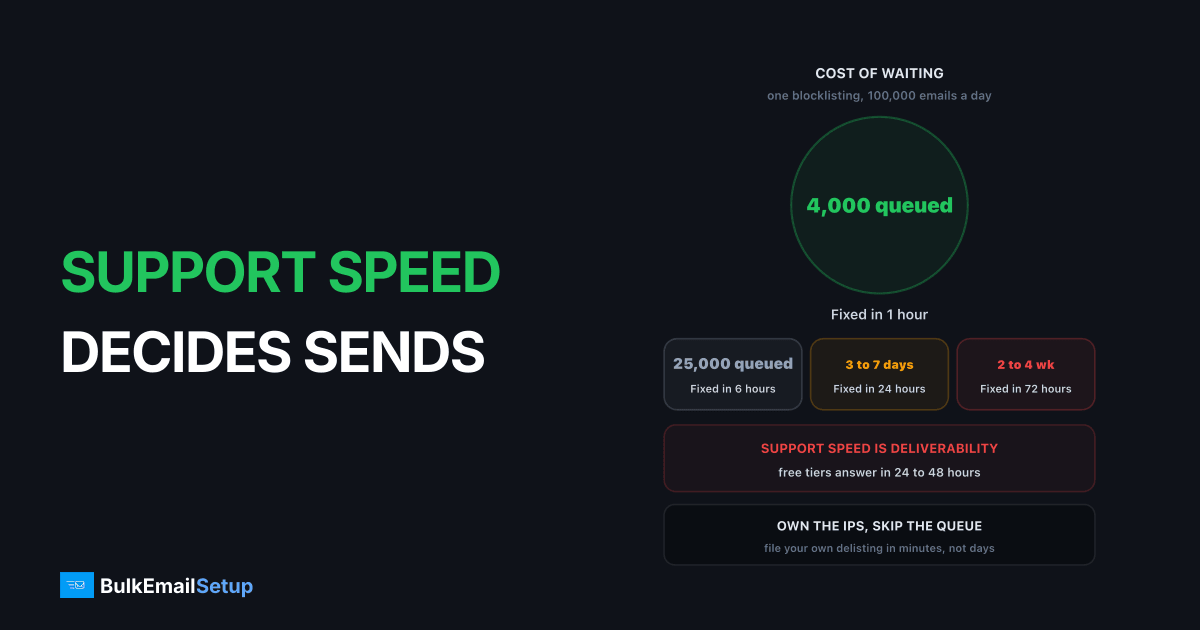
Support response time is a deliverability variable, not a comfort feature. Email failures compound: a blocklisted IP keeps retrying, a Gmail 421 throttle deepens, and every hour of that adds signal against your reputation. The same blocklisting caught in 1 hour costs you a delayed queue. Caught in 72 hours it costs the IP, plus 2 to 4 weeks of re-warming. A provider with a 48 hour first-response target has already decided which of those you get.
Most buyers compare price, volume caps and uptime. Support shows up as a checkmark, never as a number. That is backwards for email, where the cost of a problem is a function of how long it stays unfixed.
Why email problems compound and web problems do not
A web outage is flat. It is down, then it is up, and the cost is roughly linear with minutes. Email is not like that.
When your IP gets listed or a receiver starts throttling, your MTA keeps trying. Each retry is another failed delivery, another data point at the receiver, another chunk of queue aging past usefulness. Meanwhile the campaign that caused it is still going out to the rest of the list.
Here is the shape of it, for a sender pushing 100,000 messages a day.
| Time to detection and fix | Queue backlog | Reputation impact | Recovery work |
|---|---|---|---|
| 1 hour | ~4,000 messages | None measurable | Resume sending, no re-warm |
| 6 hours | ~25,000 messages | Minor dip at one or two receivers | Throttle down for 24 hours |
| 24 hours | ~100,000 messages | Domain reputation drops a grade at Gmail | 3 to 7 days reduced volume |
| 72 hours | ~300,000 messages | IP reputation burned, more listings likely | 2 to 4 weeks re-warm |
| 1 week | Queue expired, mail lost | New IPs usually needed | Full 4 to 8 week warm-up |
Those middle rows are where the money is. A 24 hour first response on a Tuesday problem puts you in row three before anyone has read the ticket. Friday evening on a business-hours plan puts you in row five by Monday.
The other half of the cost is the campaign. A 100,000 message send that lands three days late against a promotion that ended Sunday is not late, it is wasted.
What support you actually get by plan level
These are typical shapes across the market. Providers word them differently, so treat it as what to expect and verify the numbers in writing.
| Plan level | Channels | Typical first response | Deliverability help |
|---|---|---|---|
| Free / trial | Email or ticket only | 24 to 48 hours, business days | None, self-service docs |
| Entry paid (under $100/mo) | Email, sometimes chat | 12 to 24 hours, business days | Generic, tier one script |
| Mid paid ($100 to $1,000/mo) | Email plus live chat | 4 to 12 hours | Escalation possible on request |
| High volume / enterprise | Chat, phone, named contact | 1 hour P1, 24/7 | Deliverability engineer available |
Two things fall out of that table. The tier where most bulk senders sit, entry and mid paid, is exactly the tier with no guaranteed deliverability path. You get someone who can reset an API key, not someone who can read a Spamhaus listing and name the segment that caused it.
The jump that matters is not free to paid, it is business hours to 24/7. Everything in the cost-of-delay table gets worse overnight and much worse over a weekend. The SMTP provider SLA guide covers why the uptime number in the same contract tells you nothing about this.
The question types and who can actually answer them
Knowing which tier can solve which problem saves a day of escalating in the wrong direction.
| Question type | Tier one can solve | Needs escalation | Needs the provider's own relationships |
|---|---|---|---|
| API key, SMTP auth failure | Yes | No | No |
| Billing, plan limits, overage | Yes | No | No |
| Bounce classification questions | Rarely | Yes | No |
| Gmail 421 4.7.28 throttling | No | Yes | Sometimes |
| Microsoft 550 5.7.606 banned IP | No | Yes | Yes, Microsoft delisting |
| Spamhaus SBL listing on a shared IP | No | No | Yes, only the IP owner can file |
| Account suspension review | No | Yes, trust and safety | Internal only |
That last column is the one nobody asks about before buying. On a shared pool you cannot file a Spamhaus removal for an IP you do not control. Spamhaus wants evidence about the sending source from whoever runs it, so the provider has to file. If their answer to "who files a delisting" is "here is our help article", that is a hard ceiling on how fast that class of problem gets fixed, at any hour.
Same for Microsoft. A 550 5.7.606 on a shared IP is between Microsoft and whoever owns the range. You are a spectator.
What a good deliverability answer looks like
You can tell within one reply whether the person on the other end has ever read an MTA log. A canned answer restates your question, links the authentication docs and asks you to confirm SPF. A real answer names the receiver code, quotes your log, and gives a threshold or a next step with a timeframe.
| Signal | Canned answer | Real answer |
|---|---|---|
| Evidence | "Please check your SPF/DKIM" | Quotes your bounce line and the SMTP code |
| Numbers | None | Complaint rate 0.34% vs Google's 0.30% limit |
| Cause | "May be due to content" | Names the segment or campaign that spiked |
| Action | "Monitor and try again" | "We paused the pool, filing removal today" |
| Timeframe | None | "Expect Spamhaus removal within 24 hours" |
Google publishes the thresholds this is judged against in its bulk sender guidelines: spam rates below 0.30%, ideally under 0.10%, plus SPF, DKIM and DMARC for anyone over 5,000 messages a day. An agent who cannot reference numbers like these on a Gmail problem is reading a script, not diagnosing.
The escalation question, and the weekend one
Two questions decide most of the real-world outcome, and neither appears on a pricing page.
Can you reach someone who talks to receivers and blocklists? Some providers have standing relationships with Microsoft, Google's postmaster team and the blocklist operators. Some have a ticket form. That difference turns a 3 day problem into a 4 hour one.
Ask it plainly: "If our shared IP is listed on Spamhaus SBL on a Wednesday, who files the removal, and what is your median removal time?" A provider who does this routinely has a number. One who does not will talk about documentation.
Do you cover weekends? Campaigns go out Saturday morning because retail open rates are good then. Blocklists list continuously and automated listings do not keep office hours. Yet most contracts under enterprise pricing are business days only.
| Incident timing | Business hours support | 24/7 support | Cost difference |
|---|---|---|---|
| Tuesday 10am | 4 to 12 hours | 1 to 4 hours | Small |
| Tuesday 11pm | Next morning, ~10 hours | 1 to 4 hours | Moderate |
| Friday 6pm | Monday morning, ~60 hours | 1 to 4 hours | Severe, re-warm territory |
| Saturday 9am campaign | Monday, ~48 hours | 1 to 4 hours | Whole campaign lost |
The Friday evening row has cost senders I know the most. It is the scenario in my IP got blacklisted mid-campaign, and the difference between an hour of annoyance and a month of re-warming is whether anyone reads the ticket before Monday.
Business hours only? Ask whether there is an emergency channel for sending stoppages, and get the definition. "Outage" usually means their API is down, not that your mail is blocked.
How to test support before you commit
Do not take the number on the pricing page. Test it during a trial, before money changes hands.
- Open a deliverability ticket, not a sales question. Ask for the blocklist history of the IP you will be assigned and how many senders share that pool. Sales answers fast. Support is what you are measuring.
- Time the first human response. Not the autoresponder.
- Judge the answer against the table above. A number, a log line, a receiver code? Or a help article link?
- Repeat on a Saturday. Most informative test in the list, and almost nobody runs it.
- Ask the escalation question directly and see whether you get a process or a deflection.
- Send a real segment of 1,000 to 5,000 addresses and check placement, so any support test is against a genuine problem.
That pairs with the fuller checklist in 12 questions to ask an SMTP provider, and you can put the answers to the test during a trial using how to test an SMTP provider before you commit. The warning signs that predict slow support are in red flags in cheap SMTP providers, where "no stated response time" sits high on the list.
What self-hosting changes
Running your own SMTP server does not give you better support. It removes the wait.
| Situation | Managed provider | Server you own |
|---|---|---|
| Who does tier one | Their queue, 12 to 48 hours | You, immediately |
| Log access | What their dashboard shows | Full MTA logs, live |
| Blocklist removal | Provider must file it | You file it, you own the IP |
| Pause a bad segment | Support ticket or dashboard | One command |
| Weekend incident | Depends on the plan | Whenever you look |
| Who fixes a hardware fault | Provider | Your host, typically 99.9% network SLA |
A genuine trade, not a free win. You take on tier one, which means knowing what a 421 4.7.28 is and where your bounce logs live. What you get back is that the 24 to 48 hour gap in the cost-of-delay table stops existing.
The blocklist point is sharpest. On a shared pool you ask someone else to file a Spamhaus removal on an IP that is not yours, then wait in their queue. On your own IPs you file it yourself, in the time it takes to fill the form. Same process, one fewer human in the way.
The support checklist before you sign
Ten questions, all answerable by email, all worth getting in writing on the order form.
- First-response target by channel and plan? Hours, not "fast".
- Business days or 24/7? And which timezone the business days are in.
- A separate target for deliverability issues? Usually not. The answer is informative either way.
- Who files blocklist delistings on shared IPs, and what is the median removal time?
- Direct escalation paths to Google, Microsoft or Spamhaus, or a ticket form?
- What counts as an emergency? "Your mail is blocked" often is not on the list.
- Which plan does a deliverability engineer start on?
- Median time to a human decision on an account suspension?
Score the answers by how many come back as a number. Six out of eight means they have thought about this. Adjectives mean they have not, and you find out on a Friday.
Price the difference honestly. If 24/7 support costs an extra $200 a month and turns one annual Friday-evening incident from a 4 week re-warm into a 4 hour fix, it paid for itself several times over. If you never have an incident, you wasted $2,400. That is the bet, and the only way to weight it is by what your sending is worth per day.
How BulkEmailSetup helps
We build dedicated SMTP infrastructure you own: your own server, your own IPs, full SPF/DKIM/DMARC/PTR setup, MTA tuning, bounce handling and a warm-up plan. Because the IPs are yours, you are not waiting in a provider's ticket queue for someone else to file a blocklist removal, and you can pause a bad segment or read the actual MTA logs the moment something looks wrong.
Basic starts at $549 one-time, covering 1 SMTP server, 3 dedicated IPs, 25,000 emails/day and unlimited contacts. Higher tiers scale to 15 IPs and 200,000 emails/day. See pricing for the full comparison.
Frequently asked questions
What support response time should I expect from an SMTP provider?
Typical published first-response targets are 24 to 48 hours on free and entry plans, 4 to 12 hours on mid paid tiers with live chat, and 1 hour for P1 severity on enterprise contracts with a named contact. Very few providers publish a deliverability-specific response time, which is the one that actually matters, so ask for it in writing on the order form.
Why does support speed affect email deliverability?
Because email failures compound while you wait. A blocklisting stops delivery to every receiver using that list, and each hour your queue keeps retrying against a blocked IP adds bounce and complaint signals. Caught in 1 hour you lose a queue. Caught in 72 hours you lose the IP reputation and need 2 to 4 weeks of re-warming.
Can SMTP provider support actually get me off a blocklist?
It depends on the blocklist and the tier of support you reach. Spamhaus SBL removals require evidence about the sending source, which only the party controlling the IP can supply, so on shared pools the provider must file it and you cannot. Tier one support usually cannot do this and will hand you a self-service article. Ask specifically whether they file and chase delistings on your behalf.
Do SMTP providers offer weekend support?
Most entry and mid tiers do not, or offer weekend cover for outages only, not for deliverability questions. This matters more for email than for most infrastructure because campaigns run on Saturdays and blocklists list continuously. A Friday 6pm listing on a business-hours-only plan is a 60 hour outage before anyone reads your ticket.
How do I test an SMTP provider's support before buying?
Open a real ticket during the trial with a specific deliverability question, such as asking for the IP's blocklist history and how many senders share the pool. Time the first response, then judge whether the answer names a threshold or a log line, or just links a help article. Do this once on a weekday and once on a Saturday.
What does a good deliverability support answer look like?
It names the specific receiver response, quotes the log evidence, and gives a numeric threshold or a next action with a timeframe. For example: your bounce log shows Gmail 421 4.7.28 on 12% of attempts from 203.0.113.5, complaint rate on that pool is 0.34% against Google's 0.30% limit, we have paused the pool and are filing a Spamhaus removal today. A canned answer restates your question and links a generic authentication article.
Does self-hosting an SMTP server mean worse support?
It changes who does tier one. You investigate your own logs instead of waiting on a queue, which removes the 24 to 48 hour delay that causes most of the compounding damage. You still deal with blocklists directly, but as the IP owner you can file a Spamhaus removal yourself in minutes rather than asking a provider to do it for you.


