
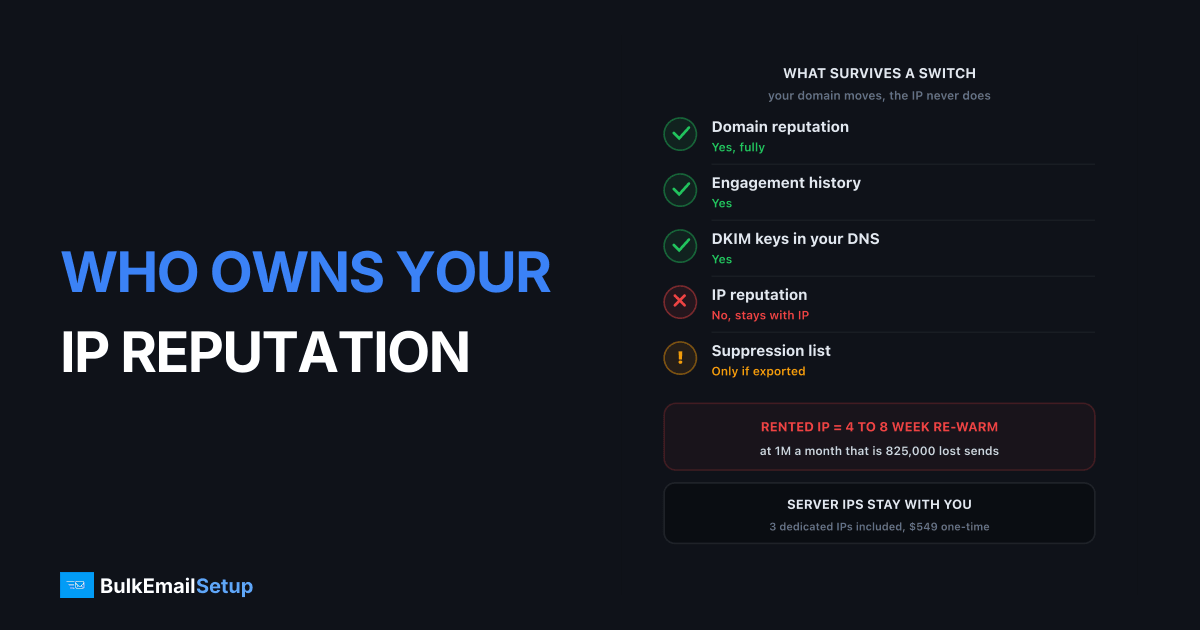
Nobody owns the IP reputation except whoever owns the IP, and on a rented dedicated IP that is SendGrid, Mailgun or Amazon SES, not you. You pay the $30 to $59 a month for the address and you do the 4 to 8 weeks of reduced-volume warm-up, then on cancellation the address goes back into their pool with your reputation still attached to it. What you keep is domain reputation, which follows your From domain everywhere. That split decides how much a provider switch really costs you.
I've watched senders treat warm-up as a one-time setup task. It is not. On rented IPs it is a cost you pay again at every vendor change, and most people do not price it into the switch.
What actually moves when you switch providers
Reputation is not one thing. It is several signals held in different places, and only some of them belong to you.
| Asset | Bound to | Survives a provider switch |
|---|---|---|
| IP reputation | The IP address | No. Stays with the address |
| Domain reputation | Your From and DKIM d= domain | Yes, fully |
| Engagement history at the receiver | Your domain plus your content | Yes |
| Blocklist listings on the IP | The IP address | No, and neither does a clean record |
| Suppression list | Your provider account | Only if you export it before cancelling |
| DKIM keys | Your DNS | Yes, if you control the selector |
| Postmaster Tools history | Your domain | Yes |
| SPF include chain | The provider's hostname | No, you rewrite it |
Everything in the "yes" column is anchored to your domain and your DNS. Everything in the "no" column is anchored to an address someone else registered.
The engagement row is the one people underrate. When a Gmail user opens your mail, replies, or drags it out of spam, that signal attaches to your sending domain and your content, not to the relay that carried it. It just cannot make an unknown IP look known on day one.
The rented-IP problem, stated plainly
A dedicated IP from a relay is a rental with no equity. You do the work that makes it valuable and the landlord keeps the improvement.
Here is the actual sequence on a SendGrid or Mailgun dedicated IP:
- You pay the add-on fee, roughly $30 per IP per month at SendGrid on Pro, roughly $59 at Mailgun, $24.95 at Amazon SES.
- You warm up for 4 to 8 weeks, ramping about 30% every two days, sending well below your real volume the whole time.
- You reach High reputation at Gmail after roughly 8 to 12 weeks of consistent sending.
- Your contract ends, your pricing tier changes, or a policy team decides your use case is too risky.
- The IP goes back into the pool. Your reputation goes with it.
Step 5 is the whole article. Eight weeks of deliberate under-sending is not a fee you can see on an invoice, which is why it gets left out of switching costs.
The three levels of IP ownership map onto this. Level 1 is renting from a relay, level 2 is IPs assigned to a server you control, level 3 is a block registered to your company at an RIR. Only level 3 is ownership a lawyer would recognise, but level 2 is where the practical break happens, because nobody can reassign the address while you are paying for the box.
Where the IP goes after you leave
Straight back into the pool, and out to another customer. Providers hold IPv4 addresses that cost them real money on the transfer market, so nothing sits idle for long.
| Level | Typical time back in service | Who inherits your reputation |
|---|---|---|
| Relay dedicated IP add-on | Days to a few weeks | The next customer who orders a dedicated IP |
| VPS or dedicated server IP | Often within days | The next server built on that address |
| Your own registered block | Never, unless you sell it | Nobody |
This is also the answer to the question nobody asks until week three: why did my brand new dedicated IP arrive dirty. Because it was not new. It was somebody else's, and their complaint rate, their spam trap hits, and possibly their UCEPROTECT level 2 listing came attached.
Providers do check before reissuing, but those checks catch the obvious cases. A soft reputation problem, the kind where Gmail quietly throttles rather than rejects, does not show up on a blocklist query. You find it by sending.
How to check an IP's history before you warm it
Do this on day zero, before you send anything real. Twenty minutes now saves three weeks of guessing later.
# Reverse DNS: must resolve to a hostname you control
dig -x 203.0.113.45 +short

# Forward-confirmed reverse DNS: the hostname must point back
dig +short mail.yourdomain.com

# Spamhaus ZEN check (reversed octets)
dig +short 45.113.0.203.zen.spamhaus.org
An answer of 127.0.0.x from the Spamhaus query means listed. No answer means not listed. Check the specific return code against the Spamhaus return codes documentation, because SBL, XBL and PBL mean very different things and only two of them are your problem.
Then work through this list:
| Check | Where | What a bad result looks like |
|---|---|---|
| Blocklist status | Spamhaus ZEN, UCEPROTECT, Barracuda | Any listing on ZEN, or UCEPROTECT level 2/3 |
| Sender score | Cisco Talos reputation lookup | Poor or Untrusted on a brand new IP |
| PTR record | dig -x | No PTR, or a generic host name like static-45.provider.net |
| IP reputation graph | Google Postmaster Tools | Data already present before you sent anything |
| Neighbourhood | Whois on the surrounding /24 | Range registered to a bulk mail operation |
That fourth row is the sharpest test. If Postmaster Tools shows an IP reputation history for an address you were told is fresh, somebody sent from it recently. Ask for a different address before you invest eight weeks in that one. And check the neighbourhood: receivers apply judgement at the /24 level, so spammers on adjacent addresses drag on you even when your own record is spotless.
The lever you always keep: domain reputation
Domain reputation is the half of the equation that is genuinely yours, and it is the reason a well-run sender re-warms faster than a beginner. Gmail tracks domain and IP reputation as separate graphs, and a High domain score means the receiver already trusts your mail stream when a new address shows up carrying it.
Three things build domain reputation that no provider can take:
Send from a subdomain you control. news.yourbrand.com for marketing, mail.yourbrand.com for transactional. The reputation accrues to your DNS, the streams stay isolated, and the split survives every infrastructure change. The full trade-off is in subdomain vs root domain for email sending.
Sign DKIM with d=yourdomain.com, never the provider's domain. This is the single most important portability decision you will make. If your mail is signed d=sendgrid.net, the reputation you build credits to SendGrid's domain, not yours, and you walk away with nothing on either axis. Own the selector, publish the key in your own DNS, and check the d= value in a received message header before you trust the setup.
Keep the From address stable. Receivers build engagement history against a specific From identity. Rotating between hello@, team@ and noreply@ splits that history three ways.
Google publishes the full requirements in its email sender guidelines, including the SPF, DKIM and DMARC baseline and the 0.3% complaint ceiling for senders above 5,000 messages a day. Meet those and your domain half stays healthy no matter whose IPs you are borrowing. The mechanics of the two scores are covered in domain reputation vs IP reputation.
What forfeiting the warm-up actually costs
Concrete numbers, because "you lose your warm-up" means nothing until it has a currency attached.
Assume a 6 week ramp at roughly 30% every two days, which means you send at an average of about 45% of normal volume across the ramp period.
| Monthly volume | Sends lost over a 6 week re-warm | Engineering hours | New provider IP fees during ramp |
|---|---|---|---|
| 100,000 | ~82,000 | 10-15 | $45-90 |
| 500,000 | ~412,000 | 15-25 | $90-180 |
| 1,000,000 | ~825,000 | 20-30 | $135-270 |
| 5,000,000 | ~4,125,000 | 30-50 | $270-590 |
Convert the lost sends to money with your own revenue per email. At a modest $0.01 per send, the 500,000 a month row is roughly $4,100 of forgone capacity, plus the staff time, plus the IP fees you pay while unable to use the capacity. That is what the warm-up is worth, and that is what you hand back at cancellation.
Two things make it worse. A dual-running period costs both bills. And a 4 to 8 week ramp is the good case, assuming a clean IP and a High domain reputation. A recycled IP with a soft history stretches to 10 or 12 weeks.
If you are mid-switch already, how to switch ESPs without losing deliverability covers the overlap plan, and the warm-up schedule has the day-by-day ramp.
What this means for the buying decision
Two rules, and they cover almost every case.
Rule one: prefer arrangements where the address stays with you. An IP assigned to a server you rent is not legally yours, but it stays yours as long as the server exists, and you set PTR, HELO and rDNS without opening a ticket. That is a different relationship to an add-on line on a relay invoice that a policy team can revoke.
Rule two: if you cannot keep the address, price the re-warm into the switch. Not as a footnote. As a line in the comparison, in money, using the table above. A relay that is $200 a month cheaper is not cheaper if you switch every two years and each switch costs $4,000 of forgone sending.
| Arrangement | Who holds the address | Re-warm on exit | Monthly IP cost, 3 IPs |
|---|---|---|---|
| SendGrid dedicated IP | SendGrid | Full, 4-8 weeks | ~$90 |
| Mailgun dedicated IP | Mailgun | Full, 4-8 weeks | ~$177 |
| Amazon SES dedicated IP | AWS | Full, 4-8 weeks | ~$75 |
| Server with assigned IPs | The host, controlled by you | Only if you move hosts | $0, included |
| Your own /24 via an RIR | You | None | $0 plus registry fees |
The third column never appears in a pricing comparison, and it is often the largest number in the decision.
The checklist
Before you sign, and again before you leave:
- Confirm who holds the IP. If the answer is a monthly add-on line, you are renting. Assume you lose it.
- Check the address history on day zero. Spamhaus, Talos, PTR, Postmaster Tools, whois on the /24.
- Sign DKIM with your own
d=domain. Verify it in a real message header, do not trust the dashboard. - Send from a subdomain, not the root, so the reputation compartments survive any move.
- Keep one stable From address per stream for the whole life of that stream.
- Set up Google Postmaster Tools before the first send, so you have a baseline to compare against.
- Export the suppression list monthly. It is the one account-held asset you can actually take with you.
- Price the re-warm into every provider comparison, in money, using your own volume.
- Overlap the old and new provider by at least 4 weeks so the ramp does not become an outage.
- Document the addresses so a future migration starts from a known reputation, not a fresh one.
How BulkEmailSetup helps
We build at level 2: your own SMTP server, dedicated IPs assigned to that server, and full SPF, DKIM, DMARC and PTR configuration signed with your domain rather than ours. Nobody reassigns those addresses while the server is yours, and the DKIM d= value credits every send to your domain, so both halves of the reputation compound in one place.
Basic is $549 one-time, covering 1 SMTP server, 3 dedicated IPs, 25,000 emails/day and unlimited contacts. Higher tiers scale to 15 IPs and 200,000 emails/day. See pricing. We run the warm-up once, on addresses that stay where you put them.
Frequently asked questions
Who owns the IP reputation you build on a dedicated IP?
Whoever holds the IP address registration owns it, and on a SendGrid or Mailgun dedicated IP that is the provider, not you. You pay roughly $30 to $59 a month for the address plus 4 to 8 weeks of reduced-volume warm-up, and on cancellation the reputation stays attached to the address. You leave with nothing but your domain.
Does IP reputation transfer when I switch email providers?
No. IP reputation is bound to the IP address, so it stays behind when the address does. Only domain reputation moves, because it is tied to your From domain and DKIM d= domain. Plan on a fresh 4 to 8 week warm-up at every provider change unless you own the addresses.
What happens to a dedicated IP after I cancel?
It goes back into the provider's pool and gets reissued to another customer, usually within days to a few weeks. That customer inherits whatever reputation you left on it, good or bad. The same mechanism is why a brand new dedicated IP can arrive already carrying complaints or a blocklist listing from the previous tenant.
How do I check the history of an IP I was just assigned?
Query it against the major blocklists at Spamhaus, check Cisco Talos for a sender reputation score, confirm the PTR record resolves to a hostname you control, and look for the IP in Google Postmaster Tools once you have sent a little volume. Do all four before day one of warm-up, not after week three when deferrals start.
Can I keep the same IP reputation if I own the IP block?
Yes. An IPv4 block registered to your company at ARIN or RIPE NCC keeps its reputation because the address itself never changes, only the network announcing it. That costs roughly $9,000 to $14,000 for a /24 plus about EUR 1,550 a year, so it only pays above roughly 5 million emails a month.
What does a forfeited warm-up actually cost?
At 500,000 emails a month, a 6 week re-warm means roughly 55% of your normal send volume goes out during the ramp, so you lose about 800,000 sends of revenue-generating capacity. Add 15 to 30 hours of engineering time and the new provider's IP fees during a period when you cannot use the capacity.
Is domain reputation enough on its own?
No, but it is the half you keep. Gmail scores domain and IP reputation separately, and a High domain reputation shortens a new IP's warm-up because the receiver already trusts your mail stream. It does not remove the warm-up, since volume from an unknown IP still gets rate limited.


