
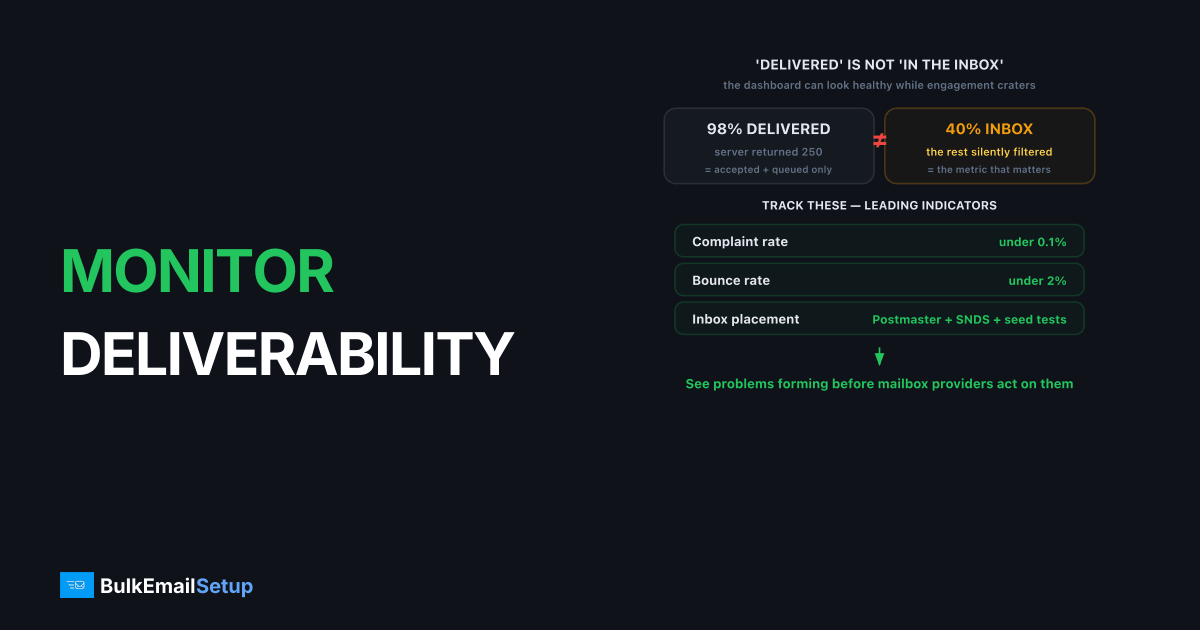
You monitor email deliverability by tracking a small set of metrics, complaint rate, bounce rate and inbox placement, and feeding them with free reputation tools like Google Postmaster Tools and Microsoft SNDS, plus blocklist checks and seed-list inbox tests. Delivery rate alone lies to you: a message can be "delivered" and still land in spam. Real monitoring answers whether mail reaches the inbox, and warns you when reputation slips, so you fix the cause before a campaign craters.
Why is "delivered" not the same as "in the inbox"?
"Delivered" just means the recipient server returned a 250 and queued the message. It says nothing about whether that message went to the inbox, the spam folder, or a Promotions tab.
This gap is why deliverability monitoring exists. Inbox placement rate, the percentage of delivered mail that actually reaches the inbox, is the metric that matters, and it is invisible in standard delivery reports. A sender can show 98 percent delivery and 40 percent inbox placement at once, with the rest silently filtered to spam. The dashboard looks healthy while engagement collapses. The whole job is measuring placement, not just acceptance, the distinction unpacked in seed list vs real inbox placement.
Which metrics should you track?
Track the four metrics mailbox providers use to judge you, plus the reputation scores they publish back. These are the leading indicators; engagement and revenue are lagging ones.
| Metric | Healthy target | What it tells you |
|---|---|---|
| Spam complaint rate | Under 0.1 percent (max 0.3 percent) | Whether recipients want your mail |
| Bounce rate | Under 2 percent | Whether your list is clean |
| Inbox placement rate | As high as possible | Whether mail reaches the inbox vs spam |
| Authentication pass rate | Near 100 percent | Whether SPF, DKIM, DMARC are aligned |
| IP/domain reputation | High/Good | How providers currently rate you |
Complaint rate is the most sensitive, because it reflects recipient intent, so it outweighs bounce rate (the full comparison). Authentication pass rate is the quiet one: if SPF or DKIM alignment drops, mail fails DMARC silently and placement falls. Watch all five together; the pattern tells you more than any single number.
What tools should you use, and what does each show?
Use the free provider tools first, because they show reputation data straight from the source. Then layer paid seed-list and blocklist tools on top for what providers do not expose. Each kind answers a different question: reputation tools show how a provider rates you, blocklist monitors flag listings, seed-list tools show where mail lands, and DMARC parsers show whether authentication holds across every receiver.
| Tool | Cost | Covers | What it shows |
|---|---|---|---|
| Google Postmaster Tools | Free | Gmail | Domain + IP reputation, spam rate, SPF/DKIM/DMARC pass rates, delivery errors, feedback loop |
| Microsoft SNDS | Free | Outlook, Hotmail, Live | Per-IP reputation color (green/yellow/red), complaint rate, spam-trap hits, filter result |
| Blocklist monitors (MXToolbox, MultiRBL, Spamhaus check) | Free / paid alerts | All receivers | Whether your IP or domain is listed on Spamhaus, Barracuda, UCEPROTECT, SORBS |
| Seed-list / inbox-placement tools (GlockApps, Inbox Insight, MailReach) | Paid | Gmail, Outlook, Yahoo, more | Actual inbox vs spam vs missing placement across real test accounts |
| DMARC report parsers (Postmark DMARC, Dmarcian, EasyDMARC) | Free tier / paid | All DMARC receivers | Per-source SPF and DKIM alignment, unauthorized senders, policy failures |
Deeper guides on the core tools: verify your domain in Google Postmaster Tools (setup guide), add Microsoft SNDS (SNDS guide), read DMARC aggregate reports, and run inbox placement testing with seed lists.
Start free: Postmaster Tools and SNDS surface most problems at no cost. Add seed-list testing when placement, not just reputation, becomes the question. A blocklist monitor that emails you on a new listing is the one paid alert worth setting up early, since a Spamhaus listing can cut placement to single digits within hours.
What are the target thresholds for each signal?
Set hard numbers, not vibes. Below are the lines that, once crossed, mean stop and investigate. They match the Gmail and Yahoo bulk-sender rules from 2024.
| Signal | Green | Watch | Act now |
|---|---|---|---|
| Spam complaint rate (Postmaster) | Under 0.1% | 0.1-0.3% | Over 0.3% |
| Bounce rate | Under 2% | 2-5% | Over 5% |
| Spam rate in Postmaster | 0% shown | "Low" | "Medium" or higher |
| Domain reputation | High | Medium | Low / Bad |
| IP reputation | High | Medium | Low / Bad |
| SNDS IP color | Green | Yellow | Red |
| Authentication pass rate | Near 100% | 95-99% | Under 95% |
Gmail's published threshold is a complaint rate below 0.3 percent, with a strong recommendation to stay under 0.1 percent. Treat 0.1 percent as your real ceiling, because by the time Postmaster shows 0.3 percent, filtering has usually already started. Bounce rate above 5 percent reads to providers like you are mailing purchased or stale data. Domain reputation now matters more than IP reputation for most senders, the split explained in domain reputation vs IP reputation.
How often should you check, and what should trigger action?
Check reputation tools weekly as a baseline, and watch them daily around any large send or list change. Deliverability problems compound, so the value of monitoring is catching a slope early, while it is still a slope and not a cliff. A reputation score sliding from high to medium over a week is a warning; ignored, it becomes a spam-folder problem before the next campaign.
A workable routine takes about ten minutes a day once the tools are wired up:
| Cadence | Check | Why |
|---|---|---|
| Daily | Blocklist alerts, Postmaster spam rate, bounce rate on yesterday's send | Catch a listing or complaint spike within hours |
| Daily (during a send or warm-up) | SNDS IP color, deferral/error codes in your logs | Volume spikes show here first |
| Weekly | Domain + IP reputation trend, authentication pass rate, DMARC report summary | Spot slow slides before they bite |
| Monthly | Seed-list inbox placement test, list-hygiene review | Confirm placement, not just acceptance |
The daily glance catches fast failures. We've watched a Spamhaus CSS listing land mid-morning and Gmail placement on a 50k/day send fall to single digits by afternoon, with the only early warning being the blocklist alert, not the dashboard, which still showed mail "delivered." Delisting cleared it within a day, but the half-day of spam-foldering was done. The weekly review catches reputation drift no single day reveals, and the monthly seed-list test is your ground truth for where mail actually lands.
Set thresholds that trigger action, not just observation:
- Complaint rate crosses 0.1 percent: pause the suspect segment, find which content or list source drives it, and cut that source or fix the opt-in. Add a one-click unsubscribe header if you lack one.
- Bounce rate rises above 2 percent: clean the list, suppress hard bounces permanently, and re-run validation on any recently added batch.
- IP or domain reputation drops a tier: review the last few sends for volume spikes or new segments, then pull volume back toward baseline and let it recover.
- A blocklist alert fires: stop sending to the affected destinations, identify the listing reason, and start delisting immediately.
- Authentication pass rate dips: a DNS or signing change likely broke SPF or DKIM alignment. Check for a recently edited SPF record (watch the 10-lookup limit) or a rotated DKIM key that did not publish.
The discipline is responding to leading indicators before the lagging ones confirm the damage. Pair thresholds with steady volume and clean practices, and reputation trends up over time.
Senders who watch these signals seriously reach a second conclusion: shared-pool sending hides the data they need, because the complaint rate and reputation you see are an average across every tenant. That is one of the clearest cases for moving to dedicated infrastructure, where the numbers you monitor are yours to control.
How BulkEmailSetup helps
A BulkEmailSetup dedicated SMTP server gives you an IP whose reputation is yours to monitor and protect, with no shared-pool noise muddying the signal. We set up Google Postmaster, SNDS, DMARC reporting and blocklist alerts so you see complaint rate, bounce rate and reputation in one view, and we help you act on the thresholds before they cost you the inbox. See plans on our pricing page.
Frequently asked questions
How do I monitor email deliverability?
Monitor deliverability by tracking complaint rate, bounce rate and inbox placement, using free provider tools like Google Postmaster Tools and Microsoft SNDS for reputation signals, plus blocklist checks and seed-list inbox tests. Together these show whether your mail reaches the inbox and warn you before problems grow.
What metrics matter most for deliverability?
The metrics that matter most are spam complaint rate (keep under 0.1 percent), bounce rate (under 2 percent), inbox placement rate, and sender reputation as reported by Google Postmaster and Microsoft SNDS. Engagement metrics like opens and replies also feed reputation indirectly.
Is Google Postmaster Tools free?
Yes, Google Postmaster Tools is free. It shows your domain and IP reputation, spam complaint rate, authentication pass rates and delivery errors for mail sent to Gmail. You verify your sending domain once and then see daily reputation data, making it essential for anyone sending to Gmail at volume.
What is inbox placement rate?
Inbox placement rate is the percentage of your delivered mail that lands in the inbox rather than the spam folder. Delivery rate only confirms a message was accepted, not where it went. Seed-list tools measure inbox placement by sending to monitored test accounts across major providers.


