
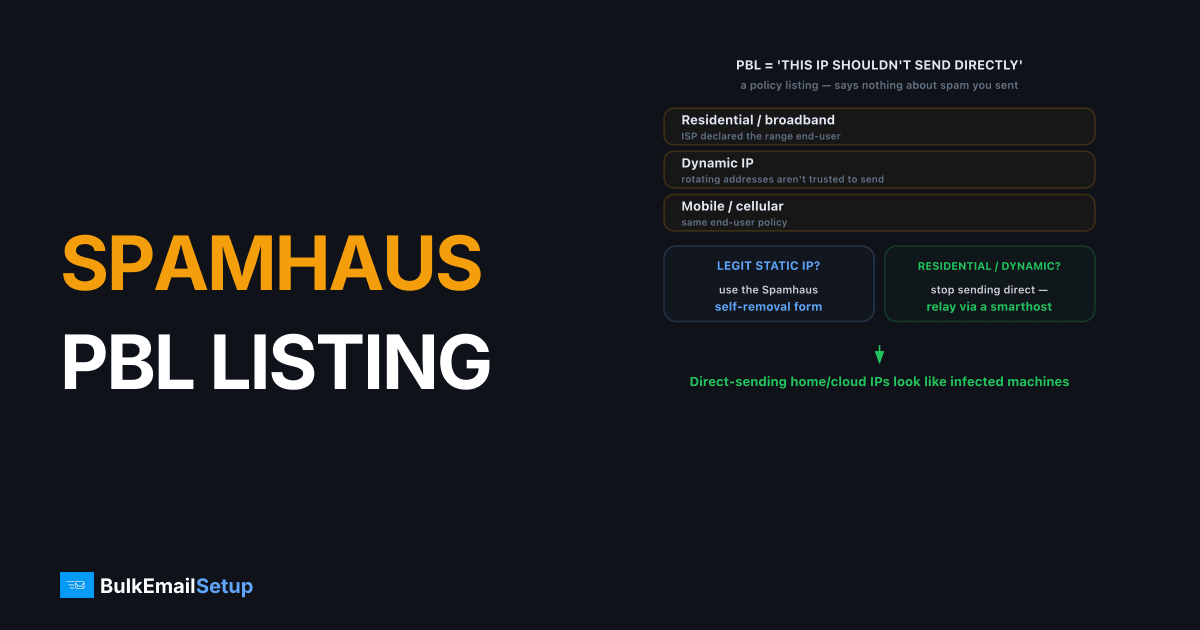
A Spamhaus PBL listing means your IP sits in a range that shouldn't send mail directly to the internet, typically residential, dynamic, or ISP-assigned addresses. It's a policy listing, not a spam accusation. Those IPs are expected to relay mail through a proper mail server. The fix depends on your IP: if it's a legitimate static IP, use the Spamhaus self-removal form; if it's residential or dynamic, stop sending directly and relay through a smarthost or dedicated SMTP server instead.
What is the Spamhaus PBL?
The PBL (Policy Block List) is a Spamhaus list of IP address ranges that, by policy, should not be delivering mail straight to other mail servers. It's populated two ways: ISPs declare which of their ranges are end-user (residential, dynamic, mobile), and Spamhaus adds ranges it identifies as the same. The list says nothing about whether you've sent spam. It says this kind of IP isn't supposed to send mail directly.
Mail from a PBL-listed IP gets rejected by receivers that check Spamhaus, usually with a 5.7.1 code and a PBL URL. The bounce string we see most often reads 550 5.7.1 Service unavailable; Client host [x.x.x.x] blocked using zen.spamhaus.org; https://check.spamhaus.org/.... The logic: a home computer or dynamic cloud IP connecting directly to deliver mail is the classic signature of an infected machine or a sender dodging proper infrastructure. So receivers expect those IPs to relay through their provider. For the wider list family, see our Spamhaus delisting guide.
Why is my IP on the PBL?
The PBL lists by range and policy, so you can be on it without ever sending a bad message.
| Your IP type | Why it's on the PBL |
|---|---|
| Residential / home broadband | ISP declared the range end-user, not for direct sending |
| Dynamic IP | Addresses that rotate aren't trusted to send mail directly |
| Mobile / cellular | Same end-user policy applies |
| Cloud / VPS in a flagged range | Some provider ranges are listed by default until you opt out |
| Static IP, wrongly listed | Occasionally a static block gets included and needs self-removal |
This is the core difference from other Spamhaus lists. The SBL and CSS react to behavior. The PBL reacts to IP type. So "I didn't spam" is true and irrelevant. The fix isn't to argue, it's to either send the right way or self-remove a static IP.
How do I fix a Spamhaus PBL listing?
Your fix depends entirely on what kind of IP you have. Pick the right path.
If it's a residential, dynamic, or end-user IP (the lasting fix):
- Stop sending mail directly. Direct delivery from these IPs will keep getting rejected, and self-removal won't stick because the range is policy-listed.
- Relay through a smarthost. Configure your mail server or app to authenticate to your ISP's outbound mail server or a dedicated SMTP server, which sends from a static, eligible IP. See what is a smart host.
- Use port 587 with SMTP AUTH. That's the authenticated submission path a smarthost expects. See SMTP ports 25 vs 465 vs 587 vs 2525.
If it's a static IP you legitimately send from:
- Confirm the IP is truly static. Ask your provider. Self-removal only holds for genuinely static addresses.
- Set valid PTR (reverse DNS). Many PBL self-removals require a proper PTR first. See PTR setup.
- Use the PBL self-removal form. Look up your IP at the Spamhaus Blocklist Removal Center and follow the PBL removal link. It's a fast, automated self-service process for eligible static IPs.
- Verify with a test send. After removal propagates, send to a Gmail or Outlook address and confirm no PBL rejection.
Should I self-remove or relay through a smarthost?
Self-remove only if you control a genuinely static IP with the right to send mail and valid PTR, that removal will hold. For residential, dynamic, mobile, or churning cloud IPs, self-removal is pointless because the range is listed by policy and re-applies. We have watched a fresh VPS in a flagged provider range get re-listed within a day or two of a self-removal, because the whole block is policy-listed, not the single address. The correct, durable answer there is to relay through a smarthost or a proper SMTP server with a static, eligible IP. Trying to bulk-send directly from a PBL range is a losing fight no matter how many times you remove it.
How BulkEmailSetup helps
A dedicated SMTP server gives you a static IP outside PBL ranges, with valid PTR and full authentication, so your mail leaves from an address receivers actually accept, no smarthost workarounds, no repeated self-removals. Point your app or mail server at us and the PBL problem disappears. See plans on our pricing page.
Frequently asked questions
What is a Spamhaus PBL listing?
The PBL (Policy Block List) is a Spamhaus list of IP ranges that should not be sending email directly to the internet, mostly residential, dynamic, and ISP-assigned addresses. It's a policy listing, not a spam accusation. Those IPs are expected to relay mail through their provider's mail server.
Why is my IP on the PBL if I didn't spam?
Because the PBL lists ranges by policy, not behavior. If your IP is residential, dynamic, or in a block the ISP declared shouldn't send mail directly, it's on the PBL regardless of what you've sent. It marks the IP type, not your conduct.
How do I remove my IP from the PBL?
If you have a static IP that legitimately sends mail, use the Spamhaus PBL self-removal form. If it's a residential or dynamic IP, the real fix is to stop sending directly and relay through your ISP's smarthost or a proper SMTP server instead.
Should I self-remove from the PBL or relay through a smarthost?
Self-remove only if you have a static IP and the right to send mail from it. For residential, dynamic, or cloud IPs that keep getting re-listed, relaying through a smarthost or dedicated SMTP server is the correct, lasting fix.


