
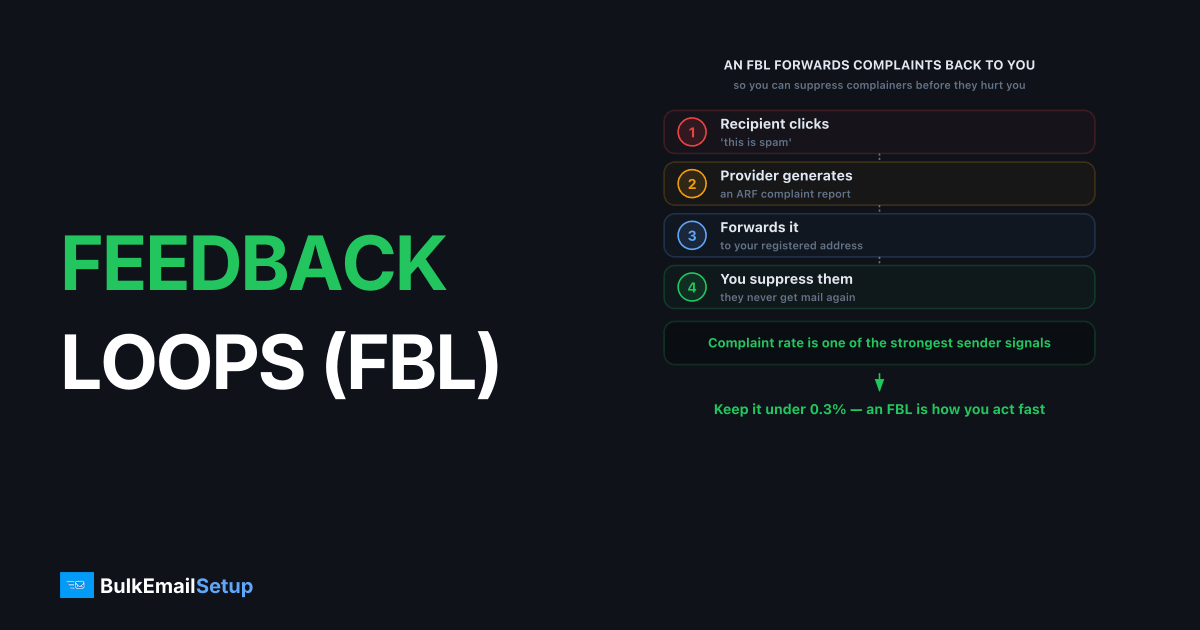
A feedback loop (FBL) is a service offered by mailbox providers that forwards a copy of spam complaints back to the sender, so you can remove unhappy recipients before they damage your reputation. When someone clicks "this is spam" on your message, an enrolled provider sends you a notification with the complaining address (or a redacted version). FBLs let you suppress complainers fast, which is critical because spam-complaint rate is one of the strongest signals mailbox providers use to judge senders.
How a feedback loop works
A feedback loop connects one action by a recipient to one notification to you: a complaint click triggers a forwarded report. Once you're enrolled with a provider and sending from a known IP or domain, the loop runs automatically for every complaint.
The flow:
- You send a campaign from an IP or domain enrolled in the provider's FBL.
- A recipient clicks "this is spam" in their mailbox.
- The provider generates a complaint report, usually in ARF (Abuse Reporting Format).
- The provider forwards it to the address you registered.
- You suppress the complaining recipient so they never get mail from you again.
The whole point is speed. A recipient who complained once will complain again if you keep mailing them, and each complaint pushes your rate toward the danger zone. In practice we see most Microsoft JMRP reports land within an hour of the "report spam" click, which is fast enough to suppress before the next batch goes out if your pipeline reads the mailbox automatically rather than once a day. Gmail's 2024+ rules want complaint rates under 0.3%, ideally under 0.1%, covered in Gmail spam complaint rate.
Which providers offer FBLs?
Feedback loops are provider-specific, and you enroll with each one separately. The major ones every bulk sender should register for are Microsoft and Yahoo, while Gmail takes a different, aggregate-only approach.
| Provider | Program | What you get |
|---|---|---|
| Microsoft (Outlook, Hotmail) | JMRP (Junk Mail Reporting Program) | Per-complaint reports by IP |
| Microsoft | SNDS (Smart Network Data Services) | Aggregate reputation and complaint data by IP |
| Yahoo | Complaint Feedback Loop (CFL) | Per-complaint reports, DKIM-keyed |
| Gmail | Postmaster Tools | Aggregate complaint rate by domain (no per-message FBL) |
Microsoft's JMRP and SNDS are separate enrollments doing different jobs: JMRP gives you individual complaints, SNDS gives you the reputation dashboard. The Microsoft SNDS guide covers that side in depth.
How do I set up a feedback loop?
Setting up an FBL means enrolling with each provider's program, which generally requires that you control the sending IP and have valid authentication in place. You can't enroll an IP you don't own, which is one practical reason a dedicated IP simplifies FBL setup.
Microsoft JMRP and SNDS
Register at the Microsoft SNDS site, request access for your sending IP ranges, and enroll those ranges in the Junk Mail Reporting Program (JMRP) separately. Microsoft verifies you control the IP, then starts forwarding complaints and showing SNDS data. You need a valid PTR record on the IP, see how to set up a PTR record.
Yahoo Complaint Feedback Loop
Yahoo's CFL is keyed to your DKIM signing domain rather than your IP, as its sender best practices describe. You enroll the d= domain from your DKIM signature, so your mail must already be signing with DKIM aligned to your domain. The DKIM explained guide covers getting that right.
Gmail (the exception)
Gmail has no per-complaint loop. Instead you monitor your aggregate complaint rate in Google Postmaster Tools. You can't suppress individual complainers, so Gmail rewards good list hygiene and clear unsubscribe paths up front.
Acting on FBL data
FBL complaints are only useful if you act on them within hours, because a complaining recipient who stays on your list keeps complaining. The standard practice is automatic suppression: feed FBL reports into your suppression list so the address is permanently excluded from future sends.
What to do with each complaint:
- Suppress immediately. Never mail a complainer again, full stop.
- Look for patterns. A spike from one campaign or segment signals a content or list-source problem.
- Track the rate. If complaints climb toward 0.3%, pause and investigate before providers start filtering you. On a 20,000-email campaign that is 60 complaints; 0.1% is 20, so a single segment producing a dozen FBL reports already deserves a look.
Complaints aren't the same as bounces; the difference matters for diagnosis, covered in complaint rate vs bounce rate.
What does an FBL report actually contain?
An FBL report arrives in ARF (Abuse Reporting Format), defined in RFC 5965, a standard MIME structure with three parts: a human-readable summary, a machine-readable block, and a copy of the original message. The machine-readable part carries the headers that matter: the Feedback-Type: abuse line, the reported IP, and the date.
Here is the catch that trips up new senders. Many providers redact the recipient's address before sending the report. Microsoft JMRP gives you the address; some loops hand back only the original message headers, so you recover the recipient from your own X- header or a unique identifier you stamped at send time.
That is why experienced senders inject a custom header (for example X-Campaign-ID or an encoded recipient token) into every outbound message. When the ARF report bounces back, you parse that header and map the complaint to the exact subscriber, even when the To: line is masked. Without that tagging, a redacted FBL report is close to useless for suppression. On setups we run, Yahoo's CFL reports arrive with the recipient hashed out, so the only reliable way we tie a complaint back to a subscriber is the X- token we stamp at send time. Skip that header and you can see the complaint count climb in SNDS while having no idea which addresses to suppress.
What are the common FBL setup mistakes?
The most common mistake is enrolling the FBL but never wiring it into automated suppression, so reports pile up in an inbox nobody reads. A close second is signing DKIM with a shared platform domain, which sends Yahoo's CFL complaints to the platform, not you.
Watch for these failure modes:
- No automation. Reports land in a mailbox and get ignored. Parse and suppress automatically within hours.
- Wrong DKIM
d=domain. Yahoo's CFL keys on your DKIM domain. Sign with your own domain, not a provider default, or the complaints go elsewhere. - Missing PTR. Microsoft will not complete IP enrollment without valid reverse DNS. Set the PTR record first.
- Re-mailing complainers. Suppressing for one campaign but not globally means they complain again next send.
- Ignoring the rate. A loop is an early warning system. If complaints climb toward 0.3%, the FBL told you before the provider started filtering.
Done right, the loop turns every "report spam" click into one automatic suppression, which keeps your domain reputation from sliding.
How BulkEmailSetup helps
BulkEmailSetup runs your mail from a dedicated IP you control with PTR and DKIM set up correctly, which is exactly what FBL enrollment requires, so we can register your IP with Microsoft JMRP and SNDS and your domain with Yahoo's CFL, then route complaints into automatic suppression. See pricing for plans.
Frequently asked questions
What is an email feedback loop?
A feedback loop (FBL) is a service offered by mailbox providers that forwards a copy of spam complaints back to the sender. When a recipient clicks 'this is spam,' the provider notifies you so you can stop mailing that address.
Which providers offer feedback loops?
Microsoft (Outlook, Hotmail) via JMRP, Yahoo via its Complaint Feedback Loop, and several others. Gmail does not offer a per-complaint FBL; instead it provides aggregate complaint data through Google Postmaster Tools.
Why does Gmail not have a feedback loop?
Gmail provides aggregated complaint rates through Postmaster Tools rather than per-message complaints. You see your overall spam-complaint percentage by domain, but not which individual recipients complained, for privacy reasons.
What should I do with FBL complaints?
Immediately suppress the complaining address so it never receives mail from you again. High complaint rates damage your reputation fast, so acting on FBL data within hours, not days, protects your inbox placement.


