
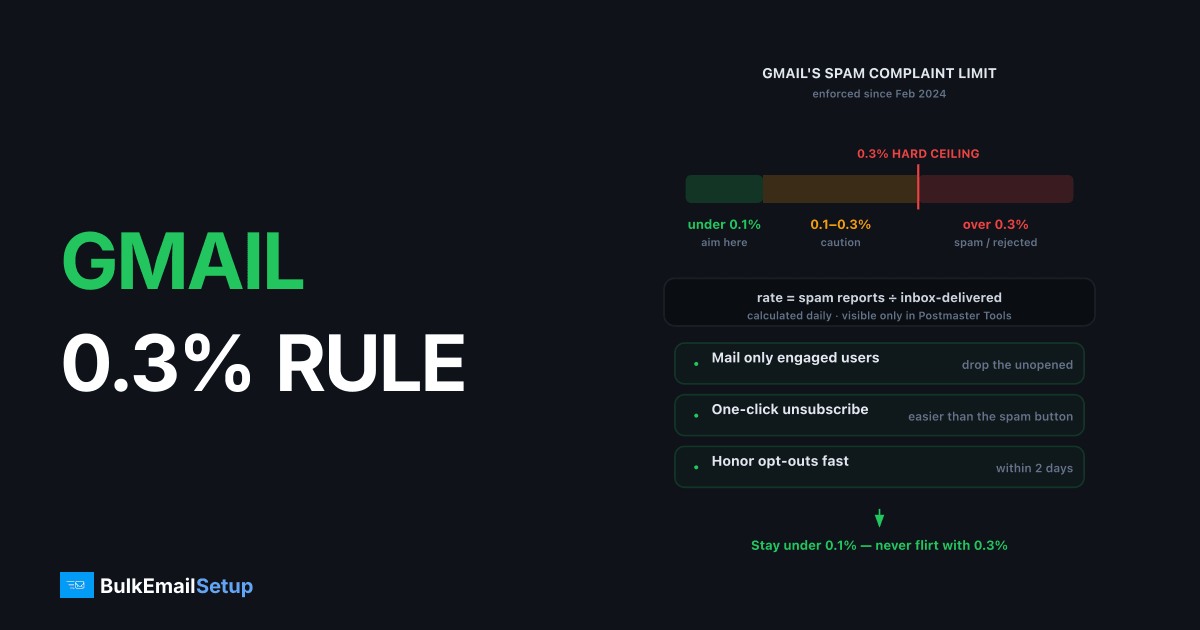
Gmail's bulk sender requirements, enforced since February 2024, set a hard ceiling of 0.3% on spam complaint rate and recommend staying below 0.1%. The rate is calculated daily as user spam reports divided by messages delivered to the inbox, and it's visible only in Google Postmaster Tools. Cross 0.3% on a sustained basis and Gmail moves your mail to spam or rejects it outright.
What the 2024 rules actually require
The thresholds apply to bulk senders, anyone sending 5,000+ messages per day to Gmail addresses. Yahoo enforces matching rules.
| Requirement | Detail |
|---|---|
| Authentication | SPF and DKIM both passing, plus DMARC (minimum p=none) aligned with the From domain |
| One-click unsubscribe | RFC 8058 List-Unsubscribe-Post header on marketing/subscribed mail; honor within 2 days |
| Spam rate | Below 0.3% always; below 0.1% as the working target |
| Valid DNS | Forward and reverse DNS (PTR) on sending IPs |
Authentication setup is covered step-by-step in SPF, DKIM, DMARC guide.
How the math works, and why it's sneaky
Complaint rate = spam reports ÷ messages delivered to the inbox that day. Three traps follow from that denominator:
- Low-volume days amplify noise. 3 complaints on 800 inboxed messages = 0.375%. The same 3 complaints on 10,000 = 0.03%.
- Spam-foldered mail can't be complained about. As placement degrades, your measured rate can improve while deliverability collapses. A falling complaint rate with falling opens is a fire alarm, not a win.
- It's a daily rate, not a campaign rate. Two campaigns on one day pool together; the riskier one hides inside the average.
The 0.1% vs 0.3% bands
| Daily spam rate | Status | What to do |
|---|---|---|
| < 0.1% | Healthy | Maintain; this is the target |
| 0.1-0.29% | Warning zone | Find the segment or content driving it this week |
| ≥ 0.3% sustained | Enforcement | Expect spam placement; cut volume to engaged-only and repair |
Gmail's own guidance: stay under 0.3% always, under 0.1% to keep headroom. Treat 0.1% as your operating limit and 0.3% as the cliff edge.
Levers that keep complaints under 0.1%
Make unsubscribing easier than complaining
The spam button is the unsubscribe button for anyone who can't find yours in 2 seconds. Implement RFC 8058 one-click unsubscribe headers (mandatory anyway), put a visible unsubscribe link in readable type, and process every request within 48 hours, the rule requires it, and delayed processing converts unsubscribes into complaints.
Mail people who expect you
- Double opt-in stops the "I never signed up" complaint, the most common kind.
- Send the first email within minutes of signup; a brand mailing for the first time 3 weeks after signup is a stranger.
- Match cadence to what was promised, a "weekly digest" subscriber who gets daily promos complains. Cadence math is in sending frequency best practices.
Stop mailing the unengaged
Complaint probability rises with inactivity. Subscribers inactive for 6+ months complain at several times the rate of active ones, they've forgotten you. A sunset policy that stops mailing chronic non-engagers is the single biggest structural complaint reducer.
Watch the first 48 hours of every campaign
Most complaints land within 2 days of a send. Check Postmaster Tools' spam rate dashboard daily; the full tool walkthrough is in our Postmaster Tools guide.
If you've already crossed 0.3%
- Cut volume to your most engaged segment only, openers/clickers from the last 30 days.
- Pause the campaign type that spiked (check which day the rate jumped in Postmaster Tools).
- Verify one-click unsubscribe is working end to end, send yourself a test and use it.
- Hold reduced volume for 2-4 weeks until the daily rate stays under 0.1%, then re-expand gradually, the same way you'd run a warm-up ramp.
Sustained spam placement that doesn't lift after the rate recovers usually means broader reputation damage, see why emails land in spam.
How BulkEmailSetup helps
Our managed deliverability monitoring tracks your Postmaster Tools spam rate daily and flags warning-zone drift before Gmail enforces anything. Dedicated SMTP servers ship with RFC 8058 one-click unsubscribe and full authentication preconfigured. See pricing.
Frequently asked questions
What is Gmail's spam complaint rate threshold?
Gmail requires bulk senders (5,000+ messages/day to Gmail) to keep spam complaint rates below 0.3%, and recommends staying under 0.1%. Sustained rates at or above 0.3% lead to spam-folder placement and rejected mail.
How is the spam complaint rate calculated?
It's the number of Gmail users who mark your message as spam divided by messages delivered to Gmail inboxes that day. Mail already landing in spam can't be complained about, which can make the rate look better as deliverability gets worse.
Where do I check my Gmail complaint rate?
Google Postmaster Tools, under the spam rate dashboard. It's the only source for Gmail complaint data. Gmail does not offer a traditional feedback loop that returns individual complainers.
Does one-click unsubscribe reduce spam complaints?
Yes, measurably. The 2024 requirements mandate RFC 8058 one-click unsubscribe for bulk senders precisely because an easy exit means fewer people use the spam button as an unsubscribe button.
How fast does Gmail punish a complaint spike?
A single bad campaign can push the next sends to spam within 24-48 hours. Recovery after sustained 0.3%+ rates typically takes 2-4 weeks of clean, reduced-volume sending.


