
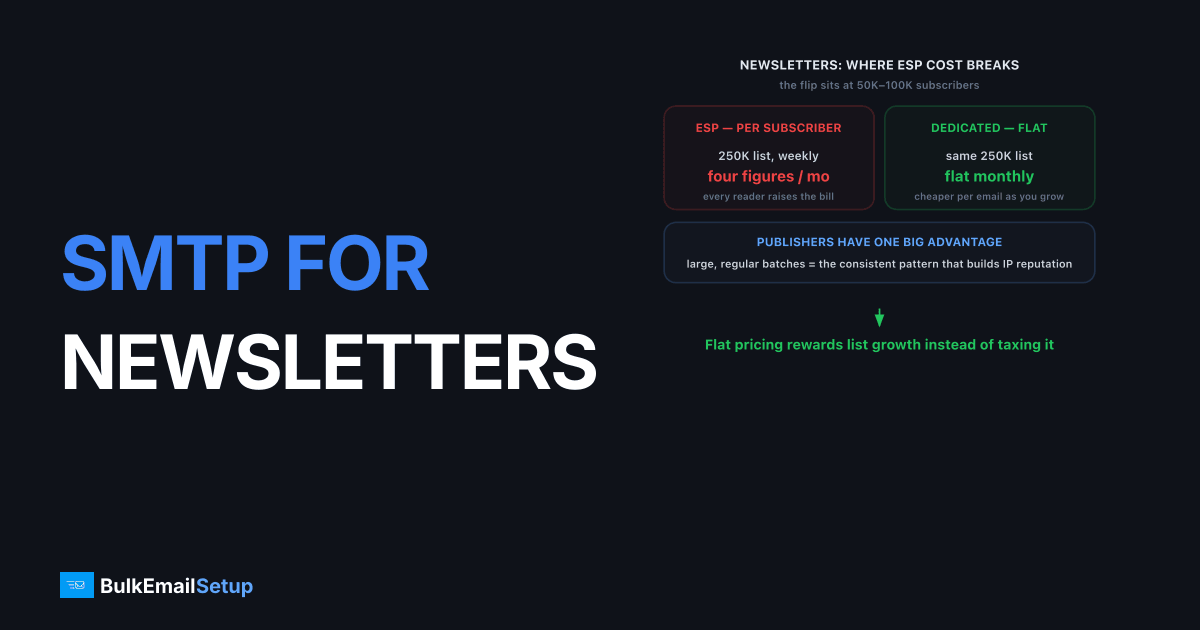
An SMTP server for newsletter publishers gives you flat-rate sending, a dedicated IP you control, and the throughput to push six-figure batches without per-subscriber pricing or shared-pool throttling. At volume, the ESP model gets expensive fast and the shared pool gets crowded, so publishers move to dedicated SMTP for predictable cost, owned reputation, and headroom. Newsletters have one big advantage here: they send in large, regular batches, which is exactly the consistent pattern that builds strong IP reputation.
The economics flip somewhere between 50,000 and 100,000 subscribers. Below that, an ESP is convenient. Above it, you are paying a premium for a reputation you do not own and a send rate someone else caps.
Why newsletter economics break on ESPs
Newsletter economics break on ESPs because most charge per subscriber or per email, so cost scales with the thing you want to grow: your list. A publisher with 250,000 subscribers sending weekly can pay well into four figures a month, and overage fees hit hard on a big launch. Dedicated SMTP uses flat monthly pricing, so your cost stops tracking your list size.
The math is stark at scale:
- ESP per-subscriber tiers mean every new reader raises your bill, even inactive ones.
- Overage fees on ESP plans punish exactly the months you grow fastest.
- Flat-rate SMTP gets cheaper per email the more you send, which rewards growth instead of taxing it.
For a worked comparison at common volumes, see our cost to send 100,000 emails a month breakdown. The per-email gap widens as the list grows.
ESP vs dedicated SMTP for publishers
The tradeoff is convenience versus control and cost. Here is how the two compare for a publisher sending large, regular batches.
| Factor | Shared ESP | Dedicated SMTP server |
|---|---|---|
| Pricing | Per subscriber/email | Flat monthly |
| Cost at 250K list | Often four figures/mo | Flat, predictable |
| Reputation | Shared pool | Your dedicated IP |
| Send rate | Plan-tier capped | Your IP's throughput |
| List ownership | Locked to platform | Fully portable |
| Built-in editor | Yes | Bring your own tool |
| Warm-up | None (pool is warm) | 4-6 weeks (one time) |
The one cost dedicated SMTP adds is warm-up: a new IP ramps over four to six weeks. After that, your regular send cadence keeps it warm with no extra effort, which suits newsletters better than almost any other use case.
How publishers keep big sends in the inbox
Newsletter inbox placement comes down to list hygiene, engagement, and clean authentication, far more than raw infrastructure. A 200,000-recipient batch with stale addresses and low engagement will struggle no matter how good the IP is. The publishers who land consistently treat their list like the asset it is.
Keep the list clean
Remove hard bounces immediately and sunset disengaged subscribers on a schedule. Sending to people who never open trains mailbox providers to file you under low engagement, which pushes you toward spam or Promotions. A disciplined email sunset policy and regular list cleaning protect deliverability more than any IP swap.
Meet the bulk-sender rules
Above 5,000 messages a day to Gmail or Yahoo, you must authenticate with SPF, DKIM, and DMARC, include one-click unsubscribe per RFC 8058, and keep complaints under 0.3%. These are enforced through Gmail's bulk sender guidelines. Our Gmail bulk sender requirements guide lists every box to check before a big send.
Watch the Promotions tab honestly
Gmail routes commercial bulk mail to Promotions partly by design. Strong engagement and clean content help, but a newsletter full of offers and tracking links will often sit in Promotions, and that is not always a deliverability failure. Our guide on emails landing in Promotions separates real problems from normal sorting.
How to connect your newsletter tool to dedicated SMTP
A dedicated SMTP server slots in behind whatever newsletter tool you already use, because nearly every publishing platform speaks SMTP. You point the tool at your host on port 587 with STARTTLS, enter your credentials, publish your DNS records, and the tool's editor, signup forms, and unsubscribe handling all keep working on top of infrastructure you own.
Wire up the SMTP connection
In your sending tool's delivery settings (Ghost, Sendy, Mailwizz, Listmonk, or a self-hosted option), set the SMTP host your provider gives you, port 587, and your username and password. Use port 2525 as a fallback if your host blocks 587, or 465 for implicit TLS. Send a test campaign to a seed address before a real send to confirm the path and the signature both check out.
Publish authentication for the sending domain
Add an SPF record listing your sending IP, publish the 2048-bit DKIM key your provider issues, and set DMARC to p=none while you warm, then move to quarantine. Keep your SPF under the 10-lookup limit to avoid a PermError, which is easy to trip if you also list a separate transactional service. Set a PTR record so your IP's reverse DNS matches the sending domain.
Configure batching and throttle limits
Most newsletter tools let you cap send rate per hour. Set this to match what your warmed IP can sustain rather than firing the whole list at once. During warm-up, restrict each send to your most engaged segment so early opens build reputation. After warm-up, your steady weekly cadence keeps the IP trusted with no extra tuning.
Common newsletter sending mistakes
The mistakes that hurt newsletter deliverability are mostly about list discipline, not infrastructure, and they compound over time on a list you keep growing. Publishers who stay clean from the start avoid the slow reputation slide that drags a once-reliable send into Promotions or spam. A few habits protect a six-figure list for years.
- Never sunsetting dead subscribers. Mailing people who never open trains providers to file you as low-engagement. Run a sunset policy on a schedule.
- Blasting the full list at once. A single instant burst of 200,000 trips
421 4.7.0throttling. Pace it. - Sending from a cold IP. Skipping the 4-6 week warm-up gets a fresh IP throttled and possibly listed on day one.
- Ignoring one-click unsubscribe. Above 5,000/day to Gmail or Yahoo, RFC 8058 headers are mandatory, not optional.
Does send timing and batching matter?
Yes. Batching and pacing affect both throughput and reputation, especially on a dedicated IP. Sending 200,000 emails in one instant burst can trigger connection throttling (421 4.7.0) or rate limits (421 4.7.28 at Gmail). A dedicated IP with steady history negotiates higher ceilings, but you still pace large sends rather than firing them all at once.
The good news for publishers: your natural cadence, the same day and time each week, is exactly what mailbox providers want to see. Predictable volume on a dedicated IP builds reputation faster than the erratic patterns that hurt other senders. Consistency is your edge. In setups we've provisioned for publishers, capping the send at roughly 20K to 30K per hour to Gmail on a warmed IP clears a 200K list cleanly, while the same list fired in one burst reliably draws 421 4.7.0 connection throttling and stretches a 20-minute send into several hours of retries. The throughput is there; pacing is what delivers it.
We are straight about limits: infrastructure gives you owned reputation, flat cost, and throughput. Whether you land in the primary inbox still depends on engagement, list quality, and content. No provider guarantees inbox placement.
How BulkEmailSetup helps
We give publishers a dedicated SMTP server with a dedicated IP you control, flat monthly pricing that decouples cost from list size, and SPF, DKIM, DMARC, and PTR set up correctly. We run the one-time warm-up and monitor reputation so your weekly send stays strong. See plans on our pricing page.
Frequently asked questions
Why are ESPs so expensive for large newsletters?
Most ESPs price per subscriber or per email sent, so a list of 200,000 can cost hundreds or thousands a month even before overage fees. A dedicated SMTP server uses flat monthly pricing, which decouples cost from list size and gets cheaper per email as you grow.
Do newsletters need a dedicated IP?
Once you send consistently above roughly 50,000 emails a month, a dedicated IP usually helps. Newsletters tend to send in large, regular batches, which is ideal for building stable IP reputation. The consistency mailbox providers reward is built into the publishing cadence.
Why do my newsletters land in the Promotions tab?
Gmail sorts bulk marketing and newsletter mail into Promotions by content, links, and engagement signals, not by your IP alone. Strong engagement, clean lists, and authenticated sending help, but Promotions placement is partly by design for commercial bulk mail.
What unsubscribe rules apply to newsletters?
Above 5,000 messages a day to Gmail or Yahoo, you must include one-click unsubscribe per RFC 8058 and process opt-outs within two days. You also need SPF, DKIM, and DMARC, plus a spam complaint rate under 0.3%. These are hard requirements, not suggestions.


