
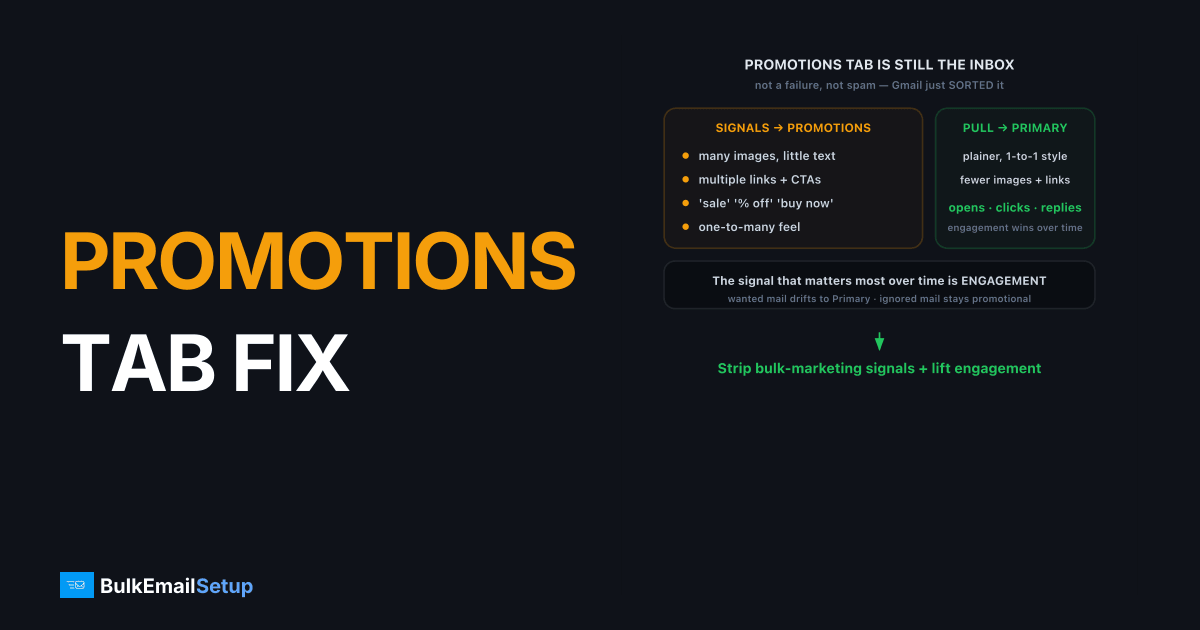
Emails landing in Gmail's Promotions tab isn't a delivery failure or a spam verdict. Gmail's classifier reads your message as promotional based on its content, structure, and how recipients engage with you. To reach the Primary tab more often, strip the bulk-marketing signals (heavy images, many links, promo language), write in a plainer one-to-one style, and lift engagement. The Promotions tab is still the inbox. Your mail arrives. It's just sorted.
Why do my emails go to the Promotions tab?
Gmail sorts incoming mail into tabs (Primary, Promotions, Social, Updates) using a classifier that weighs content and behavior. Promotional placement means your message looks like marketing: image-heavy layouts, multiple calls to action, tracking links, sale language, and a one-to-many feel. None of that is a penalty. It's categorization, and the bar for Promotions is low.
The signal that matters most over time is engagement. If recipients open, click, and reply, Gmail treats you as wanted mail and leans toward Primary. If they ignore you, the promotional signals win and you stay in Promotions, or worse, drift toward spam.
The change we have seen move the tab fastest is the dullest one: switching from a single full-width hero image to real text up top, and swapping no-reply@ for a monitored reply-to address. One sender's onboarding emails sat in Promotions across our seed Gmail accounts. After those two edits, with no change to the IP or authentication, the next send landed in Primary on most of the same accounts. Content structure, not delivery, was the whole problem.
What signals push mail into Promotions?
These are the structural and content cues Gmail reads as promotional. The more you stack, the stronger the Promotions pull.
| Signal | Why it reads as promotional |
|---|---|
| Many images, little text | Newsletters and flyers look like this |
| Multiple links and CTAs | One-to-one mail rarely has five buttons |
| Marketing words | "Sale", "% off", "limited time", "buy now" |
| Bulk HTML templates | Wide table layouts, hero banners, footer link farms |
| List-Unsubscribe header | Required for bulk (RFC 2369 header plus RFC 8058 one-click), but also a bulk-mail tell |
| Low open and reply rates | Gmail learns recipients don't act on you |
| No-reply From address | Signals automated broadcast, not conversation |
Note the tension: Gmail's bulk sender rules, set out in Google's sender guidelines, require a List-Unsubscribe header for 5,000+/day senders, which itself flags the message as bulk. You can't avoid that one. So you win on the other signals.
How do I get emails into the Gmail Primary tab?
There's no switch. You shift the balance of signals and let engagement do the rest.
- Raise your text-to-image ratio. Lead with real text. Use images to support, not carry, the message. A wall of one big image reads as an ad.
- Cut the link count. Fewer links, fewer buttons. One clear action beats five competing ones.
- Drop heavy marketing language. Write like a person emailing a person. Skip "SALE", all-caps, and excessive exclamation marks.
- Use a real, monitored From and Reply-To. A
no-reply@address screams broadcast. A real reply-to invites replies, and replies are a strong Primary signal. - Segment for engagement. Send to people who actually open you. Pruning dead addresses lifts your aggregate engagement, which Gmail rewards. See email list cleaning.
- Ask for a one-time action. Early on, a friendly "reply yes" or "drag me to Primary" from engaged recipients teaches Gmail your preferred placement.
- Keep authentication clean. SPF, DKIM, and DMARC don't decide the tab, but failing them pushes you toward spam, which is far worse. Confirm with Google Postmaster Tools.
Does the Promotions tab actually hurt me?
For most senders, less than people fear. The Promotions tab is a real, checked part of the inbox, and Gmail even surfaces deals there on purpose. If your goal is transactional or relationship mail (receipts, onboarding, replies expected), Primary matters and you should chase it. If you're sending offers and newsletters, a strong Promotions placement with good open rates often beats forcing Primary. Don't trade deliverability tricks for the tab.
Spam is the only outcome worth fearing, and Gmail measures it closely: since February 2024 its sender guidelines ask senders to keep the spam rate below 0.1% and never reach 0.3%. For the difference, see emails going to spam.
How do I confirm a change actually moved the tab?
Test with real Gmail accounts, not a single inbox. Tab placement varies per recipient based on their history with you, so one account proves nothing. Send the same campaign to a small seed set of fresh Gmail addresses and note where each lands. After you cut images, trim links, and switch to a real reply-to, send again and compare. A meaningful shift shows up across several accounts, not one.
Watch the downstream numbers too. The real signal is engagement: if open and reply rates climb after your changes, Gmail will keep routing you toward Primary over the following sends. A jump in Primary placement that isn't backed by engagement won't hold. Don't chase the tab in isolation, chase the behavior that earns it.
Prevent drift back to Promotions
Promotions pull returns when content slips back toward flyer-style or engagement sags. Keep the habits that earned Primary.
- Hold the text-to-image ratio. Don't let a designer reintroduce a single giant hero image that carries the whole message.
- Keep pruning dead addresses. Aggregate engagement is what Gmail rewards. A list full of non-openers drags everyone toward Promotions. See email list cleaning.
- Keep a real reply-to. Reverting to
no-reply@quietly removes a strong Primary signal. - Watch reputation, not just the tab. Authentication failures push you to spam, far worse than Promotions. Confirm SPF, DKIM, and DMARC stay clean.
How BulkEmailSetup helps
Tab placement is mostly content and engagement, but it sits on top of clean delivery. We give you a dedicated SMTP server with correct SPF, DKIM, DMARC, and PTR and a reputation you control, so your mail reaches the inbox in the first place and your content choices decide the tab. See plans on our pricing page.
Frequently asked questions
Why do my emails go to the Promotions tab instead of Primary?
Gmail's tabs classifier reads your mail as promotional based on content and structure: lots of images, multiple links, marketing language, bulk-style HTML, and low engagement. It's not a spam verdict, just a sorting decision.
Is the Promotions tab the same as spam?
No. The Promotions tab is still the inbox, just a separate category. Your mail is delivered and findable. Spam is a different, worse outcome. Many recipients check Promotions regularly, so it's not a delivery failure.
How do I move my emails to the Primary tab?
Reduce promotional signals: fewer images and links, plainer HTML, no heavy marketing words, and a real reply-to. Most of all, raise engagement. When recipients open and reply, Gmail learns to route you to Primary.
Can I force Gmail to put my email in Primary?
You can't force it, but recipients can. If a contact drags your message from Promotions to Primary, or adds you to their contacts, Gmail learns that preference for future mail from you to that person.


