
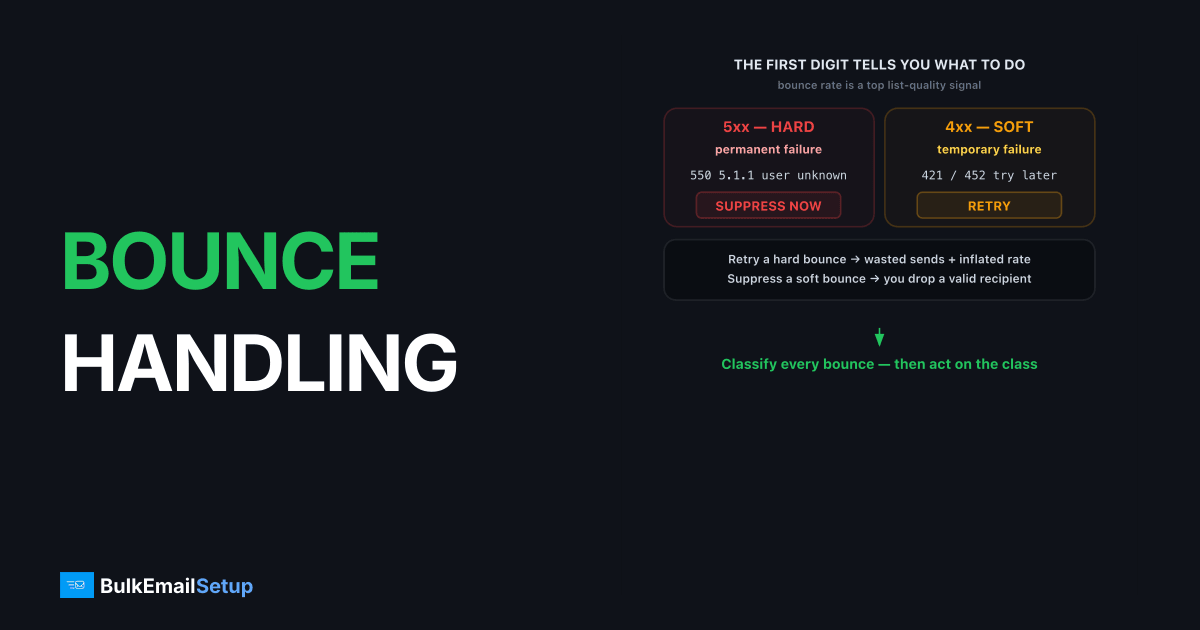
Email bounce handling is the practice of reading each SMTP bounce response, classifying it as permanent or temporary, and acting on it: suppress permanent failures immediately and retry temporary ones before giving up. Done right, it keeps your bounce rate low, which is one of the strongest signals mailbox providers use to judge list quality. Done wrong, dead addresses pile up, your bounce rate climbs, and providers start throttling or blocking your mail.
What is the difference between hard and soft bounces?
A hard bounce is a permanent delivery failure, signaled by a 5xx SMTP code, while a soft bounce is a temporary failure signaled by a 4xx code. The number tells you exactly what to do. A 550 5.1.1 user unknown means the address does not exist, so remove it now. A 421 or 452 means try again later.
Treating these the same is the classic mistake. Retrying a hard bounce wastes sends and inflates your bounce rate. Suppressing a soft bounce throws away a valid recipient over a temporary blip. The full breakdown is in soft bounce vs hard bounce and the code classes in SMTP bounce code classes.
Which bounce codes mean remove, and which mean retry?
The first digit of the SMTP code decides the action: 5 means permanent (remove), 4 means temporary (retry). The table below maps common codes to the right response.
| Code | Meaning | Action |
|---|---|---|
550 5.1.1 | User unknown | Suppress now |
550 5.7.1 | Blocked by policy | Investigate, do not retry blindly |
554 5.7.1 | Rejected / relay denied | Suppress or fix config |
421 4.7.0 | Too many connections | Retry with backoff |
421 4.7.28 | Gmail IP rate limit | Slow down, retry |
452 4.2.2 | Mailbox full | Retry, then suppress if persistent |
The dangerous codes are the ambiguous 5.7.x policy blocks. A 550 5.7.1 is not a dead mailbox, it is a reputation or authentication problem. Suppressing the recipient hides the symptom while the real cause, often an SPF or blocklist issue, keeps hurting every other recipient too.
How should retries and suppression actually work?
Retries should follow exponential backoff over 24-72 hours, and suppression should be permanent once a failure is confirmed. Most MTAs queue and retry 4xx failures automatically, increasing the gap between attempts. The logic is covered in email queue and retry explained.
The rule for soft bounces: retry across a normal queue lifetime, but if the same address soft-bounces on 3-5 consecutive sends, treat it as dead and suppress. We have seen lists where 4% of addresses soft-bounced every send for months because nobody suppressed them. That steady drag pushed the overall bounce rate over the line and triggered throttling at Yahoo.
How does bounce handling protect your reputation?
Bounce handling protects reputation by keeping your bounce rate low, which signals a clean, permission-based list. Industry guidance puts a healthy hard bounce rate under 2%, ideally under 1%, and Gmail's bulk sender guidelines tie deliverability directly to list quality. High bounces look like a purchased or scraped list, which is exactly what receivers penalize.
Bounce handling is one half of list hygiene; complaints are the other. Wire feedback loops alongside bounce processing and you suppress both dead and unhappy recipients automatically. That keeps the two metrics receivers watch most, bounces and complaints, both low.
How do you build a bounce processing pipeline?
Build a bounce pipeline that captures the SMTP response, classifies it by code, and routes it to retry or suppression automatically. There are two ways a bounce reaches you: synchronously, when the receiving server rejects during the SMTP conversation, or asynchronously, as a Delivery Status Notification (DSN) emailed back later.
The pipeline has four stages:
- Capture. Log the full SMTP response or parse the inbound DSN. You need the exact code, like
550 5.1.1, not a yes/no flag. - Classify. First digit decides: 5 is permanent, 4 is temporary. The enhanced code (5.1.1, 5.7.1) refines the reason.
- Route. Permanent goes to suppression. Temporary goes back to the retry queue with backoff.
- Suppress. Write permanent failures to a suppression list checked on every future send.
The stage most homegrown systems skip is parsing asynchronous DSNs, so they catch synchronous rejects but miss the bounces that arrive as a return message minutes later. That gap lets dead addresses survive on the list and quietly inflate the rate.
We see this miss constantly on homegrown pipelines. One sender's app logged every synchronous 550 correctly but never read the return-path mailbox, so a chunk of dead addresses, the ones a receiver accepts then bounces back as a DSN minutes later, never hit suppression. They had marked those sends as delivered. Over a few weeks the unsuppressed addresses re-mailed every campaign and dragged the real bounce rate well above what their dashboard showed. The synchronous-only view hid roughly a quarter of their true bounces.
How do you monitor your bounce rate?
Monitor your bounce rate per campaign and per provider, because a spike isolated to one mailbox provider usually means an authentication or reputation problem, not list rot. Industry guidance keeps hard bounce rate under 2%, ideally under 1%. A sudden jump is a signal to pause before the next send.
Watch the breakdown, not just the headline number. A 1% overall bounce rate that is 8% at Yahoo and near zero everywhere else points at a Yahoo-specific block, often a 550 5.7.1 policy reject rather than dead addresses. That is a reputation fix, not a suppression job. Splitting bounces by code class (see SMTP bounce code classes) and by provider turns a vague rate into a precise diagnosis, which is the whole point of monitoring deliverability.
How do you read an asynchronous bounce (DSN)?
An asynchronous bounce arrives as a Delivery Status Notification, a real email sent back to your return-path address minutes or hours after the original send. The useful part is not the human-readable text at the top; it is the message/delivery-status MIME part, which carries machine-readable fields your pipeline should parse.
Two fields do the work. Action: failed confirms it is a real bounce rather than a delay notice, and Status: 5.1.1 gives you the enhanced code in a clean, parseable form. Read those instead of guessing from the prose, because the wording varies wildly between providers while the status code does not. The original recipient lives in Final-Recipient, which is the address you actually suppress. Systems that scrape only the subject line miss or misclassify a large share of DSNs, which is why parsing the structured part matters. The first digit of that Status value drives the same 5-means-remove, 4-means-retry logic as a synchronous reject.
How BulkEmailSetup helps
Good bounce handling needs visibility into the raw SMTP responses, not a vague "delivered or not" dashboard. Our dedicated SMTP servers expose full bounce codes in your logs, so your system can classify and suppress correctly. Authentication is set up right, so policy blocks are rare to begin with. See plans on our pricing page.
Frequently asked questions
What is the difference between a hard and soft bounce?
A hard bounce is a permanent failure (5xx), usually a nonexistent address, and you should suppress it immediately. A soft bounce is a temporary failure (4xx), like a full mailbox or server issue, and the message should be retried.
How many times should I retry a soft bounce?
Retry soft bounces over 24 to 72 hours following normal queue backoff. If the address keeps soft-bouncing across 3 to 5 sends, treat it as effectively dead and suppress it to protect your bounce rate.
What bounce rate is too high?
Aim to keep your hard bounce rate under 2%, and ideally under 1%. Rates above that signal poor list quality to mailbox providers and can trigger throttling or blocks, especially for high-volume senders.
Should I remove addresses after one bounce?
After one hard bounce, yes, suppress immediately because the address is permanently invalid. After one soft bounce, no, retry first because the failure is temporary. Reading the bounce class correctly is the whole job.


