
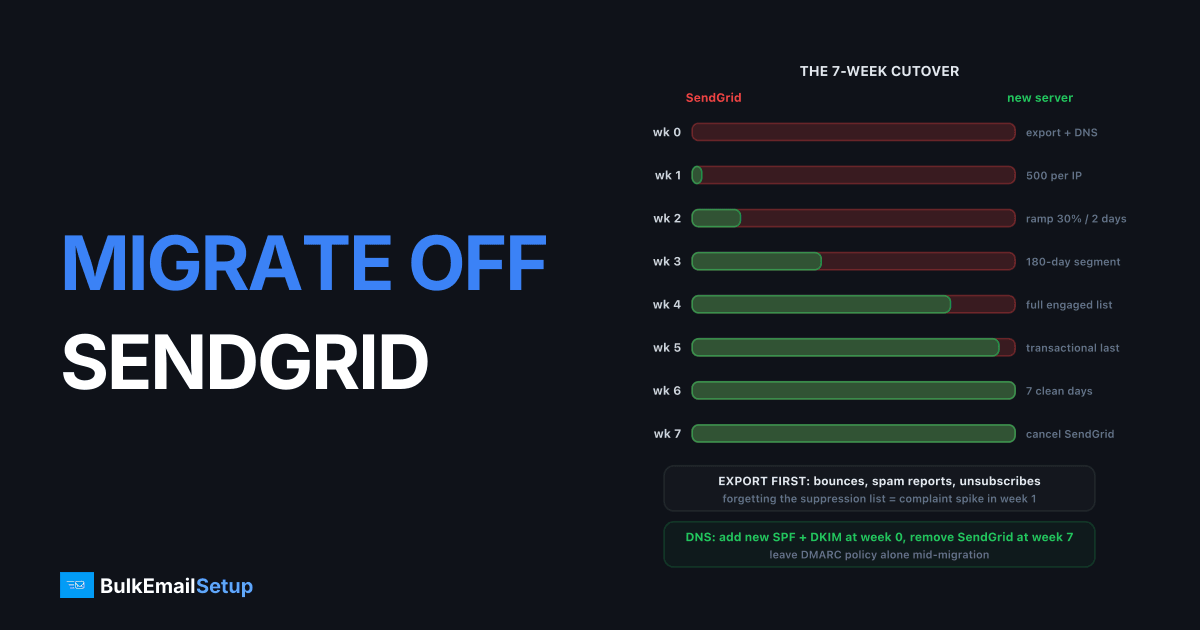
Migrating off SendGrid to a dedicated SMTP server takes about 7 weeks: 1 week to export suppression lists and change DNS, 6 weeks of parallel sending while the new IPs warm from 500 emails per IP per day to full volume, then cancel. The migration itself is not hard. What goes wrong is order of operations: people cancel before warm-up finishes, forget the suppression list, or rip out SendGrid's DNS records while messages are still flowing through it. This runbook is the order that works.
If you are here because SendGrid closed the account rather than because you chose to leave, read SendGrid suspended my account first, because you have no parallel-run option and the export window may already be closing. For the why rather than the how, SendGrid vs a dedicated SMTP server covers the cost and control trade-off. This article assumes you have decided and want the steps.
Week 0: export everything before you touch anything
Export first, cancel last. Once a SendGrid account is closed the data is gone, and the suppression lists are the one thing you cannot rebuild from memory.
| Data | Where in SendGrid | Why it matters on the new server |
|---|---|---|
| Bounces | Suppressions > Bounces | Re-mailing hard bounces is the fastest way to a 5%+ bounce rate on cold IPs |
| Blocks | Suppressions > Blocks | Receiver-side rejections you should not retry |
| Spam reports | Suppressions > Spam Reports | Every one of these is a complaint waiting to repeat |
| Global unsubscribes | Suppressions > Global Unsubscribes | Legal obligation under CAN-SPAM and GDPR, not optional |
| Unsubscribe groups | Suppressions > Group Unsubscribes | Per-list opt-outs, easy to lose because they are per group |
| Templates | Email API > Dynamic Templates | Handlebars syntax, you will need to port them |
| Event webhook data | Your own webhook store, not SendGrid | Last 30 to 90 days of opens, clicks, bounces for engagement segmentation |
| Sending stats | Stats > Overview, by category and mailbox provider | Baseline to compare the new server against |
Use the API rather than the UI for suppressions, because the UI paginates and people miss pages. GET /v3/suppression/bounces, /blocks, /spam_reports, /unsubscribes and /asm/groups/{id}/suppressions each return JSON you can load straight into the new server's suppression table. On a list of 200,000 the combined suppression export is typically 5,000 to 15,000 addresses. Those are exactly the addresses that will hurt you most if they leak back in.
Also pull 30 days of stats per mailbox provider. Knowing your Gmail delivered rate was 98.6% on SendGrid gives you something concrete to check against in week 3.
DNS: add the new records now, remove SendGrid's later
The order matters more than the records themselves. Add before you remove, and remove only after the last SendGrid message has left.
| Record | Week 0 action | Week 7 action |
|---|---|---|
| SPF | Add the new server's IPs or include alongside include:sendgrid.net | Remove include:sendgrid.net |
| DKIM | Add a new selector (for example mta1._domainkey) with the new server's public key | Remove SendGrid's s1._domainkey and s2._domainkey CNAMEs (check your selector names first) |
| DMARC | Leave at the current policy, do not tighten mid-migration | Consider tightening once reports show 100% alignment on the new path |
| PTR | Set reverse DNS on every new IP to the mail hostname | No change |
| Return-Path | Point the bounce domain at the new server's MX | Remove SendGrid's link-branding and bounce CNAMEs |
Two traps here. First, SendGrid's automated security setup uses selectors named s1 and s2 by default. If you also pick s2 on the new server, the CNAME and your new TXT record collide and one of them fails. Pick something distinct like mta1 or dsmtp. See DKIM selector explained if the mechanics are new.
Second, SPF has a 10-lookup limit. include:sendgrid.net costs 1 and most domains already sit at 7 or 8. Adding the new server as ip4: entries costs nothing, so prefer raw IPs over a new include. SPF PERMERROR too many lookups covers what happens when you go over.
Keep DMARC where it is. If you are at p=none, stay there until the reports show the new server aligned for at least two full weeks. If you are at p=reject, do not loosen it, but do confirm alignment on a small test batch before moving any real volume. The trade-offs are in DMARC none vs quarantine vs reject. PTR on the new IPs must match the HELO hostname, and Microsoft in particular will defer without it. Setup steps are in how to set up a PTR record.
The week-by-week cutover
Assumes 3 dedicated IPs and a current SendGrid volume of around 50,000 a day. Scale the percentages, not the calendar.
| Week | SendGrid share | New server share | What you are doing |
|---|---|---|---|
| 0 | 100% | 0% | Export, DNS additions, app config, test batch of 50 to internal seeds |
| 1 | 97% | 3% (1,500/day) | 500 per IP to your most engaged 90-day segment only |
| 2 | 85% | 15% (7,500/day) | Ramp roughly 30% every 2 days, watch 4xx rate |
| 3 | 60% | 40% (20,000/day) | Add the 180-day segment, check Postmaster Tools domain reputation |
| 4 | 20% | 80% (40,000/day) | Full list minus anything not engaged in 12 months |
| 5 | 5% | 95% | Only transactional or timing-critical mail left on SendGrid |
| 6 | 0% | 100% | SendGrid idle, watch for 7 clean days |
| 7 | cancel | 100% | Remove SendGrid DNS, close the account, downgrade first if you want a read-only week |
Week 5 is the one people skip. Keeping transactional mail (password resets, receipts) on SendGrid one extra week costs you nothing on Essentials pricing and gives you a fallback if the new server hits a blocklist during its first full-volume days.
The parallel-run volume split per IP
The cutover table above is the business view. This is the per-IP view the server operator works from. Rates assume a warm domain with existing reputation; a brand-new domain runs about half these numbers.
| Day | Per IP per day | 3 IPs combined | Gmail share of that | Stop signal |
|---|---|---|---|---|
| 1 | 500 | 1,500 | under 40% | any 421 or 451 |
| 3 | 1,000 | 3,000 | under 40% | 4xx over 5% |
| 7 | 5,000 | 15,000 | under 50% | 4xx over 5% |
| 14 | 20,000 | 60,000 | natural mix | complaint over 0.1% |
| 21 | 35,000 | 105,000 | natural mix | complaint over 0.1% |
| 28 | full | full | natural mix | bounce over 2% |
The stop signal column is the rule: when you hit it, hold at the current volume for 2 days, do not go backwards, do not go forwards. Deferrals are Gmail and Microsoft saying "slow down", not "go away". The full ramp logic and how to read the 4xx codes is in IP warm-up schedule explained.
Cap Gmail's share early. Gmail is the strictest on new IPs and also usually 40 to 60% of a consumer list. Sending 1,500 on day 1 with 1,200 of them to Gmail is a very different signal from 600 to Gmail and the rest spread across Outlook, Yahoo and everyone else.
Code changes in the application
Most of the migration on the code side is deleting SendGrid-specific calls and replacing them with standard SMTP. That is less work than it sounds, because you are removing a dependency rather than swapping one for another.
Transport. Replace the SendGrid SDK call with SMTP over port 587 with STARTTLS, or 465 with implicit TLS. Authentication is a username and password on the new server, not an API key. In most frameworks this is a config change:
MAIL_HOST=mta1.mail.example.com
MAIL_PORT=587
MAIL_ENCRYPTION=tls
MAIL_USERNAME=app-sender
MAIL_PASSWORD=<from the server credentials file>
Headers you were getting for free. SendGrid injected List-Unsubscribe and List-Unsubscribe-Post for you on marketing mail. Your app or your MTA must now add them. Gmail and Yahoo have required one-click unsubscribe on bulk mail since February 2024, and the header format is defined in RFC 8058: a List-Unsubscribe header with an HTTPS URL plus List-Unsubscribe-Post: List-Unsubscribe=One-Click. Your endpoint must accept a POST and process it without asking the user to log in.
Bounce and complaint handling. This is the real work. SendGrid's event webhook gave you bounces, blocks and spam reports as JSON. On your own server, bounces arrive as DSN messages to the Return-Path address, and complaints arrive via feedback loops. You need a bounce parser (or the MTA's built-in one, Postal and PowerMTA both have them) writing into the same suppression table you loaded in week 0. The suppression table must be checked before every send, in the app, not after. Email bounce handling best practices covers the parser logic.
Templates. SendGrid dynamic templates use Handlebars. Most template engines can render Handlebars or a near equivalent, so this is usually a copy-and-adjust rather than a rewrite. Test every template against the seed list before it goes near real volume, because a broken merge tag on 40,000 messages is a complaint generator.
Categories and stats. If you relied on SendGrid categories for reporting, add an X-Campaign or similar header on the new server and have your log parser aggregate on it. Set up Google Postmaster Tools if it is not already running; it is the only receiver-side view you will have. The Postmaster Tools guide explains the setup.
What breaks most often
Three failures account for nearly every bad SendGrid migration I have seen.
| Failure | Symptom | Cause | Fix |
|---|---|---|---|
| Suppression list not moved | Complaint rate jumps from 0.05% to 0.3%+ in week 1 or 2 | New server mails people who unsubscribed or complained on SendGrid | Load all 5 suppression lists before the first send, check the table on every send |
| Cancelled before warm-up done | 421 and 451 deferrals at Gmail and Microsoft, queue backs up for hours | Full volume dumped on cold IPs | Keep SendGrid alive until week 6, hold volume when 4xx exceeds 5% |
| DKIM selector clash | DKIM fails on one path, DMARC fails if you are at p=reject | New selector name matches SendGrid's CNAME | Use a distinct selector, verify with a test send to a Gmail address and check Show Original |
| SPF lookup limit | SPF PERMERROR, treated as fail by Gmail | Extra include pushed the count over 10 | Use ip4: entries for the new IPs, flatten if still over |
| PTR missing on one IP | Microsoft deferrals on one third of traffic | Reverse DNS set on 2 of 3 IPs | Check every IP with dig -x before day 1 |
| Return-Path still SendGrid | Bounces vanish, bounce rate reads 0% | Bounce domain CNAME still pointing at SendGrid | Move the bounce domain in week 0, verify with a send to a fake address |
The 0% bounce rate one is sneaky. It looks like a great result for about a week, then the accumulated hard bounces show up as a blocklist listing because you retried them 20 times.
What the migration saves
The reason most people do this is the invoice. These figures are from SendGrid's Email API pricing page, which shows Pro starting at $89.95 a month for 100K and lists 300K, 700K, 1.5M and 2.5M tiers with the exact figure shown once you pick a volume.
| Monthly volume | SendGrid plan | SendGrid per year | Dedicated server, year 1 | Dedicated server, year 2+ |
|---|---|---|---|---|
| 100K | Pro, $89.95/mo | ~$1,080 | $549 build + ~$600 hosting = ~$1,150 | ~$600 |
| 300K | Pro, ~$249/mo | ~$3,000 | ~$1,150 | ~$600 |
| 1.5M | Pro, ~$249/mo and up, plus extra IPs | ~$3,000 to $5,000 | $549 to ~$1,500 build + ~$1,200 hosting | ~$1,200 |
| 2.5M+ | Pro top tier or Premier, custom | $6,000+ | ~$2,700 | ~$1,200 |
At 100K a month it is roughly a wash in year one and you are doing it for control, not cost. At 300K and above the build fee pays back inside 6 months. SendGrid Pro includes 1 dedicated IP, and every additional IP is a paid add-on, so a sender who needs 3 or more IPs for volume is paying for them twice over relative to a server where the IPs come with the box. SendGrid alternatives has the wider option list if you have not settled on dedicated.
The rollback plan
Have one before week 1. You will probably not need it, and having it is what lets you make the week 3 volume jump without a knot in your stomach.
- Keep SendGrid on its current plan through week 6. Do not downgrade to save $70. The downgrade is the thing you cannot undo quickly.
- Route by config flag, not by code branch. One environment variable that flips the transport back to SendGrid in under a minute.
- Keep both sets of DNS records live until week 7. Rollback then needs no DNS change at all.
- Define the trigger in advance. Mine is: 4xx rate over 15% for 24 hours, or a Spamhaus listing on any new IP, or Postmaster domain reputation dropping to Low. Any one of those, flip back, diagnose, resume the ramp from the last clean day.
- Rollback does not reset the warm-up clock entirely. A 3-day pause on IPs that had reached 5,000 a day costs about a week. A 3-week pause means starting over.
After week 7 the rollback path is gone. A new SendGrid account starts from Free and gets reviewed, so treat the cancel as a one-way door and make sure the previous 7 clean days were genuinely clean.
How BulkEmailSetup helps
We build the dedicated side of this migration: server, IPs, SPF/DKIM/DMARC/PTR configured with selectors that do not clash with your existing records, bounce parsing wired to a suppression table you can load your SendGrid exports into, and a warm-up schedule sized to your list. You run the cutover table at your pace with both systems live.
Basic is $549 one-time, covering 1 SMTP server, 3 dedicated IPs, 25,000 emails/day and unlimited contacts. Higher tiers scale to 15 IPs and 200,000 emails/day. See pricing, or read SendGrid vs a dedicated SMTP server if you still want the direct comparison before committing.
Frequently asked questions
How long does it take to migrate off SendGrid?
Plan for 7 weeks. Week 0 is export, DNS and app changes. Weeks 1 to 6 are a parallel run where the new dedicated IPs start at around 500 emails per IP per day and reach full volume by day 28 to 42. Week 7 is the cancel. You can go faster only if your daily volume is under about 5,000, because cold IPs cannot absorb more than that safely on day one.
What should I export from SendGrid before cancelling?
Five things: the bounce list, block list, spam report list, global unsubscribe list and every unsubscribe group. Then templates, the last 30 to 90 days of event webhook data and your sending stats by domain. The suppression lists matter most. Forgetting them typically pushes complaint rate from under 0.1% to 0.3% or worse within a week, because you re-mail people who already opted out.
Do I remove SendGrid's DNS records when I migrate?
Not until the last SendGrid message has been sent. Add the new server's SPF include and DKIM selector first, keep SendGrid's records in place during the whole parallel run, then remove the SendGrid include and its CNAME DKIM records in week 7. Removing them early makes any message still routed through SendGrid fail DMARC alignment.
Can I skip warm-up because my domain already has reputation on SendGrid?
No. Domain reputation carries over, IP reputation does not. Gmail and Microsoft have never seen your new IPs, so a jump to 50,000 a day on day one produces 421 and 451 deferrals within hours. A standard ramp is 500 per IP on day 1, about 5,000 by day 7, 20,000 by day 14 and full volume by day 28 for a warm domain.
What breaks most often during a SendGrid migration?
Three things, in order: a missing suppression list causing a complaint spike, cancelling SendGrid before warm-up finished causing a deferral wall, and a DKIM selector clash where both systems try to use the same selector name. All three are avoidable by exporting first, running both systems in parallel, and using a distinct selector like mta1 on the new server.
How much does a dedicated SMTP server save versus SendGrid?
SendGrid Pro starts at $89.95 a month for 100K emails and climbs to roughly $249 and up at the 1.5M tier, so a 1.5M-a-month sender pays around $3,000 a year. A dedicated server is a one-time build fee plus hosting, typically $549 to set up and $40 to $100 a month for the machine. Most senders above 300K a month recover the build cost inside 6 months.


