
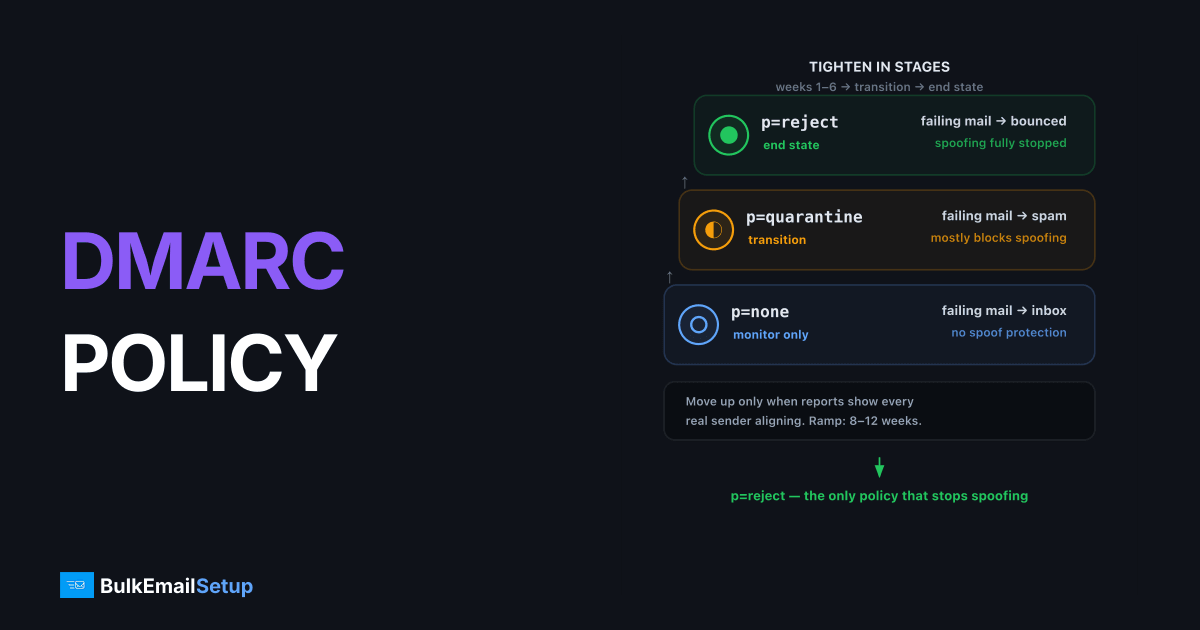
DMARC's three policies differ in what receivers do with mail that fails authentication: p=none delivers it normally and just sends you reports, p=quarantine routes it to spam, and p=reject bounces it before it reaches the mailbox. Start at p=none to discover every legitimate sending source, move to p=quarantine once reports show your real mail aligning, and finish at p=reject, the only policy that actually stops spoofing. Most domains can complete the whole ramp in 8-12 weeks.
What DMARC actually evaluates
DMARC, defined in RFC 7489, passes when SPF or DKIM passes and the passing identifier aligns with the visible From: domain. Two separate checks:
| Check | Passes when | Alignment requirement |
|---|---|---|
| SPF + alignment | Sending IP is in the Return-Path domain's SPF record | Return-Path domain matches From: domain (relaxed: same org domain) |
| DKIM + alignment | Signature verifies | d= domain matches From: domain (relaxed: same org domain) |
Only one aligned pass is needed. This is why forwarding (which always breaks SPF) doesn't doom you as long as DKIM survives. Get the underlying records right first, here's the full SPF, DKIM, and DMARC setup walkthrough.
The three policies side by side
| Policy | p=none | p=quarantine | p=reject |
|---|---|---|---|
| Failing mail goes to | Inbox (unchanged) | Spam/junk folder | Bounced at SMTP time |
| Stops spoofing | No | Mostly | Yes |
| Risk to your own mail | Zero | Misconfigured sources land in spam | Misconfigured sources bounce |
| Reports | Yes | Yes | Yes |
| Meets Gmail/Yahoo bulk sender minimum | Yes | Yes | Yes |
| Right for | Discovery phase | Transition phase | End state |
Example records:
_dmarc.yourdomain.com.  TXT  "v=DMARC1; p=none; rua=mailto:[email protected]"

_dmarc.yourdomain.com.  TXT  "v=DMARC1; p=quarantine; pct=25; rua=mailto:[email protected]"

_dmarc.yourdomain.com.  TXT  "v=DMARC1; p=reject; rua=mailto:[email protected]; adkim=s; aspf=s"
Stage 1, p=none: discovery (weeks 1-6)
Publish p=none with a rua= address and let aggregate reports accumulate. The default report interval is 86400 seconds, so every receiver that supports DMARC sends you a daily XML summary: which IPs sent as your domain, and whether SPF/DKIM passed and aligned.
What you're looking for:
- Legitimate sources you forgot. The billing system, the HR platform, the CRM your sales team signed up for. Each needs SPF or DKIM aligned before you enforce.
- Forwarders. SPF fails, DKIM passes, that's fine, DMARC still passes via DKIM.
- Actual spoofing. Unknown IPs failing both. This is what reject will eventually kill.
Don't rush this stage on low-volume domains. A source that only sends monthly invoices won't appear in week one.
dig +short TXT _dmarc.yourdomain.com
Stage 2, p=quarantine: enforcement with a safety net (weeks 6-10)
Move up when reports show every legitimate source passing with alignment for at least two consecutive weeks. Ramp with pct:
"v=DMARC1; p=quarantine; pct=25; rua=mailto:[email protected]"
Then raise pct to 50, then 100, watching reports between each step. If you leave pct out entirely it defaults to 100%, so the policy applies to all failing mail. A caveat: some large receivers don't honor pct strictly, so use it as a gradual ramp, not a precision dial.
At quarantine, a missed source means your mail hits spam folders, recoverable, visible in reports, annoying but not catastrophic. If users report legitimate mail in junk, check whether that source aligns, and review the broader spam-folder checklist. DMARC is only one input to filtering.
Stage 3, p=reject: the actual goal (week 10+)
p=reject is the only policy that prevents a spoofed message from being seen at all. Move up when quarantine at pct=100 has run clean for two to four weeks.
"v=DMARC1; p=reject; rua=mailto:[email protected]"
Two refinements worth considering at this stage:
sp=sets a separate policy for subdomains. If you don't send from subdomains,sp=rejectcloses theanything.yourdomain.comspoofing hole.adkim=s/aspf=sswitch alignment from relaxed to strict (exact domain match instead of same organizational domain). Only do this if you understand exactly which domains sign and bounce your mail, strict alignment breaks setups where, say, DKIM signs asmail.yourdomain.comwhile From: isyourdomain.com.
p=reject is also a prerequisite for BIMI. Gmail and Yahoo won't show your logo at anything weaker.
When NOT to move up yet
| Symptom in reports | What it means | Fix before tightening |
|---|---|---|
| Known SaaS vendor failing both SPF and DKIM | Vendor not configured for your domain | Add their include / publish their DKIM CNAME |
| SPF passes but doesn't align | Vendor uses their own Return-Path | Enable custom Return-Path (most ESPs offer it), or rely on aligned DKIM |
| DKIM intermittently failing from your own server | Body modification or key mismatch | Debug with the body hash failure guide |
| SPF permerror | Over the 10-lookup limit | Fix the record first, permerror can never pass |
A source that sends once a month needs at least one full cycle in your reports before you can judge it. Wait for it rather than guessing.
The mistakes that cause real damage
- Jumping straight to p=reject because a compliance checklist demanded it. Unmapped sources start bouncing silently; you find out from angry customers.
- No
rua=address. Enforcing blind. Reports are the entire feedback loop, always publishrua, even at reject. - Treating p=none as done. It satisfies the Gmail/Yahoo bulk-sender minimum that has applied to senders of 5,000 or more messages a day since February 2024 (Google's sender guidelines), but a spoofer's mail still reaches inboxes. None is a starting line, not a finish line.
- Forgetting subdomains. Without
sp=, subdomains inherit the apex policy, which is usually what you want, but verify which subdomains actually send before settingsp=reject.
How BulkEmailSetup helps
We publish your DMARC record alongside SPF, DKIM and PTR on your dedicated SMTP server, so the move from p=none to p=reject only has to cover your other senders. Basic is $549 one-time plus about $11 a month hosting. See pricing.
Frequently asked questions
What is the difference between DMARC none, quarantine, and reject?
p=none only collects reports and changes nothing about delivery. p=quarantine tells receivers to put failing mail in spam. p=reject tells them to bounce failing mail outright.
Is p=none useless?
No, it's the required first stage. It gives you aggregate reports showing every source sending as your domain, which you need before enforcing. But staying on p=none forever leaves spoofing unblocked.
How long should I stay on p=none before moving to quarantine?
Typically 4-8 weeks of reviewing aggregate reports, or until every legitimate sending source shows aligned SPF or DKIM. Low-volume domains may need longer to see all sources, like quarterly billing systems.
What does pct= do in a DMARC record?
pct applies the policy to only a percentage of failing messages, letting you ramp enforcement gradually, e.g. p=quarantine; pct=25 quarantines a quarter of failures. Note that some receivers don't honor pct strictly, so treat it as a soft ramp, not a guarantee.
Do Gmail and Yahoo require DMARC?
Yes. Since February 2024, senders of 5,000+ messages per day to Gmail or Yahoo must publish at least p=none with aligned SPF or DKIM. Without it, bulk mail is throttled or rejected.


