
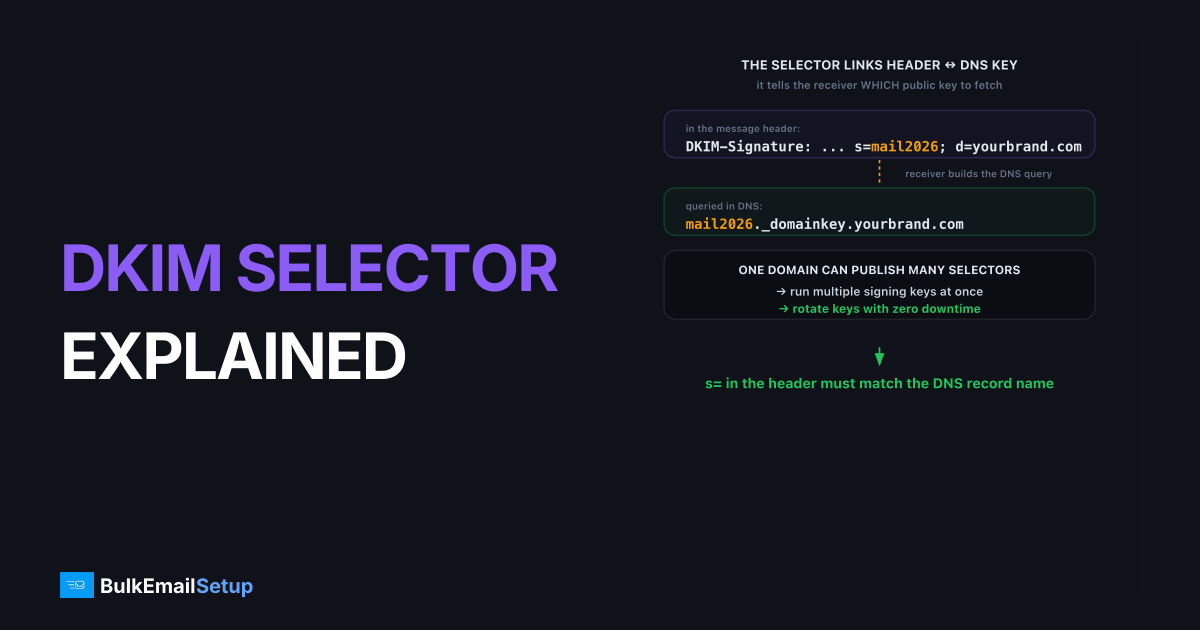
A DKIM selector is a label that tells receiving servers which public key to fetch from your DNS when verifying a message's signature. The selector forms the DNS record name selector._domainkey.yourdomain.com and appears in every message's DKIM-Signature header as the s= tag. Because a domain can publish many selectors at once, selectors are what make running multiple signing keys, and rotating them without downtime, possible.
Where the selector appears
The selector shows up in two places that have to match: the DKIM-Signature header on each message, and the DNS record name that holds the public key. When a receiver verifies a message, it reads the selector from the header and uses it to build the DNS query.
In the message header:
DKIM-Signature: v=1; a=rsa-sha256; d=yourbrand.com; s=mail2026; ...
The s=mail2026 is the selector. The receiver then queries:
mail2026._domainkey.yourbrand.com
That DNS record holds the public key. If the selector in the header and the DNS record name don't match, the receiver can't find the key and DKIM fails.
Why selectors exist at all
Selectors solve a problem a single fixed key name couldn't: a domain often needs more than one DKIM key live at the same time. Without selectors, you could publish only one key per domain, which would make rotation and multi-platform sending impossible.
Selectors give you:
- Multiple platforms, one domain. Your ESP uses selector
esp1, your dedicated server usesmail, your CRM usescrm, each with its own key, all under the same domain. - Safe rotation. Publish a new key under a new selector before retiring the old one, so there's never a moment with no valid key.
- Isolation. Compromise of one platform's key doesn't force you to re-key every sender.
The d= domain in each signature still has to align with your From address for DMARC alignment, regardless of which selector signed it.
How do I rotate a DKIM key safely?
Key rotation means replacing an old signing key with a new one, and selectors make it a zero-downtime operation if you overlap them. The rule is simple: never remove the old key until the new one is fully live and verifying. Rushing the teardown is the only way rotation breaks mail.
The safe sequence:
- Generate a new key pair under a fresh selector, for example
mail2026b. - Publish the new public key in DNS at
mail2026b._domainkey.yourdomain.com. - Wait for DNS propagation (a few minutes to a few hours).
- Switch your sender to sign with the new selector. Both keys now exist in DNS.
- Confirm new mail verifies by checking
Show originalin Gmail or a test inbox. - After a safe overlap (a week or more), remove the old selector's DNS record.
The overlap matters because mail already in transit or queued may still carry the old signature. The deeper operational checklist is in DKIM key rotation best practices.
Choosing a selector name
Selector names are free-form labels under RFC 6376, and the only hard rule is that the name in your header must match the DNS record name exactly. Beyond that, pick names that make rotation and auditing easy.
| Practice | Example | Why |
|---|---|---|
| Date-based | mail2026q1 | Makes rotation history obvious |
| Platform-based | sendgrid, dedicated | Identifies which sender signed |
| Avoid reuse | never reuse a retired name | Prevents stale-key confusion |
Receivers don't care what the name is, only that the header and DNS agree. A descriptive scheme is purely for your own sanity when you're reading reports months later.
A worked example: two selectors live at once
This is what a clean rotation looks like in DNS while both keys are published. You have the old selector still serving its key:
mail2026a._domainkey.yourbrand.com TXT "v=DKIM1; k=rsa; p=MIIBIjANBgkq...OLD"
And the new selector published alongside it, before you switch signing over:
mail2026b._domainkey.yourbrand.com TXT "v=DKIM1; k=rsa; p=MIIBIjANBgkq...NEW"
During the overlap, any message signed s=mail2026a still verifies against the old record, and any message signed s=mail2026b verifies against the new one. Nothing fails. Once a week passes with no traffic using the old selector, you delete the mail2026a record. That overlap is the entire safety mechanism, and it's why you never edit a key in place.
A quick selector setup checklist
Run this whenever you add a platform or rotate a key. The order is what keeps mail from dropping a signature.
- Pick a unique selector name. Never reuse a retired one. Date or platform-based is easiest to audit.
- Generate a 2048-bit key pair for that selector.
- Publish the public key at
selector._domainkey.yourdomain.comas one unbroken string. - Wait for propagation before switching signing on.
- Confirm the header
s=matches the DNS record name exactly. A typo here is a silent DKIM fail. - Verify
dkim=passin a Gmail test before retiring any old selector.
If you run several platforms, each needs its own selector, which is one more reason a single dedicated sender simplifies the picture. See dedicated IP vs shared IP email for that trade-off.
Pre-staging the next selector
A trick that makes rotation calmer is to publish the next selector's public key in DNS before you actually need it. Generate mail2026b now, publish its TXT record alongside the active mail2026a, and leave it dormant. The key sits in DNS doing nothing until the day you switch signing to it.
The payoff is timing. When you rotate, propagation is already done, so the switch is instant and there is zero window where a receiver queries a key that does not exist yet. You flip the signing selector, confirm dkim=pass, and the new key was live in DNS for days beforehand. Pair this with a calendar reminder every six months and rotation stops being a project you dread and becomes a two-minute change. It is the same overlap principle, just front-loaded so the DNS wait never sits on your critical path.
When rotation goes wrong
The most common rotation failure is removing the old selector too soon, while messages signed with it are still being verified, which produces sudden DKIM failures. The second most common is a typo between the header selector and the DNS record name. We have traced a "DKIM suddenly stopped passing" report to a sender who deleted the old selector's TXT record the same hour they switched signing, then watched their own queued and retried mail (some of it still carrying the old s= value) come back dkim=temperror and dkim=none for the next day. The mail was fine; the key it pointed to was gone. A one-week overlap before deleting the old record would have prevented all of it. Both failure modes show up as DKIM failures in your DMARC aggregate reports, which is one more reason to keep reading them after any rotation. For the underlying signing mechanics, see DKIM explained.
How BulkEmailSetup helps
On a BulkEmailSetup dedicated SMTP server we generate, publish, and rotate your DKIM selectors and 2048-bit keys for you, with the overlap windows handled so mail never drops a valid signature mid-rotation. Your d= stays aligned to your own domain throughout. See pricing for plans.
Frequently asked questions
What is a DKIM selector?
A DKIM selector is a label that points receivers to a specific public key in your DNS. It forms the record name selector._domainkey.yourdomain.com. The selector appears in each message's DKIM-Signature header as the s= tag.
Why use multiple DKIM selectors?
Multiple selectors let one domain run several keys at once, one per sending platform, and rotate keys safely. You publish a new key under a new selector, switch signing to it, then retire the old selector, all with no downtime.
How do I rotate a DKIM key?
Generate a new key under a new selector, publish its public key in DNS, wait for propagation, switch your sender to sign with the new selector, confirm mail verifies, then remove the old selector's DNS record after a safe overlap.
How often should I rotate DKIM keys?
Every six to twelve months is a common practice for high-volume senders. Rotation limits the damage if a private key is ever exposed. Automated platforms often rotate more frequently behind the scenes.


