
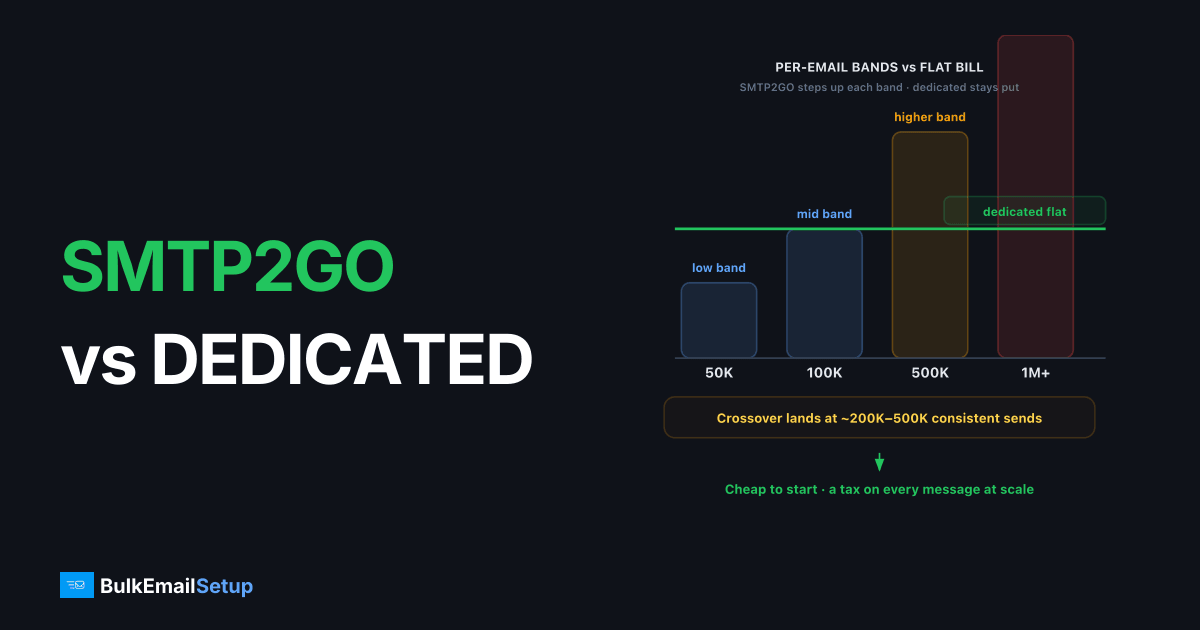
SMTP2GO scales cheaper at low and moderate volume; a dedicated SMTP server scales cheaper once you send consistently past roughly 200K-500K emails per month. SMTP2GO charges per-email tiers that climb as you grow, while a dedicated SMTP server is a flat monthly cost regardless of how many messages you push through it. So the honest answer is: SMTP2GO wins on speed-to-send and low-volume price, a dedicated SMTP server wins on cost-per-email and control at scale.
What is the real difference between SMTP2GO and a dedicated SMTP server?
SMTP2GO is a managed email relay: you point your app at their SMTP endpoint and they handle the sending infrastructure, with tiered pricing based on monthly volume. A dedicated SMTP server is infrastructure you control, a server with its own IP, full SMTP access, and DNS authentication you configure. As of early 2026, SMTP2GO's free tier covers roughly 1,000 emails/month, with paid tiers scaling up by volume.
The split is convenience versus control. SMTP2GO abstracts the hard parts and bills per message. A dedicated server hands you the IP and the MTA, which means more responsibility and a flat bill.
How do SMTP2GO and a dedicated SMTP server compare?
| Factor | SMTP2GO | Dedicated SMTP server |
|---|---|---|
| Price model | Per-email tiers (volume bands) | Flat monthly |
| Free tier | ~1,000 emails/month | None |
| Volume limits | Tied to plan tier | Bound by server/IP capacity |
| Dedicated IP | Paid add-on, higher plans | Included, you control it |
| Setup effort | Minutes, point and send | Hours to days (or managed) |
| Deliverability control | Provider-managed | Full: IP, warm-up, DNS, MTA |
| Support | Plan-dependent | Provider or self-managed |
Numbers are directional as of early 2026. Check the SMTP2GO pricing page for current tiers, since per-email bands shift.
When does a dedicated SMTP server get cheaper?
The crossover is volume and consistency. Per-email pricing feels cheap at 50K/month and painful at 1M/month, because the cost grows linearly with sends while a dedicated server's cost stays flat. If you send 1M+ emails monthly, a flat plan often lands well under per-email rates, and the gap widens the more you send.
Volume isn't the only trigger. You also want a dedicated server when you need several isolated IPs, full control over warm-up, or your own MTA tuning. We break the math down in our SMTP pricing per 1,000 emails comparison and the cost to send 1 million emails per month guide.
What about deliverability and dedicated IPs?
A dedicated IP only helps if you send enough to keep it warm, roughly 50K+/month consistently. SMTP2GO sells dedicated IPs as add-ons, but you don't control the surrounding MTA. On a dedicated server, the IP is yours end to end: you set the PTR record, align SPF, DKIM, and DMARC, and run your own IP warm-up schedule.
That control is the point. When a 550 5.7.1 block hits, you read your own logs instead of waiting on a provider queue. Deliverability still depends on your list hygiene and complaint rate, no IP fixes a bad list.
What does the cost actually look like at volume?
The gap between per-email tiers and flat pricing is hard to feel until you map it to your real send count. SMTP2GO prices in volume bands, so each jump in monthly sends moves you to a higher band with a higher effective rate per message. A flat dedicated plan doesn't move. Here's a directional view as of early 2026, using "roughly" because exact bands shift.
| Monthly volume | SMTP2GO (per-email band) | Dedicated SMTP server (flat) |
|---|---|---|
| 50K | Low band, very affordable | Flat plan, likely costs more per email |
| 100K | Mid band, still competitive | Roughly break-even territory |
| 500K | Higher band, climbing | Flat plan usually cheaper per email |
| 1M+ | Top bands, largest line item | Flat plan, clearly cheaper per email |
The pattern is consistent across per-email relays: cheap to start, expensive to scale. At 50K/month you're paying for convenience and it's worth it. At 1M/month the same convenience is a tax on every message you send. The break-even point depends on the specific band you land in, but for most senders it falls somewhere between 200K and 500K consistent monthly sends. We walk through the same curve for other providers in cost per email: SMTP vs ESP.
Where is SMTP2GO the better choice?
SMTP2GO wins when you want sending handled for you with minimal setup. If you send under 100K emails a month, run a small team without an email engineer, or need to be live in an afternoon, the managed model earns its price. Its dashboard, reporting, and built-in authentication tooling remove real friction.
It's also a reasonable pick when your volume is spiky rather than steady. A dedicated IP needs consistent volume to stay warm, roughly 50K+/month. If you send 200K one month and 5K the next, a shared, managed relay like SMTP2GO actually protects you, because your reputation rides on a pool kept warm by other senders. A cold dedicated IP that sits idle then suddenly blasts is a deliverability problem waiting to happen. We cover that timing in how many emails before you need dedicated infrastructure.
Where does a dedicated SMTP server win?
A dedicated SMTP server wins on cost-per-email at scale, on IP isolation, and on control. Once your sends are both high and consistent, the flat bill beats per-email bands, and the gap only widens as you grow. You also get IPs nobody else can damage, your own warm-up cadence, and direct access to logs and MTA tuning.
The control matters most when something breaks. On SMTP2GO, a deliverability dip means reading their reports and possibly opening a ticket. On your own server you see the raw SMTP responses, retry behavior, and per-destination throttling in real time. You can split a transactional stream from a marketing stream onto separate IPs so a campaign mistake never delays a password reset. That separation is yours to design, not a feature you wait for.
How do you migrate from SMTP2GO to a dedicated server?
Migration is mostly DNS and warm-up, not a code rewrite. Because both speak standard SMTP on ports 587 or 465, your application change is usually just new host, port, and credentials. The real work is reputation: a fresh dedicated IP starts at zero and must be warmed over four to six weeks before it carries full volume.
A safe switch runs in three phases. First, stand up the dedicated server with SPF, DKIM, DMARC, and PTR configured and verified. Second, route a small slice of traffic (start near 50 to 100 messages a day) through the new IP while SMTP2GO still carries the bulk, ramping the new IP on a warm-up schedule. Third, shift the remaining volume once the IP holds steady inbox placement. Don't cut over all at once. A cold IP that suddenly sends 500K in a day will trip rate limits and land in spam.
Who should pick which?
| Your situation | Better pick |
|---|---|
| Under 100K/month, want it handled | SMTP2GO |
| Spiky, inconsistent volume | SMTP2GO (shared pool stays warm) |
| 500K+/month, steady | Dedicated SMTP server |
| Need multiple isolated IPs | Dedicated SMTP server |
| Want full log and MTA access | Dedicated SMTP server |
| No email engineer, small team | SMTP2GO |
| Cost-per-email is your top line | Dedicated SMTP server |
What deliverability rules carry over no matter which you pick?
Switching relays doesn't change what receivers demand. Gmail and Yahoo's bulk sender rules (5,000+ recipients a day) require SPF, DKIM, and DMARC all passing, one-click unsubscribe per RFC 8058, TLS, valid PTR or reverse DNS, and a spam complaint rate under 0.3%, ideally under 0.1%. SMTP2GO sets much of this up for you; on a dedicated server you own each record. Neither path lets you skip the thresholds.
The records carry technical floors worth knowing. Your DKIM key should be 2048-bit, with 1024 the weak minimum. Your SPF must resolve in 10 DNS lookups or fewer, or receivers return a PermError and fail the check. DMARC steps through none, quarantine, then reject as your authentication proves stable. Getting these correct matters more than which logo is on your relay.
What goes wrong when senders switch badly?
The classic mistake is cutting all volume to a cold IP at once. A new dedicated IP with no history that suddenly pushes 200K in a day looks like a spam cannon to Gmail, which replies with a 421 4.7.28 rate limit or a soft block to the spam folder. The fix is patience: ramp from roughly 50 to 100 a day and double every few days while watching placement. We've seen a 50K/day cutover drop to roughly 12% inbox placement at Gmail within 48 hours when a team flipped everything at once instead of running both relays in parallel. Keeping SMTP2GO carrying the bulk while the new IP ramps for the first two weeks avoids that cliff entirely.
The second mistake is moving a dirty list to fresh infrastructure, then blaming the server. A new IP with a 5% bounce rate and rising complaints burns reputation faster than a shared pool would, because all the damage lands on an IP that's entirely yours. Clean the list, suppress hard bounces, and let your most engaged contacts lead the warm-up. A switch is the worst moment to skip list hygiene.
How much volume justifies a dedicated server?
The threshold is consistency, not just a number. A dedicated IP needs steady volume to stay warm, with a rough floor near 50K sends a month sent regularly. Below that, SMTP2GO's managed sending usually delivers better because your mail rides a warm shared pool. Above it, a dedicated IP starts to pay off, and the case strengthens as volume grows.
Cost points the same way. SMTP2GO's per-email bands stay cheap at low volume and climb into your largest line item past several hundred thousand a month. Once that bill rivals a flat dedicated plan, the convenience is a premium on every message. For most senders the crossover lands somewhere between 200K and 500K consistent monthly emails. There's a staffing factor too: a dedicated server's controls only help if someone will read logs, tune warm-up, and manage DNS. If nobody will, the managed model's hand-holding keeps real value even at higher cost.
How BulkEmailSetup helps
If SMTP2GO's per-email tiers have become your biggest sending cost, a dedicated SMTP server with a flat monthly plan usually wins at scale. We provision clean dedicated IPs, set up SPF, DKIM, DMARC, and PTR correctly, and run the warm-up so you get the control without the babysitting. See plans on our pricing page.
Frequently asked questions
Is SMTP2GO cheaper than a dedicated SMTP server?
At low volume, yes. SMTP2GO has a free tier and inexpensive starter plans. Once you send consistently above roughly 200K-500K emails per month, a flat-rate dedicated SMTP server usually costs less per email because you stop paying per-message tiers.
Does SMTP2GO offer a dedicated IP?
Yes, SMTP2GO offers dedicated IP addresses as a paid add-on on higher plans. A dedicated SMTP server gives you the IP as part of the box, plus full SMTP and DNS control rather than a managed sending interface.
Is SMTP2GO good for deliverability?
SMTP2GO has a solid deliverability reputation for transactional and moderate marketing volume, with reporting and authentication tooling built in. Outcomes still depend on your list quality, complaint rate, and authentication setup, not the provider alone.
When should I move off SMTP2GO?
Consider moving when per-email costs become your largest line item, when you need multiple isolated IPs you control, or when you want to run your own MTA tuning. That usually happens past 500K-1M emails per month.


