
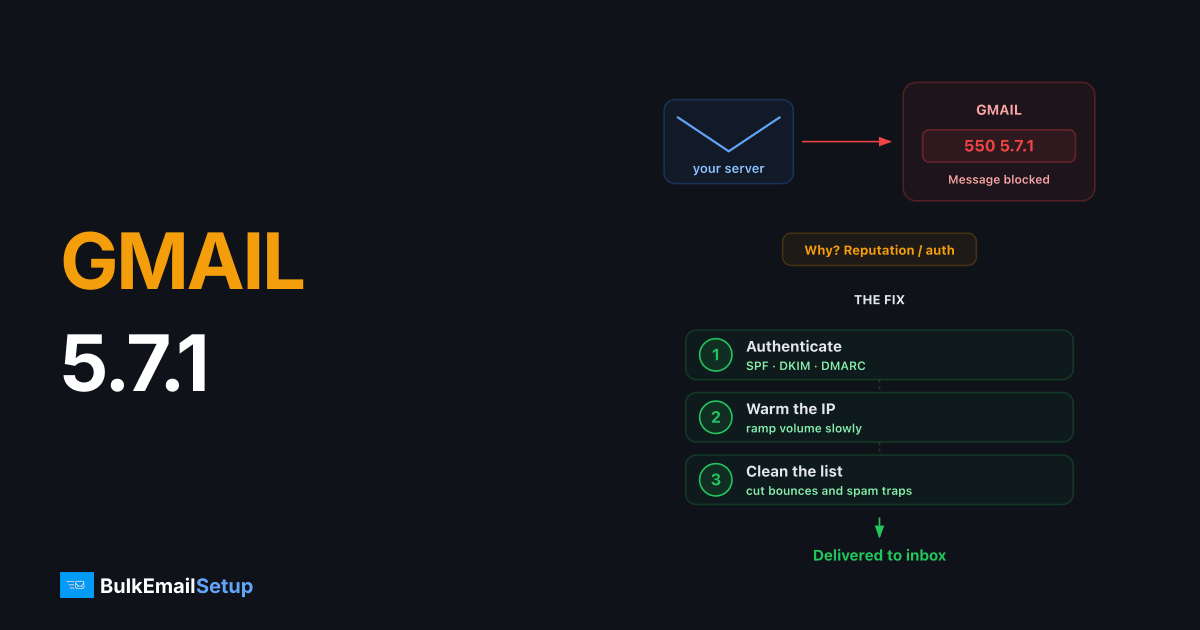
Gmail's 550 5.7.1 error means Google has permanently rejected your message because it violates Gmail's sender policies, usually due to low IP/domain reputation, failed authentication, or spam-like content. The fix is to identify which policy you tripped (the bounce text tells you), correct it, authenticate with SPF/DKIM/DMARC, cut volume, clean your list, and let reputation recover over 1-2 weeks.
What the bounce actually says
Gmail never sends a bare 550 5.7.1. The rejection line always includes a reason and a support URL, and that text is your diagnosis. Read it before changing anything.
| Bounce text contains | Real cause |
|---|---|
| "this message has been blocked" + support URL | Content or URL in the message is flagged |
| "our system has detected an unusual rate of unsolicited mail" | IP reputation, volume spike or spam complaints |
| "the user or domain that you are sending to" | Recipient-side policy (their admin blocked you) |
| "messages with this sender IP have been temporarily rate limited" | Borderline IP reputation, throttling before a full block |
| "unauthenticated email is not accepted" | Authentication failure, see the 5.7.26 guide |
The five real causes
1. IP reputation
Gmail scores every sending IP on complaint rate, spam-trap hits, and volume consistency. A cold IP that jumps from 0 to 50,000 emails/day gets blocked within hours.
Check your standing in Google Postmaster Tools (postmaster.google.com), add your domain, verify it via DNS, and look at the IP Reputation and Spam Rate panels. Anything above a 0.1% spam rate is a warning; 0.3% is the hard line in Google's bulk sender guidelines.
If your IP is new, follow a proper IP warm-up schedule instead of blasting full volume on day one.
2. Domain reputation
Gmail weighs domain reputation more heavily than IP reputation since the 2024 sender requirements. If your domain appears in flagged URLs, or your DMARC-aligned domain has a complaint history, every IP you send from inherits the problem.
3. Missing or misaligned authentication
Since February 2024, Google rejects bulk mail that fails both SPF and DKIM, and senders over 5,000/day must publish DMARC. Verify all three:
dig TXT yourdomain.com +short          # SPF record
dig TXT default._domainkey.yourdomain.com +short   # DKIM (selector varies)
dig TXT _dmarc.yourdomain.com +short   # DMARC policy
If any are missing, set them up properly, our SPF, DKIM, and DMARC setup guide walks through every record.
4. Content and link reputation
Gmail scans every URL in the body. A flagged link shortener, a blacklisted tracking domain, or even a compromised image host triggers the "this message has been blocked" variant. Test by sending the same message with all links removed, if it goes through, binary-search your links.
5. Recipient-domain policy
Google Workspace admins can block specific senders. If the bounce mentions "the user or domain that you are sending to," nothing on your side is wrong, the recipient's admin has to whitelist you.
Gmail documents its expectations for bulk senders openly, and the 550 5.7.1 block is almost always a symptom of missing one of them. The bulk sender guidelines require SPF and DKIM on the sending domain, a published DMARC record, one-click unsubscribe on marketing mail, and a spam complaint rate kept under 0.3%.
Step-by-step fix
- Read the full bounce and match it to the table above.
- Check Postmaster Tools for IP reputation, domain reputation, and spam rate trends over the last 30 days.
- Verify SPF, DKIM, and DMARC with the
digcommands above. All three must pass, and at least one of SPF/DKIM must align with your From domain. - Cut sending volume to Gmail by 75% for 72 hours. Reputation blocks ease only when the suspicious pattern stops.
- Remove unengaged recipients. Anyone who hasn't opened in 90+ days is a complaint risk. High complaint rates are the #1 cause of sustained 5.7.1 blocks.
- Add one-click unsubscribe (
List-UnsubscribeandList-Unsubscribe-Postheaders), required for bulk senders since 2024 and a direct input to Gmail's complaint scoring. - Test with a clean message via swaks before resuming campaigns:
swaks --to [email protected] --from [email protected] \
  --server your-smtp-host --port 587 --auth-user [email protected] --tls
Shared IP vs dedicated IP: who actually owns this problem
If you send through a shared pool (most ESP starter plans), a 5.7.1 block can be entirely someone else's fault, another tenant on the IP spammed, and Gmail blocked the IP for everyone. You can verify this: if Postmaster Tools shows your domain reputation as high but mail still bounces, the IP is the problem, and the IP isn't yours to fix.
| Setup | Who controls the 5.7.1 risk | Your options when blocked |
|---|---|---|
| Shared IP pool | Every tenant on the pool | Wait, or ask the provider to move you |
| Dedicated IP | You alone | Everything in this article |
This is the strongest practical argument for a dedicated IP once you send meaningful volume: when reputation is yours alone, every fix in this guide actually works, and nobody else can undo your warm-up overnight.
Workspace senders: check the admin console too
If you send from Google Workspace itself and your outbound mail gets 5.7.1 from other providers, the diagnosis differs. Workspace shares Google's IP pools, so the issue is almost always your domain reputation or a suspended-for-spam user. Check Admin Console → Reporting → Email Log Search for the real rejection, and confirm no compromised account is bulk-sending from your tenant.
How long recovery takes
| Block type | Typical recovery |
|---|---|
| Content/URL block | Immediate, once the flagged element is removed |
| IP rate limiting | 24-72 hours of reduced volume |
| IP reputation block | 1-2 weeks of clean sending |
| Domain reputation block | 2-6 weeks, sometimes longer |
There is no Gmail delisting form that overrides this. The sender contact form linked from Google's Email Sender Guidelines exists, but Google states explicitly that responses are not guaranteed and resolution comes from fixing sending practices.
Preventing the next block
Consistency is what Gmail rewards: steady daily volume, low complaint rate, full authentication, and a list of people who actually asked for your mail. If you're scaling up, ramp volume gradually and watch Postmaster Tools weekly, a falling reputation graph gives you days of warning before a 5.7.1 wall. For the broader picture, see our guide on keeping email out of the spam folder.
How BulkEmailSetup helps
We run dedicated SMTP servers on pre-warmed IPs with SPF, DKIM, and DMARC configured for you, plus a warm-up plan and bounce handling, so Gmail sees a clean, steady sender from the first send. If you'd rather send than firefight bounces, see our pricing.
Frequently asked questions
What does Gmail error 550 5.7.1 mean?
It's a permanent rejection: Gmail's filters decided your message violates its sender policies. The most common triggers are poor IP or domain reputation, missing authentication, and content that looks like spam.
Is 550 5.7.1 a blacklist?
Not in the traditional sense. Gmail uses its own internal reputation system rather than public blacklists, so delisting from Spamhaus or similar lists won't fix a 5.7.1 block by itself.
How long does a Gmail 5.7.1 block last?
Reputation-based blocks usually ease within 2-14 days once the underlying problem stops. There is no manual delisting form for Gmail; recovery happens automatically as your sending behavior improves.
Does Google have a delisting form for blocked senders?
Google provides a sender contact form for bulk senders (linked from the Gmail sender guidelines), but it rarely results in manual unblocking. Fixing authentication, volume, and complaint rate is what actually lifts the block.
Can switching IPs fix a 550 5.7.1 error?
Only if the block is IP-based and your domain reputation is still healthy. If the domain itself is flagged, a new IP changes nothing, you have to repair domain reputation through clean, low-volume sending.
What does '1 spam message blocked in the last 14 days' mean in Gmail?
It is a notice for the person who owns the inbox, not a bounce. Gmail counts the messages it blocked as spam over the last 14 days and shows the total. Nothing is wrong with the account. If you are the sender and your mail is being stopped, what you get back is the 550 5.7.1 bounce covered on this page.


