
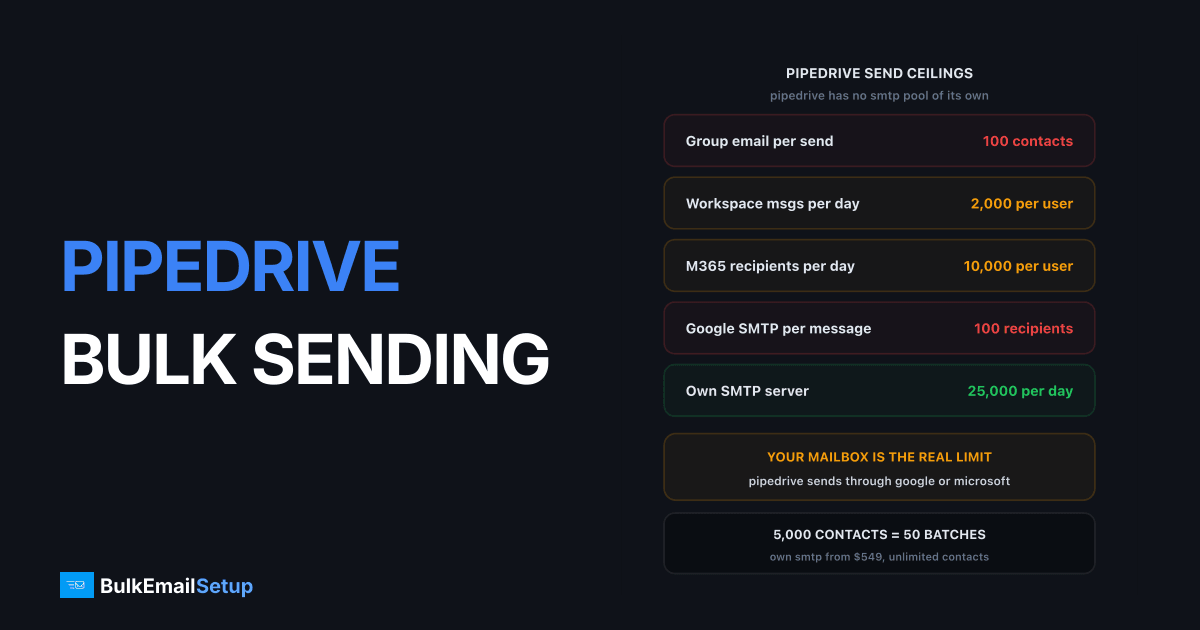
Pipedrive does not have its own bulk sending engine. It syncs your mailbox over IMAP and SMTP and sends through it, so your Google Workspace or Microsoft 365 caps are the real ceiling: 2,000 messages a day on paid Workspace, or 10,000 recipients a day on Microsoft 365. On top of that, group email in Pipedrive caps at 100 contacts per send. The Campaigns add-on is a separate light marketing tool priced by contact count. Neither path is built for volume.
How Pipedrive email actually works
This is the thing most people get wrong when they plan a Pipedrive send. There is no Pipedrive SMTP pool. Pipedrive is not the sender.
| Piece | What it does |
|---|---|
| Mailbox sync | connects your mailbox over IMAP and SMTP |
| Sending | your mailbox sends, Pipedrive logs it to the deal |
| Group email | up to 100 contacts per send, Growth plan and up |
| Campaigns add-on | separate marketing tool, priced by contacts |
| Sending quota | none from Pipedrive, your mailbox provider sets it |
So when a send fails, the error comes from Google or Microsoft, not from Pipedrive. That distinction decides where you go looking, and it decides which limits you have to plan around.
Pipedrive's own group email docs state the 100-contact cap and note a 30-second delay between messages, put there specifically so your mailbox provider does not block the batch. That delay is a tell. Pipedrive knows it is riding someone else's SMTP and is pacing itself to stay under the radar.
The limits you are actually sending under
Your mailbox provider sets the ceiling. Here are the published numbers.
| Limit | Google Workspace (paid) | Microsoft 365 |
|---|---|---|
| Messages per day per user | 2,000 | not capped, rate-limited instead |
| Recipients per day per user | 10,000 total | 10,000 |
| External recipients per day | 3,000 | tenant-level, depends on licences |
| Recipients per single message | 500 external | up to 1,000, configurable |
| Recipients via SMTP client | 100 per message | 1,000 |
| Send rate | not published | 30 messages per minute |
| Trial account | 500 per day | 5,000 external per day |
Two numbers deserve attention. Google caps SMTP client submissions at 100 recipients per message, which is lower than the 500 you get sending from the Gmail web interface. Pipedrive sends over SMTP. And Microsoft's Exchange Online limits are enforced as 30 messages per minute, which is 1,800 an hour if nothing else is queued.
Google's sending limits page also sets the deliverability bar you have to clear once you pass 5,000 messages a day: SPF, DKIM and DMARC all published, and spam complaints under 0.30%, with 0.10% as the target.
Where a sales team hits the wall
A single rep at 40 to 60 sends a day is nowhere near 2,000. That is why nobody notices the ceiling until the team grows or the marketing side wakes up.
Run the maths for 10 reps:
| Activity | Daily volume |
|---|---|
| Sequences, 10 reps at 50 each | 500 |
| Manual one-to-one replies | 150 |
| One group email to 5,000 contacts | 50 batches of 100 |
| Monthly newsletter to 20,000 | not possible without Campaigns |
The sequence load is fine. The group email is where it breaks. 5,000 contacts at 100 per send is 50 manual batches, and with the 30-second delay baked in you are watching a progress bar for the better part of half an hour, assuming nobody clicks away. Do that weekly and someone on your team is spending a day a month clicking Send.
The 20,000-contact newsletter is not a quota problem at all. It is a "this tool does not do that" problem.
What the Campaigns add-on covers
Campaigns is Pipedrive's marketing email product, bought on top of your CRM seats and tiered by how many contacts you market to. It gives you a drag-and-drop builder, templates, unsubscribe handling and open and click reporting.
It is a real product and for a 5,000-contact list it is a sensible buy. Two things to know before you budget:
- Pricing is per subscriber, not per email. Pipedrive sells Campaigns in subscriber spots from 1,000 to 50,000 in 1,000-unit increments, and the per-subscriber rate falls as the count rises. Growing the list raises the bill whether or not you send more. There is no published per-day or per-month send cap, because the meter is subscribers rather than messages. The exact rate sits behind the in-app billing slider, so check your own account rather than trusting a figure in any article including this one.
- It still is not bulk infrastructure. Campaigns sends from Pipedrive's shared pool, which means shared reputation, provider policy on what content is allowed, and the usual suspension risk that comes with any shared relay.
Compare that to HubSpot's contact-based model, which has the same shape and the same failure mode: the CRM vendor prices email by list size, and list size is the thing you are trying to grow.
The three routes, honestly
| Route | Best for | Volume ceiling | What it costs |
|---|---|---|---|
| Mailbox sync only | true one-to-one sales mail | 2,000/day per rep (Workspace) | included in your seats |
| Campaigns add-on | light marketing, under 10K contacts | per-contact tier | rises with list size |
| Own SMTP server | full-list campaigns, cold outreach | 25,000-200,000/day | one-time build |
Route one is what Pipedrive is designed for and it works well. Do not fight it.
Route two is the right buy if your list is small and your marketing is a monthly newsletter. It stops making sense somewhere around the point where the Campaigns line is bigger than your CRM seats line.
Route three is what teams pick when campaign volume is real. You keep Pipedrive as the record system, which is what it is good at, and you stop asking a CRM to be an MTA.
Cost for a 10-rep team
Rough shape at 10 seats and a 50,000-contact list sending twice a month, so 100,000 emails a month.
| Line item | Campaigns route | Own SMTP route |
|---|---|---|
| Pipedrive CRM seats | 10 seats, unchanged | 10 seats, unchanged |
| Marketing email | Campaigns tier for 50K contacts | $549 one-time build |
| Monthly email cost | recurring, scales with list | server hosting only |
| Contacts limit | tiered | unlimited |
| Daily send ceiling | Pipedrive pool | 25,000 on Basic |
| Who owns deliverability | Pipedrive | you |
The CRM seats do not change in either column, and that is the point people miss when they think about "moving off Pipedrive". You are not moving off Pipedrive. You are moving one stream of mail out of it.
The break-even is worth doing properly rather than eyeballing. Break-even point for a dedicated SMTP server runs the numbers, and what 100,000 emails a month costs covers this exact volume across providers.
How to wire an external SMTP in and keep Pipedrive as the record
You want three things: Pipedrive stays the source of truth for contacts and deals, campaign mail leaves on your own IPs, and engagement flows back so reps see it.
Segment out of Pipedrive. Filter the contacts you actually want to mail, usually anyone with engagement in the last 12 months, and sync that segment to the sending layer. Do not export the whole database. The disengaged contacts are the ones generating your complaints.
Run a campaign layer in front of the SMTP server. A dedicated SMTP server sends mail and nothing else, so you need something on top for lists, templates and unsubscribes. Self-hosted options like MailWizz, Sendy or Listmonk all speak plain SMTP and are what most teams doing this run.
Send campaigns from a subdomain. Something like news.yourdomain.com, separate from the domain your reps send from. If a campaign draws complaints, the damage lands on the subdomain and your sales mail keeps flowing. This is the single highest-value decision in the whole setup. See subdomain vs root domain for email sending.
Push engagement back. Opens, clicks and unsubscribes should return to Pipedrive as activities or field updates via the API or a connector, so a rep opening a deal sees the marketing touches.
Warm up. New IPs start cold no matter what your mailbox history looks like. Four to eight weeks to full volume, ramping roughly 30% every two days per IP. There is no way around this and rushing it is how people burn new IPs in a week.
The wider pattern is covered in SMTP servers for CRM and marketing automation.
Decision guide
Pick the row that matches you.
| Your situation | What to do |
|---|---|
| Under 5,000 contacts, one-to-one sales mail | mailbox sync, nothing else |
| Newsletter to under 10,000 contacts | Campaigns add-on |
| Batching group email 10+ times a week | you have outgrown the feature |
| Over 25,000 contacts mailed monthly | own SMTP, keep Pipedrive as CRM |
| Cold outreach at any real volume | own SMTP, separate domain |
| Campaigns bill bigger than CRM seats | run the break-even |
The trigger that matters most is the third row. Batching 100 at a time is the tool telling you what it was built for. When someone on your team has a recurring calendar block for clicking Send, the cost of the workaround has already passed the cost of fixing it.
Two other cases push the same way. If you are running cold outreach, shared pools ban or restrict it and your own mailbox will get you rate-limited long before you get results, so read what to do after you outgrow Gmail SMTP. And if you are a recruiting or staffing team running Pipedrive as an ATS-adjacent CRM, the volume pattern is well documented in SMTP for recruiting agencies at volume.
What you take on with your own server
Being straight about this, because the trade is real.
You own warm-up, four to eight weeks. You own list hygiene, meaning hard bounces suppressed permanently and 12-month non-openers dropped. You own SPF, DKIM, DMARC and a PTR record that matches your HELO name. You own watching complaint rates weekly against Google's 0.30% line.
Against that, you get no per-contact pricing, no shared pool policing your content, no suspension because another customer on your IP had a bad week, and a fixed cost that does not move when the list grows. If nobody on your team will own the maintenance side, stay on Campaigns and pay the tier. That is a legitimate answer.
How BulkEmailSetup helps
We build dedicated SMTP infrastructure you own: your own server, your own IPs, full SPF/DKIM/DMARC/PTR configuration, MTA tuning, bounce handling and a warm-up plan. Pipedrive stays exactly where it is as your CRM, and the campaign mail moves to a subdomain on IPs nobody else touches, so a marketing complaint spike can never take your sales reps offline.
Basic is $549 one-time, covering 1 SMTP server, 3 dedicated IPs, 25,000 emails/day and unlimited contacts. Higher tiers scale to 15 IPs and 200,000 emails/day. See pricing, or read HubSpot email limits and using your own SMTP for the same split at a different CRM.
Frequently asked questions
What are Pipedrive's bulk email limits?
Group email in Pipedrive caps at 100 contacts per send, on Growth plan and above, with a 30-second delay between messages. Beyond that there is no Pipedrive-side quota, because the mail leaves through your connected mailbox. So the real ceiling is your mailbox provider: 2,000 messages a day on a paid Google Workspace account, or 10,000 recipients a day on Microsoft 365.
Can you connect your own SMTP server to Pipedrive?
Pipedrive connects to a mailbox over IMAP and SMTP, so you can point it at any mailbox you control including one on your own server. What you cannot do is push high-volume campaign mail through that path at speed, because Pipedrive sends one message at a time through a single mailbox session, not through a bulk MTA. For volume, most teams run a separate sending layer and keep Pipedrive as the CRM record.
How many emails can one sales rep send per day through Pipedrive?
A rep on paid Google Workspace can send 2,000 messages a day and reach 500 external recipients in any single message. On Microsoft 365 the cap is 10,000 recipients per day at 30 messages per minute. Typical sales sequences run 40 to 60 sends a day per rep, so a single rep rarely hits the cap, but a 10-rep team running sequences plus a shared group send will.
Is the Pipedrive Campaigns add-on enough for marketing email?
Campaigns is a light marketing email tool priced separately from the CRM seats, and Pipedrive tiers it by contact count. It handles a newsletter to a modest list. It is not built for 100,000-plus sends a month, and per-contact pricing gets expensive as the list grows. Check the current Campaigns tiers on Pipedrive's own pricing page before budgeting.
Should I move bulk email off Pipedrive?
Split it once you are sending to more than roughly 25,000 contacts a month or you are working around the 100-recipient group email cap by hand. Keep Pipedrive for deals, sales sequences and one-to-one mail, and move full-list campaigns to your own SMTP server where per-contact pricing does not apply and 25,000 a day costs nothing extra.
Will bulk sending from my sales mailbox hurt deliverability?
Yes, and this is the bigger risk than the quota. Sending campaign mail from the same domain and mailbox your reps use for deal conversations puts complaint rates from the campaign onto the reputation that carries your sales mail. Send campaigns from a separate subdomain on separate IPs so a bad campaign cannot take your reps offline.


