
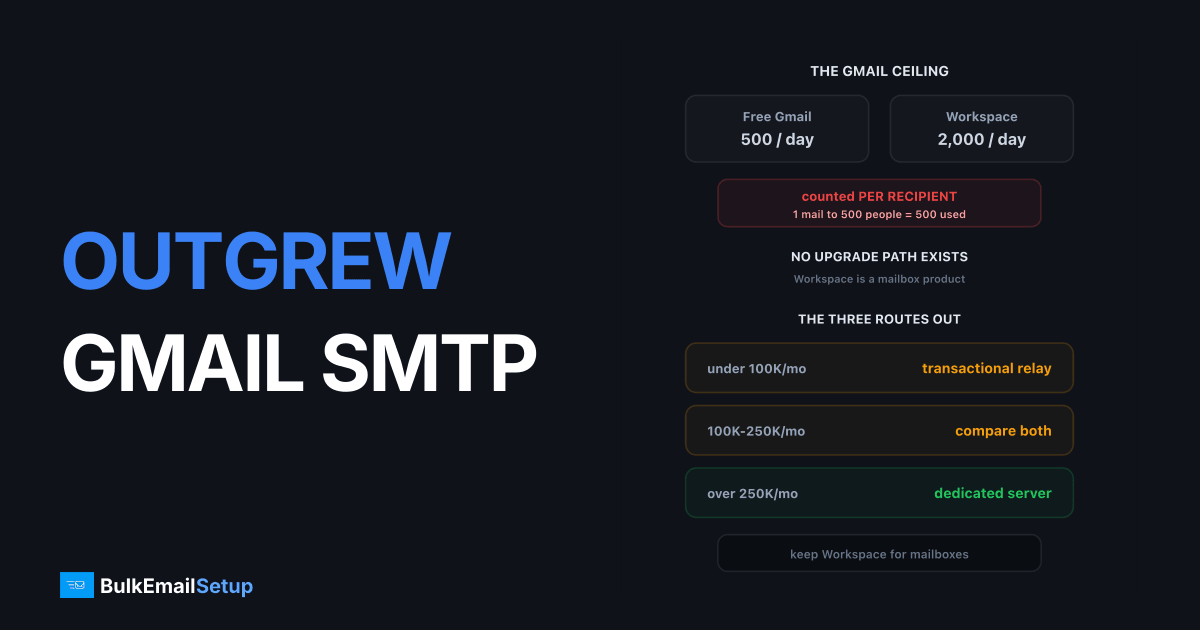
Gmail caps SMTP sending at 2,000 recipients a day on Google Workspace and 500 on a free account, counted per recipient rather than per message. One email to 500 people uses a quarter of your daily allowance. There is no upgrade path, because Workspace is a mailbox product, not a sending platform. Once you are hitting the cap regularly, you need different infrastructure.
The real limits
| Account type | Daily recipients | Per message |
|---|---|---|
| Free Gmail | 500 | 100 |
| Workspace (standard) | 2,000 | 2,000 |
| Workspace SMTP relay | Higher, internal use | Policy-bound |
Two details catch people out. The count is per recipient, so a campaign to 1,000 addresses consumes 1,000 units regardless of how you batch it. And throttling starts well before the hard cap, often around 60 to 70% of the daily allowance, showing up as slow sends rather than errors.
When you cross the line you get 550 5.4.5 Daily sending quota exceeded and the account stops sending for roughly 24 hours. Queued mail fails rather than waiting.
Why the workarounds do not work
Buying more seats and rotating accounts. This is the common one, and it breaches the Workspace acceptable use policy. Google detects the pattern easily because the sending looks identical across accounts, and suspensions arrive for all of them together rather than one at a time.
Using the SMTP relay service. The relay is designed for applications and devices inside your organisation sending authenticated mail. It has its own limits, keeps your reputation tied to Google's shared infrastructure, and using it for marketing volume breaches the same policy.
Sending in smaller batches across days. Works technically, but a campaign that takes nine days to reach 18,000 people is not really a campaign.
The reason none of these hold is that the limit is not a resource constraint Google could lift. It is a product boundary. Workspace is built so that mailboxes do not become bulk senders on shared Google infrastructure.
The three routes out
| Volume/month | Route | Cost shape |
|---|---|---|
| Under 100K | transactional relay | per email |
| 100K - 250K | relay or dedicated, compare | depends |
| Over 250K | dedicated SMTP server | one-time build |
| Any + campaigns | marketing platform on top | per contact |
A transactional relay such as Amazon SES, SendGrid or Mailgun is the smallest step. You keep Workspace for your actual mailboxes and route bulk sending through the relay. Per-email pricing, shared IP pools, immediate setup. Right answer below roughly 100,000 a month.
A dedicated SMTP server gives you your own IPs and removes the per-email fee. It becomes the better economic choice somewhere between 100,000 and 250,000 a month, and the better technical choice as soon as reputation control matters to you. The cost is a 4 to 8 week warm-up that you own. See when do you need a dedicated SMTP server.
A marketing platform is the right answer if what you actually outgrew was not the sending limit but the lack of campaign tooling. If you are building emails by hand in Gmail, a platform solves more than a relay does.
What Google actually publishes about this
The limits are documented, which is worth knowing because a lot of advice online guesses at them. Google's sending limits documentation sets out the per-account figures, and the separate bulk sender guidelines cover what Gmail expects from anyone sending over 5,000 messages a day to Gmail addresses.
Those bulk sender rules apply to you wherever you move next:
| Requirement | Applies from |
|---|---|
| SPF and DKIM on the sending domain | 5,000/day to Gmail |
DMARC published, p=none minimum | 5,000/day to Gmail |
| One-click unsubscribe | marketing mail |
| Spam complaint rate under 0.3% | all senders |
| Valid forward and reverse DNS | all senders |
The complaint rate is the one that decides outcomes. It is measured by Gmail against your sending domain, not your provider, so it follows you across any migration.
Check your domain reputation before you move
Whatever caused you to hit the ceiling may have already affected how Gmail rates you. Find out before assuming a clean start elsewhere.
- Set up Google Postmaster Tools for your sending domain, which needs one DNS TXT record and is free.
- Look at Domain Reputation and IP Reputation as separate figures.
- If domain reputation reads Low or Bad, changing infrastructure will not fix delivery on its own.
Our Google Postmaster Tools guide covers the setup and how to read the graphs.
Keep your mailbox mail separate
Whatever you move to, do not send bulk mail from the same domain as your day-to-day mailboxes without separating the streams. Use a subdomain for marketing, keep the root domain for transactional and human mail, and authenticate both. If a campaign damages reputation, you want that contained to the marketing subdomain rather than affecting your invoices and password resets. Details in subdomain vs root domain for email sending.
Costs at each route
Rough monthly figures at 100,000 emails a month, so the comparison is like for like.
| Route | Monthly | What you handle |
|---|---|---|
| Amazon SES | ~$10 | everything except sending |
| SMTP2GO | ~$60 | list hygiene |
| SendGrid | ~$120 | list hygiene |
| Brevo | ~$140 | little |
| Dedicated SMTP | one-time build | warm-up, hygiene, monitoring |
At 100,000 a month the absolute differences are small enough that features and policy fit should decide, not price. The picture changes sharply above 250,000, where per-email pricing starts to dominate and a flat cost wins clearly. See what 100,000 emails a month costs for the full breakdown.
What to do this week
- Work out your real monthly volume and your peak day, not your average.
- Pick the route from the table above based on the peak.
- Set up a sending subdomain and authenticate it fully before the first send.
- If you chose dedicated, start warm-up now, because it is the long pole.
- Keep Workspace for mailboxes. This is not a migration away from Google, just a split of the two jobs.
Migrating without breaking what works
Your Workspace mailboxes are fine. The mistake is treating this as a migration away from Google rather than a split of two different jobs.
Keep on Workspace: human mail, replies, calendar invites, anything a person types and sends. That is what the product is for and it does it well.
Move off Workspace: anything generated by a system or sent to a list. Newsletters, product announcements, transactional notifications from your app.
The split needs three things done correctly:
| Step | Why |
|---|---|
| Separate sending subdomain | contains reputation damage to marketing mail |
| Full authentication on it | SPF, DKIM, DMARC, PTR, per Gmail's rules |
| DMARC on the root domain too | stops your main domain being spoofed |
That last one gets missed. If you publish DMARC only on the sending subdomain, your root domain stays spoofable, and spoofed mail claiming to be from your company damages the reputation of the mail your staff actually send. See subdomain vs root domain for email sending and DMARC explained.
How BulkEmailSetup helps
We build the dedicated route: your own server, your own IPs, full SPF/DKIM/DMARC/PTR configuration on your sending subdomain, MTA tuning, bounce handling and a warm-up plan, with your Workspace mailboxes left exactly as they are.
Basic starts at $549 one-time, covering 1 SMTP server, 3 dedicated IPs, 25,000 emails/day and unlimited contacts, which is 12x the Workspace daily cap on day one. See pricing, or how to send 10,000 emails a day for the volume step above this one.
Frequently asked questions
What is Gmail's SMTP sending limit?
A standard Google Workspace account can send to 2,000 recipients a day through SMTP, counted per recipient rather than per message, so one email to 500 people uses 500 of your allowance. Free Gmail accounts are capped at 500 recipients a day. The SMTP relay service allows more for authenticated internal use but is not intended for bulk marketing.
Can I increase my Gmail sending limit?
Not meaningfully. There is no paid tier that lifts the per-user recipient cap for marketing mail, because Google Workspace is a mailbox product rather than a bulk sending platform. Buying more user seats to spread volume across accounts breaches the terms and gets accounts suspended, usually all at once.
What happens when you exceed Gmail's sending limit?
The account is temporarily locked from sending, typically for 24 hours, and returns a 550 5.4.5 daily limit exceeded error. Repeated breaches lead to longer locks and can trigger a full account review. Mail already queued fails rather than waiting.
Is Google Workspace SMTP relay a bulk sending option?
No. The relay exists so applications and devices inside your organisation can send authenticated mail through Google. It carries its own limits, still ties reputation to Google's shared infrastructure, and using it for marketing volume breaches the acceptable use policy.
What should I use instead of Gmail SMTP for bulk email?
Three options. A transactional relay such as Amazon SES or SendGrid for moderate volume with per-email pricing. A dedicated SMTP server with your own IPs for high volume and full reputation control. Or a marketing platform if you need campaign building and automation rather than raw sending.


