
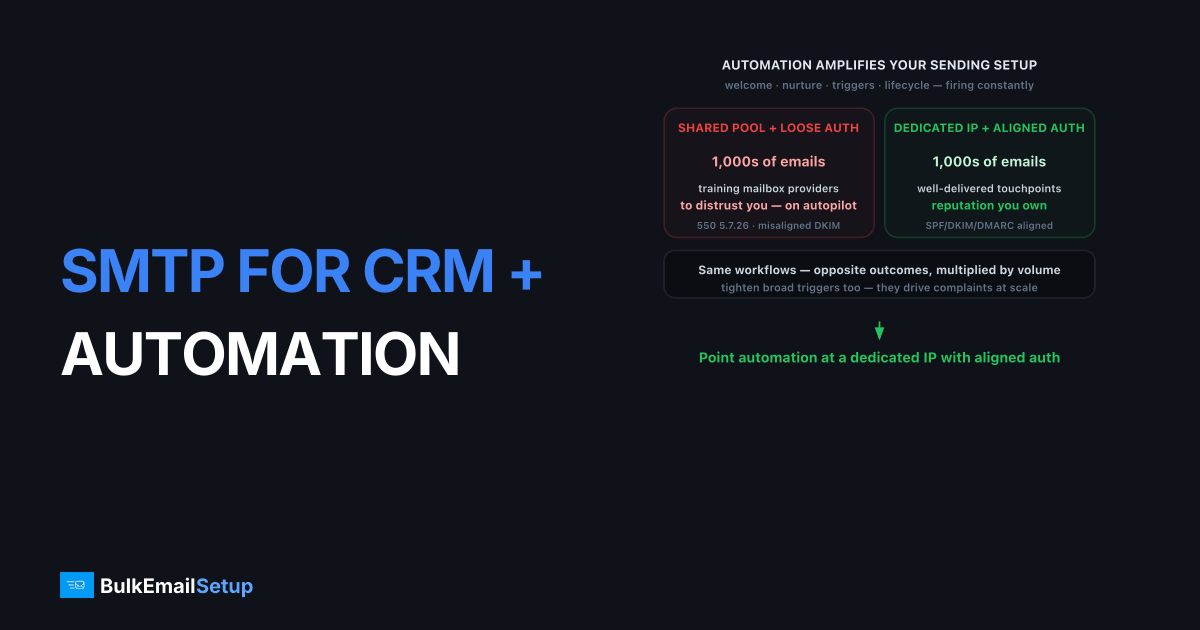
An SMTP server for CRM and marketing automation connects your automation platform to a dedicated IP you control, so the thousands of triggered emails your workflows generate get authenticated, paced, and delivered instead of dumped in spam. CRMs and automation tools fire emails constantly: welcome sequences, lead nurturing, behavioral triggers, lifecycle campaigns. Sent through a shared default pool with loose authentication, much of that lands in spam, and your automation quietly underperforms. Pointing the platform at a dedicated SMTP server with SPF, DKIM, and DMARC fixes the sending foundation your workflows depend on.
Automation amplifies whatever your sending setup does. Good infrastructure means thousands of well-delivered touchpoints. Bad infrastructure means thousands of emails training mailbox providers to distrust you, on autopilot.
Why automation email lands in spam
Marketing automation email lands in spam for three compounding reasons: shared default pools, weak authentication, and over-broad triggers. Automation platforms often send through a shared pool you do not control, so you inherit other senders' reputation. If your SPF or DKIM is misaligned, every triggered email fails authentication. And broad workflows that email everyone constantly drive complaints past the 0.3% ceiling Gmail's bulk sender guidelines enforce.
The failure pattern:
- Shared pool, no control. Your nurture sequence shares an IP with strangers, including any spammers in the pool.
- Misaligned authentication. The platform sends from your domain but signs with its own DKIM, breaking alignment and triggering
550 5.7.26. - Trigger sprawl. A workflow that fires at every contact, engaged or not, generates complaints automation makes worse at scale.
- No stream separation. Transactional CRM mail and bulk nurture share one reputation.
Routing through a dedicated IP with aligned SPF, DKIM, and DMARC and DMARC alignment done right fixes the authentication half. Tighter triggers fix the behavioral half.
Shared platform sending vs dedicated SMTP
Most CRMs default to shared sending. Here is why pointing them at a dedicated SMTP server changes results.
| Factor | Platform default pool | Dedicated SMTP server |
|---|---|---|
| Reputation | Shared with others | Yours alone |
| DKIM alignment | Often platform's domain | Your domain, aligned |
| Blocklist risk | Inherited | Your sending only |
| Throughput | Plan-tier capped | Your IP's capacity |
| Cost model | Per-contact or per-email | Flat monthly |
| Stream separation | Limited | Full control |
| Visibility | Platform dashboard | Full SMTP logs |
For automation running steady daily volume, the dedicated IP versus shared IP decision usually favors dedicated, because consistent automation traffic builds reputation well on an IP you own.
How to connect your CRM to dedicated SMTP
Connecting a CRM to dedicated SMTP takes a custom SMTP configuration, aligned authentication, and trigger discipline. The connection is quick; alignment and trigger scoping are what determine whether the automation actually lands.
Configure custom SMTP in your platform
Most CRMs and automation tools have a custom SMTP setting. Enter your host, port 587 with STARTTLS, and credentials. Send a test workflow email to confirm the path. This routes every triggered and broadcast email through your dedicated IP instead of the platform's shared pool.
Align authentication to your domain
The critical step is DKIM alignment. Your emails must be signed with a DKIM key on your own domain, not the platform's, so SPF and DKIM align with your From address under DMARC. Misalignment is the top reason authenticated-looking automation still hits spam. The DMARC alignment guide explains exactly what to check.
Scope your triggers tightly
Limit workflows to engaged contacts and suppress people who have stopped opening. Automation that emails everyone forever is the fastest way to drive complaints past 0.3%. Following email sending frequency best practices inside your workflows protects the reputation that delivers them.
Where to find the SMTP setting in common platforms
Most CRM and automation platforms hide custom SMTP under sending, delivery, or email-integration settings, and the field names vary but the inputs are always the same: host, port, username, password, encryption. You enter your dedicated server's details, save, and send a test before pointing real workflows at it. The exact menu differs by tool, the values do not.
- HubSpot, ActiveCampaign, Mautic, and similar. Look under email or sending settings for a custom SMTP or external SMTP option. Enter host, port 587, STARTTLS, and credentials.
- Self-hosted automation (Mautic, n8n, custom builds). Set the SMTP transport in the mailer config directly, the same host and port-587 values.
- Encryption. Choose STARTTLS for port 587, or implicit TLS for 465. Use 2525 only as a fallback when a host blocks 587.
After saving, fire a single test workflow to a seed inbox and inspect the headers. Confirm SPF passes, DKIM verifies on your domain, and DMARC aligns. If the DKIM d= tag shows the platform's domain instead of yours, alignment is broken and you'll keep landing in spam until you fix it. The pattern we see most often on CRM migrations: SPF and DKIM both pass in isolation, the headers look healthy, yet DMARC reads dkim=pass (d=sendingplatform.com) against a From of yourdomain.com, so alignment fails and Gmail quietly files the nurture stream in spam. Check the d= value, not just the pass/fail, before you point real workflows at it.
Common automation email mistakes
The errors that sink automation deliverability are usually about trigger design and alignment, not the SMTP connection, which is the easy part. Teams that scope triggers tightly and align DKIM to their own domain rarely see automation in spam. The recurring traps compound quietly because automation runs on its own.
- Triggers that fire at everyone. A workflow emailing every contact, engaged or not, drives complaints past 0.3%. Scope to engaged segments.
- DKIM signed by the platform. If mail signs with the vendor's domain, DMARC alignment fails. Configure DKIM on your own domain.
- No suppression of quiet contacts. Automation keeps mailing dormant users forever unless you tell it to stop. Suppress after 60-90 days of no engagement.
- Mixing transactional and nurture on one stream. A nurture complaint spike shouldn't delay a password reset. Separate the streams.
Keeping automation reputation healthy
Healthy automation reputation depends on consistent volume, clean lists, and warm-up before scale, because automation runs continuously and any reputation problem compounds. A new dedicated IP needs warming from roughly 50 to 100 emails a day over four to six weeks before you point full automation volume at it, following an IP warm-up schedule.
Automation's steady, all-day sending pattern is actually an advantage. Mailbox providers reward predictable volume, and a well-scoped automation engine produces exactly that. The danger is not the pace; it is letting workflows fire at disengaged contacts who complain or never open, which trains providers to distrust the whole stream.
We are honest about the boundary: dedicated SMTP gives you an owned, authenticated, well-paced sending foundation. Whether your automation converts and lands still depends on how you scope triggers, segment lists, and write copy. No infrastructure fixes a workflow that emails the wrong people.
How BulkEmailSetup helps
We provide a dedicated SMTP server with a dedicated IP you control, full SMTP access on ports 587, 465, and 2525, and SPF, DKIM, DMARC, and PTR configured so your automation signs and aligns to your own domain. It connects to any CRM with custom SMTP, and we handle warm-up. See plans on our pricing page.
Frequently asked questions
Can I connect my CRM to a dedicated SMTP server?
Yes. Most CRM and marketing automation platforms let you configure a custom SMTP server in their sending settings. You enter your host, port 587, and credentials, and the platform routes its automated emails through your dedicated IP instead of its shared default pool.
Why do marketing automation emails go to spam?
Usually because they send through a shared default pool, lack aligned authentication, or trigger high complaint rates from broad automation rules. Routing through a dedicated, authenticated IP and tightening your automation triggers so they only fire on engaged contacts both improve placement significantly.
Does marketing automation need a dedicated IP?
Once your combined automated and broadcast volume exceeds roughly 50,000 emails a month sent consistently, a dedicated IP usually helps. Automation tends to send steadily throughout the day, which is a good pattern for building stable IP reputation over time.
How do I keep automation from triggering spam complaints?
Scope your triggers to engaged contacts, suppress people who have gone quiet, and avoid firing the same workflow repeatedly at the same person. Broad automation that emails everyone constantly drives complaints past the 0.3% ceiling Gmail and Yahoo enforce. Tight triggers protect your reputation.


