
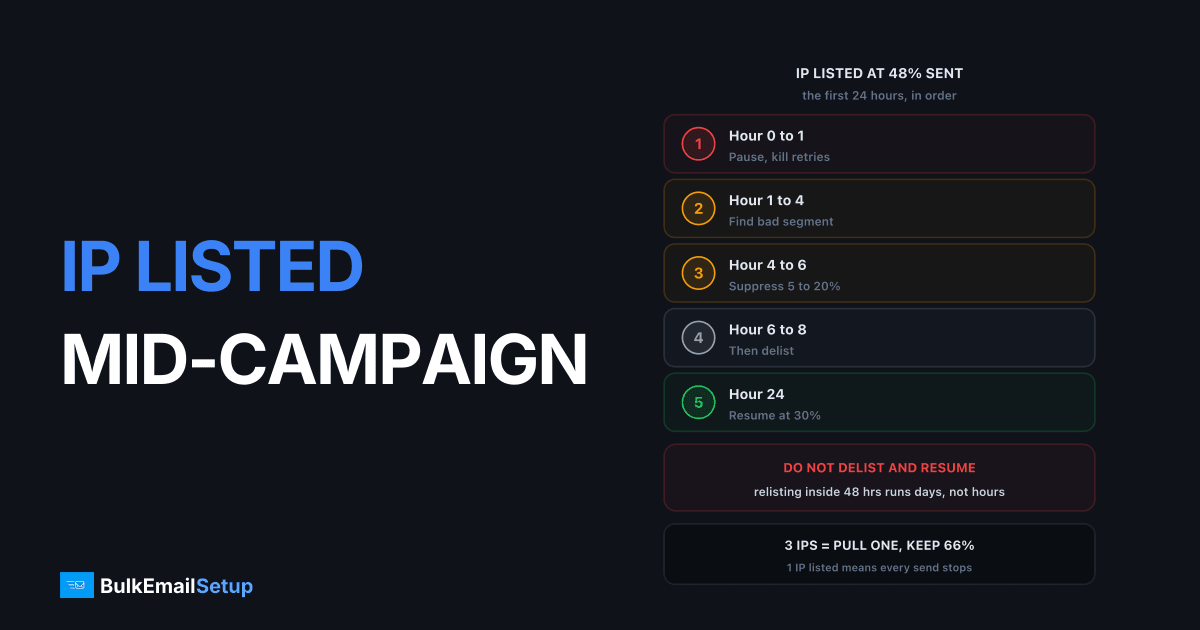
When your IP gets blacklisted during a campaign, pause the queue within 5 minutes, disable retries, and read the bounce text to identify which list hit you, because Spamhaus SBL or CSS means Gmail and Microsoft are rejecting outright while UCEPROTECT Level 1 barely dents delivery. Do not delist and resume the same queue: a repeat listing inside 48 hours runs far longer, and the cause is almost always still in your unsent half. Fix first, delist second, finish third.
The first 15 minutes when your IP is blacklisted during a campaign
Stop everything and gather evidence. Nothing else.
- Pause the queue. In Postfix that is
postsuper -h ALL. In Mautic, Interspire or Mailwizz, pause the campaign, then confirm the MTA queue is actually holding and not just the app. - Disable retries. Set the retry interval on deferrals to hold rather than resend. Every retry is another logged rejection at the receiver, and repeated hits keep a Spamhaus CSS listing alive.
- Copy 10 bounce lines. The exact wording, including the URL the receiver quotes. The URL names the list.
- Note the numbers. Sent so far, remaining, time of first rejection. You will need the timestamp to find the segment that caused it.
- Run a direct lookup. Check the IP at Spamhaus and the Barracuda and UCEPROTECT lookup pages. A Gmail 421 can be throttling with no listing at all.
Do not email support yet. Do not touch DNS. Do not swap IPs.
Reading the bounce text to identify the list
The rejection line usually names the list. Match it here.
| Bounce wording | List | Who rejects | Severity |
|---|---|---|---|
550 5.7.1 ... blocked using zen.spamhaus.org with SBL reference | Spamhaus SBL | Gmail, Microsoft, most gateways | Critical, manual removal |
... listed in Spamhaus CSS or css.spamhaus.org | Spamhaus CSS | Same as SBL | High, self-service, relists fast |
... xbl.spamhaus.org or cbl.abuseat.org | Spamhaus XBL | Most gateways | Critical, means compromise |
554 ... b.barracudacentral.org | Barracuda BRBL | Corporate gateways, some ISPs | Medium, form removal |
550 ... dnsbl-1.uceprotect.net | UCEPROTECT L1 | Small share of receivers | Low, expires in 7 days |
550 ... dnsbl-2/3.uceprotect.net | UCEPROTECT L2/L3 | Small share | Low, your neighbours, not you |
550 5.7.1 ... S(3140) or Unfortunately, messages from [IP] weren't sent | Microsoft internal | Outlook, Hotmail, Live only | Medium, Microsoft form |
... bl.spamcop.net | SpamCop | Some ISPs and hosts | Low, auto-expires in 24 hrs |
421 4.7.0 ... unusual rate of unsolicited mail | none, Gmail throttle | Gmail | Not a listing, slow down |
Severity is a function of who queries the list. Spamhaus is queried by nearly every large receiver, so an SBL or CSS listing takes 80 to 95% of your deliveries with it. UCEPROTECT Level 1 usually costs under 5% of a consumer list. The per-list fix is in how to get delisted, the Spamhaus CSS guide, the UCEPROTECT guide, and the Microsoft S3140 fix. This article is about the campaign.
What to do with the unsent half
Hold it. Decide once you know the cause.
| Option | When it is right | When it is wrong | Delivery to expect |
|---|---|---|---|
| Hold the queue 24 to 72 hours | Default. Cause unknown, or listing is Spamhaus | Time-critical send (event tomorrow) | Full, once delisted and the bad segment is gone |
| Move to a second warmed dedicated IP | Cause found and suppressed, second IP already warm | Cause not found yet, or second IP is cold | 60 to 70% of that IP's normal daily rate |
| Finish on a shared relay (SES, SendGrid, Postmark) | Transactional or time-critical and cause found | Marketing to a list you have not cleaned | Normal, but you have now exported your problem |
The mistake that turns one listing into two is option two or three with the cause still in the queue. The trap addresses that got IP one listed will get IP two listed by evening, and SendGrid will suspend you for the same traffic. Move the queue after the segment is gone, never before.
The first 24 hours, hour by hour
| Hour | Action | What you are looking for |
|---|---|---|
| 0 to 0.25 | Pause queue, kill retries, copy bounces, direct lookups | Which list, when it started |
| 0.25 to 1 | Pull the sent log, sort by hour, find the first rejection timestamp | The batch or segment that was sending at that moment |
| 1 to 3 | Compare the segment before and after the timestamp: source, age, last engagement | A list source or age band that stands out |
| 3 to 4 | Suppress that segment across every list, export it as a file | Typically 5 to 20% of the list |
| 4 to 5 | Check Postmaster Tools domain reputation and complaint rate for yesterday | Whether the domain took damage too |
| 5 to 6 | Decide: hold, second IP, or relay | Based on the cause and the deadline |
| 6 to 8 | Submit delisting requests, one per list, cause fixed and stated | A ticket or removal confirmation |
| 8 to 24 | Do not send from the listed IP. Send transactional from another IP or relay | Removal confirmation email |
| 24 | Re-check every list. If clear, resume at 30% of normal rate on that IP | Deferral rate under 2% in the first hour |
Most operators want to pull the hour 6 delisting into hour 1. Resist it. CSS removals clear in about an hour, which is exactly why people relist themselves the same afternoon.
Why you should not delist and resume immediately
Because the second listing is longer, and the cause is still in the queue. A CSS entry that returns inside 48 hours of removal gets flagged as a persistent source and the expiry stretches from hours into days. Barracuda stops accepting removal requests from IPs that keep coming back. UCEPROTECT's Level 1 timer resets to a fresh 7 days on every hit.
A 100,000 recipient campaign stalled at 48,000:
| Path | Day 1 | Day 2 | Day 3 | Result |
|---|---|---|---|---|
| Delist at hour 1, resume at hour 2 | Relisted by hour 6 | Second removal refused or delayed | Still listed | 52,000 unsent, IP damaged for weeks |
| Hold, find cause, delist at hour 6, resume at hour 24 | Listed, investigating | Clean, 30% rate | Clean, 60% rate | 52,000 sent over days 2 to 4 |
Losing a day hurts. Losing the IP for three weeks hurts more.
Finding the cause in the sent half
The cause is nearly always visible in the 48,000 that went out, and the first rejection timestamp points at it. Three causes cover almost every case:
Spam trap hits. Spamhaus SBL and CSS are trap-driven. If the first rejection lands 20 minutes into a send that runs in list order, the addresses in that window are the suspects. Recycled traps are old addresses the ISP converted after 6 to 12 months of inactivity, so a "reactivation" segment is the classic culprit.
A complaint spike. Check the feedback loop and Postmaster Tools. Google's sender guidelines set 0.3% as the hard line and 0.1% as the target. A segment pulling 0.5% complaints will not show as a Spamhaus listing but will trigger Microsoft S3140 and Gmail throttling. Same fix: find the segment, suppress it.
A bad import. A partner CSV, a trade show scan, a form with no confirmation. These arrive as one block and get you listed as one block. Sort the sent log by list source; anything over 5% hard bounces is it.
Suppress it everywhere, then run it through a list cleaning pass to catch the traps you cannot see by eye.
The multi-IP advantage
With 3 dedicated IPs, a listing on one is a 33% capacity cut. Pull the listed IP out of rotation, keep the other 2 sending to clean segments, and investigate calmly. With a single IP, listed means every campaign and every password reset is stuck until it clears.
| Setup | Listing on one IP | Sending continues at | Transactional mail |
|---|---|---|---|
| 1 dedicated IP | Full stop | 0% | Stopped, or moved to a relay in a hurry |
| 3 dedicated IPs | Pull 1 | 66% | Continues on a separate IP |
| 5 dedicated IPs, transactional isolated | Pull 1 | 80% | Unaffected |
| Shared pool (SendGrid, Mailgun) | You did not cause it, it still stops you | 0% until the provider rotates the pool | Also stuck |
On a shared pool you inherit the listing and cannot pull the IP at all, which is the case for dedicated over shared above 20,000 a day. For sizing, see do I need a dedicated IP or shared.
What the incident costs
For a 100,000 recipient campaign stalled at half, single IP, Spamhaus CSS listing handled correctly.
| Line item | Typical cost |
|---|---|
| Delisting fees | $0, no reputable list charges |
| Sending downtime | 1 to 3 days |
| Staff time, investigation and cleanup | 10 to 20 hours |
| Unsent half, revenue delayed 2 to 4 days | your normal per-campaign revenue, held |
| Second IP or relay to keep transactional moving | $10 to $90 for the month |
| If mishandled: relisted, re-warm needed | 2 to 4 weeks at 30 to 60% volume |
| If the domain took damage too | 2 to 6 weeks of Postmaster Low reputation |
The last two rows are where the real money goes, and both are avoidable.
The 7-day recovery plan
Day 1. The hour-by-hour table above. Queue held, cause found, segment suppressed, delisting submitted, transactional moved.
Day 2. Confirm removal at every list, not only the one you noticed. Resume at 30% of normal rate, engaged recipients only (opened or clicked in 90 days). Above 2% deferred means stop again.
Day 3. Rate to 60% if day 2 was clean. Finish the unsent half from the cleaned queue, engaged-first. Postmaster Tools domain and IP reputation should both be Medium or better.
Day 4 to 5. Back to 100%. Run a blocklist check every morning; a returning CSS listing here means a trap address survived the cleanup.
Day 6 to 7. Post-mortem. Write down the source of the bad segment, who imported it, and the rule that stops a repeat. Add per-IP monitoring using how to monitor deliverability.
If domain reputation dropped to Low as well, stretch this to 3 weeks.
Prevention checklist
Each item is a few hours of setup.
- Per-IP blocklist monitoring, hourly. A cron job running
digagainst zen.spamhaus.org, b.barracudacentral.org and dnsbl-1.uceprotect.net per IP, alerting on any answer. Catches a listing in 60 minutes rather than at 48% sent. - List check before every send. Same lookup as a pre-flight step. Listed means the send does not start.
- Segment-first sends. Most engaged 20% first, wait 30 minutes, read bounces and complaints, then release the rest.
- New imports go out alone. Any list under 30 days old is its own campaign, on its own IP if you have three.
- Retry policy set to hold on 5.7.x. A blocklist rejection parks the queue, never retries.
- Transactional on its own IP. Receipts never share an IP with marketing.
- Complaint rate per segment. A 0.05% campaign average can hide a 0.6% segment.
How BulkEmailSetup helps
We build dedicated SMTP infrastructure you own, with 3 dedicated IPs from the entry plan so that one listing is a 33% capacity cut and not a stopped business. Every setup ships with per-IP blocklist monitoring, a retry policy that parks the queue on a blocklist rejection, and transactional mail isolated from marketing. If a listing happens, we handle the delisting and the resume schedule.
Basic is $549 one-time, covering 1 SMTP server, 3 dedicated IPs, 25,000 emails/day and unlimited contacts. Higher tiers scale to 15 IPs and 200,000 emails/day. See pricing, or read dedicated IP vs shared IP for why the shared pool version of this incident has no playbook at all.
Frequently asked questions
What should I do first when my IP gets blacklisted during a campaign?
Pause the queue and turn off retries within the first 5 minutes. Every retry against a listed IP is a fresh rejection logged by the receiver, and Spamhaus CSS listings in particular extend when the IP keeps pushing mail. Then read the bounce text, because the wording names the list, and the list tells you how bad it is.
Which blacklist is the worst to be on mid-campaign?
Spamhaus SBL and CSS, because Gmail, Microsoft and most corporate gateways query Spamhaus and reject outright with a 550. A Barracuda listing costs you mostly corporate mail. UCEPROTECT Level 1 is used by a small share of receivers and expires on its own 7 days after the last hit. Microsoft S3140 only affects Outlook and Hotmail addresses.
Should I delist and finish the campaign right away?
No. Delisting takes 1 to 24 hours, but if the same segment that caused the listing is still in your queue, you get relisted within hours. Spamhaus treats a repeat listing inside 48 hours as a persistent source and the second term runs days rather than hours. Find the bad segment first, suppress it, then delist.
Can I finish the unsent half on a different IP?
Only after you have removed the cause. Moving the same queue to a clean IP with the spam trap addresses still in it burns the second IP too, and now you have two listings. Once the bad segment is suppressed, finishing on a second warmed IP at 60 to 70% of its normal rate is reasonable.
How much does a mid-campaign blacklisting cost?
For a 100,000 recipient send that stalls at 50% you typically lose 2 to 3 days of sending, 10 to 20 hours of staff time, and the revenue from the unsent half. A worse listing that needs a re-warm adds 2 to 4 weeks at reduced volume. The direct delisting cost is zero, since no reputable list charges.
How do multiple dedicated IPs help when one gets listed?
With 3 dedicated IPs you pull the listed one out of rotation and keep sending on the other 2 at about 66% capacity while you investigate. With a single IP, listed means stopped. This is the main practical reason we set up 3 IPs on our entry plan rather than 1.


