
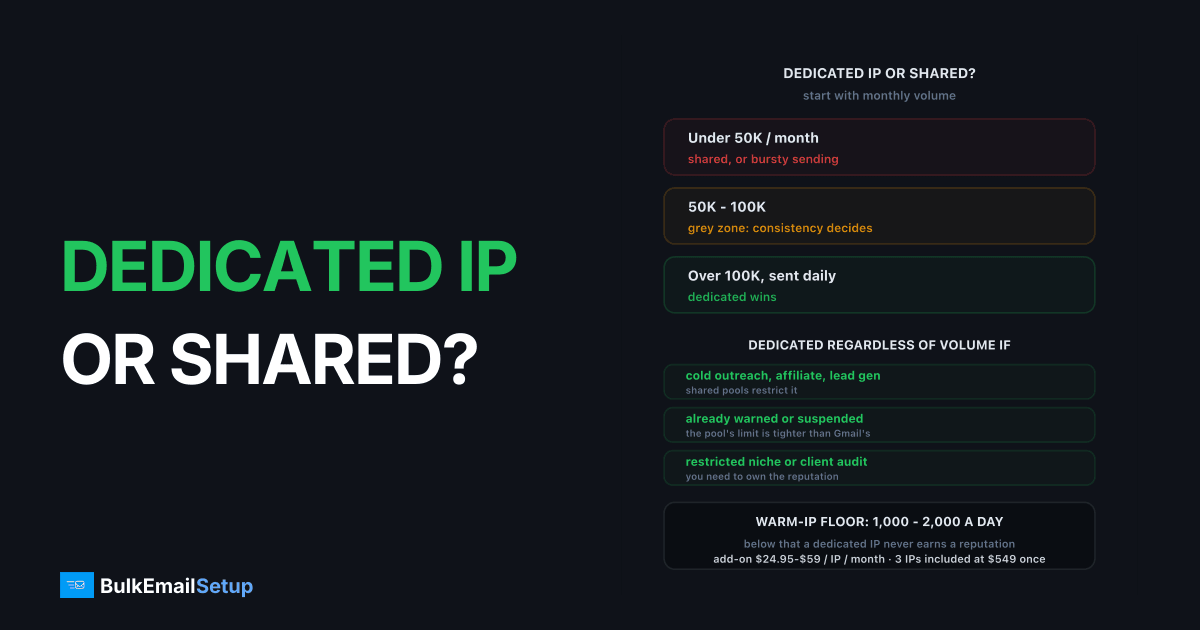
Under roughly 50,000 emails a month, or with bursty sending, a shared IP is the better choice. Over roughly 100,000 a month sent consistently, or for any use case shared pools restrict, a dedicated IP wins. Between 50,000 and 100,000 is the grey zone, and there the deciding factor is consistency, not volume. That is the whole rule. The rest of this article is the decision table, the warm-IP floor, what each option costs over 12 months, and a checklist to run before you pay for anything.
I'm not going to re-explain what an IP reputation is. Dedicated IP vs shared IP covers the mechanics. This one is the decision.
The decision table for dedicated IP or shared IP
Four inputs decide it. Run your own numbers down each row and count the answers.
| Factor | Points to shared | Points to dedicated |
|---|---|---|
| Monthly volume | under 50,000 | over 100,000 |
| Consistency | one blast a month, then silence | sending 4 or more days a week |
| Use case | newsletters, receipts, SaaS notifications | cold outreach, affiliate, lead gen, agency sending for clients |
| Compliance need | none beyond CAN-SPAM and GDPR | restricted niche, or a client who audits infrastructure |
| Tolerance for provider policy | happy to live inside the ESP's rules | been warned or suspended once already |
| Team | nobody owns deliverability | someone checks Postmaster Tools weekly |
Three or more answers in the right-hand column and you need dedicated. Three or more in the left and shared is fine, and buying a dedicated IP would make delivery worse, not better. A split means you are in the grey zone, and the tiebreaker is the next section.
The warm-IP minimum most people skip
A dedicated IP needs roughly 1,000 to 2,000 emails a day, sent most days, to hold a reputation at all. That is the floor, and it is the reason low-volume senders regret buying one.
Gmail scores IPs on traffic it has seen. Send 300 a day from a fresh IP and Google Postmaster Tools shows no reputation line for it, because there is not enough data to draw one. "Unknown" is not neutral. Mail from an IP with no track record gets more scrutiny than mail from a busy shared pool that Gmail has watched for years.
Consistency matters as much as the daily number. An IP that sends 30,000 on the first of the month and nothing for three weeks decays between sends. In practice a two-week gap means partial re-warming, so the bursty sender is permanently half-warm. Steady 1,500 a day beats 45,000 once a month, even though the monthly total is the same.
Warm-up itself is 4 to 8 weeks per IP. How long IP warm-up takes has the day-by-day ramp. If you cannot commit to that ramp and then keep the IP busy afterwards, stay on shared.
What a dedicated IP costs as an add-on vs owning it
Add-on IPs are cheap on the sticker and gated behind a plan tier. Owned IPs are a one-time cost. Here is what one year looks like.
| Provider | IP cost per month | Plan gate | 12-month IP cost | 12-month with plan gate |
|---|---|---|---|---|
| Amazon SES | $24.95 per IP | none, pay per email on top | $299 | $299 plus $0.10 per 1,000 sent |
| SendGrid | ~$30 per IP | Pro plan, ~$90/month | $360 | ~$1,440 |
| Mailgun | $59 per IP | Foundation, ~$35/month | $708 | ~$1,128 |
| Postmark | $50 per IP | needs 300,000/month volume | $600 | $600 plus plan |
| BulkEmailSetup Basic | included, 3 IPs | $549 one-time server | $0 recurring | $549 total, year 2 is $0 |
Amazon publishes the $24.95 figure on its SES pricing page, and it is the cheapest rental on the list. It also hands you the warm-up with no tooling, so the price you save on the IP you spend on your own time.
Two things stand out. First, the plan gate is the real cost on SendGrid and Mailgun. A $30 IP that forces a $90 plan is a $120 IP.
Second, the break-even against owning is under a year on every line. Three add-on IPs on SendGrid run about $1,080 a year before the Pro plan. Three owned IPs are $549 once. Is a dedicated IP worth $30 a month runs the same math from the ESP side if you want the longer version.
The shared pool policy tax
On a shared IP you are judged against the provider's internal limit, not Gmail's. This is the cost that never appears on a pricing page.
Gmail's published line is a 0.3% spam complaint rate, with 0.1% as the target, per the bulk sender guidelines. SendGrid, Mailgun and Postmark all act well below 0.3%, because your complaints land on IPs their other customers depend on. The exact trigger is not published and it moves. A campaign that is fine by Gmail's standard can still get you paused.
The same logic drives use-case bans. Cold outreach, affiliate offers, and several niches are not illegal, but they raise complaint rates for everyone on the pool, so the provider bans them outright. On a dedicated IP that objection disappears. The only reputation at risk is yours, and the only limit that applies is Gmail's 0.3%. That does not remove the law or the receiver's rules. It removes the provider sitting between you and them.
If you have been warned once, count that as a right-column answer in the decision table. Providers rarely warn twice.
How many IPs for your volume
One dedicated IP is almost never the right number. Plan on 1 IP per 25,000 to 50,000 emails a day, and never fewer than 2.
| Daily volume | IPs to run | Why that number |
|---|---|---|
| 1,000 to 10,000 | 2 | one carries the load, one is warm as a spare |
| 10,000 to 50,000 | 2 to 3 | rotation plus failover if one gets listed |
| 50,000 to 100,000 | 3 to 4 | stays inside per-IP hourly limits at Gmail and Microsoft |
| 100,000 to 200,000 | 5 to 8 | one blocklisting costs you 15% of capacity, not 100% |
The second IP is failover, not throughput. If a single IP lands on a blocklist you want to shift traffic in minutes, not wait 24 to 72 hours for a delisting while nothing goes out. The trap runs the other way too: buying 6 IPs for 10,000 a day leaves each one under the 1,000 a day floor, and none of them ever warms. Per-IP ceilings by receiver are in how many emails per day per IP.
The hybrid answer
Most senders over 100,000 a month should run both. Transactional on shared, marketing on dedicated.
Receipts, password resets and account alerts rarely reach 1,000 a day on their own, and they are the mail you can least afford to have deferred. A shared transactional pool at Postmark or SES is always warm and has a clean history. Marketing volume is where complaints come from, and it should never share an IP with the mail that logs your customers in.
The split also keeps the decision honest. If your marketing stream alone cannot hit the warm-IP floor, you did not need a dedicated IP for it either, and shared is fine for the whole lot.
Signs you should switch
Any one of these means the shared pool is now setting your delivery, and the decision is made for you.
- Deferrals you did not cause. 421 or 451 responses from Gmail or Microsoft on a campaign with under 0.1% complaints. Someone else on the pool did that.
- A provider warning or suspension over a use case you consider legitimate. The appeal will not change the policy.
- IP reputation that swings in Postmaster Tools with no change on your side.
- A restricted niche. Crypto, gambling, CBD, forex, loans, dating. Shared pools ban most of these regardless of your compliance, and you still need the licences, age gates and suppression lists on dedicated infrastructure.
- Volume passing 100,000 a month for three months running. At that point the per-email price is working against you as well.
Checklist before you buy
Run this in order. Stop at the first no.
- Do you send 1,000 or more a day, at least 4 days a week? No means shared.
- Have you sent at that rate for 3 months? No means wait, unless a policy conflict forces the move.
- Can you commit to a 4 to 8 week warm-up per IP? No means shared, or buy pre-warmed.
- Is your complaint rate under 0.1% and bounce rate under 2% right now? No means fix the list first. A dedicated IP isolates you with your own problem.
- Are SPF, DKIM and DMARC published and passing? No means fix that first. It is free and it moves the needle more than any IP.
- Do you need 2 or more IPs for failover? Yes, always. Price for that, not for one.
- At 12 months, is renting cheaper than owning? Add the plan gate. On SendGrid and Mailgun the answer is usually no.
Seven yeses and you need a dedicated IP. The setup guide for running your own is at dedicated IP for email sending.
How BulkEmailSetup helps
We build dedicated SMTP infrastructure you own: your own server, your own IPs, full SPF/DKIM/DMARC/PTR configuration, MTA tuning, bounce handling and a warm-up plan. Because the IPs are yours alone, there is no shared pool to protect and no provider limit sitting below Gmail's, so the only thresholds you are judged against are the published ones.
Basic is $549 one-time, covering 1 SMTP server, 3 dedicated IPs, 25,000 emails/day and unlimited contacts. Higher tiers scale to 15 IPs and 200,000 emails/day. See pricing, and if you are still weighing the ESP route, what 100,000 emails a month costs runs the numbers side by side.
Frequently asked questions
Do I need a dedicated IP or is shared fine?
Under about 50,000 emails a month, or if your sending is bursty, shared is better because the pool stays warm from other senders' traffic. Over about 100,000 a month sent every week, or for any use case shared pools restrict such as cold outreach or affiliate offers, dedicated wins. Between 50,000 and 100,000 it depends on how steady your volume is.
What is the minimum volume to keep a dedicated IP warm?
Roughly 1,000 to 2,000 emails a day, sent most days. Below that Gmail does not see enough traffic to score the IP, and Postmaster Tools shows it as having no reputation at all. An IP that goes quiet for two weeks partly resets and needs re-warming before you can push volume again.
How much does a dedicated IP cost per month?
As an add-on, roughly $25 to $60 per IP per month: Amazon SES charges $24.95, SendGrid about $30 on top of a Pro plan, Postmark $50, and Mailgun $59 on Foundation tiers. Owning them is a one-time cost. A $549 dedicated SMTP server from BulkEmailSetup includes 3 dedicated IPs with no monthly IP fee.
How many dedicated IPs do I need?
Plan on 1 IP per 25,000 to 50,000 emails a day, and at least 2 to 3 total for failover and rotation. At 100,000 a day that is 3 to 4 IPs. More IPs than your volume can keep warm is a mistake, because each one then sits under the 1,000 a day floor and never builds reputation.
Can I use shared and dedicated IPs at the same time?
Yes, and it is often the right setup. Keep low-volume transactional mail such as receipts and password resets on a shared pool, and put marketing volume on dedicated IPs. Transactional mail rarely reaches the 1,000 a day floor on its own, and marketing complaints should never touch the IP that delivers your receipts.
What are the signs I should move off a shared IP?
Deferrals at Gmail or Microsoft that you did not cause, a provider warning or suspension over a use case you consider legitimate, or a Postmaster Tools IP reputation that swings without any change on your side. Any one of these means another sender on the pool is setting your delivery, and that is the moment to take the IP in-house.


