
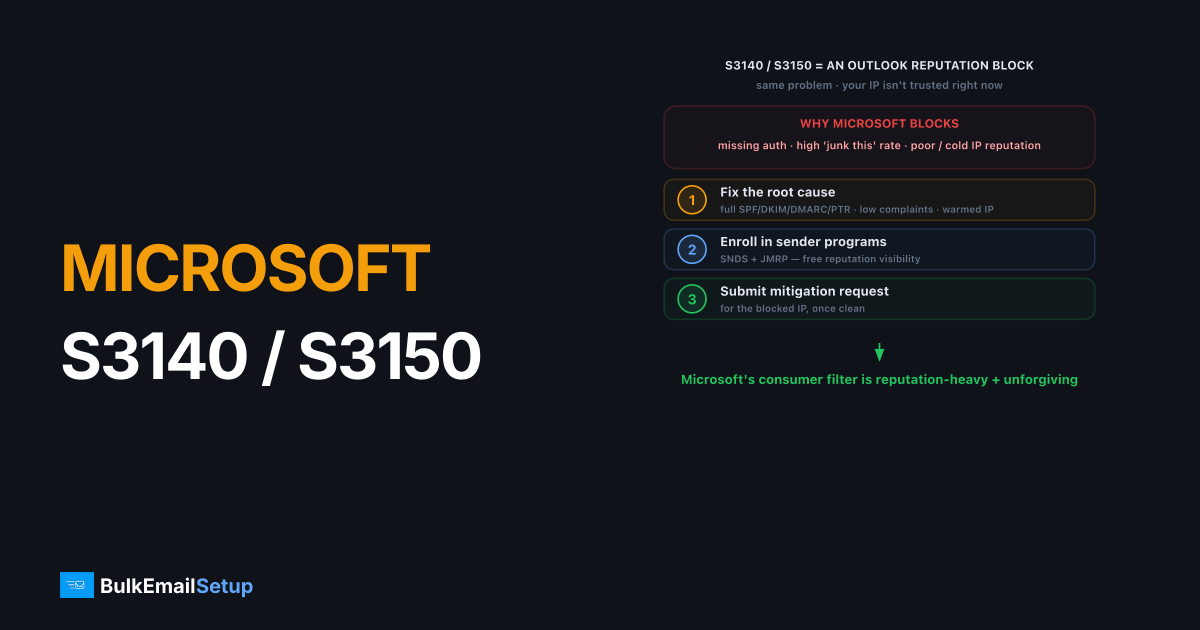
Microsoft S3140 and S3150 errors are block codes returned by Outlook and Hotmail (outlook.com, hotmail.com, live.com) when your sending IP's reputation or policy compliance trips their filter. The message is rejected. These codes point to authentication gaps, reputation problems, or sending behavior Microsoft doesn't trust. The fix is to correct the root cause (full SPF, DKIM, DMARC, PTR, low complaints, a warmed IP), enroll in Microsoft's sender programs, then submit a mitigation request for the blocked IP.
What do S3140 and S3150 mean?
S3140 and S3150 are internal Microsoft block codes that appear in rejection messages from Outlook and Hotmail's filtering system. They mean the receiving server refused your mail because your sending IP failed a reputation or policy check. The rejection usually arrives as a 5.7.x SMTP error containing the S31xx code and a link to Microsoft's support page.
For senders, the two codes are effectively the same problem. Both live in the same block family and signal that your IP isn't trusted enough to deliver to Microsoft consumer mailboxes right now. The distinction between them is internal to Microsoft's classification. Your job is the same either way: fix reputation and policy, then ask for mitigation. For related Microsoft blocking, see Outlook 550 5.7.606 banned IP.
Why is Microsoft blocking my IP?
Microsoft's consumer filtering is reputation-heavy and unforgiving of weak setup. These are the usual triggers.
| Cause | Why Microsoft blocks |
|---|---|
| Missing or failing authentication | No SPF, DKIM, DMARC, or PTR reads as untrusted |
| High complaint rate | Outlook's "junk this" rate is a major signal |
| Poor IP reputation | New, cold, or previously abused IP |
| No SNDS / JMRP enrollment | Microsoft trusts senders who use its programs |
| Bounce and spam-trap hits | Mailing dead or trap addresses |
| Volume spikes | Sudden bulk from an unproven IP |
Microsoft weighs IP reputation more heavily than most providers, and it offers fewer public signals than Google. The two tools that matter are SNDS (Smart Network Data Services) and JMRP (Junk Mail Reporting Program). Without them, you're sending blind. See our SNDS guide.
How do I read the S3140 / S3150 bounce?
The full rejection tells you more than the code alone. A typical S3140 bounce from Outlook looks like this:
550 5.7.1 Unfortunately, messages from [203.0.113.10] weren't sent.
Please contact your Internet service provider since part of their
network is on our block list (S3140).
Three things to pull from it: the IP in brackets (the sending IP that's blocked), the S31xx code, and the support URL Microsoft includes. S3140 and S3150 both mean a reputation or policy block, not a content filter, so rewriting your message body won't help. If you instead see 550 5.7.606 the problem is a hard IP ban with a different removal path, covered in the Outlook 550 5.7.606 banned IP fix.
Before you request anything, check SNDS for that IP. SNDS color-codes complaint rate and trap hits: green is fine, yellow and red explain why you're blocked. If SNDS shows red and you submit a mitigation request without fixing it, Microsoft will deny the request and you'll have burned a chance.
How do I fix a Microsoft S3140 / S3150 block?
Fix the cause, then request mitigation. Requesting mitigation without fixing anything gets denied.
- Verify all authentication. SPF, DKIM, DMARC, and a valid PTR for every sending IP. Microsoft rejects unauthenticated bulk hard. Use our authentication setup guide and PTR setup.
- Enroll in SNDS and JMRP. SNDS shows your IP's reputation and complaint data at Microsoft; JMRP feeds you Outlook junk complaints so you can suppress those recipients. Both build trust.
- Cut complaints and bounces. Remove unengaged recipients, honor unsubscribes instantly, and clean hard bounces. Microsoft watches the junk rate closely. See email list cleaning.
- Warm or re-warm the IP. If the IP is new or recently blocked, ramp volume gradually over a few weeks rather than resuming full blast.
- Submit a mitigation request. Use Microsoft's sender support / mitigation form, provide the blocked IP, and confirm you've completed authentication and enrolled in SNDS/JMRP.
- Meet the 2026 sender rules. Microsoft now enforces bulk-sender requirements similar to Gmail and Yahoo. See Microsoft Outlook sender requirements 2026.
How long does mitigation take and will it stick?
Microsoft usually responds to a mitigation request within a day or two. But mitigation is conditional, it only holds if you actually fixed the reputation or policy problem behind the block. If your complaint rate stays high or your IP keeps hitting traps, the block returns and repeat requests get denied. Treat mitigation as the last step after real cleanup, not a reset button. Monitor your standing in SNDS afterward so you catch a dip before it becomes another block.
In the S31xx mitigations we've filed, the single best predictor of success is the SNDS color at submission time. Green or a clean grey, and the block usually lifts inside 24 to 48 hours and stays gone. Submit while SNDS still shows red, and Microsoft's automated reply effectively says the data doesn't support removal, and you've spent one of your limited requests for nothing. We've watched senders burn two denials in a week this way before pausing the send, fixing the complaint source, and waiting for the color to recover. Fix first, then ask once.
If repeated Microsoft blocks are pushing you to leave a shared ESP pool, weigh the move in dedicated IP vs shared IP email. On a shared pool, another tenant's bad behavior can trigger an S31xx block you can't fix yourself.
How BulkEmailSetup helps
We provision a dedicated IP with SPF, DKIM, DMARC, and PTR set correctly, enroll it in Microsoft's sender programs, and run the warm-up, so S3140 and S3150 blocks are far less likely, and if one appears we handle the mitigation request from a genuinely clean baseline. See plans on our pricing page.
Frequently asked questions
What does Microsoft error S3140 mean?
S3140 is a Microsoft block code returned by Outlook and Hotmail (outlook.com, hotmail.com, live.com) when your sending IP's reputation or policy compliance triggers their filter. The message is rejected. It points to reputation, authentication, or volume problems on your sending IP.
What is the difference between S3140 and S3150?
Both are Microsoft block codes in the same family, returned when Outlook and Hotmail reject mail for reputation or policy reasons. The distinction is internal to Microsoft's filtering. For senders, the diagnosis and fix are effectively the same: clean up authentication, reputation, and sending behavior, then request mitigation.
How do I fix a Microsoft S3140 or S3150 block?
Set up SPF, DKIM, DMARC, and PTR correctly, enroll in SNDS and JMRP, lower your complaint and bounce rates, and warm your IP. Then submit a sender mitigation request through Microsoft's support form for the blocked IP.
How long does Microsoft mitigation take?
After you submit a mitigation request, Microsoft typically responds within a day or two. Mitigation only holds if you've fixed the underlying reputation or policy problem. If the bad behavior continues, the block returns and further requests are denied.


