
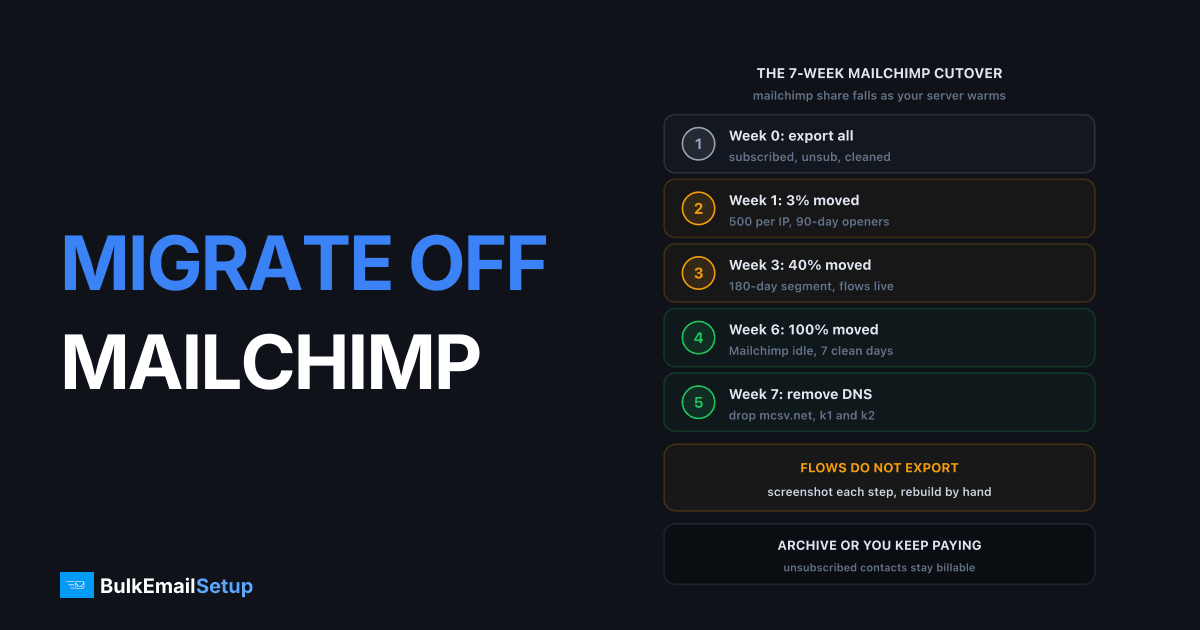
Migrating off Mailchimp to your own SMTP server takes about 7 weeks: 1 week to export the audience and stand up a replacement mailer, 6 weeks of parallel sending while new IPs warm from 500 emails per IP per day to full volume, then a DNS cleanup and downgrade. The part people underestimate is that Mailchimp is a builder and a sender in one box. You are replacing both. The sending side is the same runbook as any ESP exit. The builder side is a software choice, and getting it wrong costs more time than the warm-up does.
If the bill is what brought you here, Mailchimp bill keeps rising covers the why and the alternatives. If you have already decided on dedicated infrastructure, this is the how. The SendGrid version of this runbook is at migrating from SendGrid; the shape is the same, the Mailchimp specifics are not.
Week 0: export the audience, the suppressions and the flows
Export before you change anything, and export the segments separately. Mailchimp's single "export audience" button gives you a zip with one CSV per status, and people routinely keep only the subscribed file.
| Data | Where in Mailchimp | Why it matters on the new stack |
|---|---|---|
| Subscribed contacts | Audience > Export Audience, subscribed.csv | Your list, with tags and merge fields as columns |
| Unsubscribed contacts | Same zip, unsubscribed.csv | Legal suppression list under CAN-SPAM and GDPR, load before the first send |
| Cleaned contacts | Same zip, cleaned.csv | Hard bounces Mailchimp already removed, re-mailing them is a 5%+ bounce rate on day 1 |
| Non-subscribed contacts | Same zip, nonsubscribed.csv | Do not import as subscribers, they never opted in |
| Tags and merge fields | Columns in the subscribed CSV | Segmentation logic, check every custom field came through |
| Campaign reports | Reports > Export, per campaign, last 90 days | Engagement data for the warm-up segments |
| Templates | Campaigns > Email Templates > Export as HTML | Rebuild in the new mailer, merge tags need rewriting |
| Automation flows | Nothing exports, screenshot each step and write the logic down | You will rebuild these by hand |
The automation point catches everyone. Mailchimp's Customer Journeys do not export in any format another tool can read. Open each one, note the trigger, the delays, the conditions and which template each step sends, and put it in a document. A 5-step welcome flow takes 15 minutes to write up and half a day to rebuild. A 20-step abandoned-cart flow with branches is a day or two.
Merge fields are the second trap. *|FNAME|* is Mailchimp syntax and nothing else uses it. Mautic uses {contactfield=firstname}, MailWizz uses [FNAME], Sendy uses [Name]. Every template needs a find-and-replace and a test send before it goes near real volume.
Choosing the replacement mailer
Pick the mailer by which Mailchimp feature you actually use, not by which one is cheapest. All four below run on a VPS next to, or on, the SMTP server.
| Mailer | Cost | Automations | Editor | Hosting | Best fit |
|---|---|---|---|---|---|
| Mautic | Free, open source | Full visual builder, branches, lead scoring | Drag-and-drop | 2 vCPU, 4 GB RAM minimum, PHP and MySQL | Teams leaving Mailchimp Journeys |
| MailWizz | ~$89 one-time licence | Autoresponders and list-triggered sequences | Drag-and-drop | 1 vCPU, 2 GB RAM, PHP and MySQL | Newsletter senders who want a polished list manager |
| Sendy | $69 one-time licence | Autoresponders only, no branching | HTML paste, basic | Any PHP host, built around Amazon SES | Simple weekly sends, tiny budget |
| Listmonk | Free, open source | None built in, webhooks only | Markdown or raw HTML | Single Go binary plus PostgreSQL, under 512 MB RAM | Developers, very large lists, no marketing team |
Mautic is the one that replaces Mailchimp's Journeys properly. It is also the heaviest to run and the one that most needs someone to own updates. MailWizz is what I install for most newsletter operations because the list and campaign screens feel familiar to a Mailchimp user and the autoresponders cover a welcome series. Sendy is fine if your entire automation is "send the welcome email", and not otherwise. Listmonk sends a million messages faster than any of them but hands your marketing team a Markdown box.
Setup guides for the two I recommend are at MailWizz SMTP server setup and Mautic SMTP configuration. Whichever you choose, connect it to the SMTP server over port 587 with STARTTLS and confirm the bounce mailbox is wired up before importing anything.
DNS: add the new records first, remove Mailchimp's last
Mailchimp authenticates your domain with one SPF include and two DKIM CNAMEs. Both stay in place until the final Mailchimp campaign has gone out.
| Record | Week 0 action | Week 7 action |
|---|---|---|
| SPF | Add the new server's IPs as ip4: entries alongside include:servers.mcsv.net | Remove include:servers.mcsv.net |
| DKIM | Add a new selector such as mta1._domainkey with the server's public key | Remove the k1._domainkey and k2._domainkey CNAMEs pointing at dkim.mcsv.net and dkim2.mcsv.net |
| DMARC | Leave the policy alone during the run | Tighten only after 2 weeks of clean reports on the new path |
| PTR | Set reverse DNS on every new IP to the mail hostname | No change |
| Return-Path | Point the bounce subdomain at the new server | Nothing to remove, Mailchimp handled bounces on its own domain |
Use ip4: entries rather than a new include. include:servers.mcsv.net already costs a lookup, most domains sit at 7 or 8 of the 10 allowed, and a new include is how you land in SPF PERMERROR mid-migration. Pick a selector that is not k1 or k2, because a TXT record and a CNAME with the same name will fight and one of them stops resolving.
If you were at p=none on DMARC, stay there through week 7. If you were at p=reject, do a 50-message test batch from the new server to Gmail and Outlook seed addresses and check Show Original for dkim=pass and spf=pass before the parallel run starts. Set the PTR on all 3 IPs and verify each with dig -x, because Microsoft defers on a missing one and the failure only shows on a third of your traffic.
The 6-week parallel run
Both systems live, Mailchimp's share of each campaign falling, the new server's rising. Assumes 3 dedicated IPs and 50,000 contacts mailed 4 times a month, so roughly 200,000 sends a month.
| Week | Mailchimp share | New server share | What you are doing |
|---|---|---|---|
| 0 | 100% | 0% | Export, mailer install, DNS additions, template rebuild, 50-message seed test |
| 1 | 97% | 3% | 500 per IP per day to the 90-day engaged segment only |
| 2 | 85% | 15% | Ramp about 30% every 2 days, hold when 4xx deferrals pass 5% |
| 3 | 60% | 40% | Add the 180-day segment, first automations live on the new mailer |
| 4 | 20% | 80% | Full subscribed list minus 12-month non-openers, remaining flows moved |
| 5 | 5% | 95% | Only one campaign per week still on Mailchimp as a fallback |
| 6 | 0% | 100% | Mailchimp idle, archive unsubscribed and non-subscribed, watch for 7 clean days |
| 7 | downgrade | 100% | Remove Mailchimp DNS, downgrade to Free, keep the account for read-only access |
Split each campaign by segment, not at random. Week 1's 3% is your best openers, because their engagement is the signal Gmail uses to decide what the new IPs are. Sending 3% of a random slice of the list gives the IPs a worse first impression for no benefit.
The per-IP ramp
This is the same table the server operator works from. It assumes a domain with existing reputation from years on Mailchimp; a brand-new subdomain runs at about half these numbers.
| Day | Per IP per day | 3 IPs combined | Gmail share | Stop signal |
|---|---|---|---|---|
| 1 | 500 | 1,500 | under 40% | any 421 or 451 |
| 3 | 1,000 | 3,000 | under 40% | 4xx over 5% |
| 7 | 5,000 | 15,000 | under 50% | 4xx over 5% |
| 14 | 20,000 | 60,000 | natural mix | complaint over 0.1% |
| 21 | 35,000 | 105,000 | natural mix | complaint over 0.1% |
| 28 | full | full | natural mix | bounce over 2% |
A stop signal means hold at the current volume for 2 days. Do not drop back and do not push through. Deferrals are the receiver asking you to slow down, and a 200,000-a-month sender only needs about 7,000 a day, so the 3 IPs are comfortably at full capacity by day 10. The reasoning behind the ramp and how to read the 4xx codes is in IP warm-up schedule explained.
Cap Gmail's share early. A 50,000-contact consumer list is often 55% Gmail, and 1,500 messages with 800 of them at Gmail is a very different signal from 500 at Gmail and the rest spread across Outlook, Yahoo and everyone else.
The Mailchimp-specific traps
Three things go wrong on Mailchimp migrations that do not go wrong on SendGrid ones.
| Trap | What happens | Fix |
|---|---|---|
| Billing does not fall when you stop sending | Unsubscribed and non-subscribed contacts stay in the billable count; archiving only takes effect at the next billing date | Archive them in week 6, before the final invoice, then downgrade to Free in week 7 |
| Double opt-in setting does not travel | Mailchimp's audience-level double opt-in is a Mailchimp setting; the new mailer's forms default to single opt-in | Turn on double opt-in in the new mailer before republishing any signup form |
| Unsubscribe link is Mailchimp's | Every template carries `* | UNSUB |
The unsubscribe one is a compliance problem, not a cosmetic one. Gmail and Yahoo have required one-click unsubscribe on bulk mail since February 2024, and the header format is defined in RFC 8058: a List-Unsubscribe header carrying an HTTPS URL and a List-Unsubscribe-Post: List-Unsubscribe=One-Click header, with an endpoint that accepts a POST and processes it without a login. Mailchimp added these for you. Mautic, MailWizz and Listmonk all add them when configured, and Sendy needs a small patch. Test with a send to a Gmail address and confirm the Unsubscribe link appears next to the sender name before week 1.
On opt-in, if the Mailchimp audience was single opt-in and the new mailer is set to double, existing contacts do not need to re-confirm; you imported them as confirmed. The setting only governs new signups. Double opt-in vs single opt-in covers which to pick going forward.
What the migration saves over 12 months
Mailchimp's own marketing pricing page shows Standard with a 50% introductory discount for 12 months and a send allowance of 12 times the contact count. The list-price figures below are for a 50,000-contact audience once the discount ends.
| Line item | Mailchimp Standard, 50K contacts | Dedicated SMTP + Mautic | Dedicated SMTP + MailWizz |
|---|---|---|---|
| Platform fee | ~$450/month | $0 | ~$89 one-time |
| Server build | $0 | $549 one-time | $549 one-time |
| Hosting | $0 | ~$50/month | ~$50/month |
| Extra contacts | tier steps up at 50K, 75K, 100K | $0 | $0 |
| Year 1 total | ~$5,400 | ~$1,150 | ~$1,240 |
| Year 2 total | ~$5,400 | ~$600 | ~$600 |
| Payback on the build | n/a | about 5 weeks | about 6 weeks |
The gap widens with the list. At 100,000 contacts Mailchimp Standard is about $800 a month, or $9,600 a year, and the dedicated side does not move because unlimited contacts is the point. The cost comparison by list size, including the hosted alternatives if you want to keep a builder you do not run yourself, is in Mailchimp vs your own SMTP server.
Add your own time honestly. Rebuilding a dozen templates and three automations is 2 to 4 days of work in week 0. Against a $4,250 first-year saving that is still a clear win at 50,000 contacts. Under about 5,000 contacts, where Standard is $100 a month, it is not, and I tell people to archive their unsubscribes and stay.
The rollback plan
Write it down before week 1. The migration decisions get easier when you know what flipping back costs.
- Keep Mailchimp on Standard through week 6. Downgrading to save $450 for one month is what removes your fallback. Downgrade in week 7, after 7 clean days.
- Keep both sets of DNS live until week 7. Rollback then needs no DNS change, just send the next campaign from Mailchimp.
- Keep the Mailchimp audience in sync for the first 4 weeks. Export new unsubscribes from the new mailer weekly and import them into Mailchimp as unsubscribed, so a rollback campaign does not mail someone who opted out on the new system.
- Define the trigger in advance. Mine is any one of: 4xx rate over 15% for 24 hours, a Spamhaus listing on a new IP, or Google Postmaster domain reputation dropping to Low. Hit one, send the next campaign from Mailchimp, diagnose, resume the ramp from the last clean day.
- A pause costs time, not the whole ramp. A 3-day hold on IPs at 5,000 a day costs about a week. A 3-week hold means starting the ramp again.
After week 7 the Mailchimp account is on Free with a 250-contact cap, so treat the downgrade as the point of no return and make sure the previous week was genuinely clean at every major receiver.
How BulkEmailSetup helps
We build the sending half of this migration: the server, 3 dedicated IPs, SPF/DKIM/DMARC/PTR with a selector that does not collide with Mailchimp's k1 and k2, bounce handling wired to a suppression table your unsubscribed and cleaned exports load straight into, and a warm-up schedule sized to your list. MailWizz or Mautic can run on the same box, so the builder and the sender are both yours.
Basic is $549 one-time, covering 1 SMTP server, 3 dedicated IPs, 25,000 emails/day and unlimited contacts. Higher tiers scale to 15 IPs and 200,000 emails/day. See pricing, or read Mailchimp vs your own SMTP server if you want the feature-level comparison before committing.
Frequently asked questions
How long does it take to migrate off Mailchimp?
About 7 weeks. Week 0 is exporting the audience, templates and reports and standing up the new mailer. Weeks 1 to 6 are a parallel run where Mailchimp's share of sends falls from 97% to 0% while 3 new IPs ramp from 500 emails per IP per day to full volume. Week 7 is the DNS cleanup and the account downgrade. Lists under about 5,000 contacts can compress this to 3 weeks.
What do I need to export from Mailchimp before I leave?
Six things: the audience CSV with tags and merge fields, the unsubscribed segment and the cleaned segment as separate files, campaign reports for the last 90 days, every template as HTML, and your automation flows written up as notes, because Mailchimp does not export automation logic. The unsubscribed and cleaned files are the ones that matter most. Losing them means re-mailing people who opted out or bounced.
What replaces Mailchimp's campaign builder on a dedicated SMTP server?
A self-hosted mailer. Mautic is free and has a full visual automation builder. MailWizz is a one-time licence of about $89 with autoresponders and a strong list manager. Sendy is $69 one-time but was built for Amazon SES. Listmonk is free and fast but has no drag-and-drop editor. For a team leaving Mailchimp's automations, Mautic is the closest match.
When do I remove Mailchimp's SPF and DKIM records?
Only after the last Mailchimp campaign has been sent, in week 7. Mailchimp uses include:servers.mcsv.net in SPF and two DKIM CNAMEs at k1._domainkey and k2._domainkey. Add the new server's records in week 0 alongside them, keep both sets live for the whole parallel run, then delete the Mailchimp records. Removing them early makes any campaign still sent from Mailchimp fail DMARC alignment.
Do archived Mailchimp contacts still cost money?
Archived contacts drop out of the billable count, but the tier only changes at the next billing date, and unsubscribed and non-subscribed contacts stay billable until you archive or delete them. On a 50,000-contact account that is often 10,000 to 15,000 records. Archive them in week 6, before the final invoice, or you pay one more month at the higher tier for a list you have already moved.
How much does leaving Mailchimp save at 50,000 contacts?
Mailchimp Standard at 50,000 contacts is about $450 a month at list price, roughly $5,400 a year. A dedicated SMTP server is a $549 one-time build plus about $50 a month hosting, and Mautic is free, so year one is around $1,150 and year two is around $600. That is a saving of about $4,250 in the first year and $4,800 a year after that, with no contact-count fee ever again.


