
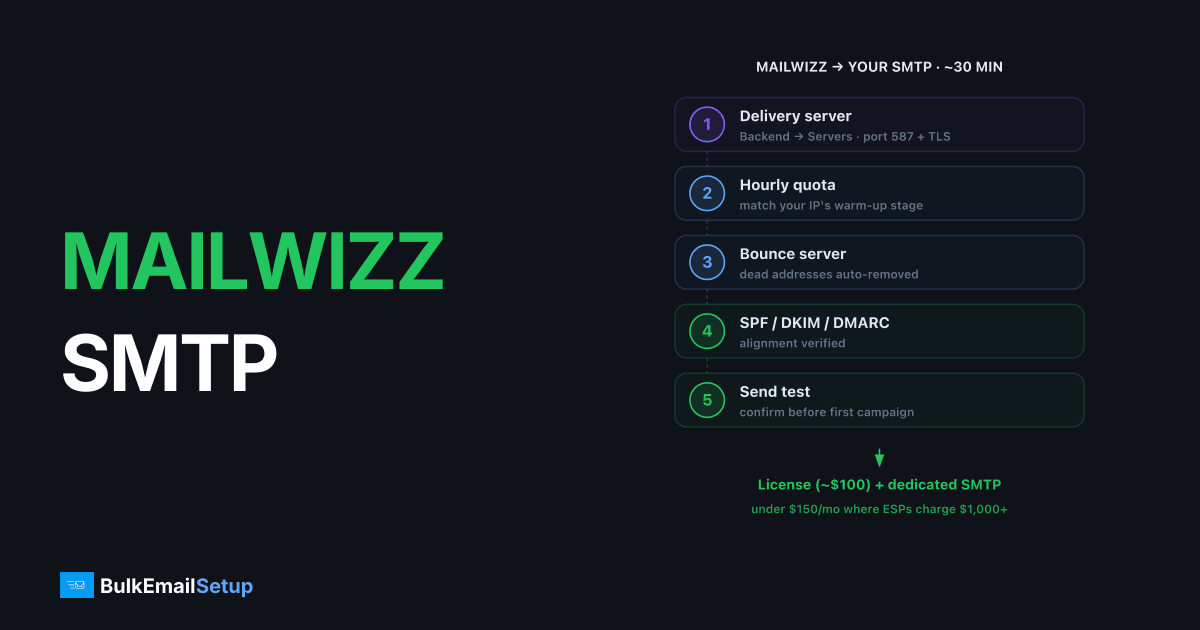
Connecting MailWizz to your own SMTP server takes about 30 minutes: create a delivery server entry (Backend → Servers → Delivery servers) pointing at your server on port 587 with TLS, set hourly quotas that match your IP's warm-up stage, configure a bounce server so dead addresses get removed, and verify SPF/DKIM/DMARC alignment before the first campaign. The combination of a one-time MailWizz license (~$100) and a dedicated SMTP server is one of the cheapest legitimate bulk-email stacks running, often under $150/month total at volumes where ESPs charge $1,000+.
I've deployed this stack for a dozen clients. The exact setup, including the bounce handling and quota details most tutorials skip.
What you need before starting
| Requirement | Why |
|---|---|
| MailWizz installed (one-time license, ~$100) | The campaign manager |
| An SMTP server with a dedicated IP | The sending engine, see best dedicated SMTP server providers |
| SMTP credentials (host, port, user, password) | For the delivery server entry |
| SPF, DKIM, DMARC published for your sending domain | Without these, 2026 inbox providers junk or reject you |
| An IMAP mailbox for bounces (e.g. [email protected]) | Bounce processing |
| Cron jobs configured per MailWizz docs | MailWizz sends nothing without them |
If your SMTP server runs Postal, you get webhook-based bounce handling instead of IMAP polling, cleaner, covered below.
Step 1: Create the delivery server
In the MailWizz backend: Servers → Delivery servers → Create new → SMTP.
Fill in:
- Hostname: your SMTP server, e.g. mail.yourdomain.com
- Port: 587 with TLS (or 465 for implicit SSL, match what your server offers)
- Protocol: TLS
- Username / password: your SMTP credentials
- From email: an address on the domain whose SPF/DKIM you've published, alignment matters more than the address itself
- Hourly quota / daily quota: see step 2; do not leave these unlimited
Click Validate server. MailWizz sends a confirmation email to the address you specify, click the link in it to activate the server. If validation fails, test the same credentials with a manual SMTP session (swaks or openssl s_client) before debugging MailWizz.
Step 2: Set quotas to match your warm-up
This is the step that separates working deployments from blacklisted ones. A fresh IP cannot send 50K emails on day one. Gmail and Microsoft will defer, then junk, then block.
Set the delivery server's hourly quota to roughly your current warm-up day's allowance divided by sending hours:
| Warm-up stage | Daily volume | MailWizz hourly quota |
|---|---|---|
| Week 1 | 500-2,000 | 50-200 |
| Week 2 | 2,000-10,000 | 200-1,000 |
| Week 3 | 10,000-40,000 | 1,000-4,000 |
| Week 4+ | 40,000+ | 4,000+ |
Raise the quota every few days only if bounce and deferral rates stay clean. A managed SMTP provider will give you (or enforce) this schedule; if you're self-managing, the discipline is on you.
Step 3: Configure the bounce server
Without bounce processing, every campaign re-mails the addresses that bounced last time, and your hard-bounce rate compounds until receivers block you.
Classic IMAP route: Backend → Servers → Bounce servers → Create new. Point it at the IMAP mailbox receiving bounces (the Return-Path mailbox), e.g. [email protected], with its IMAP host, port 993/SSL, and credentials. MailWizz polls it via cron, parses bounce codes, and marks subscribers as bounced automatically.
Postal/webhook route: if your sending server is Postal-based, skip IMAP and use the delivery-server type for it or a webhook integration, bounces arrive in real time instead of on a polling delay. (Which server software to run is its own decision, see Postal vs Postfix.)
Either way, also create a feedback loop server if your provider exposes complaint feeds, so spam-button presses unsubscribe people automatically.
Step 4: Verify authentication before the first campaign
Send a test to a mail-tester service and to your own Gmail/Outlook accounts. Check:
- SPF: pass, and the envelope domain matches your sending domain.
- DKIM: pass, with d= equal to your sending domain (alignment), not the server's default hostname.
- DMARC: at least p=none published, with alignment passing.
- rDNS: the sending IP resolves to a hostname that resolves back to the IP.
A surprising number of "MailWizz deliverability problems" are just a DKIM signature on the wrong domain. Fix infrastructure first; templates and copy are second-order. The complete infrastructure checklist is in how to set up an SMTP server for bulk email.
Step 5: Cron jobs and a test campaign
Confirm the MailWizz cron jobs are installed (the install screen lists them; send-campaigns runs every minute, bounce-handler every 10-20 minutes). Then run a small test campaign, 50-100 subscribers across Gmail, Outlook, and Yahoo, and read the delivery server logs.
What to look for: acceptance (250 responses), any 4xx deferrals (slow down), any 5xx rejections (stop and diagnose). Only scale up when a small send is clean.
Common failure modes
| Symptom | Usual cause |
|---|---|
| Campaign stuck at "sending" | Cron jobs missing or broken |
| Validation email never arrives | Wrong port/TLS combination, or server firewall |
| High bounces from one provider | Warm-up too aggressive for that provider |
| Everything lands in spam | Authentication misalignment or cold IP |
| Sending stops mid-campaign | Hourly quota reached (working as intended) |
Once MailWizz is sending through your own server, the authentication requirements are yours to meet. Google's bulk sender guidelines set out what Gmail expects from any sender above 5,000 messages a day, and MailWizz will not configure DNS for you.
How BulkEmailSetup helps
BulkEmailSetup provides MailWizz-ready dedicated SMTP servers, credentials handed over with SPF, DKIM, DMARC, and rDNS already configured, plus a managed warm-up schedule so your quotas have numbers behind them. Pair a one-time MailWizz license with a flat-fee server and the whole stack costs less than most ESPs' starter tiers; see pricing.
Frequently asked questions
What SMTP settings does MailWizz need?
In Backend > Servers > Delivery servers, create an SMTP server entry with your server's hostname, port 587 (or 465 for implicit TLS), your SMTP username and password, and the from-email on your sending domain. Set hourly and daily quotas to match your IP's warm-up stage.
Why are my MailWizz emails going to spam?
Almost always an infrastructure issue, not a MailWizz issue: missing or misaligned SPF/DKIM/DMARC, an unwarmed IP, or no reverse DNS. Verify authentication with a mail-tester service before blaming templates.
How does MailWizz handle bounces?
Two ways: a bounce server (an IMAP/POP3 mailbox MailWizz polls for bounce messages) or webhooks from platforms like Postal. Without one of these configured, MailWizz keeps mailing dead addresses and your reputation decays.
Can MailWizz send through multiple SMTP servers?
Yes. MailWizz supports multiple delivery servers with probability-based rotation and per-server quotas, useful for spreading volume across IPs or separating customer groups.
Do I need cron jobs for MailWizz sending?
Yes. MailWizz sends via cron-triggered queue processing. The send-campaigns command should run every minute; without correct cron setup, campaigns stay stuck in 'sending' status.


