
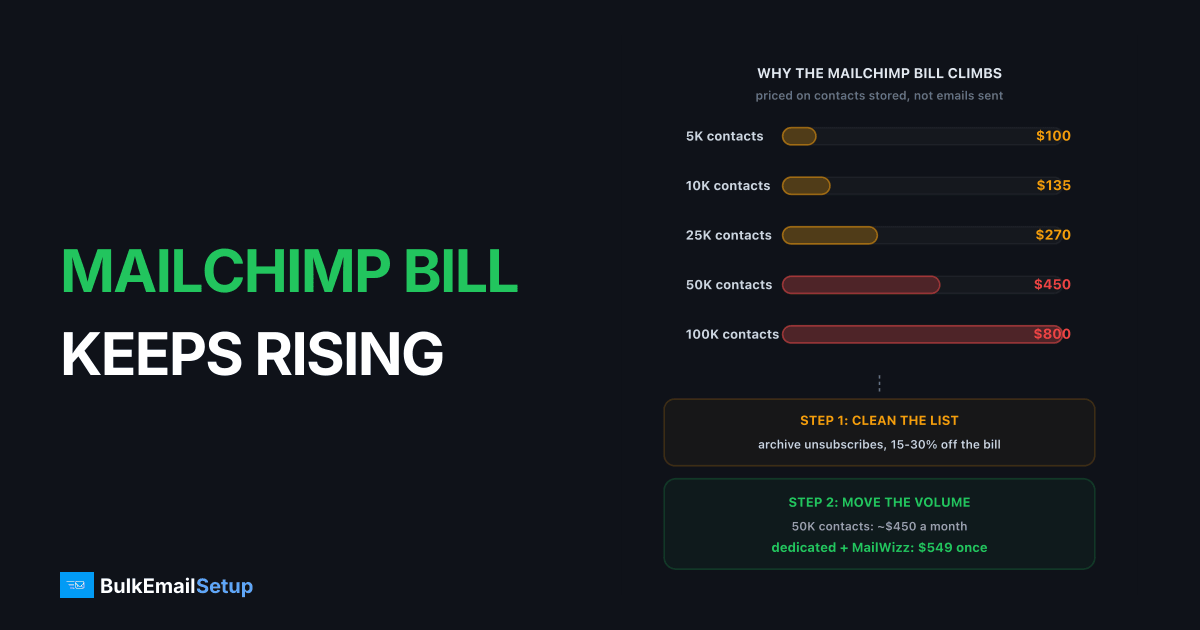
Mailchimp gets too expensive because it bills on contacts stored, not emails sent, and the count includes unsubscribed and non-subscribed addresses across every audience. Standard starts around $20 a month at 500 contacts and reaches roughly $450 a month at 50,000, whether you mail that list once or twelve times. Cleaning the audience typically cuts 20 to 30% off the bill without moving. Above about 25,000 contacts, moving to per-send or flat-fee infrastructure pays back in 1 to 4 months.
I've migrated lists off Mailchimp at every size from 3,000 to 400,000 contacts. The bill surprise is nearly always the same shape: nobody changed how often they send, the list just grew, and the tiers climbed underneath them.
Why the Mailchimp bill climbs when you send the same amount
Four things push the number up, and only one of them is "you got more subscribers".
| Cause | What happens | How much it adds |
|---|---|---|
| Contact tiers | Price steps up at each contact boundary, not smoothly | $35 to $150 per step on Standard |
| Unsubscribes still counted | Unsubscribed and non-subscribed contacts sit in the billable total until archived | Often 15 to 30% of the count |
| Mid-cycle overage | Cross a tier during a billing month and you pay an overage on top of the plan | One-off charge every time it happens |
| Multiple audiences | The same address in two audiences is two contacts | Duplicates, commonly 5 to 15% on multi-audience accounts |
| Intro discount ending | 50% off for 12 months, then full price | Bill doubles at month 13 |
The contact definition is the big one. Mailchimp's billing help page is explicit: subscribed, unsubscribed and non-subscribed contacts all count. Only archived, cleaned and deleted contacts drop out. So the person who unsubscribed in 2024 and the checkout abandoner who never opted in are both on your invoice every month.
Overage is the quiet one. The Mailchimp pricing page states that overages apply if the contact or send limit is exceeded and that campaigns are not paused, which is helpful for continuity and bad for your bill. A list that ticks over 50,001 on the 20th of the month gets charged for the higher tier without warning.
What Mailchimp Standard costs by list size
List prices, rounded, checked against Mailchimp's pricing page. Standard includes a send allowance of 12 times your contact limit per month, which almost nobody uses, so you are paying for capacity you never touch.
| Contacts | Standard, monthly | Per year | Sends included per month |
|---|---|---|---|
| 500 | $20 | $240 | 6,000 |
| 5,000 | $100 | $1,200 | 60,000 |
| 10,000 | $135 | $1,620 | 120,000 |
| 25,000 | $310 | $3,720 | 300,000 |
| 50,000 | $450 | $5,400 | 600,000 |
| 100,000 | $800 | $9,600 | 1,200,000 |
Essentials is cheaper at every tier but drops the automation builder past a single step and the send allowance falls to 10x. Premium starts around $350 a month and is priced for 10,000 contacts up, so it rarely changes the picture below 100,000.
The number that matters is not the monthly figure, it's the per-send cost at your real frequency. At 50,000 contacts mailed four times a month you send 200,000 emails for $450, which is $2.25 per thousand. Amazon SES charges $0.10 per thousand for the same delivery. That 22x gap is the platform layer: the builder, the automations, the reports. Fine if you use them heavily. Expensive if you send a Tuesday newsletter and nothing else.
Clean the audience first, then decide
Before comparing providers, archive what you are paying to store. This is the one step that cuts the bill without changing anything else, and I've seen it drop accounts two full tiers.
- Archive every unsubscribed contact. They cannot be mailed anyway. Archiving keeps the suppression record so they never get re-added by an import.
- Archive non-subscribed contacts. These are e-commerce and form-fill records with no marketing consent. If you are not going to run a consent campaign, they are dead weight.
- Merge audiences. If you run three audiences, any address in more than one is billed more than once. Consolidate into one audience with tags or groups.
- Archive 12-month non-openers. Zero opens and zero clicks in a year is a contact who is costing money and pulling engagement rates down. Export them first if you want a re-permission run later.
- Re-check the tier. Mailchimp bills on the highest contact count you reach during the billing period, so clean before contacts pile up, not just before renewal.
On a typical 50,000-contact account this removes 10,000 to 15,000 records. That is the difference between the 50,000 tier at ~$450 and the 40,000 tier at roughly $370, or the 30,000 tier at about $300 if the list was really stale. Twenty to thirty percent off, for an afternoon's work.
Cleaning also improves the honesty of the comparison below. Moving 50,000 contacts when only 35,000 are real just carries the same problem to a new invoice.
What 50,000 contacts costs elsewhere
Assume the cleaned list is 50,000 contacts and you mail it four times a month, so 200,000 sends. These are 2026 list prices, rounded, and I'd check each vendor's page before signing anything.
| Provider or route | Monthly cost | Billing basis | Campaign builder | Notes |
|---|---|---|---|---|
| Mailchimp Standard | ~$450 | contacts stored | yes, best in class | counts unsubscribes, overage on tier crossings |
| MailerLite Growing Business | ~$190 to $290 | contacts stored | yes | same model, cheaper tiers, unsubscribes not billed |
| Brevo Business | ~$100 | emails sent | yes | list size irrelevant, dedicated IP is an add-on |
| Amazon SES + self-hosted Mautic or Sendy | ~$40 to $60 | emails sent + VPS | yes, self-hosted | SES ~$20, VPS $20 to $40, you own warm-up and bounces |
| Dedicated SMTP server + open-source mailer | $549 one-time | none after build | yes, MailWizz or Mautic on the same box | 3 dedicated IPs, 25,000/day, no contact or send fee |
Two things jump out. MailerLite keeps the per-contact model, so it halves the bill rather than fixing the shape of it, and a list that keeps growing walks straight back up the tiers. Brevo flips to per-send, which is the right model for a big list mailed a few times a month, but if you go daily the per-send number grows fast.
The bottom two rows remove the contact count from the invoice entirely. The trade is that you take on deliverability work: warm-up, bounce processing, complaint monitoring. I laid out that split in Mailchimp vs your own SMTP server, and the setup side in the MailWizz SMTP server setup guide.
Migration effort by route
Cost is half the decision. The other half is how much of Mailchimp you have to rebuild, and that depends on where you go.
| Task | To MailerLite or Brevo | To SES + self-hosted mailer | To dedicated SMTP + open-source mailer |
|---|---|---|---|
| List export and import | CSV export, import with tags. 1 hour | CSV import into Mautic or Sendy. 1 to 2 hours | Same, into MailWizz or Mautic. 1 to 2 hours |
| Suppression list | Export unsubscribes and abuse reports, import as suppressed. 30 min | Same, plus enable bounce feedback loops in SES. 1 hour | Same, plus bounce handler on the server. 1 hour |
| Templates | Rebuild in the new editor, no direct import. 2 to 6 hours | Rebuild or paste HTML. 2 to 6 hours | Rebuild or paste HTML. 2 to 6 hours |
| Automations | Rebuild flows by hand. Half a day per complex flow | Mautic has a flow builder, Sendy has autoresponders only. Half a day to two days | MailWizz has autoresponders, Mautic has full flows. Same as SES route |
| DMARC re-alignment | New SPF include, new DKIM keys from the provider. 1 hour plus DNS wait | SES DKIM (3 CNAMEs), SPF include, custom MAIL FROM domain. 2 hours | Your own DKIM selector, SPF with your IPs, PTR set. Done as part of the build |
| IP warm-up | None on shared IPs, 4 to 6 weeks if you buy a dedicated one | 4 to 6 weeks, SES enforces its own ramp | 4 to 8 weeks across 3 IPs |
| Total hands-on time | 1 to 2 days | 2 to 4 days | 2 to 4 days |
The DMARC step is where most migrations break. Mailchimp signs with its own DKIM unless you set up authenticated domain, and your SPF record probably has a servers.mcsv.net include. Leave it there during the overlap period, add the new source, and watch your DMARC reports for a week before removing it. Google's bulk sender requirements need SPF or DKIM to align with the From domain, and a migration that switches the sending source without updating alignment fails that check on day one.
Automations are the real hidden cost. Templates are a day of annoyance. A 12-step welcome series with branching on purchase behaviour is a project, and if you have five of those, that alone can justify staying another year.
Break-even in months
Take the cleaned 50,000-contact list, four sends a month, and count from the day you start paying the new route.
| Route | Upfront | Monthly | Saving vs Mailchimp | Payback |
|---|---|---|---|---|
| MailerLite | $0 | ~$240 | ~$210 | immediate, but per-contact growth continues |
| Brevo | $0 | ~$100 | ~$350 | immediate |
| SES + self-hosted mailer | ~$100 setup time | ~$50 | ~$400 | first month |
| Dedicated SMTP + open-source mailer | $549 | ~$0 to $20 | ~$430 | about 5 weeks |
Now scale the same dedicated route against Mailchimp Standard by list size, because the answer changes with the tier.
| Contacts on Standard | Mailchimp monthly | Dedicated payback | Year-one saving |
|---|---|---|---|
| 5,000 | $100 | ~5.5 months | ~$650 |
| 10,000 | $135 | ~4 months | ~$1,070 |
| 25,000 | $310 | ~2 months | ~$3,170 |
| 50,000 | $450 | ~5 weeks | ~$4,850 |
| 100,000 | $800 | ~3 weeks | ~$9,050 |
At 5,000 contacts the payback works on paper but the migration time eats it. At 25,000 it's clearly worth doing. At 50,000 and up you are paying Mailchimp the price of a dedicated build every 5 weeks, forever. For a second opinion on the same math at higher send volumes, see what 500,000 emails a month costs, and for the broader field of options, Mailchimp alternatives for high-volume senders.
Who should stay on Mailchimp
Some people should read all of the above and renew anyway.
- Under 5,000 contacts. Standard is $100 a month or less. Migration effort and a cold IP warm-up cost more than a year of savings.
- The builder is doing real work. Multi-branch automations, Shopify or WooCommerce product blocks, predictive segments. Rebuilding these elsewhere is where migrations go over budget.
- Nobody owns deliverability. Shared IPs mean Mailchimp's team watches reputation for you. A dedicated server with no one checking complaint rates weekly degrades quietly, and the saving is not worth a burned domain.
- Send frequency is high and list is small. Per-contact billing is a bargain if you mail 2,000 people every day. Per-send models punish that pattern.
If none of those apply and your list is past 25,000, the invoice will keep growing whatever you do inside Mailchimp. Cleaning buys a tier or two. Changing the billing model is what stops the climb. The cheaper than Mailchimp comparison walks the pricing models in more depth if you want the wider field.
How BulkEmailSetup helps
We build the dedicated route: your own server, your own IPs, full SPF/DKIM/DMARC/PTR configuration, MTA tuning, bounce handling and a warm-up plan. Pair it with MailWizz or Mautic and the contact count disappears from the invoice for good. No tier boundaries, no overage, no charge for unsubscribed addresses sitting in a suppression list.
Basic starts at $549 one-time, covering 1 SMTP server, 3 dedicated IPs, 25,000 emails/day and unlimited contacts. Higher tiers scale to 15 IPs and 200,000 emails/day. See pricing, or read Mailchimp vs your own SMTP server for the feature-level comparison.
Frequently asked questions
Why does my Mailchimp bill keep going up?
Mailchimp prices by contacts stored, not emails sent, and the count includes subscribed, unsubscribed and non-subscribed contacts across every audience. Each time the total crosses a tier boundary the plan price steps up, and if you cross mid-cycle you pay an overage on top. A list that grows 1,000 addresses a month climbs a tier roughly every quarter.
Does Mailchimp charge for unsubscribed contacts?
Yes. Mailchimp's billing help page states that subscribed, unsubscribed and non-subscribed contacts are all included in the contact count. Only archived, cleaned and deleted contacts are excluded. Archiving unsubscribes and non-subscribed contacts is usually the fastest way to drop a tier.
How much does Mailchimp Standard cost at 50,000 contacts?
Roughly $450 a month at list price, with a send allowance of 12 times your contact limit. That is about $5,400 a year for a list you may only mail four times a month. Introductory discounts of 50% for 12 months mask this in year one, then the bill doubles.
What is the cheapest way to leave Mailchimp at 50,000 contacts?
Amazon SES plus a self-hosted mailer such as Sendy or Mautic runs about $40 to $60 a month for 200,000 sends. A dedicated SMTP server with an open-source mailer is a $549 one-time build with no per-contact or per-send fee after that. Brevo at around $100 a month is the cheapest route that keeps a hosted campaign builder.
How long does a dedicated SMTP server take to pay back against Mailchimp?
At 50,000 contacts on Standard, about 5 weeks, because $549 one-time against $450 a month breaks even inside the second month. At 25,000 contacts it is about 2 months, and at 10,000 contacts about 4 months. Below 5,000 contacts the payback stretches past a year, so stay put.
Who should stay on Mailchimp despite the price?
Anyone under 5,000 contacts, where Standard is $100 a month or less and the builder, automations and e-commerce integrations are doing real work. Also teams with no one to own deliverability. At that size the cost of migrating and warming new IPs outweighs a year of savings.
Will leaving Mailchimp hurt my deliverability?
It can for 4 to 6 weeks if you skip warm-up. Mailchimp's shared IPs carry a reputation you do not take with you, so new IPs start cold at a few hundred sends a day and ramp roughly 30% every two days. Your domain reputation at Gmail and Microsoft does carry over, for better or worse.


