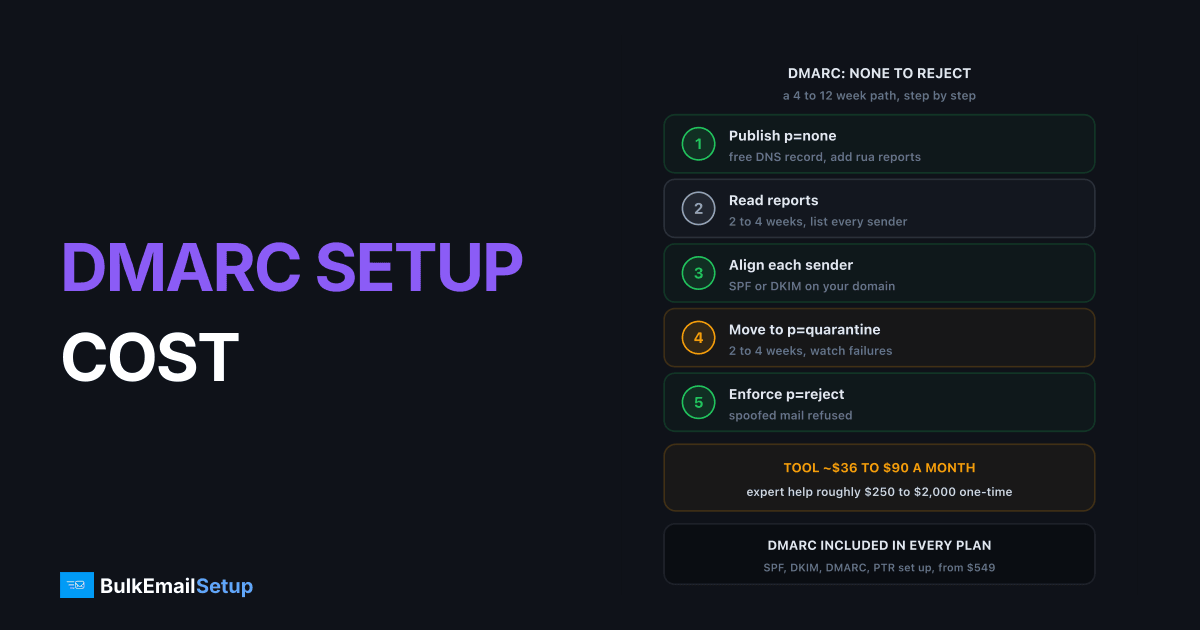
A DMARC setup service mostly charges for time and monitoring, not the record. The DMARC record is one free DNS entry that takes minutes. A monitoring tool such as EasyDMARC lists $35.99 to $71.99 a month on annual billing. The real cost is the 5 to 20 hours it takes to find every service sending as your domain and move safely from p=none to p=reject, which at $50 to $100 an hour is roughly $250 to $2,000.
What you are actually paying for
| Piece | DIY cost | Paid cost | Time |
|---|---|---|---|
| DMARC DNS record | free | included | 10 minutes |
| SPF and DKIM fixes per sender | free | included | 30 to 60 minutes each |
| Report monitoring | free, reading XML by hand | ~$36 to $90 a month for a tool | ongoing |
| Finding every sender | your time | consultant time | 2 to 6 hours |
| Rollout to p=reject | your time | consultant time | 4 to 12 weeks elapsed |
The record is free. Time and monitoring are the bill.
Monitoring prices are from EasyDMARC's pricing page: Plus is $35.99 a month billed annually ($44.99 monthly) for 2 domains, Premium $71.99 ($89.99 monthly) for 4 domains. Other tools price differently, often by message volume.
Can you set up DMARC yourself?
Yes. The record is simple. Start with monitoring only:
_dmarc.example.com. TXT "v=DMARC1; p=none; rua=mailto:[email protected]"
What takes time is what the reports show you: every service that sends as your domain. CRMs, helpdesks, billing tools, survey tools, your website's contact form. Each one needs SPF or DKIM that aligns with your domain before you can enforce, or its mail starts failing. Our guides to reading DMARC aggregate reports and DMARC alignment cover how.
Same record either way. The difference is who reads the reports.
| You should DIY if | You should pay for help if |
|---|---|
| one or two platforms send as your domain | five or more services send as you |
| you are comfortable editing DNS | nobody owns DNS internally |
| you can check reports weekly for a month | you need p=reject by a deadline |
| a delayed rollout costs nothing | a broken invoice or password email costs money |
DIY in five steps
- Publish p=none with a report address. Use the record above. Reports start arriving within a day or two.
- List every sender. Group the reports by source IP and service. Expect a surprise or two: an old newsletter tool, a billing system, a contact form on the website.
- Fix alignment for each one. Add the service to SPF if it sends from its own IPs, and turn on DKIM signing with your domain wherever the service supports it. DKIM is the safer of the two, because SPF breaks on forwarding.
- Move to quarantine. Once reports show only spoofing failing, change the policy:
_dmarc.example.com. TXT "v=DMARC1; p=quarantine; rua=mailto:[email protected]"
- Move to reject after 2 to 4 clean weeks at quarantine, and keep reading the reports. New tools get added to companies all the time, and each one is a new sender to align.
What a good DMARC service delivers
If you pay someone, these are the things you should get back, not just a DNS change.
| Deliverable | Why it matters |
|---|---|
| A written list of every sender | you can check it, and keep it when the contract ends |
| SPF record under 10 DNS lookups | over 10 is a permanent error, see SPF too many lookups |
| DKIM on for each service, with selectors listed | you know what to rotate and where |
| A dated rollout plan | none, quarantine and reject dates you agreed to |
| Report address you control | history stays yours if you change tools |
| A check after enforcement | confirms nothing legitimate started failing |
How long it takes to reach p=reject
The policy steps are none, quarantine, then reject. Each step needs time with real reports before the next.
A typical 12-week path. A simple domain can do it in about a month.
| Stage | Policy | How long | Move on when |
|---|---|---|---|
| 1. Monitor | p=none | 2 to 4 weeks | every legitimate sender is identified |
| 2. Fix | p=none | alongside stage 1 | each sender passes SPF or DKIM aligned |
| 3. Soft enforce | p=quarantine | 2 to 4 weeks | failures are only spoofing, not your tools |
| 4. Enforce | p=reject | ongoing | keep watching reports for new senders |
What changed in 2026
DMARC became a Proposed Standard in May 2026. RFC 9989 replaces the older RFC 7489. The practical change for setup: the pct tag, which many guides use to enforce on a percentage of mail first, is removed in the new spec, and a t tag for test mode is added. Plenty of records still carry pct, and receivers will not all switch at once, so check what your monitoring tool expects before relying on either.
What Gmail and Yahoo require
| Requirement | Bulk senders (about 5,000 a day or more) |
|---|---|
| DMARC record | required, p=none is the minimum |
| SPF and DKIM | both required |
| Alignment | From domain must align with SPF or DKIM |
| Enforcement (quarantine or reject) | not required, but protects against spoofing |
Source: Google's sender guidelines. For the full list, see Gmail bulk sender requirements, and for what each policy does, DMARC none vs quarantine vs reject.
Red flags in a DMARC service quote
- "p=reject in one day." Without weeks of reports, this breaks legitimate mail.
- No list of your senders. You should get the inventory, not just a record.
- Locked-in report address. If the rua points at their tool, you lose history when you leave.
- Monitoring sold as the setup. A dashboard does not fix alignment on its own.
How BulkEmailSetup helps
Every plan includes SPF, DKIM and DMARC setup on the sending domains we configure, plus PTR on every IP and a warm-up plan, so the infrastructure you send bulk mail from passes authentication from day one.
| Plan | One-time fee | Emails per day | Domains configured |
|---|---|---|---|
| Basic | $549 | 25,000 | 1 |
| Advance | $1,199 | 200,000 | 4 |
| Custom | $2,997 | 1,000,000 | 13 |
Other tools that send as your main domain, such as a CRM or helpdesk, still need to be found and aligned before you enforce p=reject. There is no monthly fee to us and a 15-day money-back guarantee. See what a full SMTP setup includes or compare pricing.
Frequently asked questions
How much does a DMARC setup service cost?
The DMARC record itself costs nothing, since it is one DNS TXT entry. What you pay for is report monitoring and expert time. A monitoring tool such as EasyDMARC lists $35.99 a month on annual billing for 2 domains. Hands-on help to find every sender and reach p=reject is usually 5 to 20 hours of work, so at $50 to $100 an hour that is roughly $250 to $2,000.
Can I set up DMARC myself?
Yes. Publish a TXT record at _dmarc.yourdomain.com with p=none and a rua address for reports, then read the reports for two to four weeks. The hard part is not the record, it is finding every service that sends as your domain, such as your CRM, helpdesk and billing tool, and fixing SPF and DKIM alignment for each one before you enforce.
How long does it take to reach p=reject?
Plan for 4 to 12 weeks. Spend 2 to 4 weeks at p=none reading reports, 2 to 4 weeks at p=quarantine, then move to p=reject once every legitimate sender passes. Domains with many third-party senders take longer. A domain that only sends from one platform can get there in about a month.
Is a DMARC monitoring tool worth paying for?
For most senders, yes, at least during rollout. Raw aggregate reports are XML files from every receiver, one per day per receiver, and reading them by hand is slow. A tool groups them by sender so you can see what fails. Once you are at p=reject and nothing changes, a free or cheaper tier is often enough.
Do Gmail and Yahoo require DMARC?
Yes for bulk senders. Gmail and Yahoo require anyone sending about 5,000 or more messages a day to their users to publish DMARC, with p=none as the minimum, plus SPF, DKIM and alignment. Enforcement to quarantine or reject is not required by them, but it protects your domain from spoofing.
What changed in DMARC in 2026?
DMARC moved to the standards track. RFC 9989, published in May 2026, replaces RFC 7489. It removes the pct tag that many guides use for a gradual rollout and adds a t tag for test mode. Records that still carry pct will be found in the wild for a while, so check what your receivers and tools support.
Is DMARC included when I buy an SMTP setup?
It should be, at least the records. Every BulkEmailSetup plan includes SPF, DKIM and DMARC setup for the sending domains it configures, starting at $549 one-time on Basic. If other services also send as your main domain, such as a CRM or helpdesk, those still need to be found and aligned before you move to p=reject.