
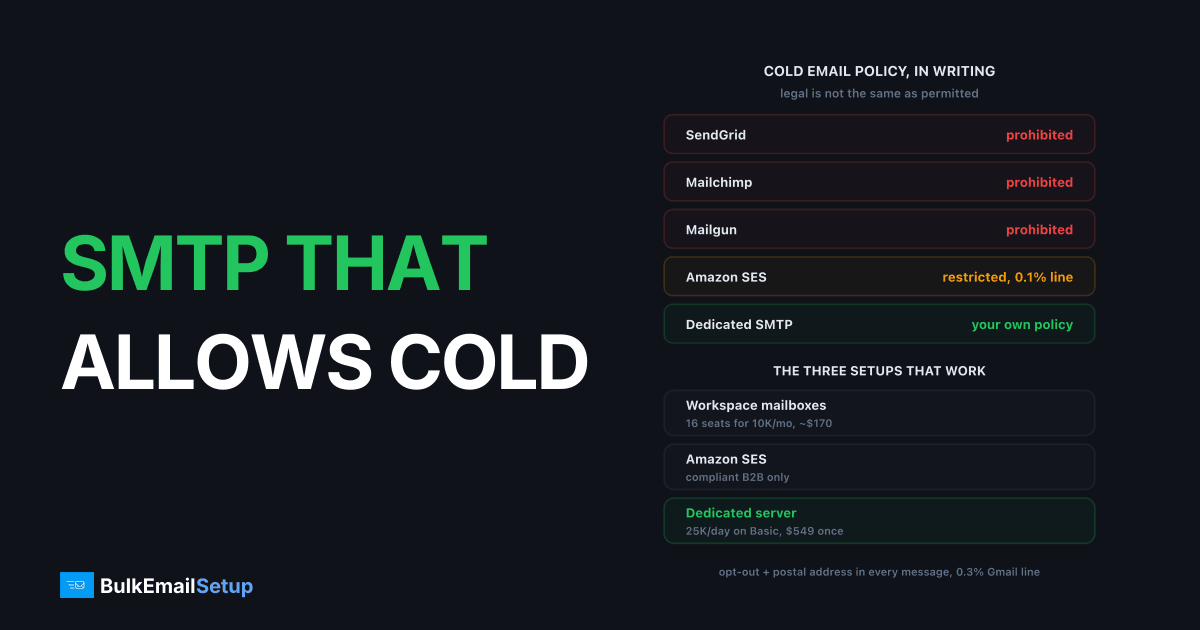
Almost no shared-pool SMTP relay allows cold email in writing. SendGrid, Mailgun, Postmark, Mailchimp and Brevo all prohibit unsolicited email in their terms, and the rest restrict it to the point that a single complaint spike ends the account. Only three setups work for outreach without a policy conflict: Google Workspace or Microsoft 365 mailboxes at 30 to 50 sends a day each, a dedicated SMTP server with your own IPs, or Amazon SES for low-complaint B2B sending under its 0.1% complaint review line. Here is the policy table, the maths for 10K, 50K and 200K cold emails a month, and who should pick which.
What each SMTP provider's policy says about cold email
The short version: if the provider shares IPs between customers, it bans cold email. Your complaints land on the same IP as their transactional customers, so they cannot afford you. This table is from the providers' own terms and acceptable use pages as of writing. Where I am not certain of the exact wording, I say so rather than guess.
| Provider | Cold email policy | How it is enforced |
|---|---|---|
| SendGrid | Prohibited (unsolicited email and purchased lists banned) | Automated complaint and bounce triggers, human review, suspension |
| Mailgun | Prohibited (unsolicited email banned in AUP) | Complaint rate and bounce monitoring, account disable |
| Amazon SES | Restricted, check AUP (unsolicited bulk mail not permitted; compliant low-complaint sending survives in practice) | Account review near 0.1% complaints or 5% bounces, sending pause |
| Postmark | Prohibited (transactional and opt-in only) | Manual approval at signup, immediate shutdown |
| Brevo | Not permitted for unsolicited (opt-in required) | List import checks, complaint monitoring |
| SMTP2GO | Restricted, check AUP | Complaint and bounce monitoring |
| Mailchimp | Prohibited (permission required, purchased lists banned) | Omnivore abuse detection at import, account closure |
| Elastic Email | Restricted, check AUP | Reputation scoring, sending limits and suspension |
Two things people get wrong here. First, "legal" and "permitted" are different tests. Cold B2B email can be fully CAN-SPAM compliant and still break SendGrid's terms. Second, never try to hide cold email inside a transactional account. Providers detect it from complaint patterns within days, the ban is usually permanent, and the domain goes on their record. If that has already happened, what to do after an ESP bans cold email covers recovery.
Setup 1: Workspace or 365 mailboxes plus a cold-email tool
This is how most outbound teams start, and it works at low volume because you are sending from real mailboxes on Google's and Microsoft's own infrastructure. Instantly, Smartlead and lemlist connect to each mailbox, rotate sends across them, and run inbox warm-up. The limit is per mailbox: 30 to 50 sends a day is the safe band, even though Workspace's technical cap is 2,000 a day. Push past 50 and the mailbox starts landing in spam within a week.
Google's own Gmail sending limits page states the hard caps, but the practical limit for cold is set by reputation, not by that page.
The mailbox-count maths for 10,000 a month:
| Line item | Figure |
|---|---|
| Safe sends per mailbox per day | 30 |
| Working days per month | 22 |
| Sends per mailbox per month | about 660 |
| Mailboxes needed for 10,000 a month | 16 |
| Mailboxes per domain (keep it low) | 2 to 3 |
| Domains needed | 6 to 8 |
| Workspace Business Starter per mailbox | about $8 a month |
| Tool plan (Instantly, Smartlead) | $37 to $39 a month entry tier |
| Monthly total | about $170 |
| Cost per 1,000 sends | about $17 |
That $17 per 1,000 is the most expensive option on this page, and the operational load is the real cost: 16 mailboxes to warm, 6 to 8 domains to authenticate, and a spreadsheet that never ends. At 50,000 a month you are managing 76 mailboxes across 25 or more domains. The tools are good at this, but you are paying per seat forever. Instantly alternatives compares the tool layer if that is the piece you are choosing.
Setup 2: a dedicated SMTP server with your own IPs
On a dedicated server the policy question goes away, because you are the provider. There is no shared pool to protect, so nobody's terms ban your use case. What remains is the law and the receivers' rules, which apply to everyone. This is the option once volume passes roughly 20,000 a month and the mailbox model stops scaling.
What you get and what you owe:
| Factor | Dedicated SMTP server |
|---|---|
| Policy on cold email | Yours to set, within CAN-SPAM and receiver rules |
| Capacity on Basic | 25,000 emails a day, 3 dedicated IPs |
| Warm-up before full volume | 4 to 8 weeks, ramping about 30% every 2 days per IP |
| Sending domains | Several, never your main company domain |
| Cost | $549 one-time plus about $50 a month VPS |
| Blocklist delisting | You do it yourself, which is faster than waiting on a provider |
| Reply handling | Needs mailboxes or a tool on top |
The warm-up is not optional and cold lists make it harder. Start each IP at a few hundred a day to your cleanest segment and watch 4xx deferrals, not opens. How many emails per day per IP has the ramp schedule, and dedicated SMTP for cold email outreach covers the domain isolation setup in detail.
Setup 3: Amazon SES for compliant, low-complaint B2B outreach
SES is the odd one out. Its terms do not welcome unsolicited bulk mail, and I have listed it as "restricted" above for that reason. In practice, though, SES enforces by metrics rather than by reading your copy. Targeted B2B outreach to verified addresses, with a real opt-out and complaint rates well under 0.1%, tends to survive. Scraped lists do not.
The numbers that matter:
| Metric | SES threshold | What happens |
|---|---|---|
| Complaint rate | review near 0.1%, pause near 0.5% | account review, then sending pause |
| Bounce rate | review near 5%, pause near 10% | same escalation |
| Price | $0.10 per 1,000 emails | plus $24.95 a month per dedicated IP if you want one |
| Sandbox exit | manual request | expect to explain your use case honestly |
At $0.10 per 1,000 it is the cheapest sending on this page by a wide margin. The trade is that a review can pause your account with no warning, and if you are describing your sending to AWS you should describe it truthfully. Amazon SES vs a dedicated SMTP server goes deeper on when the risk is worth taking.
Cost of cold email at 10K, 50K and 200K a month
Year-one monthly figures, rounded. Domains add $1 to $2 per domain per month on every setup.
| Monthly volume | Mailboxes plus tool | Dedicated SMTP server | Amazon SES |
|---|---|---|---|
| 10,000 | 16 mailboxes, about $170 ($17 per 1,000) | $549 spread over 12 months plus $50 VPS, about $96 ($9.60 per 1,000) | $1, or $26 with a dedicated IP |
| 50,000 | 76 mailboxes, about $730 ($14.60 per 1,000) | about $96 ($1.90 per 1,000) | $5, or $30 with a dedicated IP |
| 200,000 | 303 mailboxes, about $2,700 ($13.50 per 1,000) | about $96 ($0.48 per 1,000) | $20, or $45 with a dedicated IP |
Two notes on the table. The dedicated server figure drops to about $50 a month in year two once the one-time fee is paid, and 200,000 a month is under 7,000 a day, well inside Basic's 25,000 daily cap. The SES figure looks unbeatable, but it carries the review risk, and 200,000 cold emails a month through one SES account is exactly the pattern that gets reviewed.
Deliverability rules that apply on every setup
Infrastructure choice changes who can ban you. It does not change the receivers or the law. These rules hold whether you send from 16 mailboxes or 3 dedicated IPs.
- CAN-SPAM. Honest From and subject line, a valid physical postal address in every message, a working opt-out honoured within 10 business days, and no sending to anyone who opted out. The FTC's CAN-SPAM compliance guide puts the penalty at up to $53,088 per email in violation. The company whose product is promoted is liable too, not only the sender.
- Gmail's bulk sender rules. From February 2024, anyone sending 5,000 or more a day to Gmail needs SPF, DKIM and DMARC, a spam rate under 0.3% in Postmaster Tools, and one-click unsubscribe via List-Unsubscribe headers. Cold senders should treat 0.1% as the real line.
- Per-domain volume caps. Keep each sending domain under a few hundred cold sends a day regardless of how many IPs sit behind it. Domain reputation is scored separately from IP reputation.
- Multiple domains, never the main one. Cold outreach runs on separate lookalike domains so one bad week cannot stop your invoices. Cold email with multiple domains covers how many and how to split them.
- Verified lists only. Bounce rate above 5% is the single fastest way to get reviewed on every platform, including your own server's IPs at Gmail and Microsoft.
Who should pick which setup
| Situation | Pick | Why |
|---|---|---|
| Under 10,000 a month, small team, replies matter most | Workspace or 365 mailboxes plus a tool | Native inbox reputation, tool handles warm-up and replies |
| 20,000 to 200,000 a month, want control and predictable cost | Dedicated SMTP server | No policy conflict, under $2 per 1,000 after month one, 25,000 a day capacity |
| Tightly targeted B2B, verified lists, engineering team on hand | Amazon SES | $0.10 per 1,000, but you own the complaint rate risk |
| Scraped or bought lists | None of the above | Every option here will pause you, and CAN-SPAM liability follows the list |
| Already banned by an ESP for cold email | Dedicated SMTP server on new domains | Shared relays share suspension signals; your own IPs start clean |
If you are unsure, the mailbox route is the cheapest way to find out whether your list and copy get replies. Move to a dedicated server when the mailbox count passes about 30 and the seat fees stop making sense.
How BulkEmailSetup helps
We build dedicated SMTP infrastructure you own: your own server, your own IPs, full SPF/DKIM/DMARC/PTR configuration, MTA tuning, bounce handling and a warm-up plan built for outreach volume. Because the IPs are yours alone, there is no shared pool and no acceptable use policy deciding whether your compliant cold email is too risky for someone else's customers. The law and Gmail's rules still apply, and we set the server up so you can meet them.
Basic starts at $549 one-time, covering 1 SMTP server, 3 dedicated IPs, 25,000 emails/day and unlimited contacts. Higher tiers scale to 15 IPs and 200,000 emails/day. See pricing, or read dedicated SMTP for cold email outreach for the setup walkthrough.
Outreach on BulkEmailSetup servers follows our anti-spam policy: lawful B2B email to business contacts you researched yourself, a working opt-out honoured within 10 business days, your physical address in every message, and complaints under 0.1%. Bought, rented or scraped lists are not allowed.
Frequently asked questions
Which SMTP providers allow cold email?
Almost none of the shared relays do in writing. SendGrid, Mailgun, Postmark, Mailchimp and Brevo all prohibit unsolicited email in their terms. The setups that actually work are Google Workspace or Microsoft 365 mailboxes driven by a cold-email tool at 30 to 50 sends a day each, a dedicated SMTP server with your own IPs where you set the policy, and Amazon SES for low-complaint B2B outreach that stays under its 0.1% complaint review line.
Is cold email legal?
In the US, yes, if you follow CAN-SPAM: honest headers and subject line, a valid physical postal address, a working opt-out honoured within 10 business days, and no sending to people who opted out. The FTC penalty is up to $53,088 per email in violation. Legal does not mean a given provider permits it; most shared relays ban it in their AUP regardless of the law.
Can I send cold email through SendGrid or Mailgun?
No. Both prohibit unsolicited email and purchased lists in their acceptable use policies, and both enforce with automated complaint and bounce triggers, typically around 0.1% complaints. Accounts caught sending cold outreach are suspended, and appeals for a policy breach rarely succeed. Hiding cold email inside a transactional account is the fastest route to a permanent ban.
Can I use Amazon SES for cold email?
SES is the one large relay where compliant, low-complaint B2B outreach is workable in practice, at $0.10 per 1,000 emails. The catch is enforcement by metrics: a complaint rate near 0.1% or a bounce rate near 5% triggers an account review, and a review can end in a sending pause. It suits teams with verified lists and small, targeted sends, not scraped lists at scale.
How many Google Workspace mailboxes do I need for 10,000 cold emails a month?
At a safe 30 sends a day per mailbox over 22 working days, one mailbox does about 660 emails a month, so 10,000 a month needs roughly 16 mailboxes. Spread them 2 to 3 per domain, so 6 to 8 domains. At about $8 per mailbox plus a $37 to $39 tool plan, that is around $170 a month, or $17 per 1,000 sends.
What does a dedicated SMTP server cost for cold email?
Basic from BulkEmailSetup is $549 one-time for 1 server, 3 dedicated IPs and 25,000 emails a day, plus roughly $50 a month for the VPS. At 200,000 cold emails a month that is under $0.50 per 1,000 in year one. You also need 4 to 8 weeks of warm-up and several separate sending domains before you reach that volume.
What Gmail rules apply to cold email senders?
Since February 2024, anyone sending 5,000 or more messages a day to Gmail must authenticate with SPF, DKIM and DMARC, keep spam complaints under 0.3% in Postmaster Tools, and support one-click unsubscribe via the List-Unsubscribe header. Cold senders should aim well under 0.1% complaints, because cold lists generate complaints faster than opt-in lists.


