
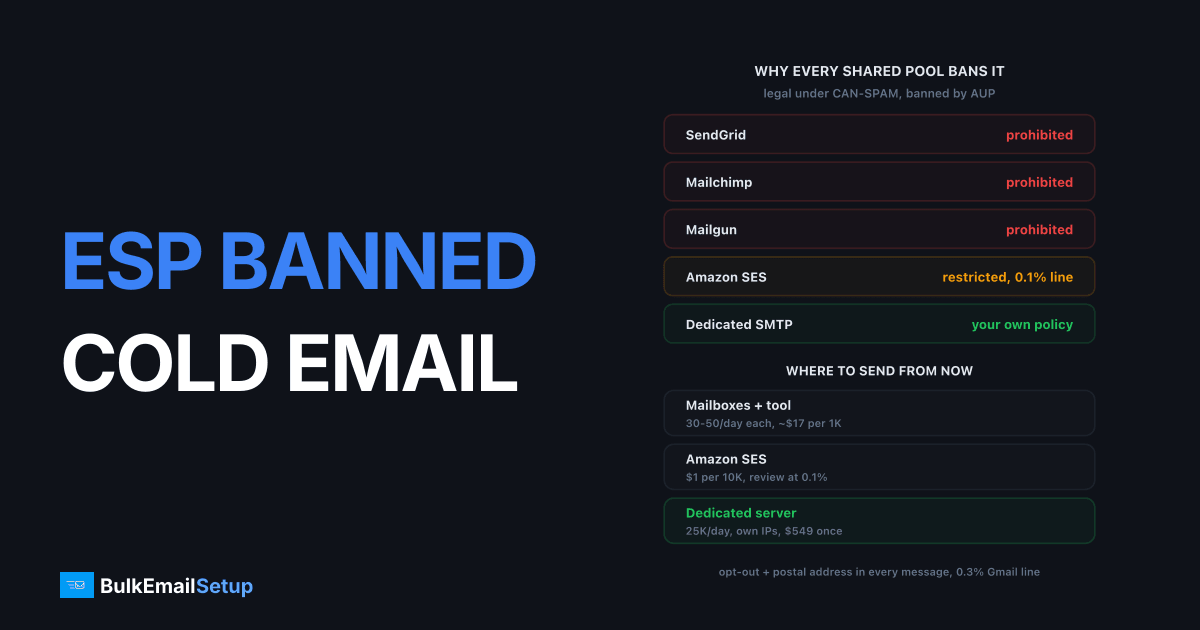
If your ESP banned cold email, the account is not coming back, and that is true at SendGrid, Mailchimp, Mailgun and Brevo alike. All four write unsolicited outreach into their acceptable use policies, because cold lists produce complaint rates of 0.5% to 2% and those complaints land on IPs shared with hundreds of other customers. Cold B2B email is legal in the US under CAN-SPAM. It is simply not allowed on shared pools. You have three realistic routes from here: mailbox-based tools at 30 to 50 sends a day per mailbox, a transactional relay like Amazon SES with hard complaint limits, or a dedicated SMTP server on your own IPs.
Why every shared-pool ESP bans cold email
Shared-pool ESPs ban cold email because the complaint rate lands on their IPs, not yours. A SendGrid IP might carry mail for 300 customers. If your cold campaign runs at 1% complaints while everyone else sits at 0.05%, the IP's blended rate jumps, Gmail throttles it, and 299 innocent customers see deferrals. The provider's only defence is to remove you.
The numbers make it obvious why. Google's sender guidelines set a hard spam-complaint ceiling of 0.3% and recommend staying under 0.1%. A well-run opt-in newsletter runs at 0.02% to 0.08%. A cold B2B list, even a clean, well-targeted one, runs at 0.3% to 1%. A scraped one runs at 2% or worse. There is no version of cold email that fits inside an ESP's shared-pool tolerance, which is why the policy is written as a flat prohibition rather than a threshold.
I've read the acceptable use pages for all of these. The wording differs, the outcome does not.
| Provider | Cold email policy | Typical enforcement |
|---|---|---|
| SendGrid | Prohibited: unsolicited or purchased-list mail | Suspension, usually permanent |
| Mailgun | Prohibited on shared IPs, tolerated only on dedicated IP plans with review | Account termination |
| Mailchimp | Prohibited: audience must be opt-in, purchased and scraped lists banned | Immediate closure, no appeal |
| Brevo | Prohibited: cold prospecting listed as unauthorised | Suspension after complaint spike |
| Amazon SES | Not named, but 0.1% complaint and 5% bounce limits enforced on every account | Review, then pause |
| Dedicated SMTP server | Your IPs, your policy, receiver rules still apply | None from a provider |
Two things to take from that table. First, an appeal is pointless: the notice says what you did and it matches the policy, so there is nothing to argue. Second, "just move to Mailgun" is not a route. It's the same policy with a different logo, and it ends the same way two weeks later. If you got the SendGrid version of this notice, the SendGrid suspension guide walks through reading it, but for cold email the answer to "should I appeal" is no.
What the ban did and did not do to your domain
The ban stopped your sending. It did not damage your domain, but the complaints that caused it already did, and that damage travels with you.
Gmail and Microsoft score your sending domain independently of the provider. A 1% complaint rate at Gmail through SendGrid is a 1% complaint rate against your domain in Google's records, and it follows you to any route below. So before you choose where to send from, check what you are carrying:
- Open Google Postmaster Tools for the sending domain. If you never set it up, it takes one DNS TXT record and shows data within a day or two.
- Read Domain Reputation, not IP Reputation. The IPs were SendGrid's and you're leaving them behind.
- If domain reputation is High or Medium, you can keep the domain. If it's Low or Bad, retire it from cold outreach entirely.
A Bad domain reputation at Gmail takes months of clean, engaged sending to recover, and cold email is the worst possible tool for that recovery because engagement is low by nature. The cheaper move is fresh lookalike domains, which is standard cold-email practice anyway and is covered in cold email on multiple domains. If the banned domain was also your company's main domain, that is the bigger problem: move cold outreach off it permanently and never send cold from the domain your invoices go out on.
The three routes that work for cold email
There are three realistic routes, and they suit different volumes. Below roughly 3,000 a month, mailboxes win. Above 10,000 a month, a dedicated server wins. SES sits awkwardly in between and works only for the most disciplined senders.
Route 1: mailbox-based tools
Instantly, Smartlead, Lemlist and similar tools send through ordinary Google Workspace or Microsoft 365 mailboxes rather than a bulk relay. Each mailbox sends 30 to 50 cold emails a day once warmed, and the tool rotates across a pool of them. Workspace's hard cap is 2,000 messages a day per user, but nobody sending cold gets near it without the mailbox being flagged.
The economics are per-mailbox. A Workspace seat is about $7 a month on the Starter plan, a lookalike domain runs $10 to $15 a year, and you want no more than 2 to 3 mailboxes per domain. Sending 10,000 a month at 40 a day per mailbox over 22 working days needs roughly 12 mailboxes across 4 to 5 domains. It works well, and the reply handling is native because the mail lives in a real inbox. The ceiling is management: at 50,000 a month you are running 60 mailboxes and 25 domains, and Google's mailbox-level heuristics start catching pools that size.
Route 2: transactional relays with hard limits
Amazon SES and a handful of other transactional relays do not name cold email in their policies, and some cold senders run through them. SES charges $0.10 per 1,000 emails, which is close to free at any volume. The catch is enforcement by metric rather than by category: SES puts an account under review at 0.1% complaints and 5% bounces, and a cold list crosses one of those lines in its first serious week unless the list is verified and the targeting is tight.
I would only use this route with a verified list, complaint rate tracking per campaign, and a suppression process that stops sending to a domain the moment it complains. Even then, plan for the review. The Amazon SES review guide explains what that looks like. And you still send from SES's shared IPs unless you pay $24.95 a month per dedicated IP, so an IP-level problem is still partly out of your hands.
Route 3: a dedicated SMTP server on your own IPs
A dedicated server with your own IP addresses removes the provider policy conflict entirely. There is no shared pool to protect, so no policy team decides your use case is too risky for other customers. Cold email at 10,000 to 200,000 a month is the volume where this route pays for itself, and the sending tool on top can be anything that speaks SMTP: Mautic, MailWizz, a sequencer, or your own script.
What it does not remove is the receiver rules. Gmail's 0.3% complaint ceiling applies to your IPs exactly as it applied to SendGrid's, and now you are the one watching it. You also own the warm-up, the bounce handling, and delisting if an IP gets caught. The cold email SMTP server guide covers the domain separation and rotation that keeps this route healthy, and it is the route I'd pick for anything past 10,000 a month.
Cost per 10,000 cold emails a month
At 10,000 a month all three routes are affordable. The difference is what the money buys and where the ceiling sits.
| Route | Monthly cost at 10,000 | What's included | Realistic ceiling |
|---|---|---|---|
| Mailboxes (Instantly or Smartlead) | $150 to $250 | 12 Workspace seats ($84), 5 domains (~$6), tool plan ($37 to $97), warm-up service | ~50,000/month before pool management breaks |
| Amazon SES | $1 sending + $25 to $75 for 1 to 3 dedicated IPs | Relay only, no tool, no warm-up help | Whatever complaint rate you can hold under 0.1% |
| Dedicated SMTP server | $549 one-time, then hosting | Server, 3 dedicated IPs, DNS, MTA tuning, warm-up plan | 25,000/day on Basic, 200,000/day on top tier |
The mailbox route looks cheap at 10,000 and gets expensive by 50,000, because each extra 1,000 a month costs another mailbox and a fifth of a domain, forever. The dedicated server is a one-time cost that stays flat to 25,000 a day, which is 750,000 a month, and by then the mailbox route would be running 900 seats. SES is nearly free and nearly unusable for cold, which is its own kind of price. There is a full-volume breakdown in cost to send 100,000 emails a month.
The legal baseline you must meet on any route
Cold email is legal in the US under CAN-SPAM, and the FTC's compliance guide sets out exactly what it requires. None of the three routes exempts you from any of it, and getting it wrong costs up to $53,088 per email.
| Requirement | What it means in practice |
|---|---|
| Honest headers | From, Reply-To and routing must identify the real sender |
| Honest subject line | No "Re:" on a first email, no fake replies |
| Identify it as an ad | The message has to be recognisable as commercial |
| Physical postal address | A real street address or registered PO box in every message |
| Opt-out mechanism | A clear way to stop future mail, working for at least 30 days |
| Honour opt-outs in 10 business days | And never sell or pass on an opted-out address |
Note that CAN-SPAM does not require consent. That is what makes cold B2B email lawful in the US. It requires honesty and a working exit.
Outside the US the rules tighten. The EU's GDPR allows B2B cold email under legitimate interest, which means a documented reason the recipient's role is relevant to your offer, a business address rather than a personal one, and an opt-out honoured immediately. Canada's CASL is stricter still and largely requires consent. Whichever route you pick, the suppression list is the thing that keeps you legal: every opt-out, every complaint, every bounce goes on it and never comes off.
The warm-up reality on new infrastructure
New IPs start with zero reputation, and cold email builds it slowly. Plan for 4 to 8 weeks to full volume on a dedicated server, and 2 to 3 weeks per mailbox on the mailbox route.
The mechanics on a dedicated server: start at 200 to 500 a day per IP to your most relevant, most likely-to-reply segment. Ramp roughly 30% every two days. Watch the deferral rate, not opens. A rising rate of 4xx responses from Gmail or Outlook means you moved too fast, so hold the volume flat for four days before continuing. A server with 3 IPs on that schedule comfortably reaches 10,000 a day around week 6. The detailed schedule and the reasons it cannot be compressed are in how long does IP warm-up take.
Cold email warms slower than newsletters for one reason: replies and opens are the signal receivers use to build trust, and cold gets fewer of both. Mixing in a small volume of mail people actually want during warm-up, such as follow-ups to existing conversations, speeds the process measurably.
The 14-day recovery plan
Assume the account is gone and work this from day one.
Days 1 to 2: export and assess. Pull suppression lists, bounce logs and complaint data from the banned account while you still have access. You will lose access within days. Check Postmaster Tools domain reputation and decide whether the domain stays in cold rotation or retires.
Days 3 to 4: pick the route by volume. Under 3,000 a month, go mailboxes. Over 10,000 a month, go dedicated. In between, mailboxes unless you plan to grow, in which case start on dedicated and skip the migration later. Order the infrastructure now, because provisioning and DNS spread take 2 to 3 days.
Days 5 to 7: set up domains and authentication.
Register 3 to 5 lookalike domains. Publish SPF, DKIM at 2048-bit, and DMARC at p=none on each. Set PTR records to match the HELO hostname on every IP. Build the suppression list from the exported data before a single message goes out.
Days 8 to 10: fix the list. Verify every address. Remove role addresses, catch-all domains and anything that bounced or complained before. Cut the list to people whose job title actually matches the offer. This step is what determines whether the new infrastructure survives; a scraped list burns dedicated IPs as reliably as it burned SendGrid's.
Days 11 to 14: start warming. First sends at 200 to 500 a day per IP, or 10 to 20 a day per new mailbox. Best segment only. Log complaints and bounces per campaign from the first day. By day 14 you are sending real cold email again at low volume, on infrastructure where it is not a policy breach.
How BulkEmailSetup helps
We build dedicated SMTP infrastructure you own: your own server, your own IPs, SPF, DKIM, DMARC and PTR configured on every sending domain, MTA tuning, bounce handling, and a warm-up plan built for cold-email engagement patterns. Because the IPs are yours alone, there is no shared pool for a policy team to protect, so cold outreach that complies with CAN-SPAM and receiver rules is a use case, not a violation.
Basic starts at $549 one-time, covering 1 SMTP server, 3 dedicated IPs, 25,000 emails/day and unlimited contacts. Higher tiers scale to 15 IPs and 200,000 emails/day. See pricing, or read dedicated SMTP for cold email for how to set up the domains and rotation on top of it.
Outreach on BulkEmailSetup servers follows our anti-spam policy: lawful B2B email to business contacts you researched yourself, a working opt-out honoured within 10 business days, your physical address in every message, and complaints under 0.1%. Bought, rented or scraped lists are not allowed.
Frequently asked questions
Why did my ESP ban me for cold email?
Because cold email generates complaint rates of 0.5% to 2% on a typical list, and on a shared IP pool those complaints land on IPs used by hundreds of other customers. SendGrid, Mailchimp, Mailgun and Brevo all write cold or unsolicited outreach into their acceptable use policies as a prohibited use. The ban is a policy decision, not a claim that you broke the law.
Is cold email illegal in the US?
No. Under CAN-SPAM, cold B2B email is legal if the headers are honest, the subject line is not misleading, the message includes a valid physical postal address, and opt-outs are honoured within 10 business days. The FTC lists the penalty at up to $53,088 per email that breaks those rules. ESPs ban cold email on shared pools for reputation reasons, not legal ones.
Will the ban hurt my domain reputation?
The ban itself does not. The complaints that caused it already did. Gmail and Microsoft score your sending domain independently of which provider carried the mail, so check Google Postmaster Tools for your domain before you move. If domain reputation shows Low or Bad, switch cold outreach to fresh lookalike domains rather than trying to recover the old one.
Can I run cold email through Amazon SES?
Only just. Amazon SES does not name cold email as prohibited the way Mailchimp does, but it enforces a 0.1% complaint rate and 5% bounce rate on every account, and a cold list breaches both quickly. Most SES cold-email accounts end up under review within the first few weeks. Treat SES as a tolerated route with hard limits, not a home for cold outreach.
How many cold emails can I send per mailbox per day?
Around 30 to 50 per Google Workspace or Microsoft 365 mailbox per day once warmed, which is what tools like Instantly and Smartlead default to. Workspace's hard cap is 2,000 a day, but sending anywhere near it from a cold list gets the mailbox flagged within days. Reaching 10,000 a month takes roughly 8 to 12 mailboxes across 3 to 4 domains.
How long before a new dedicated server can send full cold volume?
Plan for 4 to 8 weeks. New IPs start with no reputation regardless of your history elsewhere, and cold lists build it slowly because engagement is low. Start at a few hundred a day per IP and ramp roughly 30% every two days, backing off whenever the deferral rate climbs. A server with 3 IPs reaches 10,000 a day comfortably by week 6.
Should I open a new account at the same ESP?
No. SendGrid, Mailchimp and Mailgun link accounts by payment method, domain and sending pattern, and a replacement account is normally closed within days. It also puts a second termination on record against your domain. Move to infrastructure where cold email is not a policy breach in the first place.


