
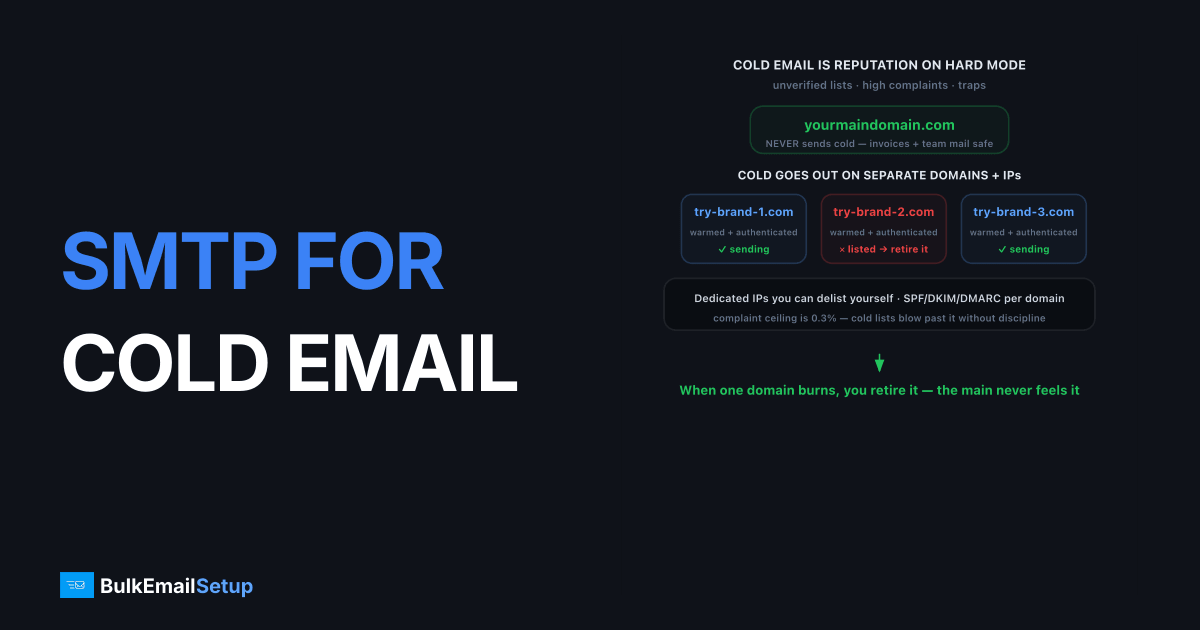
Dedicated SMTP for cold email gives you the IP control, domain separation, and warm-up discipline that outreach demands, without putting your main domain at risk. You get full SMTP access, dedicated IPs you control, and the ability to isolate each sending domain so a single spam-trap hit or blocklist listing stays contained. Cold email is unforgiving: lists are unverified, complaint risk runs high, and one careless ramp can list an IP for weeks. The infrastructure has to give you control and isolation, not a shared pool you can poison for everyone.
Outreach deliverability is mostly a reputation game played on hard mode. You are emailing people who never asked, so spam filters watch closely. The senders who land consistently treat infrastructure as carefully as copy.
Why cold email needs dedicated infrastructure
Cold email needs dedicated infrastructure because shared pools and main domains can't absorb its risk. Unverified lists bounce harder, recipients complain more, and spam traps lurk in scraped data. On a shared IP, your outreach poisons the pool; on your main domain, a bad run can stop your invoices and team email from delivering. Gmail and Yahoo enforce a complaint-rate ceiling of 0.3% (ideally under 0.1%), per Gmail's bulk sender guidelines, and cold lists blow past that fast without discipline.
The core requirements:
- Separate sending domains. Never send cold from your primary domain. Use dedicated lookalike or alternate domains so reputation damage stays isolated.
- Dedicated, controllable IPs. You need to know exactly what each IP is doing and to delist it yourself if it gets listed.
- Careful rotation. Spreading volume across multiple domains and IPs reduces per-domain risk, but only when each one is warmed and authenticated.
- Clean authentication. SPF, DKIM, and DMARC on every sending domain, no exceptions.
Mailbox sending vs dedicated SMTP for outreach
Both approaches work at different scales. Below is when each fits a cold-email operation.
| Factor | Mailbox-level (Gmail/Workspace inboxes) | Dedicated SMTP server |
|---|---|---|
| Best volume | Up to a few hundred/day per inbox | Hundreds to thousands/day |
| IP control | None (provider-shared) | Full, dedicated IPs |
| Domain isolation | Per inbox | Per domain and IP |
| Cost at scale | Many inboxes add up | Flat monthly |
| Delisting | Out of your hands | You control it |
| Warm-up | Per inbox | Per IP and domain |
| Reply handling | Native | Needs separate setup |
Many teams blend the two: mailboxes for the highest-touch, lowest-volume sequences, dedicated SMTP for scaled campaigns where IP control and domain reputation versus IP reputation both matter.
How to warm up and protect reputation
Reputation protection for cold email comes down to slow warm-up, strict authentication, and tight list hygiene. New IPs and domains have zero trust, and cold lists test that trust hard, so the ramp has to be gradual and the lists have to be clean.
Warm slowly, every domain and IP
Start each new sending IP and domain at roughly 20 to 50 emails a day and ramp over four to six weeks. Both the IP and the domain need warming for cold email, since you are building trust on brand-new sending identities. Our guide on domain warm-up versus IP warm-up explains why you cannot skip either.
Authenticate every sending domain
Set SPF, DKIM, and DMARC on each domain before you send. A missing DKIM signature triggers Gmail's 550 5.7.26 unauthenticated rejection. Keep DKIM at 2048-bit and your DMARC at p=none while warming, then tighten. The SPF, DKIM, and DMARC overview covers the records you need.
Clean the list before you send
Verify addresses and remove obvious risks before launch. A high hard-bounce rate signals a scraped or stale list to mailbox providers and triggers throttling fast. Spam traps in unverified lists are the single biggest blocklist risk in cold email, and no warm-up survives them.
How to set up domains and IPs for outreach
A solid cold-email setup spreads volume across several sending domains and IPs, each authenticated and warmed, so no single identity carries enough load to draw attention. The standard pattern is a handful of alternate domains, each with a few sending mailboxes or a dedicated IP, feeding a sequencing tool. The infrastructure work is mechanical, the discipline is what's hard.
Register and authenticate alternate domains
Buy two to four lookalike domains close to your brand, never the brand itself. On each one, publish an SPF record listing your sending IP, add the DKIM public key your provider issues, and set DMARC to p=none while you warm. Point a mail subdomain at the sending host and set a matching PTR record so reverse DNS resolves cleanly. Skipping PTR is a common reason outreach gets a 550 5.7.1 from stricter receivers.
Pace volume per domain, not in total
Cap each sending domain at a modest daily ceiling, often 30 to 50 cold sends a day even after warm-up, and let the sequencer rotate across domains. A single domain firing 500 cold emails a day looks like exactly what it is. Spreading the same volume across four warmed domains keeps each one under the radar and limits blast damage if one gets listed.
Plan reply handling early
Cold email without inbox monitoring wastes the replies you worked for. Route each sending mailbox's inbound to a place a human checks daily, and watch for hard bounces and out-of-office storms that signal a stale list. A spike in bounces mid-campaign means stop and clean, not push harder. Catch it early and you protect every domain in the rotation.
Common cold-email mistakes that list your IPs
The fastest ways to burn outreach infrastructure are predictable, and most are self-inflicted rather than provider problems. Senders who avoid these handful of errors keep their domains alive far longer than those who chase volume. A listed IP costs weeks of recovery, so prevention beats cleanup every time. In setups we've provisioned for outreach teams, the single most common failure is a scraped list seeded with spam traps: one client jumped a fresh domain from 50 to 600 sends a day, hit a pristine trap inside the first week, and picked up a Spamhaus CSS listing that took the whole rotation offline. The copy was fine. The list was the problem.
- Ramping too fast. Jumping from 50 to 500 a day in a week trips throttling and blocklists. Stretch the ramp over four to six weeks.
- Sending from the main domain. One trap hit on your primary domain can stall invoices and team mail. Always isolate.
- Skipping verification. Mailing an unverified scraped list is the single biggest spam-trap risk in cold email.
- Ignoring complaints. Past Gmail's 0.3% complaint ceiling, your domains drop fast. Suppress non-responders and honor opt-outs immediately.
Staying inside the rules
Cold email is legal in many places when done honestly, and reckless when done deceptively. Under US CAN-SPAM, B2B cold email is allowed if you tell the truth about who you are, skip misleading subject lines, include a real physical address, and honor opt-outs promptly. The EU and other regions are stricter, and consent rules vary, so check the jurisdiction of the people you are emailing.
This matters for deliverability, not just compliance. Deceptive sending generates complaints and trap hits, which is exactly what gets IPs and domains blocklisted. The legal best practices and the deliverability best practices point the same direction.
We are honest about the ceiling: dedicated SMTP gives you control, isolation, and clean authentication. It cannot make a bad list deliver. Inbox placement depends on your targeting, your copy, your complaint rate, and your discipline.
How BulkEmailSetup helps
We provide dedicated SMTP servers with dedicated IPs you control, full SMTP access, and SPF, DKIM, DMARC, and PTR configured for every sending domain. You get the IP control and domain isolation cold outreach needs, plus warm-up guidance so each new identity ramps safely. See plans on our pricing page.
Outreach on BulkEmailSetup servers follows our anti-spam policy: lawful B2B email to business contacts you researched yourself, a working opt-out honoured within 10 business days, your physical address in every message, and complaints under 0.1%. Bought, rented or scraped lists are not allowed.
Frequently asked questions
Do I need a dedicated SMTP server for cold email?
Once you send beyond a few hundred cold emails a day, dedicated SMTP gives you the IP control and domain separation cold outreach needs. You can isolate sending domains, rotate carefully, and keep a problem on one domain from spreading. Below that, mailbox-level sending often works fine.
Should cold email use my main company domain?
No. Cold outreach should run on separate, dedicated sending domains, never your primary domain. If a sending domain gets a poor reputation or a spam-trap hit, you want that isolated from the domain your customers and team rely on for normal business email.
How fast can I scale cold email volume?
Slowly. Warm up each sending IP and domain from roughly 20 to 50 emails a day, ramping over four to six weeks. Cold lists already carry higher bounce and complaint risk, so aggressive ramping invites blocklist hits and `550 5.7.1` rejections.
Is cold email allowed under CAN-SPAM?
Cold B2B email can be legal under CAN-SPAM in the US if you identify yourself honestly, avoid deceptive subject lines, include a real physical address, and honor opt-outs. Other regions, like the EU under GDPR, are stricter. Always check the rules for your recipients' jurisdiction.


