
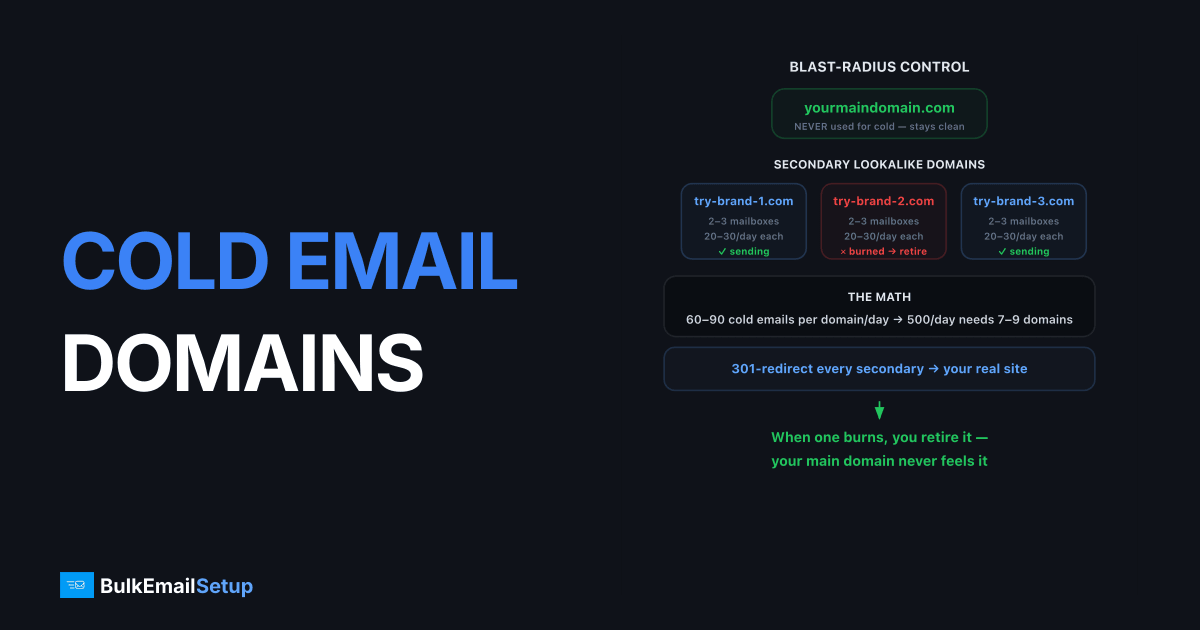
Cold email secondary domains cost $10-15 per domain per year, plus $6-7 per mailbox per month. For 500 emails a day you need about 8 domains and 20 mailboxes, which works out to roughly $1,700 in year one and about $1,560/year after that. Domains are the cheap part. Mailboxes are 90% of the bill.
The architecture behind those numbers: buy lookalike secondary domains (never your main domain), put 2-3 mailboxes on each, cap every mailbox at 20-30 emails per day, warm everything for 2-3 weeks, and 301-redirect the domains to your real site. One domain carries 60-90 cold emails a day. The point is blast-radius control: when a domain gets burned, and at cold-email complaint rates some eventually will, you retire it and your main domain never feels it.
What cold email domain setup costs
Every cold email operation pays for four things: domains, mailboxes, warm-up, and the sequencer. Here is the real breakdown at two common volumes.
| Line item | 500 emails/day | 1,000 emails/day |
|---|---|---|
| Domains needed | 8 | 15 |
| Domains @ $12/yr | $96/yr | $180/yr |
| Mailboxes needed | 20 | 40 |
| Mailboxes @ $6.50/mo | $1,560/yr | $3,120/yr |
| Warm-up tool | $30-50/mo | $50-80/mo |
| Year-one total | ~$1,700-2,100 | ~$3,400-4,200 |
Cost per email sent lands near $0.009-0.011 at 500/day. That looks cheap until you scale, and this is where the model breaks.
Where the mailbox model stops making sense
Mailbox costs scale linearly with volume, but domain costs barely move. Double your sending and you double the mailbox bill.
  500/day   →  20 mailboxes  →  $1,560/yr   ← mailboxes fine
1,000/day   →  40 mailboxes  →  $3,120/yr   ← getting heavy
5,000/day   → 200 mailboxes  →  $15,600/yr  ← model has broken
Past roughly 1,000 emails/day you are paying Google or Microsoft a per-seat fee purely to bypass their own per-account send limits. At that point dedicated SMTP infrastructure with your own IPs costs less per email and removes the per-mailbox cap entirely. Our setup plans start at $549 one-time for 25,000 emails/day, which undercuts a 200-mailbox setup in the first month.
Hidden costs people forget
- Spare domains. Keep one warmed spare per 5 active domains. That is 20% on top of your domain and mailbox count, not optional, since a burned domain mid-campaign otherwise stops the campaign.
- Warm-up time. 2-3 weeks per mailbox before real outreach. If you need pipeline in week one, this is a real cost.
- Replacement churn. Budget to replace 10-20% of domains a year at normal cold-email complaint rates.
Why secondary domains are non-negotiable
Cold email, by definition, goes to people who didn't ask for it. Even good outreach runs complaint rates 5-10x higher than opt-in mail, and bounce rates that would be a crisis on a newsletter.
| Risk | On main domain | On secondary domain |
|---|---|---|
| Domain hits a blocklist | Invoices, support, sales all junked | Retire domain, swap in spare |
| Gmail domain reputation drops | Months to recover, affects everything | Contained to that stream |
| Recipient checks sender domain | Sees your real company | Redirects to your real site |
This is the same isolation logic as using subdomains for marketing mail, taken one step further, see subdomain vs root domain for where each applies.
Step 1: Buy the right domains
- Name pattern: close brand variants,
trybrand.com,getbrand.com,brandhq.com,brand.co,brand-app.com. Recipients should recognize you. - TLDs: .com first, .co/.io acceptable. Avoid bargain TLDs (.xyz, .top, .icu), filters pre-score them badly.
- Check history before buying: a previously owned domain may carry baggage.
# Did this domain exist before? Check current DNS footprint
dig MX trybrand.com +short
dig TXT trybrand.com +short
# Also check the domain against the Spamhaus DBL at check.spamhaus.org
- Age them: register domains 30+ days before serious sending. Brand-new domains trip "young domain" heuristics at Gmail and Microsoft.
- Cost: $10-15/domain/year, ~$120/year for a 9-domain setup. See the full cost breakdown above for how domains compare to the mailbox bill.
Step 2: DNS for every domain
Each secondary domain needs the full authentication stack, exactly as if it were your main domain:
# SPF
trybrand.com.            TXT  "v=spf1 include:_spf.yourprovider.com -all"

# DKIM (provider-issued key)
s1._domainkey.trybrand.com.  TXT  "v=DKIM1; k=rsa; p=MIIBIjANBg..."

# DMARC - enforce from day one on cold domains
_dmarc.trybrand.com.     TXT  "v=DMARC1; p=quarantine; rua=mailto:[email protected]"

# MX must exist and receive - replies and bounces matter
trybrand.com.            MX   10 mx.yourprovider.com.
Then two finishing touches that separate professional setups from spam farms:
- 301 redirect the domain (and
www) to your main website. - Custom tracking domain per sending domain if your sequencer uses link tracking, never share one tracking domain across all sending domains, or one burned domain poisons the rest.
Step 3: Mailboxes and volume math
| Variable | Safe value |
|---|---|
| Mailboxes per domain | 2-3 |
| Cold sends per mailbox/day | 20-30 |
| Effective sends per domain/day | 60-90 |
| Domains for 500/day | 7-9 |
| Domains for 1,000/day | 14-17 |
| Yearly cost at 500/day | ~$1,700 |
| Yearly cost at 1,000/day | ~$3,400 |
Use real names on mailboxes (anna@, mark.s@), not sales@ or outreach@. Keep one spare warmed domain per 5 active ones so a burned domain can be swapped without pausing campaigns.
These per-mailbox caps exist because most cold email rides on Google/Microsoft mailboxes with per-account behavioral limits. Higher-volume programs move to dedicated SMTP infrastructure with IP rotation instead of stacking hundreds of mailboxes.
Step 4: Warm-up before outreach
- Weeks 1-2: 5-10 emails/day per mailbox, conversational traffic with replies (peer-to-peer or a warm-up network). Ramp to 15-20.
- Week 3: introduce real outreach at 10/day per mailbox, keep some warm traffic mixed in.
- Week 4+: full 20-30/day per mailbox.
Never skip this on a new domain, first impressions are weighted heavily, and a domain that opens its life with 100 cold sends starts in the junk folder.
Step 5: Operate and rotate
- Monitor per domain: reply rate, bounce rate (<2%), and spam-folder checks via placement tests. A domain whose reply rate halves is degrading.
- Rest, don't just retire: a softening domain pulled out for 2-4 weeks at low warm volume often recovers.
- Burn criteria: blocklisted (DBL/SURBL), or placement tests show junk at 2+ major providers → retire it, move its sequences to a spare.
- List hygiene does the most: verified emails, no scraped lists, and tight targeting keep complaint rates low enough that rotation stays rare.
Secondary domains do not exempt you from the sender rules. Each one needs SPF, DKIM and DMARC in its own right, and Google's bulk sender guidelines apply per sending domain once volume crosses 5,000 messages a day to Gmail.
How BulkEmailSetup helps
We set up the whole multi-domain stack, domain selection, DNS, mailboxes or dedicated SMTP, warm-up, and per-domain monitoring, so your main domain never carries outreach risk.
If your cost math is heading past ~1,000 emails/day, the mailbox model stops paying off. Our Basic plan is $549 one-time for a dedicated SMTP server with 3 dedicated IPs and 25,000 emails/day, no per-mailbox fees and no contact limits. Compare that against a 40-mailbox setup at $3,120/year. See pricing for full plan details.
Frequently asked questions
How much does cold email domain setup cost?
Budget $10-15 per domain per year and $6-7 per mailbox per month. A 500 emails/day setup needs about 8 domains and 20 mailboxes, so roughly $120/year in domains plus $1,560/year in mailboxes, around $1,700 total for year one.
How many domains do I need for cold email?
Work backward from volume: one mailbox sends 20-30 cold emails a day safely, and one domain carries 2-3 mailboxes. So 500 emails/day needs roughly 7-9 domains with 2-3 mailboxes each.
Is it cheaper to use mailboxes or a dedicated SMTP server?
Mailboxes win below roughly 500 emails/day. Above that, per-mailbox fees compound fast, 1,000/day needs about 40 mailboxes at $6-7 each, and a dedicated SMTP setup with its own IPs becomes cheaper per email while removing per-account send caps.
Should I send cold email from my main domain?
No. Cold outreach carries inherent complaint and bounce risk, and a spam-flagged main domain damages every email your company sends, including invoices and support. Always use separate secondary domains.
What domains should I buy for cold outreach?
Close variants of your brand: trycompany.com, getcompany.com, company-hq.com, or the .co/.io versions. Stick to mainstream TLDs, cheap TLDs like .xyz or .top start with worse reputation.
How long should I warm up cold email domains?
Minimum 2-3 weeks per mailbox before real outreach, ramping from 5-10 emails a day. Domains older than 30 days also perform noticeably better, so register them ahead of time.
Do secondary domains hurt my brand or SEO?
No, as long as each secondary domain 301-redirects to your main site and you never publish duplicate content on them. Recipients who check the domain land on your real website.


