
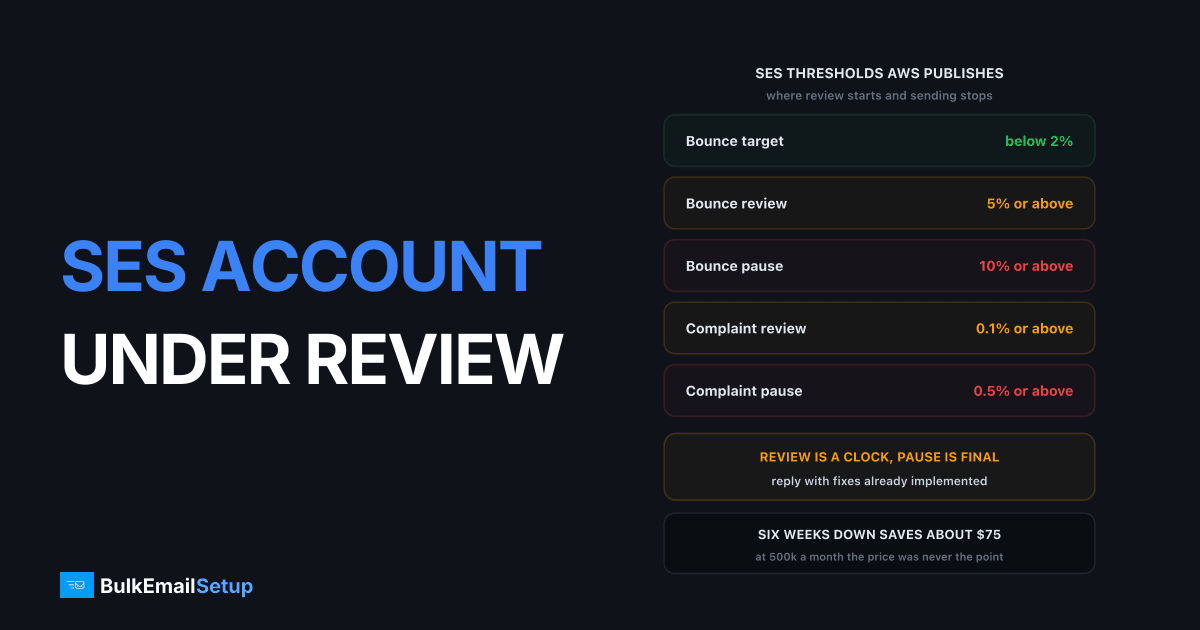
SES puts accounts under review when the bounce rate reaches 5% or the complaint rate reaches 0.1%, and pauses sending at 10% bounces or 0.5% complaints. Those numbers are published by AWS, which makes an SES review more recoverable than most suspensions: the trigger is knowable, and the exit is measurable. Fix the metric, reply to the support case with evidence, and the review closes.
Read the notice before you touch anything
AWS emails the notice to the root AWS account address, which is often not the address you send from. That is why people find out days late. The SES console Account dashboard shows Healthy or Paused, and the AWS Health Dashboard event log carries a copy of the notice.
| Notice type | Can you send? | What triggered it | Realistic outcome |
|---|---|---|---|
| Under review, bounces | Yes | hard bounce rate at 5% or above | closes on measured improvement |
| Under review, complaints | Yes | complaint rate at 0.1% or above | closes if you change targeting |
| Under review, spamtraps | Yes | trap organisations reported hits | 3 weeks or more to confirm a fix |
| Under review, manual investigation | Yes | an AWS investigator flagged content | depends on the category |
| Sending paused | No | unfixed review, repeat review, or AUP breach | reinstatement request only |
A review is a warning with a clock. A pause is a decision you argue back from. AWS says it will pause without a review first if the issue is severe, or if the same issue has put you under review before. A second review for bounces is your last one.
The exact thresholds AWS publishes
Most providers keep trigger points private. AWS does not, and the numbers tell you how much room you had and how far back you need to come.
| Metric | Target | Review at | Pause at |
|---|---|---|---|
| Hard bounce rate | below 2% | 5% or above | 10% or above |
| Complaint rate | below 0.1% | 0.1% or above | 0.5% or above |
| Spamtrap hits | zero | not disclosed | not disclosed |
| Gmail spam rate | below 0.1% | n/a | 0.3% is Gmail's own hard limit |
Two details change how you read your dashboard. Only hard bounces to domains you have not verified count, so your raw bounce log looks worse than the rate AWS acts on. And the complaint rate covers only domains that send feedback loop data to SES, so it is a sample. Both are in the AWS sending review process FAQs.
The bigger trap is the window. AWS uses a representative volume, an amount of mail reflecting your typical sending, not a fixed period. It differs per account and can stretch further back than the SES console will show you. That is why two clean days reset nothing.
What to pull before you reply
Do not open the case with an apology. Open it with numbers.
| Source | What to pull | Why it matters |
|---|---|---|
| SES reputation metrics | current bounce and complaint rate, account status | tells you which threshold you are on |
| CloudWatch SES metrics | Bounce, Complaint, Reputation.BounceRate over 30 days | shows the exact day the curve broke |
| SNS bounce notifications | hard bounce list with recipient domain | identifies the segment in minutes |
| SNS complaint notifications | complaint volume by campaign tag | separates targeting from list quality |
| Your ESP or app logs | which campaign or job ran on the break day | the actual root cause |
Sort hard bounces by recipient domain. A bought list shows as a wall of dead addresses at the two or three biggest consumer domains, three to eight times your normal rate. A stale but real list spreads bounces evenly across many domains at 5 to 10%.
AWS will not do this for you. The docs say support gives only a high-level overview, such as "you have a problem with bounces". AWS also will not hand over the addresses that bounced or complained, so if you were not capturing SNS notifications, that history is gone.
Bounces or complaints, because the fix differs
A bounce rate over 5% is nearly always list provenance. Addresses you collected yourself do not fail at that rate unless the list sat unused for years. A complaint rate over 0.1% is a different problem: the addresses are real, and the people behind them did not want your mail. Cleaning will not move that number, only changing what you send and to whom.
| Signal | Root cause | The fix that works |
|---|---|---|
| Bounces 5-10%, spread across domains | list aged out | remove 12-month non-openers, verify the rest |
| Bounces above 15%, clustered | purchased or scraped | delete the segment, do not suppress it |
| Complaints 0.1-0.3% | frequency or targeting drift | cut cadence, segment by engagement |
| Complaints above 0.5% | consent problem | stop, re-permission the list |
| Spamtrap notice, low bounces | recycled dead addresses | sunset policy, list hygiene |
AWS does not disclose how many spamtrap hits trigger action, and a small number does real damage. Most traps are recycled addresses that hard bounced for a year first, so strict bounce removal prevents them for free. AWS also warns against re-engagement campaigns to cold addresses, because they hit traps and spike bounces together. Read re-engagement campaigns before you try one.
What to do, in order
1. Stop the bleeding. Pause the segment that caused the spike. AWS says you can keep sending during a review, and also that sending on unchanged makes the issue worse. Both are true.
2. Enable the SES account-level suppression list so hard-bounced addresses cannot be mailed again from any part of your stack.
3. Wire up SNS notifications for Bounce and Complaint events, with CloudWatch alarms on Reputation.BounceRate at 2% and Reputation.ComplaintRate at 0.05%. Alarms at half the threshold buy you a week of warning.
4. Remove the bad segment entirely. Not suppress, remove. Suppressed addresses still count against list quality when you migrate.
5. Clean the rest. Every hard bounce out, every 12-month non-opener out. On a typical list that is 20 to 30% of addresses, and those are the ones generating bounces. See email list cleaning.
6. Reply to the support case. Only after steps 1 to 5, because AWS wants implemented changes.
7. Resume slowly. Come back at a fraction of previous volume, to engaged recipients only.
What a strong reply to AWS contains
AWS asks for three things, and the docs are explicit: list only steps already implemented, not steps you intend to take. Keep it to one message.
| Section | What to write | Weak version |
|---|---|---|
| Root cause | "A 2023 webinar list of 41,200 addresses imported on 3 Sept" | "some older contacts" |
| What changed | "Segment deleted, 41,200 addresses removed, 8,900 hard bounces suppressed" | "we cleaned the list" |
| Prevention | "SNS bounce webhook auto-suppresses, CloudWatch alarm at 2%, quarterly hygiene" | "we will be more careful" |
A bounce case also asks how you track bounces and verify new addresses. A complaint case asks how you acquire addresses and how subscribe and unsubscribe work, with the actual links. Give the answer, not the argument, and reply once on the case AWS opened.
What the review does to your domain
The review threatens your SES access. It does not undo the reputation damage that caused it, and that damage sits on your sending domain, not on AWS.
Gmail and Microsoft score sending domains independently of which service carries the mail. Google's bulk sender requirements set a hard limit of 0.30% spam complaints and recommend under 0.10%, the same number AWS uses as its review trigger. So the damage is already recorded at every receiver and follows you to any provider you move to.
Check before assuming a clean start. Open Google Postmaster Tools and read Domain Reputation and IP Reputation separately. If domain reputation reads Low or Bad, changing provider fixes nothing. Setup is one DNS TXT record: see our Postmaster Tools guide and domain vs IP reputation.
Outcomes and timelines
| Outcome | What it looks like | Typical timeline |
|---|---|---|
| Review closes on its own | metrics fall back under the threshold in the window | days to a few weeks |
| Review closes after your reply | AWS accepts the evidence and cancels the period | reply, then AWS responds on the case |
| Review extended for spamtraps | AWS needs more data to confirm the fix | 3 weeks or more |
| Sending paused | window expired, or repeat, or severe | reinstatement request, no fixed clock |
| Reinstatement refused | AWS explains why, you may resubmit | another cycle |
| Account closed | AUP breach, phishing, unsolicited at scale | final |
One knock-on people miss: while SES is under review or paused, AWS may refuse quota increase requests for other outbound services such as SNS. Other AWS services keep working, but any plan needing a higher outbound limit is on hold. If you were mid-way through raising your SES sending quota, see what to do when a limit increase is denied.
What the outage costs
| Line item | Typical scale |
|---|---|
| Sending down or throttled | 1 to 6 weeks |
| Revenue from paused campaigns | your normal email revenue, gone |
| Re-warm to full volume after that | 4 to 8 weeks |
| Engineering and admin time | 20 to 40 hours |
| Domain reputation recovery | months, if Postmaster Tools dropped |
| SES cost saved during the outage | roughly $0.10 per 1,000 emails, so nearly nothing |
The last row is the point. A six-week outage at 500,000 emails a month saves about $75 in SES fees while costing a quarter of a year's email revenue. The per-email price was never the number that mattered. The two clocks also run in sequence: a three-week review plus a six-week warm-up is nine weeks, not six.
The 30-day recovery plan
Days 1 to 3: contain and measure. Pause the segment. Pull 30 days of CloudWatch metrics and find the break day. Turn on the suppression list and SNS events. Set up Postmaster Tools. Export your suppression list and bounce history, because AWS will not rebuild it later.
Days 4 to 7: clean, then reply. Delete the segment. Remove every hard bounce and every 12-month non-opener permanently. Verify what remains. Then reply to the support case with the three-part answer above.
Days 8 to 14: build the fallback path. Do not bet the business on the reply. Stand up sending on a subdomain, not the root domain, so the next problem stays contained. SPF, DKIM at 2048 bits, DMARC at p=none read for two weeks, PTR matching your HELO name. Reasoning in subdomain vs root domain.
Days 15 to 45: warm up. A few hundred a day per IP to the most engaged 10%. Grow roughly 30% every two days. Watch 4xx deferrals rather than opens, because deferrals move first. Full ramp in how long IP warm-up takes.
Ongoing: fifteen minutes a week. Bounce and complaint rate per campaign, alarms still armed, Postmaster Tools domain reputation. That is the whole cost of not repeating this.
When SES is the wrong fit anyway
SES gives you raw sending with no list management, no campaign tooling and no bounce handling beyond the events you wire up yourself. If the review happened because nothing was catching bounces automatically, it recurs after you fix this instance, and the repeat is the one AWS escalates straight to a pause.
Two honest paths. Build the missing pieces around SES, which is real engineering work. Or move to infrastructure where bounce handling, suppression and warm-up come with the setup. See Amazon SES alternatives and SES vs a dedicated SMTP server.
What not to do
- Do not open a second AWS account to keep sending. It breaches the AWS Acceptable Use Policy, AWS links accounts by payment method and identity, and it converts a recoverable review into a closure across both accounts.
- Do not resume full volume the moment the review closes. The representative volume window still holds your bad days.
- Do not treat suppression as cleaning. Suppressed addresses still count against list quality when you migrate.
- Do not send a re-engagement blast to fix engagement. AWS names this as high risk for both spamtraps and bounces.
- Do not open five support tickets. Reply once on the case AWS opened, with numbers.
- Do not skip the post-mortem. If you never identify the segment you repeat it, and the repeat is a pause.
How BulkEmailSetup helps
We build dedicated SMTP infrastructure with bounce and complaint handling wired in from the start, so hard bounces suppress automatically, complaint rates are visible per campaign rather than discovered in a review notice, and warm-up is planned rather than improvised. The IPs are yours alone, so there is no shared pool to protect.
If your review was caused by list quality, fix that first, because dedicated IPs make poor lists more costly rather than less. When the list is clean, Basic starts at $549 one-time covering 1 SMTP server, 3 dedicated IPs, 25,000 emails/day and unlimited contacts. Higher tiers scale to 15 IPs and 200,000 emails/day. See pricing.
Frequently asked questions
Why is my Amazon SES account under review?
AWS places accounts under review when the bounce rate reaches 5% or the complaint rate reaches 0.1%, measured across a representative volume of your recent sending rather than a fixed window. Spamtrap hits and manual investigator findings also trigger reviews. Unlike most providers, AWS publishes these thresholds, so the trigger is knowable rather than discretionary.
What is the difference between under review and sending paused?
Under review means you can still send while AWS watches your metrics improve. Sending paused means outbound mail has stopped entirely and you must reply to the support case to request reinstatement. AWS pauses at a 10% bounce rate or a 0.5% complaint rate, and it can pause without a review first if the issue is severe or repeated.
How long does an SES review last?
The review period is stated in the notification AWS emails to your root account address, and it is commonly a few weeks. For spamtrap and direct-complaint cases AWS says it can take three weeks or more just to confirm your fix worked. Reply to the support case as soon as the change is live rather than waiting for the window to expire.
How do I get out of an SES review?
Fix the metric that triggered it, then reply to the AWS support case with three things: the root cause, the changes already implemented, and how those changes stop a repeat. AWS explicitly says to list only steps you have already done, not planned steps. Name the segment, the number of addresses removed, and the automation now handling bounces.
What bounce rate does Amazon SES actually allow?
AWS asks you to stay below 2% for best results. At 5% or above it places the account under review, and at 10% or above it may pause sending. Only hard bounces to unverified domains count, so mailbox-full and blocked-IP failures do not push the number up.
Can Amazon SES close my account permanently?
Yes. AWS can pause sending without a review when the issue breaches the AWS Acceptable Use Policy outright, such as phishing content or clearly unsolicited mail, and repeat reviews for the same issue escalate straight to a pause. In practice SES is more recoverable than most shared-pool providers because the thresholds are published and the exit is measurable.


