
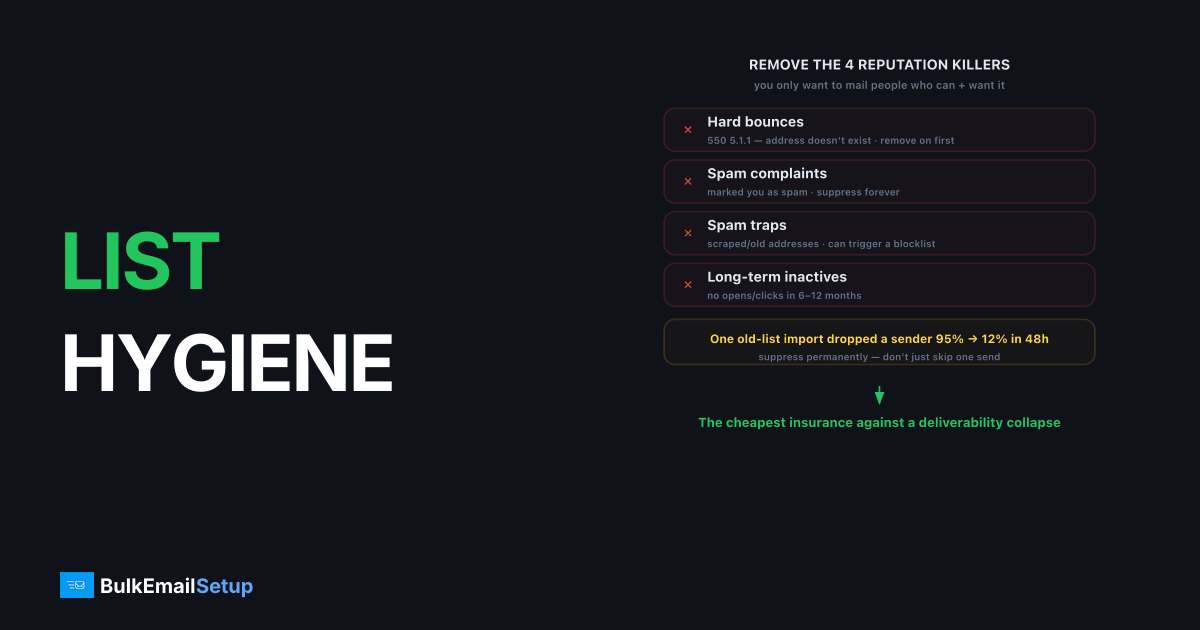
List hygiene is the ongoing practice of removing invalid, inactive, and risky email addresses from your sending list so that you only mail people who can and want to receive your email. It protects deliverability because the three biggest reputation killers, hard bounces, spam-trap hits, and spam complaints, all come from mailing addresses you should have removed. A clean list keeps bounce rates low and engagement high, the exact signals mailbox providers reward with inbox placement.
Why does a dirty list destroy deliverability?
A dirty list raises bounce and complaint rates, and both signal poor sending practices to mailbox providers. Gmail's bulk sender guidelines cap the acceptable spam complaint rate at 0.3%, with under 0.1% considered healthy. Cross that line repeatedly and you get throttled or blocked, regardless of how good your content is.
The damage compounds. Each hard bounce tells receivers you are mailing addresses that do not exist, which looks like a purchased or scraped list. Each spam-trap hit can trigger a blocklist listing. We have seen a single old-list import drop a sender from 95% to 12% inbox placement in 48 hours, purely from a bounce and complaint spike. Hygiene is the cheapest insurance against that.
What exactly should you remove?
Remove anything that bounces, never engages, or looks risky. The categories below cover most of it. Suppress permanently, do not just skip for one send.
- Hard bounces (
550 5.1.1 user unknownand similar): the address does not exist. Remove on first hard bounce. - Repeat soft bounces: temporary failures that persist across several sends usually mean a dead mailbox.
- Spam complaints: anyone who marked you as spam. Suppress immediately and forever.
- Long-term inactives: no opens or clicks in 6-12 months, depending on your cadence.
- Role and catch-all addresses:
info@,admin@, and unverified catch-alls carry higher trap risk.
The riskiest addresses are not the obviously dead ones, they are the quietly inactive ones. A mailbox that stopped engaging months ago can be recycled by the provider into a spam trap. Sunsetting inactives is trap prevention, not just engagement optimization. The pattern we see most often is a sender who imports an old database, sees a tolerable 3 to 4 percent hard bounce rate, and assumes the list is fine, then trips a Spamhaus listing weeks later from a recycled trap that never bounced at all. Traps accept your mail quietly, which is exactly why bounce rate alone never catches them.
How do bounces and complaints fit into hygiene?
Bounce handling is hygiene in real time: every bounce code tells you whether to retry or remove. Hard bounces (5xx) mean permanent removal; soft bounces (4xx) mean retry, then remove if they persist. The full classification is in email bounce handling best practices and soft bounce vs hard bounce.
Complaints feed in through feedback loops. When a recipient hits "report spam," participating providers send you a notification so you can suppress that address. Wiring those up turns complaints into automatic hygiene instead of silent reputation damage.
What does a practical hygiene routine look like?
A practical routine validates at entry, suppresses at failure, and re-engages on a schedule. The cadence below scales from small lists to high-volume senders.
| Trigger | Action |
|---|---|
| New signup | Validate syntax and MX; prefer double opt-in |
| Hard bounce | Suppress permanently, immediately |
| Spam complaint | Suppress permanently via feedback loop |
| Persistent soft bounce | Suppress after 3-5 failed sends |
| No engagement 6-12 months | Run re-engagement, then sunset |
Double opt-in is the strongest entry filter because it confirms the address is real and wanted. The trade-offs are in double opt-in vs single opt-in. For the deeper cleaning workflow, see email list cleaning guide.
How do you validate addresses at entry?
Validate addresses at entry in three layers: syntax, domain, and mailbox. Syntax catches typos like user@gmail,com. A DNS MX lookup confirms the domain can actually receive mail. Mailbox-level verification (an SMTP probe or a validation service) checks the inbox exists without sending a real message.
The highest-value layer is the cheapest. A simple MX check at signup rejects garbage domains for free, before they ever bounce. Pair that with double opt-in and most invalid addresses never enter your list. For risky sources (imported lists, old databases) run a bulk validation pass before the first send, not after, because the first send to a dirty list is the one that triggers the reputation hit.
One caution: validation reduces hard bounces but cannot detect spam traps or measure engagement. A syntactically valid, deliverable address can still be a recycled trap. Validation is the first filter, not the whole job.
How do you measure list health?
Measure list health with four metrics tracked over time: hard bounce rate, complaint rate, engagement rate, and list growth versus churn. Keep hard bounces under 2% (ideally under 1%) and complaints under 0.3% per Gmail and Yahoo's rules. Watch the trend, not just the single number.
| Metric | Healthy target | Warning sign |
|---|---|---|
| Hard bounce rate | Under 1-2% | Climbing above 2% |
| Spam complaint rate | Under 0.1% | Approaching 0.3% |
| Open / engagement rate | Stable or rising | Steady decline |
| Inactive share | Shrinking | Growing dead segment |
The metric most senders ignore is the trend in inactive share. A list can show a healthy bounce rate while quietly filling with people who never open. That hidden dead weight drags engagement-based placement down long before bounces or complaints flag it. Sunset on a schedule, do not wait for the bounce rate to break.
How does a re-engagement pass actually work?
A re-engagement pass is the controlled last step before you sunset an inactive segment, and the order of operations protects your reputation. Pull everyone with no open or click in your inactivity window, then mail them in small batches from your warmest IP, not your whole list at once. A dormant segment bounces and complains harder than active mail, so you isolate that risk rather than blending it into a normal send.
Send two or three short messages with a clear "still want these?" ask and a one-click way to stay. Anyone who opens or clicks moves back to active. Everyone who stays silent gets suppressed, not mailed again. The mistake is treating re-engagement as a reason to keep mailing dead addresses indefinitely. It is a one-time gate: re-engage once, then sunset what does not respond. Mailing a stale segment over and over is exactly the behavior that recycles those addresses into spam traps. For the full workflow, see re-engagement email campaign guide.
How BulkEmailSetup helps
Clean lists are the sender's job, but your infrastructure should make the signals visible. Our dedicated SMTP setup surfaces bounce codes and complaint data in your own logs, so suppression is straightforward and reputation problems show up early. Authentication is configured correctly out of the gate. See plans on our pricing page.
Frequently asked questions
What is list hygiene in email marketing?
List hygiene is the ongoing process of removing invalid, bounced, inactive, and risky addresses from your email list. It keeps bounce and complaint rates low, which protects your sender reputation and inbox placement.
How often should I clean my email list?
Validate new addresses at signup, suppress hard bounces immediately, and run a full re-engagement and removal pass every 3 to 6 months. High-volume senders mailing daily should monitor continuously rather than on a fixed schedule.
Does list hygiene really affect deliverability?
Yes, directly. High bounce rates and spam-trap hits signal poor list quality to mailbox providers, who then throttle or block your mail. Clean lists keep bounce rates low and engagement high, both of which improve placement.
What is a spam trap?
A spam trap is an email address that exists only to catch senders with poor list practices. Hitting one signals you are mailing addresses you should not have, and pristine traps can trigger blocklist listings.


