
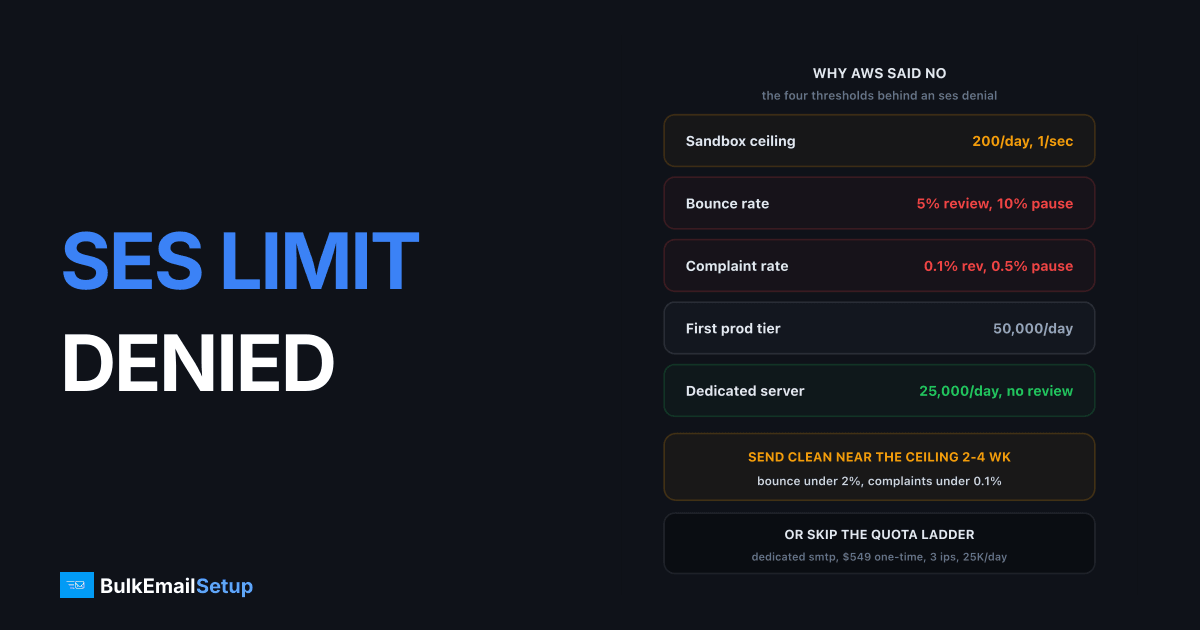
An SES sending limit increase gets denied for one of four reasons: AWS has no bounce and complaint history to judge you on (sandbox accounts send 200 a day, 1 per second), your bounce rate is over 5% or your complaint rate over 0.1%, your use-case description was too vague, or the account is only days old. The denial email names the category but not the fix. Work out which one you hit, because the right response ranges from "rewrite three paragraphs" to "you are on the wrong platform".
The quota process is mechanical once you know what the reviewer checks. Most denials I have seen came from the request, not the account.
What the denial wording means
AWS uses a handful of standard phrasings. Each one points somewhere different.
| Denial wording | What AWS is saying | Fix |
|---|---|---|
| "We are unable to grant your request at this time" | No sending history to evaluate | Send real mail near your current ceiling for 2 to 4 weeks, re-request |
| "Your use case does not align with our policies" | Content category or vague description | Rewrite the request with specifics, or accept SES is not the fit |
| "Your account's bounce/complaint rate exceeds..." | Bounce over 5% or complaints over 0.1% | Clean the list, wire up SNS bounce handling, wait for the rate to fall |
| "We need additional information" | Not a denial, a stall | Answer every question in one reply within 24 hours |
| "Account is under review" | A separate enforcement case is open | Close that case first, quota requests are frozen until it clears |
The one people misread is the last row. If your account is under review for bounces, every quota request is refused until the review clears, and the FAQ says the same freeze applies to related services like SNS. Fix the review first. Our SES account under review guide covers that path.
The numbers AWS checks before saying yes
AWS publishes its enforcement thresholds, which most providers do not. The quota reviewer works to the same numbers.
| Metric | Target | Review trigger | Sending pause |
|---|---|---|---|
| Hard bounce rate | under 2% | 5% or higher | 10% or higher |
| Complaint rate | under 0.1% | 0.1% or higher | 0.5% or higher |
| Sandbox ceiling | 200 per day, 1 per second | n/a | n/a |
| Spam trap hits | zero | undisclosed count | undisclosed count |
These come from the SES sending review FAQ. Two details matter for a quota request. First, bounce rate counts hard bounces only, to domains you have not verified, so "mailbox full" soft bounces do not hurt you. Second, the rates are measured over a "representative volume", not a fixed window, so a bad campaign three weeks ago can still be dragging your number if you have sent little since.
For the automatic increases, the sending quotas page lists four conditions: content recipients want, real production mail to external addresses, volume regularly near your current ceiling, and low bounce and complaint rates. A manual request is judged on the same four things plus how clearly you describe the use case.
Why "no history" denials happen and how to build history
The sandbox catch-22 is real. You cannot show a bounce rate on 200 emails a day, and AWS will not raise you without one. The way through is to make those 200 count.
- Verify your sending domain, not just an address, and publish SPF, DKIM and DMARC before the first send.
- Send only to real external recipients. Test mail to your own domain is excluded from the metrics and proves nothing.
- Send at or near 200 a day, every day, for at least 14 days. A single burst of 200 followed by silence reads as no history.
- Set up SNS topics for bounce and complaint events on day one, and suppress the addresses automatically.
- Keep hard bounces under 2% across the whole period. On a clean list that is easy. On an old list it is not, and that is the point.
Then request production access with the full write-up below. If the account is under 7 days old, wait. New-account denials clear on their own once there is a couple of weeks of activity.
How to write a request that gets approved
The reviewer has a few minutes per case and is deciding whether you are a spammer. Make the decision easy. Cover every item in this table in plain sentences.
| Section | Weak version (denied) | Strong version (approved) |
|---|---|---|
| Volume | "We need a higher limit" | "20,000 per day steady, 60,000 peak on Tuesdays, 500,000 per month" |
| List source | "Our customers" | "Double opt-in signup form on example.com, consent timestamp and IP stored per contact" |
| Bounce handling | "We monitor bounces" | "SNS bounce topic to SQS, hard bounces suppressed automatically within 60 seconds" |
| Complaint handling | not mentioned | "SNS complaint topic, address suppressed on first complaint, current rate 0.03%" |
| Unsubscribe | "There is a link" | "One-click List-Unsubscribe header plus footer link, processed within 24 hours" |
| Content | "Marketing emails" | "Weekly product update to paying customers, sample attached" |
| Rate | not mentioned | "Peak 14 per second during a 90-minute send window" |
Put the numbers in. A request that says "500,000 a month" with a bounce rate of 1.2% is approvable. A request that says "as much as possible" is not, whatever the metrics look like. Ask for what you need in the next 60 days, not what you hope to send next year. A request for 50,000 a day from a sandbox account is normal. A request for 2 million a day from a sandbox account is a denial.
Keep it to one message. Answer any follow-up question the same day, because the 24-hour SLA restarts when AWS asks for more information.
How long to wait before re-requesting
Re-requesting with nothing changed gets the same answer within 24 hours. Change something first.
| Denial cause | Minimum wait | What must be different |
|---|---|---|
| No history | 2 to 4 weeks of steady sending | Daily volume near the ceiling, metrics visible |
| Bounce over 5% | Until the rate is under 2% | List cleaned, SNS suppression live |
| Complaint over 0.1% | Until the rate is under 0.1% | Segment removed, frequency cut, unsubscribe fixed |
| Vague use case | No wait | Rewritten request with the table above |
| New account | 7 to 14 days | Activity on the account |
The bounce and complaint waits are the slow ones. Because AWS measures over representative volume, you have to send enough clean mail to outweigh the bad batch. At 200 a day that can take a month. This is the stage where most people start looking at how to reduce bounce rate properly, and they should, because the same list will fail on any provider.
Why the ceiling stays low even after approval
Approval is not the end. The typical first production quota is 50,000 per 24 hours at 14 per second, and AWS sets it per account, so some get less. From there it grows in steps.
| Stage | Typical quota | How you get there |
|---|---|---|
| Sandbox | 200 per day, 1 per second | Default on every new account |
| First production tier | 50,000 per day, 14 per second | Approved production access request |
| Automatic increases | Roughly doubles per step | Send near the ceiling with clean metrics for 1 to 2 weeks |
| Large manual increase | 500,000+ per day | Support case with history to back it |
Each step wants you sending near the current limit with bounces under 2% and complaints under 0.1%. Getting from 50,000 to 500,000 a day is realistically 4 to 8 weeks of steady, clean, growing volume. That is fine for transactional mail that grows with your app. It is painful for a marketing team with a list of 400,000 that wants to send this week.
Quotas are also per region and per account. A second account starts at 200 a day again, and opening one to dodge the ladder breaches the AWS terms.
Stay in SES or move to a dedicated server
Two honest paths. Both work, for different senders.
Stay in SES if your mail is transactional or your marketing volume is under about 200,000 a month, your list is clean opt-in, and you have an engineer who will own the SNS bounce pipeline and the suppression list. At $0.10 per 1,000 it is the cheapest sending on the market, and the automatic increases do arrive once your metrics are clean.
Move to a dedicated SMTP server if you are a marketing sender above that volume, you have been denied twice, or the quota ladder is slower than your business. A dedicated server with your own IPs has no quota committee. You warm up for 4 to 6 weeks and then send 25,000 a day on the entry tier, 200,000 a day on the top tier. The trade is that you carry deliverability yourself: Gmail, Microsoft and Yahoo still score your domain and IPs, and a 5% bounce rate will hurt you there just as it did at AWS. Full comparison in Amazon SES vs a dedicated SMTP server, and the wider options are in Amazon SES alternatives.
Cost at 500,000 emails a month
| Line item | Amazon SES | Dedicated SMTP server (Basic) |
|---|---|---|
| Sending, 500,000 per month | $50 | included |
| Dedicated IP | $24.95 per IP per month, 1 to 2 IPs | 3 IPs included |
| Server hosting | none | $11 to $30 per month VPS |
| Setup | $0 | $549 one-time |
| Bounce and complaint pipeline | build it: SNS, queue, code, 10 to 20 engineering hours | included |
| Daily ceiling | 50,000 at first tier, grows on approval | 25,000 per day after warm-up, no approval step |
| Warm-up | AWS manages dedicated IP warm-up | 4 to 6 week schedule provided |
| Suspension risk | review at 5% bounce or 0.1% complaints | receiver rules only, no platform review |
| Year 1 cash | $900 to $1,200 plus engineering time | $680 to $910 |
SES year one assumes one dedicated IP at $24.95 and $50 a month of sending, roughly $900, before anyone's time. The dedicated column is $549 plus 12 months of hosting. The engineering line is the one that moves the answer. If you already have the SNS pipeline built, SES stays cheaper on paper. If you are building it just to get approved, you are spending the cost of the dedicated server in hours.
The 14-day plan
Work this whether or not you plan to stay in SES. If the re-request succeeds, you have a clean account. If it fails, you have a clean list ready for new infrastructure.
Days 1 to 2: read and measure. Match the denial wording to the table above. Pull the reputation dashboard bounce and complaint rates. Check whether a review case is open. Export your bounce and complaint notifications if you have any.
Days 3 to 5: clean. Remove every hard bounce permanently. Remove anyone with no open or click in 12 months. On a typical list this cuts 20 to 30% and that 20 to 30% is where the bounces were.
Days 6 to 7: wire up handling. SNS topic for bounces, SNS topic for complaints, both feeding a suppression store. Add the List-Unsubscribe header. Confirm SPF, DKIM and DMARC pass on a test send to Gmail.
Days 8 to 12: send clean, near the ceiling. 200 a day to your most engaged segment if you are in the sandbox, or near your current quota if you are out. Watch the two rates daily.
Day 13: decide. Bounce under 2% and complaints under 0.1%? Write the request using the strong-version column and submit. Rates still high, or this is the second denial, or you need 100,000 a day within the month? Order the dedicated server and start the warm-up on day 14, because a 4 to 6 week warm-up is faster than another two rounds with AWS.
Day 14 onward: one path, not both. Pick SES or the dedicated server, warm it, and monitor bounces and complaints weekly.
How BulkEmailSetup helps
We build dedicated SMTP infrastructure you own: your own server, your own IPs, SPF, DKIM, DMARC and PTR configured, bounce and complaint handling wired in, and a warm-up schedule tuned to your list. There is no quota request, no reviewer, and no ceiling set by someone else's risk model. If your SES denial was about list quality, fix the list first, because dedicated IPs make a bad list more expensive rather than less.
Basic is $549 one-time, covering 1 SMTP server, 3 dedicated IPs, 25,000 emails/day and unlimited contacts. Higher tiers scale to 15 IPs and 200,000 emails/day. See pricing, or read Amazon SES vs a dedicated SMTP server for the direct comparison.
Frequently asked questions
Why was my Amazon SES sending limit increase denied?
Four causes cover almost every denial: the account has no bounce or complaint history because it is still in the sandbox at 200 emails a day, the bounce rate is over 5% or the complaint rate is over 0.1%, the use-case description was too vague for AWS to judge, or the account is only days old. The denial email names a category, and the fix is different for each.
How long should I wait before requesting an SES quota increase again?
Wait until you have sent at least 2 to 4 weeks of real production mail near your current ceiling with a bounce rate under 2% and a complaint rate under 0.1%. AWS answers most requests within 24 hours, so a fast re-request with nothing changed just gets the same answer faster. Change the numbers or the use-case description first.
What sending quota does AWS give you when you leave the sandbox?
The common first production tier is 50,000 emails per 24 hours at 14 per second, though AWS sets it per account and can grant less. It then raises the quota automatically when you send near the ceiling with low bounces and complaints. Expect several rounds of gradual increases rather than one jump to 500,000 a day.
What should a successful SES limit increase request include?
Specific daily and peak volumes, where the addresses came from and how consent was captured, how bounces and complaints are handled automatically via SNS notifications, the unsubscribe method, and the type of content. One or two sample messages help. Vague requests along the lines of marketing emails to our customers are the ones that get denied.
Can I open a second AWS account to get a higher SES quota?
No. A second account starts in the sandbox at 200 emails a day like any other, it breaches the AWS terms, and AWS links accounts by payment method and sending identity. Any later request on either account is harder. Fix the first account or move to different infrastructure.
Is a dedicated SMTP server a better option than waiting for SES?
For marketing volume above roughly 200,000 emails a month, usually yes. A dedicated server gives you 25,000 emails a day from the first tier after a 4 to 6 week warm-up, with no quota committee. It costs more up front, about $549 one-time plus $11 to $30 a month hosting, against SES at $0.10 per 1,000 emails, but there is no ceiling set by someone else.


