
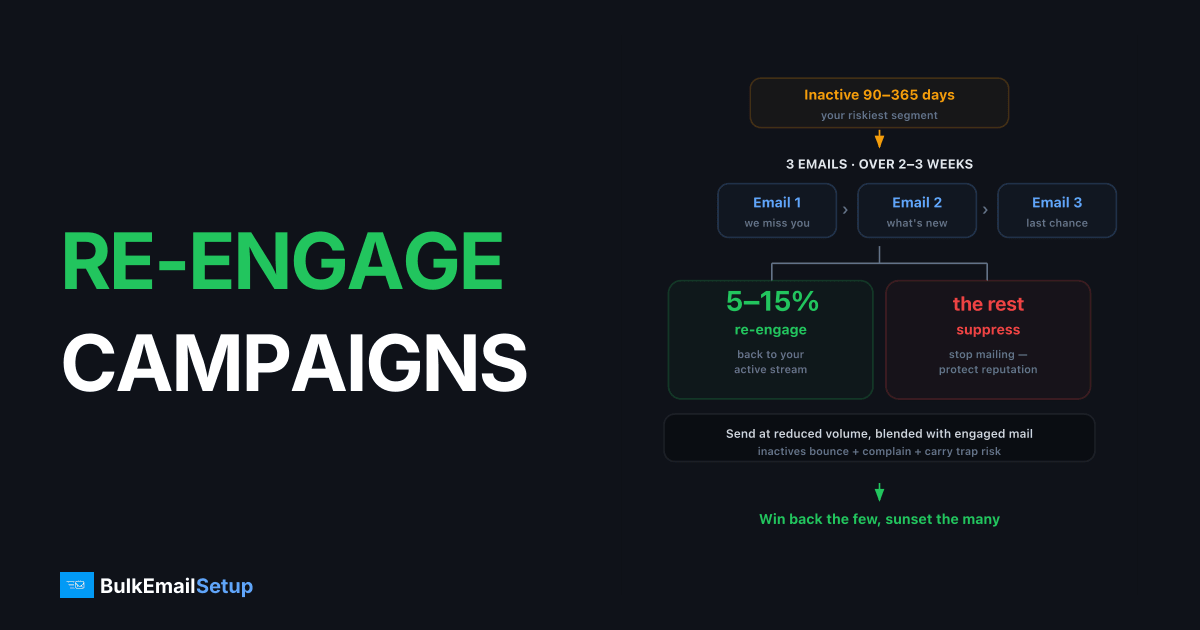
A re-engagement campaign is a short series, typically 3 emails over 2-3 weeks, sent to subscribers who've gone 90-365 days without opening or clicking, with the goal of winning back the 5-15% who'll respond and suppressing the rest. Run it at reduced volume blended into your engaged sends, because inactive segments bounce more, complain more, and contain your recycled-spam-trap risk.
Why this is your riskiest send
The inactive segment concentrates every negative signal at once.
| Risk | Why it's elevated in inactive segments |
|---|---|
| Hard bounces | Abandoned mailboxes get deactivated; some have already died |
| Spam complaints | People who forgot you treat your mail as unsolicited |
| Recycled spam traps | Long-dead mailboxes get converted to traps |
| Engagement drag | Near-zero opens pull down your domain-wide engagement rate |
That's why the volume rules below matter as much as the copy.
Volume and sequencing rules
- Verify the segment first. Run inactive addresses through email verification before mailing; drop invalids. This alone removes most of the bounce risk, details in the list cleaning guide.
- Never blast the whole segment in one day. Cap re-engagement mail at 10-20% of any day's total volume, blended with engaged traffic.
- Start with the least-stale. Mail the 90-180-day inactives first; only proceed to the 365-day tier if bounce and complaint metrics hold.
- Stop on bad numbers. Bounce over 2% or complaints over 0.1% on a re-engagement send: pause, tighten the segment, resume smaller.
If you're on a fresh IP still in warm-up, don't run re-engagement at all yet, warm-up traffic should be your most engaged, not your least.
The 3-email series
| Timing | Job | Subject line pattern | |
|---|---|---|---|
| 1. Reminder | Day 0 | Re-establish who you are and the value they signed up for | "Still want emails from us?" |
| 2. Incentive / preferences | Day 7 | Offer a reason to stay, discount, best content, or a frequency choice | "One click to stay on the list" |
| 3. Goodbye | Day 14-21 | Clear deadline: click to stay or be removed | "We're removing you in 7 days" |
Copy principles that move the numbers:
- Ask for a click, not an open. Post-Apple-MPP, opens are unreliable; a "keep me subscribed" button gives you a clean engagement signal.
- Offer a downgrade, not just on/off. A monthly-digest option retains 2-3x more people than a binary stay/go.
- Mean the goodbye. Subscribers who ignore email 3 get suppressed on the stated date. Sending email 4, 5, and 6 anyway is how complaint rates climb past Gmail's 0.3% threshold.
Defining "inactive" correctly
| Your sending cadence | Re-engagement trigger | Suppression point (non-responders) |
|---|---|---|
| Daily | 60-90 days no open/click | ~120 days |
| 2-3x weekly | 90-120 days | ~180 days |
| Weekly | 120-180 days | ~240 days |
| Monthly | 6-12 months | ~15 months |
Use clicks, site visits, and purchases alongside opens. Apple Mail Privacy Protection auto-fires opens for a large share of consumer lists, so "opened everything, clicked nothing for a year" can still be inactive.
These trigger/suppression pairs are the heart of a sunset policy; the re-engagement series is the mechanism that executes it.
What success looks like
- 5-15% win-back of the mailed segment (click or preference update).
- Bounce under 2%, complaints under 0.1% on every send in the series.
- The rest suppressed on schedule, which is also success. A 10% win-back plus a 90% clean suppression typically lifts list-wide open rates 20-40% within two campaigns.
If win-back exceeds 20%, your inactivity window was too tight and you spent risk budget on people who weren't gone. If it's under 3%, the segment was too stale to mail, next cycle, trigger earlier.
Common failure modes
- Re-engaging forever. Looping non-responders back into the series monthly converts a hygiene tool into a complaint generator.
- Leading with the discount. Email 1 should reaffirm value; discount-first trains inactives to ignore you until coupons appear.
- Skipping suppression because "list size." A 100K list that inboxes beats a 160K list in the spam folder, placement basics in why emails go to spam.
How BulkEmailSetup helps
On our dedicated SMTP servers you can set per-hour and per-day limits for risky segments like re-engagement sends, and the campaign statistics show bounce or complaint spikes mid-series so you can stop before one campaign burns the domain. Basic is $549 one-time plus about $11 a month hosting. See plans and pricing.
Frequently asked questions
What is a good re-engagement campaign success rate?
Winning back 5-15% of genuinely inactive subscribers is realistic. Anything above 20% usually means your inactivity definition was too aggressive and you were re-engaging people who weren't really gone.
How many emails should a re-engagement campaign have?
Three is the standard: a value-led reminder, an incentive or preference-update offer, and a final goodbye with a clear deadline. More than 3-4 attempts pushes complaint risk past the point of diminishing returns.
When should a subscriber enter a re-engagement campaign?
After 90-180 days without an open or click for frequent senders, or 6-12 months for monthly senders. The trigger should fire before engagement-based spam filtering makes them unreachable.
Should I send re-engagement emails from the same domain and IP?
Send them at reduced daily volume mixed with your engaged traffic, never as one big blast. Some high-volume senders use a separate subdomain to isolate the risk, which works but means that subdomain carries lower reputation by design.
What do I do with subscribers who don't respond to re-engagement?
Suppress them. The campaign's purpose is a clean decision, non-responders go to your suppression list under your sunset policy, which protects deliverability for everyone who stayed.


