
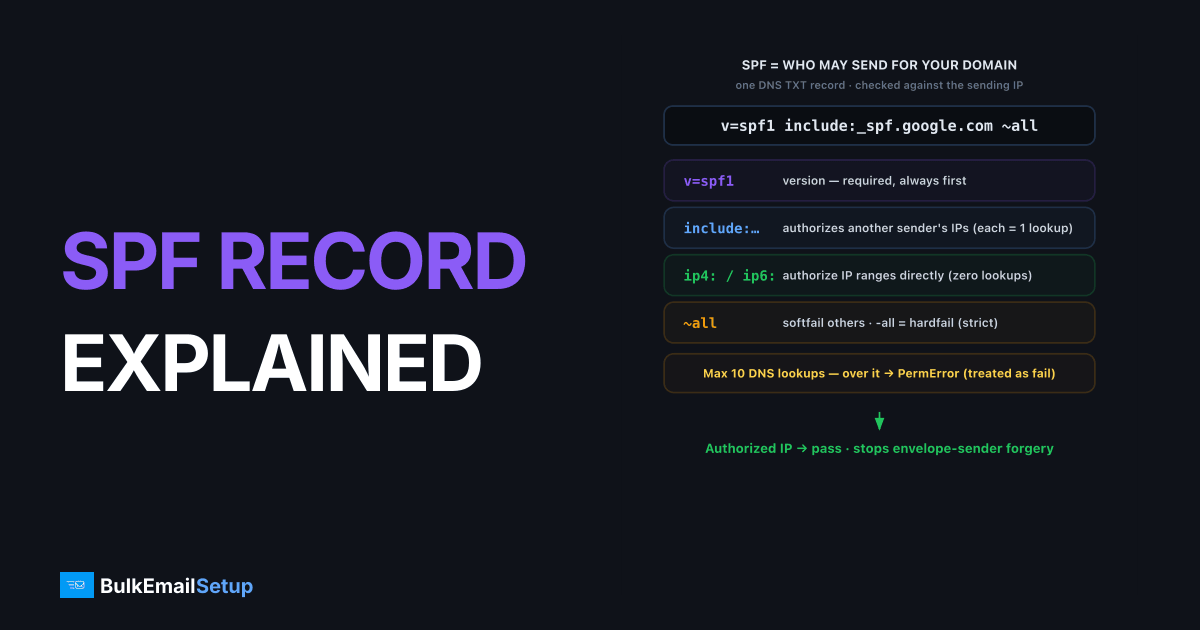
An SPF record is a DNS TXT record that lists which mail servers are allowed to send email on behalf of your domain. SPF stands for Sender Policy Framework, defined in RFC 7208. When a receiving server gets your mail, it checks the sending IP against your published SPF record. If the IP is authorized, SPF passes; if not, it fails. SPF helps stop spammers from forging your domain in the envelope sender.
What an SPF record looks like
A real SPF record is one line of text published as a TXT record on your domain. It always starts with v=spf1 and ends with an all mechanism:
v=spf1 include:_spf.google.com include:_spf.yourprovider.com ~all
Reading it left to right:
v=spf1declares the SPF version. Required, always first.include:_spf.google.comauthorizes all IPs in Google's published SPF.include:_spf.yourprovider.comauthorizes your other sending platform.~allis the catch-all: softfail anything not listed above.
That's the whole structure. Mechanisms in the middle, version at the start, all at the end.
What does each SPF mechanism mean?
SPF mechanisms are the building blocks that tell receivers which IPs to accept. There are six you'll actually use, and each one either authorizes specific senders or sets the default policy. Knowing them is the difference between an SPF record that works and one that silently fails.
| Mechanism | Meaning | Counts toward 10-lookup limit? |
|---|---|---|
ip4: / ip6: | Authorize a literal IP or CIDR range | No |
include: | Authorize another domain's SPF | Yes |
a | Authorize the domain's A record IPs | Yes |
mx | Authorize the domain's MX host IPs | Yes |
exists: | Authorize if a DNS lookup resolves | Yes |
all | Default policy for everything else | No |
Each mechanism carries a qualifier: + (pass, the default), ~ (softfail), - (fail/hardfail), or ? (neutral). So -all means hardfail, ~all means softfail.
The 10-DNS-lookup limit and PermError
SPF allows a maximum of 10 DNS lookups during evaluation, and crossing that line produces a PermError. This is the single most common reason SPF "stops working" for growing senders. Each include, a, mx, ptr, and exists triggers a lookup, and includes chain (one include can pull in several more), so the count climbs fast.
When you exceed 10 lookups:
- The result is PermError (permanent error).
- Most receivers treat PermError as an SPF failure.
- DMARC alignment on SPF then fails too, weakening your authentication.
The fix is SPF flattening: replace lookup-heavy include mechanisms with the resolved ip4/ip6 ranges they point to, which don't count against the limit. If you're already seeing the error, the SPF PermError too many DNS lookups fix walks through it.
-all vs ~all: which should you use?
The choice between -all (hardfail) and ~all (softfail) decides what receivers do with mail from servers not in your record. Hardfail tells them to reject; softfail tells them to accept but mark as suspicious. Use softfail while you're still discovering every legitimate sender, then tighten to hardfail.
| Qualifier | Name | Receiver behavior | When to use |
|---|---|---|---|
-all | Hardfail | Reject unlisted senders | Once all senders are confirmed |
~all | Softfail | Accept but flag unlisted | During setup / discovery |
?all | Neutral | No opinion | Almost never |
+all | Pass all | Authorize everyone (dangerous) | Never |
One caution: SPF alone doesn't fully protect your From address, because it checks the envelope sender, not the visible From. That's why DMARC exists. See SPF vs DKIM vs DMARC for how the three fit together, and the 550 5.7.23 SPF fail fix if mail is being rejected.
A few real examples
# Single ESP, still in setup (softfail)
v=spf1 include:_spf.yourprovider.com ~all

# Google Workspace plus a marketing platform (locked down)
v=spf1 include:_spf.google.com include:spf.marketingtool.com -all

# Your own dedicated SMTP server by IP (no extra lookups)
v=spf1 ip4:203.0.113.10 ip4:203.0.113.11 -all
The last example is worth noting: authorizing by raw IP costs zero DNS lookups, so dedicated-server senders rarely hit the 10-lookup wall. If your SPF is a chain of nested includes, that's exactly where flattening or a dedicated IP setup helps.
Common SPF errors and how to read them
Most SPF problems fall into four buckets, and the error you see at the receiver tells you which one. Knowing the failure mode saves you from guessing.
| Symptom | What it means | Fix |
|---|---|---|
PermError | Over 10 lookups, or invalid syntax | Flatten, or fix the typo |
TempError | A DNS timeout during evaluation | Usually transient; check DNS health |
Two v=spf1 records | A domain may publish only one | Merge into a single record |
550 5.7.23 at receiver | SPF check failed for this mail | Add the missing IP/include, or align |
The two that bite real senders most are the double record and the lookup overrun. You can publish only one SPF record per domain. If you add a second when you onboard a new platform (a common mistake), receivers see two v=spf1 records and return PermError, treating SPF as broken. The single most common SPF break we are handed: a sender already running Google Workspace adds a marketing tool's setup wizard, which publishes a brand-new second v=spf1 TXT record instead of editing the existing one, and all authentication breaks overnight with no obvious change to either record. Merge the mechanisms into one line instead. If mail is bouncing with 550 5.7.23, the 550 5.7.23 SPF fail fix covers the receiver-side triage.
A quick SPF setup checklist
Walk this list when you publish or change an SPF record, in order. Each step prevents one of the failure modes above.
- One record only. Confirm the domain has a single
v=spf1TXT record. Delete duplicates. - List every sender. Workspace, ESP, CRM, ticketing, billing, anything that sends as your domain.
- Count your lookups. Run the record through any SPF checker and keep the count at 10 or below.
- Pick the right qualifier. Start with
~all(softfail) during rollout, tighten to-allonce you're sure the list is complete. - Confirm alignment. SPF passing isn't enough for DMARC; the passing domain must match your From. See DMARC alignment explained.
- Re-check after any change. Adding a platform can silently push you over 10 lookups.
If you're deciding between sending platforms, a dedicated IP you authorize by ip4 sidesteps the whole lookup problem. The trade-offs are in dedicated IP vs shared IP email.
How BulkEmailSetup helps
On a BulkEmailSetup dedicated SMTP server, your sending IPs are fixed and known, so your SPF record can authorize them directly by ip4 with no nested includes and no risk of the 10-lookup PermError. We set the record up correctly with your domain at the center. See pricing for plans.
Frequently asked questions
What is an SPF record?
An SPF record is a DNS TXT record that lists which mail servers are allowed to send email for your domain. Receiving servers check it to verify the sending server's IP is authorized, which helps block spoofing.
How many SPF records can a domain have?
Exactly one. A domain must publish a single TXT record starting with v=spf1. Two or more SPF records is a permanent error (PermError) and most receivers will treat your SPF as broken.
What is the SPF 10-lookup limit?
SPF allows a maximum of 10 DNS lookups while evaluating a record. Each include, a, mx, ptr, and exists mechanism counts. Exceed 10 and the result is PermError, which means SPF effectively fails.
Should I use -all or ~all?
Use -all (hardfail) once you're confident every legitimate sender is listed; it tells receivers to reject unlisted servers. Use ~all (softfail) during setup; it flags unlisted senders without outright rejection.


