
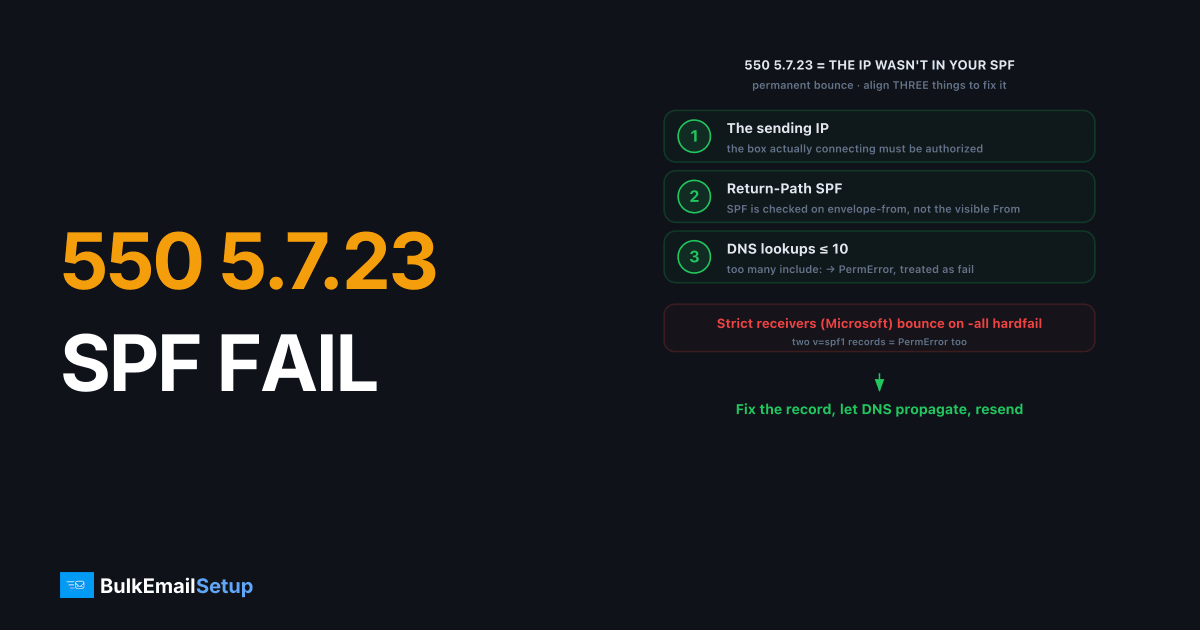
A 550 5.7.23 rejection means the receiving server checked your SPF record and the sending IP wasn't authorized to send for your domain. The fix is to align three things: the IP actually sending the mail, the SPF record on your Return-Path (envelope-from) domain, and the number of DNS lookups that record triggers. It's a permanent bounce, so nothing retries. Correct the SPF record, let DNS propagate, and resend.
What does 550 5.7.23 mean?
The full string reads something like 550 5.7.23 The message was not delivered. SPF validation failed or 550 5.7.23 SPF check failed. The receiving server looked up the SPF record published in DNS for your envelope-from (Return-Path) domain, compared it against the IP that connected, and the IP wasn't on the approved list. So the message was rejected before delivery.
SPF (Sender Policy Framework, RFC 7208) is a DNS TXT record listing which IPs may send mail for a domain. When the sending IP isn't authorized, and your policy ends in -all (hardfail), strict receivers like Microsoft return 5.7.23 rather than accepting and filtering.
Why is my SPF validation failing?
There are four common reasons, and they're easy to confuse. The sending IP is the usual culprit, but PermError and Return-Path misalignment trip up otherwise careful senders.
| Cause | What went wrong |
|---|---|
| Sending IP not in SPF | You switched servers or added a sender and never updated the record |
| Two SPF records | Multiple TXT records starting v=spf1 is invalid; SPF returns PermError |
| Over 10 DNS lookups | Too many include: mechanisms triggers PermError, treated as fail |
| Return-Path mismatch | SPF checks the envelope-from, not the visible From header |
| Forwarding | Forwarded mail keeps your envelope but arrives from the forwarder's IP |
The Return-Path trap is the sneaky one. SPF validates the envelope-from domain, which is often a subdomain set by your ESP, not the From address your recipient sees. If those don't align, SPF can pass technically but fail DMARC, or fail outright.
In the records we debug, the most common 5.7.23 cause isn't a missing IP at all, it's PermError from too many include: mechanisms. We've watched a record sit at exactly 10 lookups, then a provider quietly adds one nested include and tips it to 11, at which point Microsoft hosts start returning 550 5.7.23 on the next send with nothing in the visible record changed. The lookup count stays invisible until a receiver counts it for you.
How do I fix a 550 5.7.23 SPF error?
Work top to bottom. Each step removes one cause.
- Find your sending IP. Check the
Received:header of a test message or your SMTP server's outbound IP. That exact IP must appear in SPF. - Read your current SPF record. Run
dig TXT yourdomain.comand find thev=spf1line. Confirm there's only one. - Add the missing IP or include. Use
ip4:198.51.100.10for a direct IP orinclude:_spf.provider.comif your provider supplies one. Example:v=spf1 ip4:198.51.100.10 include:_spf.provider.com -all. - Stay under 10 DNS lookups. Each
include,a,mx, andredirectcounts. Over 10 returns PermError. If you're close, see SPF flattening explained and SPF PermError fix. - Align the Return-Path. Make sure the envelope-from domain (or its subdomain) carries the SPF record being checked. This is the heart of DMARC alignment.
- Wait for DNS, then test. TTL can be up to a few hours. Send to a Gmail address, open the original message, and confirm
spf=passin the Authentication-Results header.
For the full mechanics of how the record is built and read, our SPF record explained guide walks through every mechanism.
How do I confirm SPF now passes?
Send a test to a Gmail or Outlook inbox you control, then view the raw headers. Look for spf=pass in the Authentication-Results line and confirm the smtp.mailfrom domain matches your SPF-published domain. A pass there means receivers will stop returning 5.7.23. If you still see spf=fail or permerror, the IP or lookup count is still wrong.
The confirmation header looks like this:
Authentication-Results: mx.google.com;
  spf=pass (google.com: domain of bounce.yourdomain.com
  designates 198.51.100.10 as permitted sender)
  smtp.mailfrom=bounce.yourdomain.com
Note that the smtp.mailfrom domain is the envelope domain, not your visible From. That's the domain whose SPF record matters for 5.7.23. You can also check the lookup count without sending: an SPF validator that walks the record will flag a permerror before a receiver does.
Prevent 550 5.7.23 from recurring
SPF failures come back whenever the sending path changes and the record doesn't, so treat SPF as something you update on every infrastructure change.
- Update SPF when you change senders. New SMTP server, new ESP, new IP: add it to the record before the first send, not after the bounce.
- Stay well under 10 lookups. Leave headroom. If you're at 8 includes, the next provider tips you into
PermError. Flatten the record when it grows. - Keep one SPF record only. A second
v=spf1TXT record is invalid and fails everything. Merge, never duplicate. - Lock the Return-Path. Use a custom bounce subdomain under your domain so the envelope stays aligned even through ESP changes.
How BulkEmailSetup helps
We set up SPF, DKIM, DMARC, and PTR correctly on your dedicated SMTP server, with the Return-Path aligned and the sending IP authorized from day one, so 5.7.23 rejections don't come from a half-configured record. You get authentication done right and a sending IP you control. Plans are on our pricing page.
Frequently asked questions
What does 550 5.7.23 mean?
It means the receiving mail server ran an SPF check on your message and it failed. The sending IP was not listed as authorized in the SPF record of the Return-Path domain, so the message was rejected outright.
How do I fix an SPF validation failure?
Add your real sending IP or include mechanism to the domain's SPF record, make sure there's only one SPF record, and confirm the Return-Path domain matches. Then wait for DNS to propagate and resend.
Can SPF fail even with a valid record?
Yes. If your SPF record exceeds 10 DNS lookups it returns PermError, which many receivers treat as a hard fail. Forwarding and a misaligned Return-Path also cause SPF to fail despite a correct-looking record.
Is 550 5.7.23 permanent?
Yes, it's a 5.x.x permanent rejection. The receiver won't retry. The message bounces. You have to correct the SPF record or sending path before the next send will pass.


