
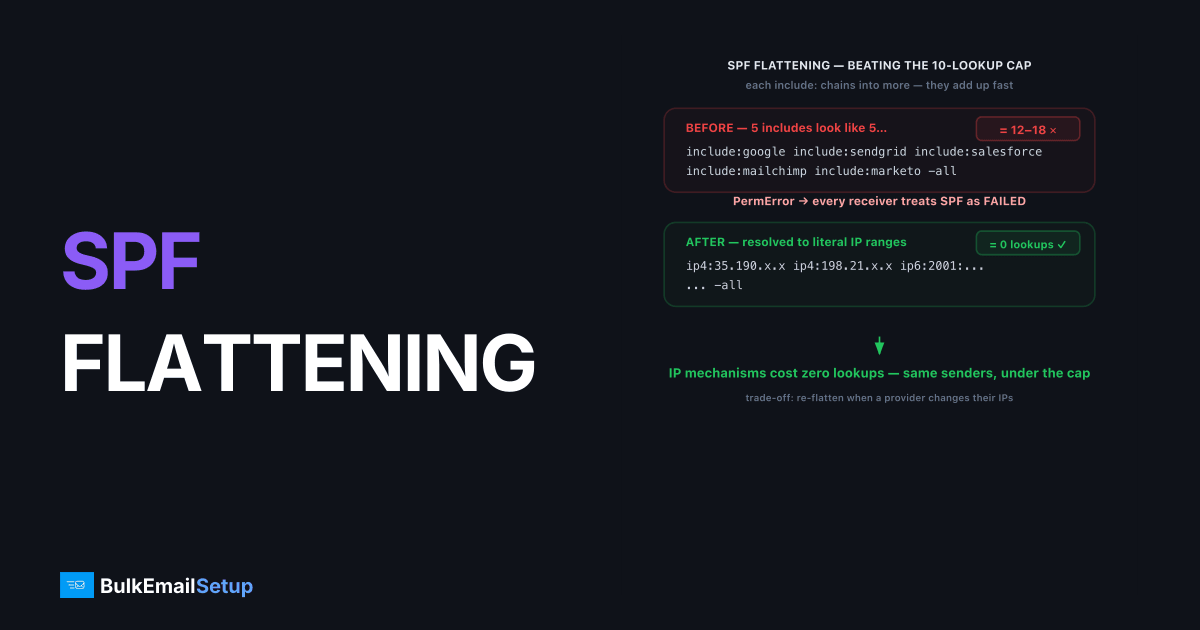
SPF flattening is the practice of replacing lookup-based SPF mechanisms (like include, a, and mx) with the literal ip4 and ip6 ranges they resolve to, so your record stays under SPF's 10-DNS-lookup limit. Because IP mechanisms don't count toward that limit, flattening turns a record that triggers PermError back into one that evaluates cleanly. It's the standard fix when too many sending platforms have pushed your SPF over the cap.
Why the 10-lookup limit forces this
SPF allows a maximum of 10 DNS lookups while a receiver evaluates your record, and exceeding it returns PermError, which most receivers treat as an outright SPF failure. Defined in RFC 7208, the limit exists to stop SPF from being used to amplify DNS traffic. The trouble is that includes chain.
A single include:_spf.example.com can itself contain three more includes, each of which counts. Add a few platforms and you blow past 10 fast:
v=spf1 include:_spf.google.com include:sendgrid.net include:spf.mandrillapp.com include:_spf.salesforce.com include:mktomail.com -all
That looks like five lookups, but each include expands. Google alone resolves to several. The real count can be 12 to 18, and the moment it crosses 10, every receiver returns PermError and your SPF effectively stops working, including for DMARC alignment.
How does SPF flattening work?
Flattening works by resolving each include down to the actual IP ranges it ultimately authorizes, then writing those ranges directly into your record as ip4 and ip6 mechanisms. Since IP mechanisms cost zero DNS lookups, the flattened record can authorize the same servers while staying well under the cap.
Before flattening:
v=spf1 include:sendgrid.net -all
After flattening (illustrative ranges):
v=spf1 ip4:167.89.0.0/17 ip4:208.117.48.0/20 ip4:50.31.32.0/19 -all
Same authorized servers, but now zero lookups for that block instead of several. Do this for each heavy include and your total lookup count drops to zero for the flattened portions.
The catch: flattened records go stale
The serious downside of flattening is that it freezes a snapshot of IP ranges that the provider can change at any time, which means a flattened record can break silently. When SendGrid or Google adds a new sending range, their include updates automatically, but your hardcoded ip4 list does not. Mail from the new range then fails SPF.
This makes flattening a maintenance commitment, not a one-time fix:
- Manual flattening requires you to re-resolve and re-publish whenever a provider changes ranges, which you won't be notified about.
- Automated flattening services re-resolve on a schedule and update your record (often via a CNAME or hosted SPF), trading the staleness risk for a dependency on the service.
Neither is free of risk. A stale flattened record causes the exact PermError-equivalent failures you flattened to avoid, just harder to diagnose. The failure we have traced most often: a sender flattened a provider's include months earlier, the provider quietly added a new /24, and mail from that new range began silently softfailing SPF and dropping out of DMARC alignment, with nothing in the record itself looking wrong. It took pulling DMARC aggregate reports to spot the one source IP that no longer matched.
Better alternatives to flattening
Flattening is a workaround, and several approaches avoid the underlying problem instead of patching it. The cleanest is to reduce how many lookup-based senders your domain has to authorize in the first place.
| Approach | How it helps | Trade-off |
|---|---|---|
| Fewer sending platforms | Each removed include frees lookups | Requires consolidating tools |
| Subdomain delegation | Split senders across subdomains, each with its own SPF | More DNS records to manage |
Dedicated IP, authorized by ip4 | Zero lookups, never goes stale | Needs a dedicated sending IP |
| Automated SPF macro service | Re-flattens on a schedule | Adds a third-party dependency |
Sending from a dedicated IP is the option that removes the problem entirely: you authorize a fixed IP with ip4, it costs no lookups, and it never changes underneath you. If you're already hitting the error, the SPF PermError too many DNS lookups fix covers triage. For the full record syntax, see SPF record explained.
How to count your lookups before flattening
Before you flatten anything, measure where you actually stand, because you might be closer to the limit than you think (or further than you feared). Each lookup-based mechanism counts once, and includes expand recursively.
| Mechanism in your record | Lookups it costs |
|---|---|
ip4: / ip6: | 0 |
include: | 1 + whatever that include contains |
a | 1 |
mx | 1 (plus 1 per returned MX host) |
exists: | 1 |
ptr | 1 (deprecated, avoid) |
all | 0 |
Run your record through any SPF lookup counter and it'll report the resolved total. A record like v=spf1 include:_spf.google.com include:sendgrid.net -all looks like two lookups but resolves to far more once each include expands. If the tool reports 8 or 9, you're one new platform away from PermError, which is your signal to act before mail breaks rather than after.
A flattening worked example with a trap
Say your record is at 13 lookups and failing. You flatten SendGrid's include to its published ranges:
# Before (over the limit)
v=spf1 include:_spf.google.com include:sendgrid.net -all

# After flattening just the SendGrid block
v=spf1 include:_spf.google.com ip4:167.89.0.0/17 ip4:208.117.48.0/20 -all
The trap is in those hardcoded ranges. SendGrid can add a new sending range tomorrow, their include updates automatically, but your ip4 list does not, so mail from the new range starts failing SPF with no warning. That's why flattening is a maintenance commitment. Set a reminder to re-resolve quarterly, or use an automated service that re-flattens for you. If the error is already live, the SPF PermError too many DNS lookups fix covers triage.
When flattening is the right call
Flattening makes sense when you genuinely need many third-party senders and can't consolidate them, and you're willing to either monitor the ranges or pay for an automated service. It's a legitimate tool, just not a set-and-forget one. If your sending is dominated by one or two platforms, consolidating onto a dedicated IP is usually less fragile than maintaining a flattened record forever.
How BulkEmailSetup helps
A BulkEmailSetup dedicated SMTP server sends from fixed IPs you authorize directly with ip4, which adds zero DNS lookups and never goes stale, so the 10-lookup limit and flattening simply stop being your problem. We configure the record correctly with your domain at the center. See pricing for plans.
Frequently asked questions
What is SPF flattening?
SPF flattening is the practice of replacing include and other lookup-based SPF mechanisms with the literal IP ranges they resolve to. Because ip4 and ip6 mechanisms don't count toward SPF's 10-DNS-lookup limit, flattening keeps your record under the cap.
Why does the 10-lookup limit matter?
SPF allows only 10 DNS lookups during evaluation. Each include, a, mx, and exists counts. Exceed 10 and receivers return PermError, which most treat as an SPF failure, weakening your authentication and DMARC alignment.
What's the downside of SPF flattening?
Flattened records can break silently. If a provider changes the IP ranges behind its include, your hardcoded list goes stale and legitimate mail starts failing SPF. Flattening needs monitoring or automated re-flattening to stay accurate.
Is there an alternative to flattening?
Yes. Reduce the number of sending platforms, use subdomains to split SPF across domains, or send from a dedicated IP you can authorize directly with ip4, which adds no lookups at all and never goes stale.


