
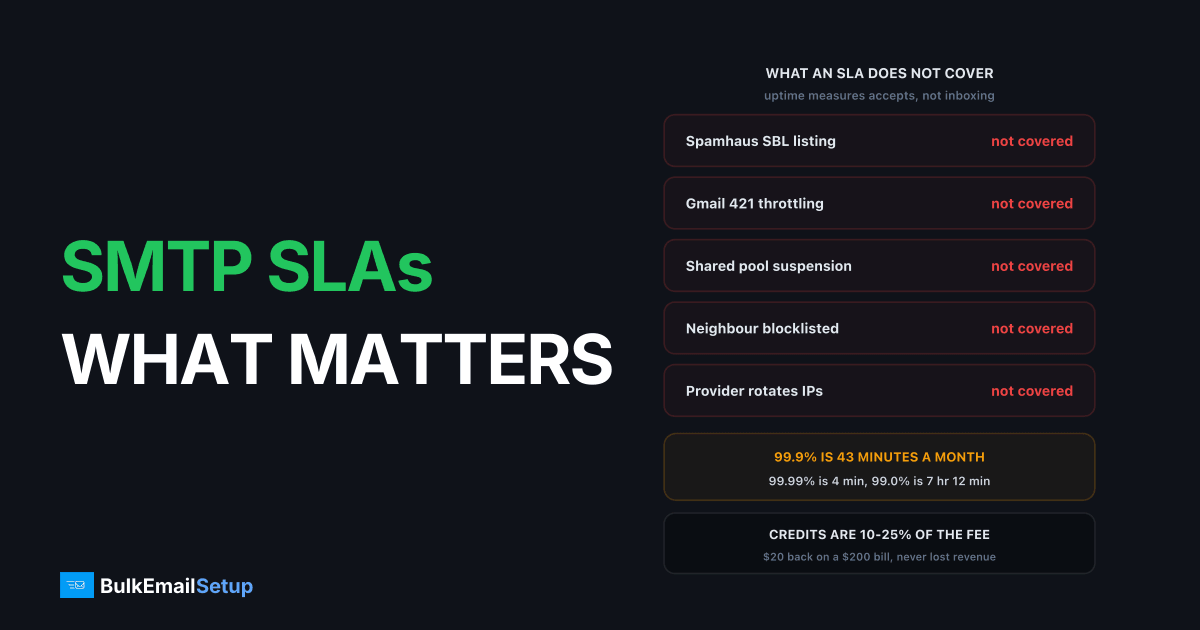
An SMTP provider's SLA measures one thing: whether their endpoint accepted your API or SMTP call, usually counted as requests that did not return a 500 or 503 error. The AWS User Engagement SLA, which covers Amazon SES, commits to 99.9% monthly uptime on exactly that basis and pays a 10% credit if it drops below. Nothing in it promises delivery, speed, or inbox placement. So a provider can post 99.99% for the quarter while your open rate halves because you landed in spam, and owe you precisely nothing.
That gap between "accepted" and "delivered" is where every expensive email outage I have seen actually lives.
What an email SLA actually promises
Read any SMTP provider's SLA and you will find the commitment is scoped to the front door, not the destination.
| SLA term | What it really measures | What it excludes |
|---|---|---|
| Monthly uptime percentage | Successful API/SMTP accepts | Whether the mail ever left the queue |
| Error rate | HTTP 500 and 503 responses | 4xx deferrals from receiving networks |
| Availability window | 5-minute measurement intervals | Brief blips shorter than the interval |
| Service credit | A percentage of your monthly fee | Your lost revenue, always |
The AWS User Engagement SLA is worth reading in full because it is unusually explicit. It defines an Error as "any Request that returns a 500 or 503 error code" and measures availability in 5-minute intervals per region. That is the standard shape across the industry. SendGrid, Mailgun and Postmark all publish uptime on API and SMTP acceptance, not on delivery outcomes.
Which means the SLA is a promise about their infrastructure, not about your email programme. Useful, but far narrower than most buyers assume when a sales deck flashes "99.99% uptime" on a slide.
The uptime table nobody shows you
Percentages hide how little difference the marketing numbers make. Here is the same figure in minutes, for a 30-day month.
| Uptime | Downtime per month | Downtime per year | What that feels like |
|---|---|---|---|
| 99.0% | 7 hr 12 min | 3.65 days | An entire working day lost |
| 99.5% | 3 hr 36 min | 1.83 days | A campaign window missed |
| 99.9% | 43 min 12 sec | 8.76 hr | One bad morning |
| 99.95% | 21 min 36 sec | 4.38 hr | A queue backlog, no more |
| 99.99% | 4 min 19 sec | 52.6 min | Barely noticed |
| 99.999% | 26 sec | 5.26 min | Marketing, not engineering |
Two things fall out of this table. First, 99.9% is the industry floor and it is genuinely fine for bulk sending: a 43 minute gap on a newsletter queue delays delivery, it does not lose it. Second, the gap between 99.9% and 99.99% is 39 minutes a month, and providers routinely charge a tier upgrade for it. For password resets and one-time codes, pay it. For a Tuesday morning campaign to 200,000 people, you are buying nothing.
Also worth checking: whether the SLA measures per region or globally. Amazon's is per region, so a total failure in eu-west-1 while us-east-1 runs clean still counts as a regional breach, which is the customer-friendly reading.
What service credits are actually worth
Almost nothing, and the maths is not subtle.
| Uptime achieved | Typical credit | Credit on a $200/mo bill | Credit on a $2,000/mo bill |
|---|---|---|---|
| 99.0% to 99.9% | 10% | $20 | $200 |
| 95.0% to 99.0% | 25% | $500 max at 25% | $500 |
| Below 95.0% | 100% | $200 | $2,000 |
Those bands are lifted straight from the AWS User Engagement SLA and they are representative of the market. Note what a 10% credit means in practice: a provider can be down for 7 hours in a month, cost you a full day of campaign revenue, and hand you back 10% of a bill that might be $200.
Then there are the conditions, which are where most claims die:
- You must notice. Credits are not automatic anywhere I have seen. Nobody emails you an apology cheque.
- You must claim inside a window. AWS requires the claim by the end of the second billing cycle after the incident. Some providers give 30 days.
- You must supply evidence. Request logs, timestamps, error codes. If you were not logging 5xx responses at the time, you have no case.
- Credits apply to future invoices, not as cash back, and often only if the amount exceeds $1.
- Consequential loss is excluded. Every SLA I have read caps liability at the credit. Your lost sales are your problem.
Treat the credit as a signal of how seriously the provider takes its own uptime, not as insurance. If you need real financial protection against email downtime, that is what redundancy costs money for, not a contract clause.
The failures no SLA covers
This is the important section. The things that have actually taken senders I work with offline for days or weeks are all outside the SLA boundary.
| Failure | Business impact | Covered by SLA |
|---|---|---|
| Your sending IP hits Spamhaus SBL | Delivery to most receivers stops | No |
| Gmail throttles you with 421 4.7.28 | Queue backs up for hours | No |
| Shared pool suspension after a complaint spike | Sending stops entirely, days to weeks | No |
| Neighbour on your shared IP gets blocklisted | Your inbox rate drops, nothing changed on your side | No |
| Provider silently rotates your IPs | Warm-up reset, deliverability dip | No |
| Queue backlog while API stays up | Mail is hours late, uptime reads 100% | No |
| Domain reputation drops at Gmail | Open rate halves | No |
| Provider bans your use case post-signup | Account closed | No |
That last column is the whole article. A provider whose API accepted every one of your calls has met its SLA in full while your mail sat in a queue for six hours, or landed in spam, or never sent at all because their trust team paused the account.
The queue backlog case deserves a specific mention because it is the most common and the least visible. Acceptance and delivery are separate stages. The API returns a 250, the message enters the provider's outbound queue, and if that queue is congested or the receiving network is deferring, your mail is late by hours with the status page showing all green. I have watched a provider report 100% uptime through a four hour delivery delay. Technically correct.
Shared pool suspension is the expensive one. It is not an outage in any SLA sense, it is a policy decision, so no credit applies and no clock runs. The red flags in cheap SMTP providers piece covers how to spot providers most likely to do this to you.
What to ask for in writing instead
The SLA is published and non-negotiable for most buyers. These four things are not in it, are frequently negotiable, and matter more during a real incident.
| Ask for | Good answer | Why it matters |
|---|---|---|
| Support response by severity | P1 within 1 hr, 24/7 | An SLA on uptime with 48 hr support is worthless |
| Escalation to a deliverability engineer | Named path, not a ticket queue | Tier one cannot fix a blocklisting |
| Blocklist assistance | They file and chase delistings with you | Spamhaus removals need sending evidence |
| Notice before IP changes | 30 days minimum, in writing | An IP swap resets warm-up silently |
Support response time is the one I would fight hardest for. A 99.99% uptime commitment paired with next-business-day support means that during your one real incident of the year, you are on your own until Monday. Ask for the severity definitions too, because "P1" without a written definition means whatever the vendor decides at 3am.
The IP change notice is underrated. Providers reshuffle shared pools and sometimes reassign dedicated IPs during infrastructure work. If that happens without notice, your carefully warmed reputation resets and your first symptom is a deferral spike you cannot explain. Thirty days notice lets you re-warm in parallel.
There is a fuller list of pre-purchase questions in 12 questions to ask an SMTP provider, and the commercial clauses that quietly add cost are in hidden fees in ESP contracts.
How a dedicated server changes the question
Running your own SMTP server does not give you a better email SLA. It removes the question and replaces it with two smaller ones you can actually control.
| Concern | Shared or managed ESP | Dedicated server you own |
|---|---|---|
| Uptime commitment | Provider SLA, typically 99.9% | Your host's SLA, Hetzner and OVH both around 99.9% network |
| Deliverability | Nobody's responsibility contractually | Yours, with your own IPs |
| Blocklist risk from neighbours | Real, and outside the SLA | Removed, the IPs are yours alone |
| Shared pool suspension | The main outage risk in practice | Does not exist |
| Queue control | Provider's queue, opaque | Your MTA, your retry policy, full logs |
| Credit if it breaks | 10% of the monthly fee | None, but the fee was one-time |
That is an honest trade, not a free win. You give up the vendor promise and you take on patching, monitoring and reputation management. What you get back is that the failure mode that most often kills a sending programme, a shared pool decision made about somebody else's behaviour, stops being possible.
Two hosting notes worth checking on any dedicated setup. Confirm the host's network SLA rather than the server SLA, since a dead NIC and a dead switch have different remedies. And keep a second server on a different provider if email is revenue-critical, because two 99.9% servers in different networks give you far more real availability than one 99.99% vendor promise. Whether the operational load is worth it is covered in is managed SMTP worth it.
The checklist before you sign
Ten minutes with the actual SLA document, not the sales page.
- Find the definition of "unavailable". If it is only 500 and 503 errors, delivery delays do not count. They almost never do.
- Check the measurement interval. Five minutes is standard. Longer intervals hide short outages.
- Check the scope. Per region, per service, or account-wide? Regional scope is better for you.
- Read the credit table. 10% at the first tier is normal. Under 10% is stingy.
- Find the claim window. Two billing cycles is generous. Thirty days is common. Diary it.
- Look for the exclusions list. Scheduled maintenance, force majeure, and anything caused by your own configuration are always excluded.
- Confirm whether delivery is mentioned at all. It will not be. Confirm it anyway so you stop expecting it.
- Get support response times separately. They are not in the SLA. Get them in the order form.
- Ask what happens on suspension. No SLA covers it, so ask what the review process and timeline are.
- Check whether the status page is honest. Look at the incident history, not the current colour. A page with no incidents in two years is not a reliable page.
On that last point, Google publishes its bulk sender requirements with hard numbers: spam rates below 0.30%, ideally under 0.10%, plus SPF, DKIM and DMARC for anyone sending over 5,000 messages a day. Those thresholds decide whether your mail is delivered. Your provider's SLA does not mention them. That asymmetry, published receiver rules with real consequences against a vendor promise with a $20 payout, is the clearest way to see what an SLA is and is not for.
The honest summary
An SLA is a floor on vendor competence, not a guarantee about your email. Use it to screen out providers who will not commit to 99.9%, then stop weighing it and spend the attention on the things that actually decide whether your mail arrives: your list quality, your authentication, your complaint rate, and who else is on your IP.
If a provider's pitch leans on the uptime number, ask them what they pay out when your mail goes to spam. The answer is nothing, at every provider, and how they explain that tells you more than the percentage ever will.
How BulkEmailSetup helps
We build dedicated SMTP infrastructure you own: your own server, your own IPs, full SPF/DKIM/DMARC/PTR setup, MTA tuning, bounce handling and a warm-up plan. There is no shared pool to be suspended from and no neighbour whose complaint rate becomes your delivery problem, which removes the failure mode that no SLA covers anyway.
Basic starts at $549 one-time, covering 1 SMTP server, 3 dedicated IPs, 25,000 emails/day and unlimited contacts. Higher tiers scale to 15 IPs and 200,000 emails/day. See pricing for the full comparison.
Frequently asked questions
What does an SMTP provider SLA actually guarantee?
It guarantees that the provider's API or SMTP endpoint accepts your request, almost always measured as the percentage of calls that do not return a 500 or 503 error. The AWS User Engagement SLA covering Amazon SES commits to 99.9% monthly uptime on that basis. It says nothing about whether the message is delivered, how fast it leaves the queue, or whether it lands in the inbox or spam.
How much downtime is 99.9% uptime per month?
About 43 minutes and 12 seconds in a 30-day month. 99.95% is roughly 21 minutes, 99.99% is about 4 minutes 19 seconds, and 99% is over 7 hours. The jump from 99.9% to 99.99% sounds small but cuts allowed downtime by a factor of ten, and providers price it accordingly.
Are SMTP service credits worth anything?
Rarely. Typical credits are 10% of the monthly fee for the affected service when uptime falls between 99.0% and 99.9%, rising to 25% below 99.0%. On a $200 monthly bill a breach earns you $20. You also have to notice the outage, file a claim inside the window, which is two billing cycles at AWS, and credits never cover lost revenue.
Does any SMTP SLA cover deliverability or inbox placement?
No mainstream provider guarantees inbox placement, and none pays out when your mail goes to spam. Blocklisting, receiver throttling, shared pool suspensions and reputation drops all sit outside the SLA. A provider can hit 99.99% acceptance while every message you send lands in the junk folder and still owe you nothing.
What should I ask a provider for in writing beyond the SLA?
Support response time by severity level, an escalation path to an actual deliverability engineer rather than tier one support, whether they will help with blocklist delisting, and how much notice you get before your sending IPs change. None of these normally appear in the published SLA, and all four matter more during an incident than the uptime number does.
How does a dedicated SMTP server change the SLA question?
It splits the problem in two. Uptime becomes your hosting provider's SLA, typically 99.9% on the network at Hetzner or OVH, and deliverability becomes your own responsibility with your own IPs. You lose the vendor promise but you also remove the shared pool suspension risk, which is the failure mode that actually takes senders offline for weeks.
What uptime number should I look for in an SMTP contract?
99.9% is the market standard and is fine for bulk sending, where a 43 minute gap just delays a queue. Push for 99.95% or better only if you send time-sensitive transactional mail like password resets or one-time codes. Paying a premium for 99.99% on marketing campaigns buys you 39 minutes a month you will not notice.


