
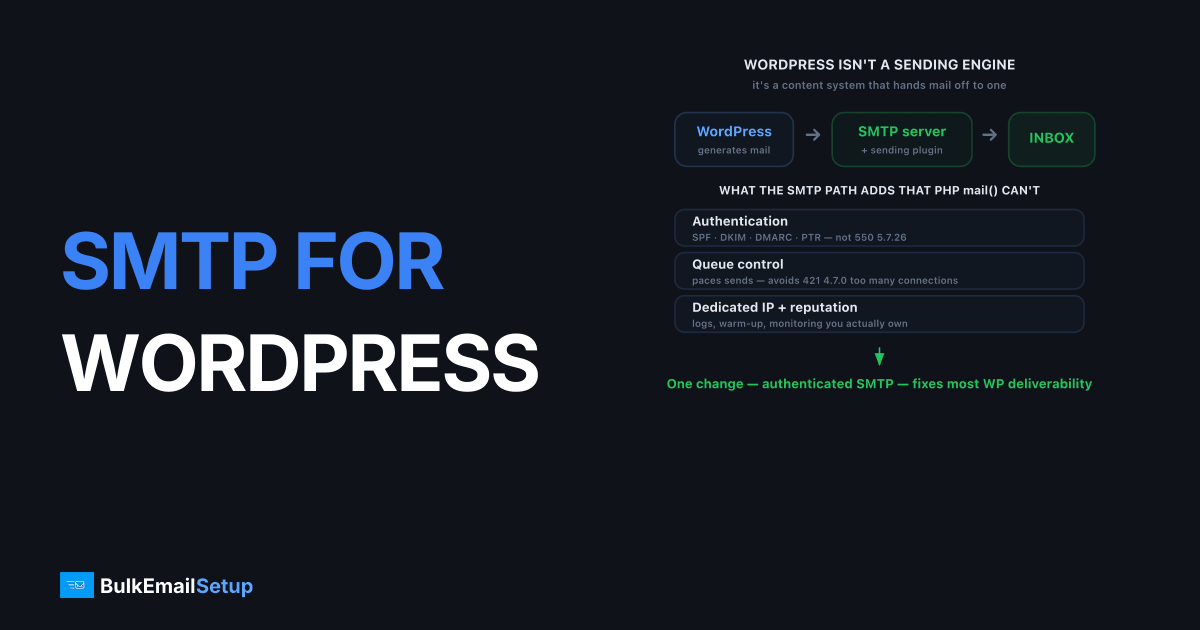
SMTP for WordPress bulk email replaces the default PHP mail() function with an authenticated dedicated SMTP server, so your campaigns and notifications actually reach the inbox instead of spam. Out of the box, WordPress sends unauthenticated mail from a shared web server IP, which mailbox providers distrust and filter. For bulk sending, that means most of your email never gets read. Routing WordPress through a dedicated SMTP server with SPF, DKIM, and DMARC, plus a sending plugin to manage the queue, turns WordPress into a reliable bulk-email platform.
WordPress is not a sending engine. It is a content system that can hand mail off to one. The trick at volume is connecting it to infrastructure that authenticates, paces, and builds reputation properly.
Why WordPress bulk email lands in spam
WordPress bulk email lands in spam because PHP mail(), the default sender, has no authentication and rides a shared server IP with poor reputation. Mailbox providers run SPF and DKIM checks on every message, and unauthenticated mail from a shared IP fails them, so it gets filtered or rejected. Gmail and Yahoo now reject unauthenticated bulk mail with 550 5.7.26 once you cross 5,000 messages a day, the threshold set in Gmail's bulk sender guidelines.
The structural problems:
- PHP mail() does not authenticate. No DKIM signature, no aligned SPF, instant credibility loss.
- Shared hosting IPs carry baggage. You inherit whatever reputation your server neighbors built, good or bad.
- No queue control. Blasting thousands of emails at once trips connection throttling (
421 4.7.0). - No reputation tooling. PHP mail() gives you no logs, no warm-up, no monitoring.
The fix is an authenticated SMTP path plus correct SPF, DKIM, and DMARC records. That single change resolves the majority of WordPress deliverability complaints.
PHP mail() vs dedicated SMTP for bulk
For bulk WordPress sending, the gap between the default and a dedicated SMTP server is enormous. Here is the comparison.
| Factor | PHP mail() (default) | Dedicated SMTP server |
|---|---|---|
| Authentication | None | SPF, DKIM, DMARC, PTR |
| Sending IP | Shared web host | Dedicated, yours |
| Reputation | Inherited, weak | Your own, managed |
| Queue and pacing | None | Plugin or tool managed |
| Bulk volume | Unreliable past a few hundred | Tens of thousands/day |
| Logs and monitoring | Minimal | Full visibility |
| Cost model | "Free" but broken | Flat monthly |
For senders weighing the move, our guide on how many emails before you need dedicated infrastructure lays out the threshold. For bulk WordPress sending, that threshold arrives fast.
How to set up WordPress for bulk SMTP
Setting up WordPress for reliable bulk email takes three parts: an SMTP connection, correct DNS authentication, and a sending tool that paces the queue. Miss any one and bulk sends either fail authentication or overrun rate limits.
Connect WordPress to your SMTP server
Install WP Mail SMTP or FluentSMTP, then enter your SMTP host, port 587 with STARTTLS, and credentials. Send a test message to confirm. This reroutes all WordPress mail, including from your newsletter plugin, through the authenticated server instead of PHP mail().
Publish DNS authentication
Add your SPF record, publish the DKIM public key from your provider, and set DMARC at p=none to monitor before enforcing. Watch the SPF 10-lookup limit if you stack several sending services. Authentication is what earns you the inbox; the SMTP connection alone is not enough.
Add a tool that manages the queue
For real bulk volume, pair WordPress with a newsletter plugin or a sending tool like Sendy or Mailwizz connected to your SMTP server. These handle batching, throttling, bounce processing, and one-click unsubscribe, which raw WordPress does not. Pacing matters: a warmed IP still has per-hour ceilings you do not want to blow past.
Common WordPress bulk-email mistakes
Most WordPress bulk-email failures come from a short list of configuration and discipline errors, not from WordPress being incapable. Senders who avoid these get reliable delivery at volume, while those who skip them blame the platform for problems they created. A few checks prevent the bulk of spam-folder complaints.
- Sending bulk through
wp_mail()directly. Core WordPress has no queue or pacing. A plugin or tool that batches the send is mandatory above a few hundred recipients. - Mismatched From domain. Sending as
[email protected]while signing DKIM on a different domain breaks alignment and triggers spam filing. Match them. - Running two SMTP plugins. Multiple plugins hooking
wp_mail()cause silent drops. Keep exactly one. - No bounce processing. Without bounce handling, dead addresses pile up and your hard-bounce rate signals a dirty list. Use a tool like Sendy or Mailwizz that processes bounces.
- Firing the whole list instantly. A burst of thousands trips
421 4.7.0too-many-connections. Throttle the queue to your IP's sustainable rate.
The pattern across all of these: WordPress hands mail off correctly, but it does no reputation, pacing, or list management on its own. The plugin or sending tool, plus correct DNS, is what carries bulk volume.
Warming up for bulk WordPress sending
A new dedicated IP needs warm-up before it can carry bulk WordPress volume, no matter how good the plugin setup is. A fresh IP has zero history, so blasting 20,000 emails on day one gets it throttled and likely blocklisted. Ramp from roughly 50 to 100 messages a day up to full volume over four to six weeks, following an IP warm-up schedule.
Match your warm-up to your real audience. Send to your most engaged subscribers first during the ramp, since their opens and clicks build positive reputation fastest. Save the long tail of inactive addresses until the IP is trusted. Front-loading engagement makes the whole warm-up smoother.
The mistake we see most on WordPress bulk senders is firing the full list on day one through a newsletter plugin with no throttle set. One site queued 20,000 messages from a fresh dedicated IP in a single batch. The server opened connections as fast as the plugin handed them over, Gmail returned 421 4.7.0 too many concurrent connections, and most of the run deferred and then bounced. The fix was capping the plugin's send rate to a few hundred per hour during warm-up. WordPress will happily try to send faster than any cold IP can survive, so the throttle is not optional.
We stay honest about outcomes: dedicated SMTP plus correct authentication plus disciplined warm-up gives WordPress a real path to the inbox. Actual placement still depends on your list quality, content, and complaint rate. No infrastructure guarantees 100% inbox.
How BulkEmailSetup helps
We give WordPress senders a dedicated SMTP server with a dedicated IP you control, full SMTP access on ports 587, 465, and 2525, and SPF, DKIM, DMARC, and PTR configured correctly. It connects to WordPress with any standard SMTP plugin, and we run the warm-up so your bulk sends land. See plans on our pricing page.
Frequently asked questions
Why does WordPress bulk email go to spam?
WordPress uses PHP mail() by default, which sends unauthenticated mail from a shared web server IP with weak reputation. Mailbox providers distrust unauthenticated bulk mail and file it as spam. Routing through an authenticated SMTP server with SPF, DKIM, and DMARC fixes the root cause.
Can WordPress handle bulk email on its own?
Not well. WordPress and PHP mail() can technically send mail, but they have no authentication, no rate control, and no reputation management. For bulk sending above a few thousand a day, you need a dedicated SMTP server and usually a sending plugin or newsletter tool to manage the queue.
Which plugin sends WordPress bulk email through SMTP?
WP Mail SMTP and FluentSMTP reroute all WordPress mail through your SMTP server. For large campaigns, a newsletter plugin like Newsletter or a tool like Sendy or Mailwizz connected to your SMTP server handles batching, queuing, and unsubscribe management.
How much bulk email can WordPress send through SMTP?
The limit is your SMTP server and IP reputation, not WordPress. A warmed dedicated IP can send tens of thousands a day. You ramp a new IP from roughly 50 to 100 a day over four to six weeks, then scale to full volume as reputation builds.


