
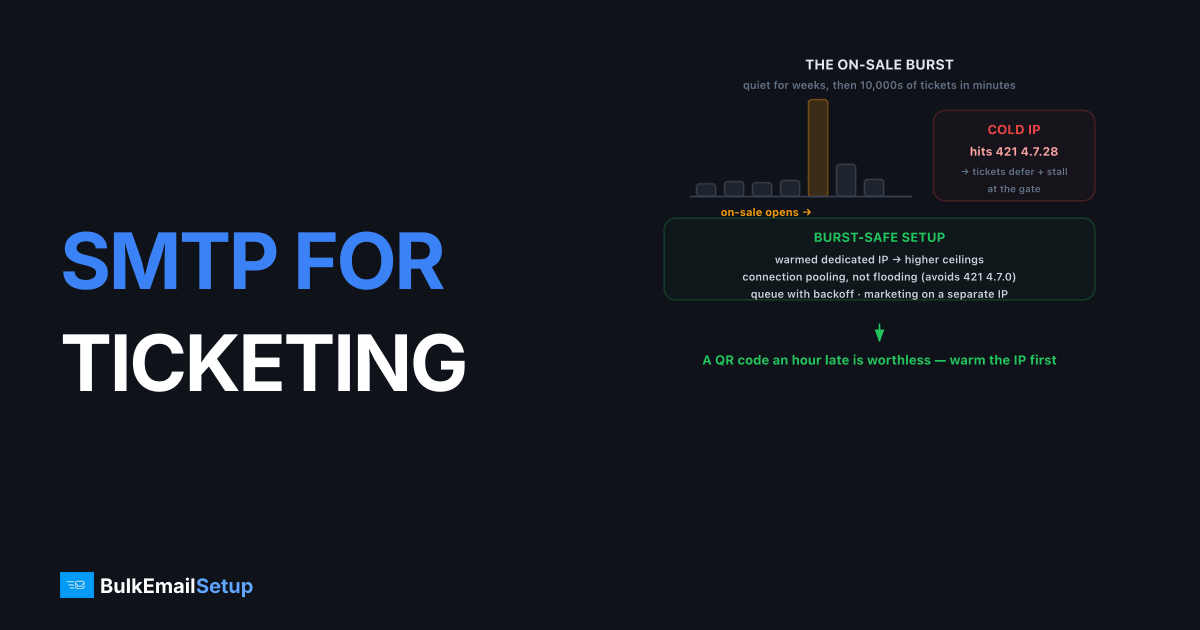
SMTP for event and ticketing platforms has to handle one unusual demand: enormous, time-critical bursts. A popular on-sale can fire tens of thousands of confirmation emails in minutes, each carrying a ticket or QR code the buyer needs immediately. The right setup combines high throughput, a warmed sending IP, correct authentication, and stream separation so marketing blasts never delay ticket delivery. Below roughly 50,000 emails a month a quality shared relay works; above it, a dedicated SMTP server with a dedicated IP you control handles bursts without throttling and keeps your ticket-delivery reputation isolated.
What makes event email harder than normal transactional mail
Event email is bursty and unforgiving. Most transactional senders trickle mail out steadily. Ticketing does the opposite: long quiet stretches, then a flood the instant an on-sale opens or a reminder batch fires the morning of the show. That burst pattern is exactly what trips rate limits and reputation systems.
The core challenges:
- Throughput under burst. Thousands of confirmations in minutes will saturate a weak SMTP queue and delay the QR codes buyers need at the gate.
- Cold-IP throttling. An IP without steady history hits Gmail's
421 4.7.28rate limit fast when you suddenly push volume through it. - Time-criticality. A confirmation that lands an hour late is a support ticket. A reminder that lands after the doors close is worthless.
- Reputation isolation. Event marketing (announcements, upsells) is complaint-prone; ticket delivery cannot inherit that risk.
How do you send a burst of confirmations without throttling?
You warm the IP first, respect per-provider hourly ceilings, and queue with retry instead of opening floods of connections. A single cold IP pushed hard hits Gmail's 421 4.7.28 IP rate limit, after which mail defers and confirmations stall exactly when buyers need them.
A burst-safe setup looks like this:
| Lever | Why it matters |
|---|---|
| Warmed dedicated IP | Higher negotiated throughput ceilings at Gmail, Yahoo, Microsoft |
| Connection pooling, not flooding | Avoids 421 4.7.0 too many connections |
| Queue with exponential backoff | Deferrals retry cleanly instead of failing |
| Small IP pool for the largest on-sales | Spreads load, raises aggregate throughput |
For very large platforms the architecture in infrastructure to send 100K emails per day and the per-IP math in how many emails per day per IP apply directly. The Gmail fix detail lives in our 421 4.7.28 guide.
The math matters here. A single warmed IP delivers roughly 20,000 to 50,000 messages a day to a major mailbox provider without throttling, depending on reputation. An on-sale that fires 100,000 confirmations in an hour needs either a small pool of warmed IPs or a queue that paces delivery over the surge. Trying to push that through one cold IP fails every time. Plan the throughput before the on-sale, not during it.
On one ticketing platform we ran the burst test for, a single warmed IP held steady at about 18,000 Gmail confirmations an hour, then started returning 421 4.7.28 past roughly 22,000 in the same window. That ceiling is not a hard number you can look up; it tracks the IP's reputation and moves week to week. The practical lesson we give every event client: measure your own ceiling in a rehearsal send, then size the IP pool so your worst-case on-sale stays under it with headroom to spare.
Should ticket delivery and event marketing share a stream?
No. Ticket delivery, confirmations, and QR codes are transactional and must always inbox. Event marketing (lineup announcements, upsells, "doors close soon" promos) is complaint-prone. Mixing them means a single bad promo can drag your must-deliver mail into spam right when an on-sale is running.
Separate them by subdomain and, on a dedicated server, by IP:
tickets.yourevents.comfor confirmations, e-tickets, reminders.news.yourevents.comfor announcements and promotions.
This mirrors the subdomain separation pattern. Each stream builds its own reputation, so a marketing complaint spike can't delay a buyer's QR code. On a dedicated SMTP server you route each subdomain through its own IP for true network-level isolation.
A sending setup that survives an on-sale
Here's the configuration a ticketing platform should run before its first big night. Each piece targets one of the failure modes above: bursts, throttling, late delivery, and reputation bleed.
| Component | Recommended setup | Why |
|---|---|---|
| Submission port | 587 with STARTTLS (2525 as fallback) | Modern authenticated submission; 465 also works for implicit TLS |
| Sending IP | Warmed dedicated IP, small pool for the largest on-sales | Higher throughput ceilings, isolated reputation |
| Queue | Exponential backoff, multi-day lifetime | Deferrals retry cleanly instead of dropping tickets |
| Connection model | Pooled, capped concurrency per provider | Avoids 421 4.7.0 too many connections |
| Auth | Aligned SPF + DKIM, DMARC at quarantine or reject | Stops 550 5.7.26 rejections under bulk rules |
| Streams | tickets. and news. subdomains on separate IPs | Promo complaints never touch ticket delivery |
| Monitoring | Postmaster Tools + blocklist checks per IP | Catch a reputation dip before the next on-sale |
Test this end-to-end with a dry run a week before a major event. Fire a few thousand messages at your real providers and watch for deferrals. Finding a throttle in a rehearsal is cheap. Finding it during the actual on-sale costs you support tickets and refunds.
Mistakes that cost ticketing platforms inbox placement
The most expensive mistakes are predictable, and most happen the first time a platform scales past a quiet launch. We see the same handful repeatedly.
- Launching on a cold IP. Spinning up a fresh dedicated IP and pushing a full on-sale through it on day one. Gmail throttles it instantly with
421 4.7.28. Always warm over 4 to 6 weeks first. - One stream for everything. Sending tickets, reminders, and lineup promos from the same IP and domain. One complaint-heavy promo blast drags confirmations into spam.
- No retry discipline. Treating a
4.x.xdeferral as a failure and re-sending manually, which floods the provider and duplicates tickets. Let the queue back off and retry. - Skipping PTR. Sending from an IP with no reverse DNS. Major providers reject or heavily filter mail from IPs without a valid PTR record.
- Ignoring the unsubscribe header. Marketing streams above 5,000 a day need RFC 8058 one-click unsubscribe. Skip it and complaint rates climb fast.
Fix these before they compound. A reputation hit taken during a high-profile on-sale can suppress delivery for weeks, long after the show is over.
Authentication and deliverability basics you can't skip
Every ticketing message needs aligned SPF and DKIM plus a DMARC policy, or Gmail rejects it with 550 5.7.26. Authentication is non-negotiable under the 2024+ Gmail bulk sender rules, and ticketing platforms sending on behalf of many event organizers hit alignment edge cases constantly.
Watch for these:
- Multiple SPF sources. If organizers also send from their own tools, your SPF can blow past the 10-lookup limit and hit
PermError. See SPF flattening. - DKIM per sending domain. Sign with a key aligned to the From domain. Our DKIM explainer covers selectors and rotation.
- One-click unsubscribe. Required on marketing streams via RFC 8058 headers.
- Complaint rate under 0.3 percent. Monitor it in Google Postmaster Tools.
How BulkEmailSetup helps
We provision dedicated SMTP servers with a dedicated IP you control and the throughput to survive on-sale bursts, plus SPF, DKIM, DMARC, and PTR set up correctly and a warm-up run before your big nights. You can route ticket delivery and event marketing through separate IPs so a promo complaint never delays a buyer's QR code. Plans and volume tiers are on our pricing page.
Frequently asked questions
Why do my ticket confirmation emails arrive late?
Usually SMTP queue backlog during an on-sale burst, or a cold IP getting throttled by mailbox providers. Ticketing email is bursty, thousands of sends in minutes, so throughput and a warmed IP matter more than for steady senders. Late tickets mean angry buyers at the gate.
Do ticketing platforms need a dedicated SMTP server?
Once you cross roughly 50,000 emails per month, yes. Event email is spiky and time-critical, and a dedicated IP with negotiated throughput absorbs on-sale bursts better than a shared pool that throttles you mid-surge. Below that volume a quality shared relay is fine.
How do I send 100,000 ticket reminders in one hour without throttling?
Spread sends across a warmed dedicated IP (or a small pool), respect per-provider hourly limits, and queue with retry instead of hammering connections. A single cold IP will hit Gmail's 421 4.7.28 rate limit fast. Warm-up and throughput planning prevent it.
Should event reminders and marketing promotions use the same sending IP?
No. Keep transactional ticket delivery and confirmations on a separate stream from event marketing blasts. A promo complaint spike should never delay a buyer's QR code. Separation keeps the must-deliver mail clean.


